For AdSense, ads.txt is a plain text file at https://yourdomain.com/ads.txt containing one line: google.com, pub-0000000000000000, DIRECT, f08c47fec0942fa0, with your own 16-digit publisher ID. Google says the file is "not mandatory, but it's highly recommended". There is one catch that matters more than the recommendation: if your domain has an ads.txt file and it does not list you, Google-served ads are not allowed there. So either add the correct line or make sure no file exists.
What ads.txt does and whether you need it
ads.txt ("Authorized Digital Sellers") is an IAB Tech Lab standard that lets a site owner publicly list which companies may sell its ad space. Buyers check it to avoid paying for counterfeit inventory.
For AdSense it has three roles:
- Authorising Google. Advertisers that check ads.txt see that Google may sell your inventory.
- One of three ways to verify your site. The AdSense code snippet, the
google-adsense-accountmeta tag and an ads.txt line are all accepted (Connect your site). - A hard rule once it exists. Google Publisher Policies say you must not "place Google-served ads on a domain that uses ads.txt where you are not included as an authorized seller" (Dishonest declarations and ads.txt).
That last point is why a half-finished file is worse than none. A theme or plugin that creates an empty ads.txt, or a file left over from another network, can block AdSense on its own.
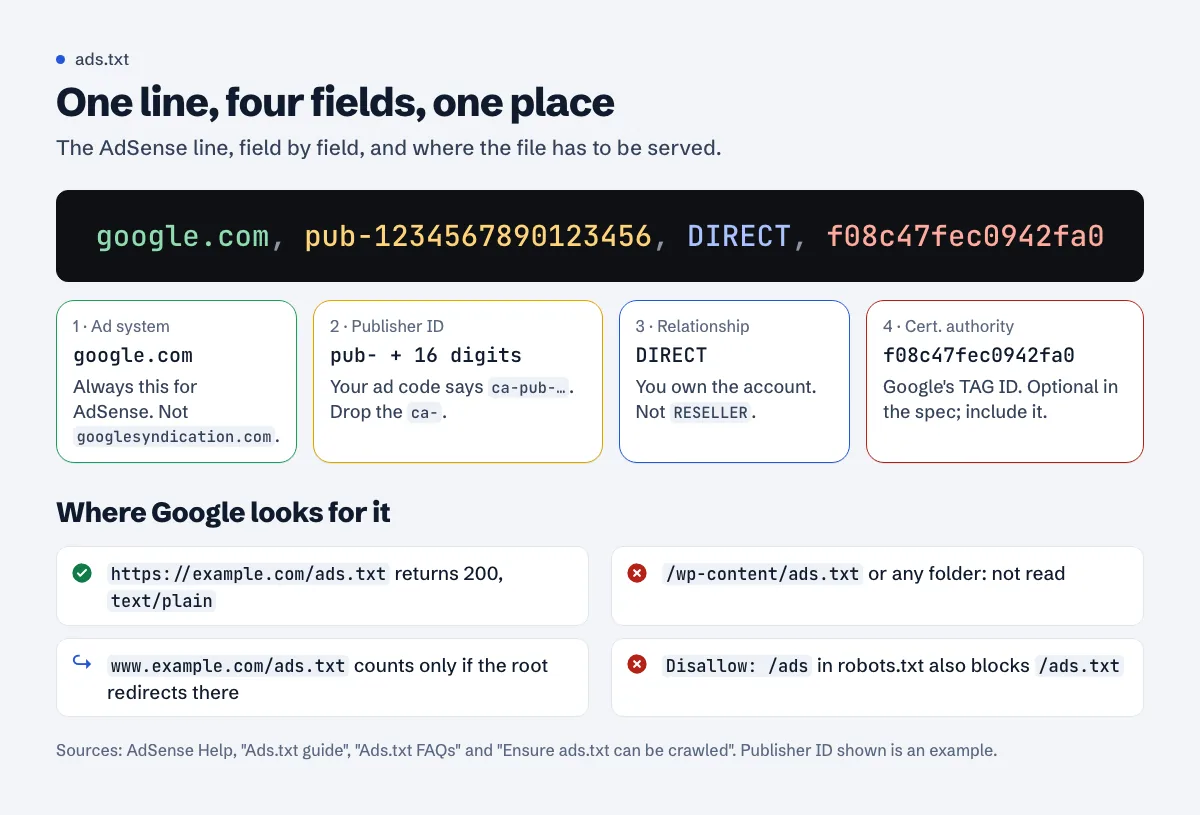
The exact line for AdSense
From the AdSense ads.txt guide:
google.com, pub-1234567890123456, DIRECT, f08c47fec0942fa0
| Field | Value | Notes |
|---|---|---|
| 1. Ad system domain | google.com |
Always google.com for AdSense, not googlesyndication.com |
| 2. Publisher ID | pub- + 16 digits |
Only the pub- prefix. Google: "Delete the product-specific prefix (for example, ca- or ca-video-)" (Ads.txt FAQs) |
| 3. Relationship | DIRECT |
You own the account. RESELLER for your own ID is wrong |
| 4. Certification authority ID | f08c47fec0942fa0 |
Google's TAG ID. Optional in the IAB spec, but include it |
Find your publisher ID in AdSense under Account > Settings > Account information. It appears in your ad code as ca-pub-1234567890123456; in ads.txt you drop the ca-. If you would rather not assemble it by hand, the ads.txt generator builds the line from your ID.
If you run other networks, each adds its own lines. A file for a site using AdSense and one other network might look like this:
# ads.txt for example.com
google.com, pub-1234567890123456, DIRECT, f08c47fec0942fa0
examplenetwork.com, 98765, DIRECT
contact=ads@example.com
Lines starting with # are comments. contact= and ownerdomain= are optional variables from the IAB ads.txt 1.1 spec, which lists OWNERDOMAIN as recommended.
Where the file must live
The rules are strict and come from Ensure ads.txt can be crawled:
- At the root of the registrable domain, at the path
/ads.txt. Not in a folder, not/ads.txt/, not/wp-content/ads.txt. - On the root domain, not only on www. "An ads.txt file on
www.domain.com/ads.txtwill only be crawled if domain.com/ads.txt redirects to it." - Reachable over HTTP and HTTPS, directly or by redirect.
- Returning HTTP 200. A 404 means Google treats the file as missing; an HTML "page not found" served with 200 is a soft 404 and is also a problem.
- Not blocked by robots.txt. Watch for prefix rules:
Disallow: /adsalso blocks/ads.txt. - Plain text, ideally with
Content-Type: text/plainand UTF-8 encoding.
Subdomains with their own ad setup are declared from the root file with subdomain=blog.example.com. How that works in practice: AdSense on subdomains.
How to add it on common platforms
WordPress
The simplest way is to upload a file named ads.txt to the WordPress root folder (the one containing wp-config.php) by FTP or your host's file manager. Alternatively, use a dedicated ads.txt plugin, which serves the file through WordPress. Do not use both: a physical file usually wins, and you will edit the wrong one. After a caching or security plugin update, recheck that /ads.txt still returns plain text. Step by step, including the subfolder trap and WordPress.com plans: ads.txt on WordPress.
Blogger
Go to Settings > Monetization, turn on "Enable custom ads.txt", and paste the line. Blogger's help says you need a custom file if you use third-party networks or added AdSense code manually; once it's on, the file contains only what you type, so include your Google line. Details, including custom domains: ads.txt on Blogger.
Static hosts (Netlify, Vercel, Cloudflare Pages, GitHub Pages)
Put ads.txt in the folder that is published as the site root (often public/ or static/). Make sure your framework does not rewrite unknown paths to index.html, which would turn /ads.txt into an HTML page. Platform walkthroughs: Next.js and Cloudflare Pages and Workers.
Hosted shops and site builders
Some builders let you add ads.txt in the dashboard; others do not allow root files at all. Google supports "a single HTTP redirect to a destination outside the original root domain", so a platform redirect from /ads.txt to a hosted text file can work. If the builder cannot serve the file at all, rely on the meta tag or code snippet for verification instead. How this works on specific builders: Wix has a built-in ads.txt editor, Shopify needs a file upload plus a URL redirect, and Squarespace has no built-in option.
Common errors and fixes
| Symptom | Cause | Fix |
|---|---|---|
| AdSense shows ads.txt "Not found" | File missing on the root domain, or only on www without a redirect | Serve it at https://example.com/ads.txt |
| "Unauthorized" or earnings at risk warning | Wrong or missing publisher ID line | Copy the exact line with your own pub- ID |
| Line ignored | ca-pub- used instead of pub-, or 15/17 digits |
Use pub- plus exactly 16 digits |
| File parsed as garbage | Written in a word processor: smart quotes, non-breaking spaces, a BOM | Recreate it in a plain text editor |
| Browser shows a styled page | Framework or CMS returns HTML for unknown paths | Serve a real static file |
| Google cannot read it | Disallow: /ads or similar in robots.txt |
Allow /ads.txt |
| Ads blocked on a site that used to work | A new network or plugin replaced the file without the Google line | Merge lines into one file |
Check that it works
curl -sI https://example.com/ads.txt
curl -sI http://example.com/ads.txt
curl -s https://example.com/ads.txt
You want 200 on both schemes (directly or after a redirect), a text/plain content type and your Google line in the body. In AdSense, the Sites page shows the ads.txt status. Updates are not instant: Google's crawler needs to refetch the file, which can take a few days.
For crawler rules that affect ads.txt, see the robots.txt guide. The approval checklist lists ads.txt alongside the other verification steps, and our methodology explains exactly which ads.txt checks we run.
Validate your ads.txt for free
A free scan fetches your ads.txt over both schemes, parses each line, compares the publisher ID with your ad code and flags formatting problems. Run a free scan.
FAQ
Do I need ads.txt to get AdSense approval?
No. It is optional and one of three verification methods. If you create one, it must include your Google line.
Can I put ads.txt on a subdomain?
Google reads the file at the root domain. For subdomains with separate ad setups, reference them from the root file with a subdomain= line.
How long does Google take to see a new ads.txt?
Usually a few days, because the crawler has to refetch it. Make sure it returns 200 and plain text, then wait before changing anything else.
I removed AdSense from a site. Should I delete the Google line?
Yes, if you no longer have an account relationship there. ads.txt should accurately reflect who may sell your inventory.
Spotted something out of date or wrong? Tell us and we'll correct it.
Read this guide in Turkish →Check it on your own site. Free, no sign-up.