On this page (9)
"Low value content" means a Google reviewer looked at your site and decided it doesn't yet offer enough original, useful material to justify ads next to it. It's a verdict on the site as a whole, not on one broken page, and the fix is almost never "write more of the same". You improve, merge or remove the weak pages, make the strong ones easy to find, and then request another review. Google doesn't publish a waiting period for that.
What Google means by "low value"
The rejection label maps to a rule in the Google Publisher Policies, under the heading "Inventory value". The rule reads: "We do not allow Google-served ads on screens: without publisher-content or with low-value content, that are under construction, that are used for alerts, navigation or other behavioral purposes" (Google-served ads on screens without publisher-content). The tips on the same page add: "Don't place ads on automatically generated content without manual review or curation."
AdSense's own article on why an account wasn't approved describes the same problem under "Content quality issues":
We believe that there isn't enough original, rich content that would be of value to users. As a publisher, you must provide unique and relevant content that gives users a reason to visit your site.
Two more lines from that article explain why the rejection often surprises people. The first: "Don't place the ad code on auto-generated pages or pages with little to no original content." The second: "Keep in mind that we may review all pages of your site, not just the sign-up URL where you placed the code." A polished home page doesn't help if the archive behind it is thin.
Notice what Google doesn't say: there's no word count, no post count and no traffic level in any of these texts. Its helpful content guidance even asks "Are you writing to a particular word count because you've heard or read that Google has a preferred word count?" and answers "(No, we don't.)". The question a reviewer is answering is closer to: would a visitor get something here they couldn't get faster somewhere else?
How it differs from the other content rejections
People often mix up the content-related labels. They overlap, but each points at a different first move.
| Message | What the reviewer saw | Start with |
|---|---|---|
| Low value content | Pages exist, but they add little that's original | Improving and pruning pages |
| Valuable inventory: No content | Too little readable content at all, or the crawler got an empty page | Checking what the crawler receives |
| Valuable inventory: Under construction | Placeholders, demo content, broken menus | Removing leftovers |
| Valuable inventory: Scraped content | Text copied or lightly rewritten from other sites | Removing or replacing copied material |
If your pages are full of text that you wrote yourself and you still got "low value content", the problem is usually depth or originality, not volume.
The patterns that usually trigger it
The rejection rarely comes from a single weak article. It comes from a pattern across the site. Each pattern below is tied to a line in Google's own policies, so you can see why it counts.
| Pattern | What it looks like | Why it counts against you |
|---|---|---|
| Template pages | 80 "best plumber in {city}" pages that differ by one word | Search's doorway abuse policy: "substantially similar pages that are closer to search results than a clearly defined, browseable hierarchy" |
| Summaries of other pages | 400-word posts restating what already ranks | Helpful content: "Are you mainly summarizing what others have to say without adding much value?" |
| Embed-only pages | A YouTube video or social post with two lines of text | Replicated content: "embedding content such as video, images, or other media from other sites without substantial added value" |
| Unreviewed automation | Dozens of posts published at once, same skeleton, no sources | Inventory value tips: no ads on "automatically generated content without manual review or curation" |
| Affiliate shells | Product lists copied from the merchant with buy buttons | 81904: affiliate content "should form only a minor part of the content of your site if the content adds no additional features" |
| No clear topic | Recipes, crypto, celebrity news and phone reviews on one domain | Helpful content: "Does your site have a primary purpose or focus?" |
If two or three rows describe your site, that's your answer. If none do, look at depth: each page may be fine on its own but too short or too generic to stand out.
A real example: 81 pages, 6 words of their own
Here's what the template pattern looks like when you measure it. This is an Approvalens scan of gunlukrituel.com.tr, a live Turkish site whose owner let us use the report. It has a "dream map" section with one page per Turkish province.
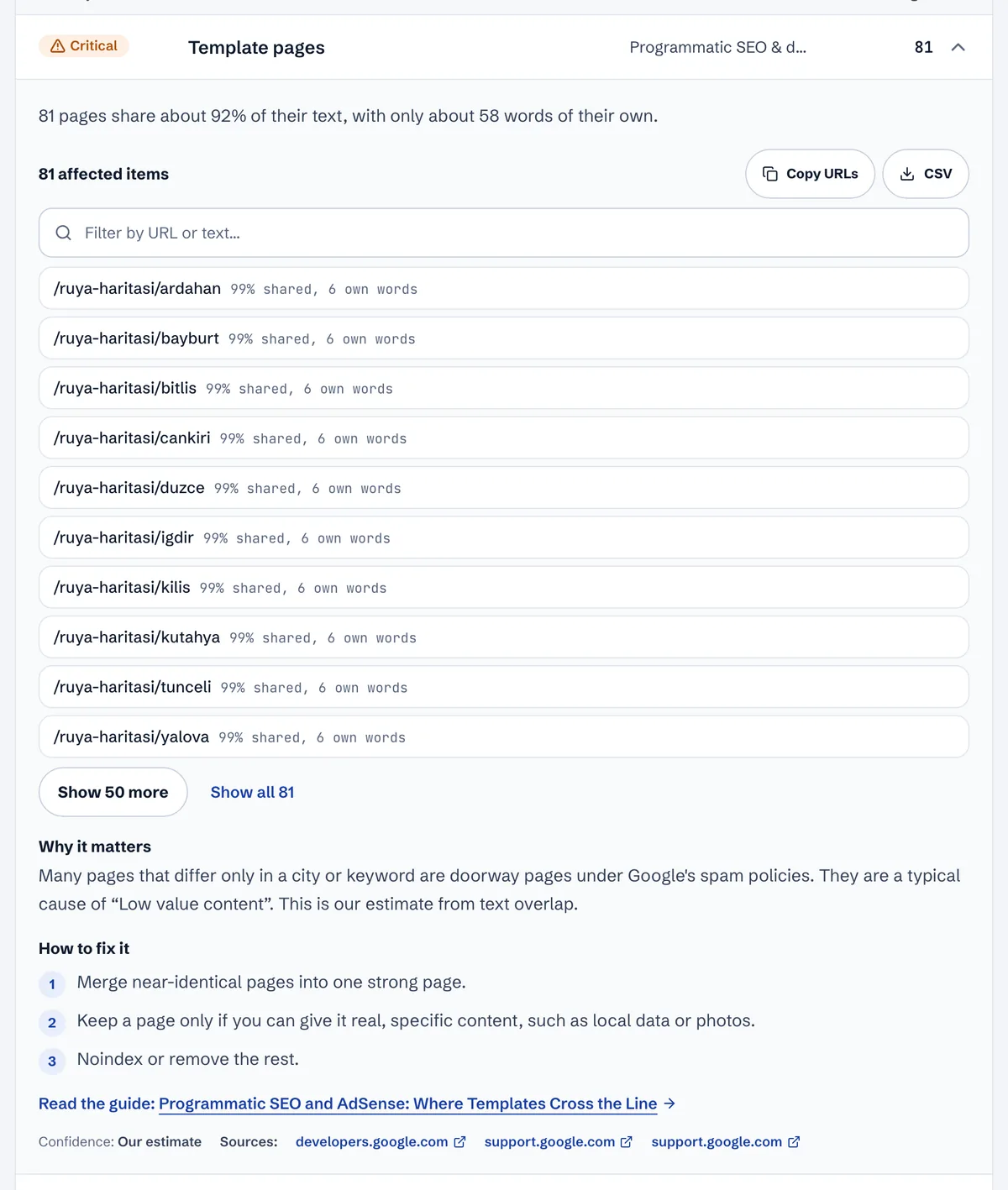
Each page is technically "content". Together they're the textbook case of low value: a visitor who opens /ruya-haritasi/ardahan and then /ruya-haritasi/bayburt reads the same page twice. A reviewer who samples five URLs from the sitemap and lands on three of these will reasonably conclude the site is padded. The fix is the one the report suggests: keep a province page only if it can carry real local material, and merge the rest into one strong page.
Check your own site in an afternoon
You don't need a tool to find most of the problem. You need a spreadsheet and an honest hour or two.
- List every URL. Open your sitemap (usually
/sitemap.xmlor/sitemap_index.xml) and paste the article URLs into a sheet. Add columns for topic, approximate word count, last real update, and a rating from 1 to 5. - Rate them like a stranger would. A 1 is "I wouldn't send this to a friend", a 5 is "this is the best page on the web for this question". Rate the page you'd show a reviewer, not the one you meant to write.
- Sort by rating and count. If more than a third of the sheet is rated 1 or 2, the reviewer saw the same thing.
- Look for families. Sort by URL. Runs of URLs with the same pattern (
/city/…,/tag/…,/product/…) are where template pages hide. - Open ten random URLs on a phone. Use a random sample, not your favourites. Read each one to the end. Note where you'd have gone back to the search results.
- Check what the crawler gets. Run the home page through the free Googlebot access checker. If Google's crawlers get far fewer words than a browser does, part of your content isn't being seen at all, and you're dealing with a no content problem, not just a quality one.
Fix it, in this order
1. Triage every page
Run each URL through the same four questions. Off-topic pages go, duplicates get merged, pages you can't improve get removed or set to noindex, and the rest get improved or kept.
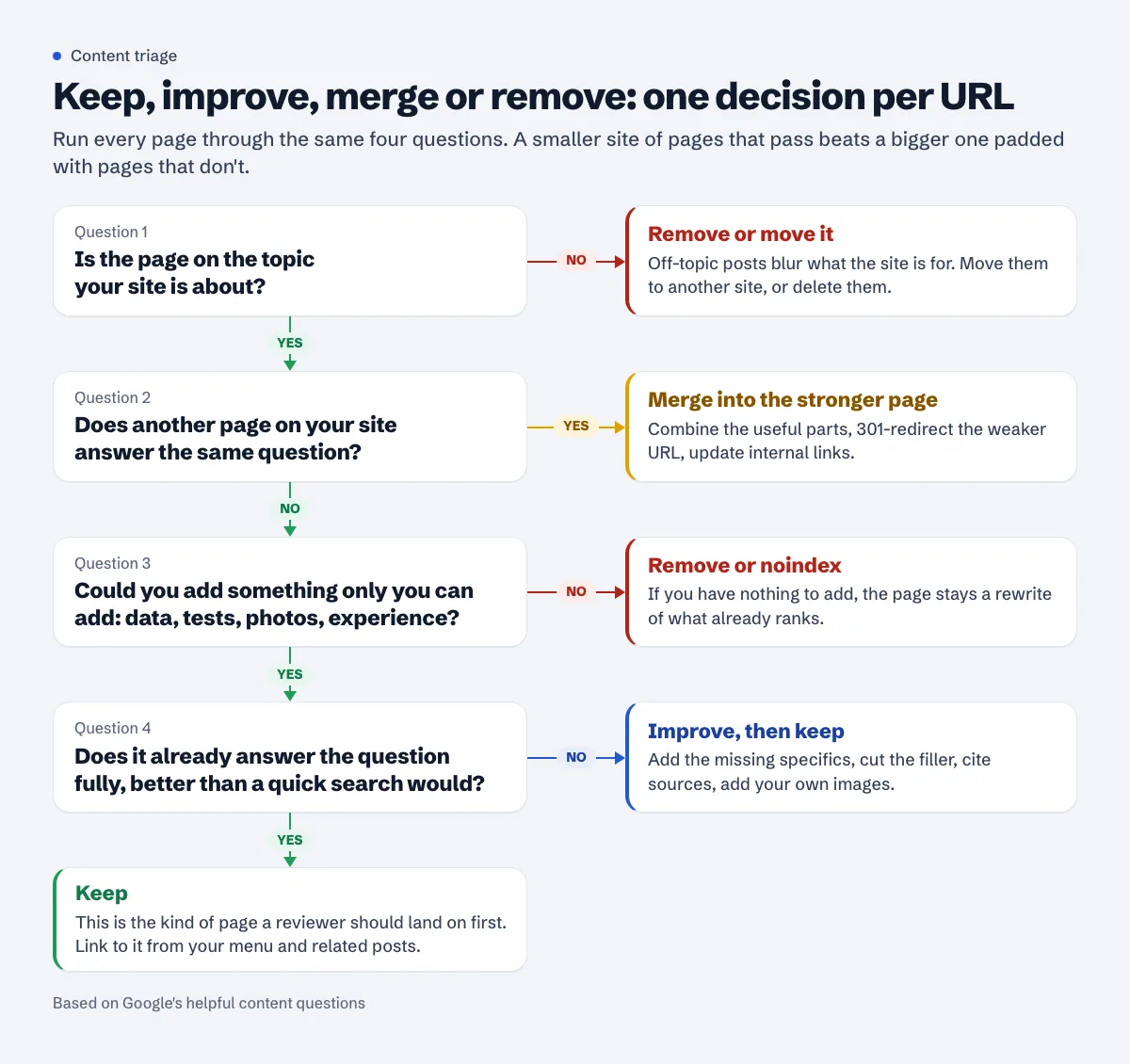
Removing pages feels wrong when you're trying to look bigger, but a reviewer judges what's there. Ten strong articles beat ten strong plus forty weak ones. When you merge, 301-redirect the old URL to the surviving page and update internal links, so nothing points at a dead address.
2. Rewrite for original contribution
Google's helpful content questions are the best rewrite checklist available. The ones that matter most here:
- "Does the content provide original information, reporting, research, or analysis?"
- "Does the content provide insightful analysis or interesting information that is beyond the obvious?"
- "If the content draws on other sources, does it avoid simply copying or rewriting those sources, and instead provide substantial additional value and originality?"
- "After reading your content, will someone leave feeling they've learned enough about a topic to help achieve their goal?"
In practice that means adding what only you can add. Compare two versions of the same section on an invented coffee blog:
Before: "Descaling your coffee machine regularly is important. Limescale can affect taste and performance. Use a descaling solution and follow the manufacturer's instructions."
After: "I descale every 6 weeks because our tap water is hard (the water company's report lists it as 'very hard'). I use citric acid at 1 tablespoon per litre, run half the tank through the steam wand, wait 20 minutes, then run the rest. The first time I skipped the rinse cycle and the next three shots tasted sour. The photo shows the flakes that came out of the drip tray."
The second version is longer, but length isn't the point. It has a reason to exist: specific numbers, a mistake, a photo, and a clear routine someone could copy. AdSense's site readiness article puts it this way: "It's really important that you contribute your own original content, whether it's specialist knowledge, improvement ideas, reviews, or your personal thoughts."
Don't pad. A 700-word page that answers the question fully beats a 2,000-word page that repeats itself. The word count guide explains how to tell the difference, and the thin content guide has more before-and-after examples.
3. Collapse template and automated pages
If you generated pages from a dataset or with an AI tool, judge them as a group:
- Pages that differ only in a place name, product name or number are templates. Either give each one real per-page data (prices, opening hours, local rules, measurements, photos) or collapse them into one page with a table. The programmatic SEO guide shows where the line sits.
- Pages nobody reviewed. Google says "appropriate use of AI or automation is not against our guidelines", and also that generating "many pages without adding value for users may violate Google's spam policy on scaled content abuse" (Gen AI guidance). The AI content guide covers a review workflow that holds up.
- Dates. Helpful content guidance asks "Are you changing the date of pages to make them seem fresh when the content has not substantially changed?" If every post shows today's date, fix that before the review.
4. Tighten the topic and the paths through it
A reviewer needs to understand what the site is about within a minute. The home page should say it plainly, the menu should list the main sections, and each section should hold several real articles. Empty categories, tag pages with one post and off-topic posts all make the site read like an experiment. The niche focus guide and the navigation guide cover this in detail.
5. Remove signs of an unfinished site
Delete "Hello world!" and "Sample Page", theme demo content, "coming soon" sections and empty shop pages. These are covered in the under construction guide, and they drag down an otherwise good site.
Request another review
When the work is live, open the site in AdSense (Sites), confirm you've fixed the issues and request a review. Leave the AdSense code or meta tag in place. Google says the review "usually takes a few days, but in some cases can take 2-4 weeks" (Site not ready to show ads).
Before you click the button, do the ten-random-URLs test once more. If you'd happily show every one of them to a stranger, you're ready. If you'd skip three of them, so will the reviewer.
There's no published waiting period for a new site review. (For sites already listed in the Policy center, Google notes that the review button can be inactive "if your site has been reviewed and rejected several times recently" and shows the date when you can try again: Fix policy issues.) That's another reason to fix everything first rather than resubmitting after each small change.
See which pages drag your site down
You can do the triage above by hand, or let a free Approvalens scan do the first pass: it rates the first 50 pages (the full report covers up to 20,000) and flags template families, near-duplicates, thin and off-topic articles, so you know which rows of your spreadsheet to start with. Scan your site for low value pages.
FAQ
How many articles do I need to fix low value content?
There's no number in any Google document. Reviewers look at originality and depth across the site. Sites with a modest set of strong articles get approved, and sites with hundreds of posts get this rejection. See how many posts you need.
Is AI-written content the reason for my rejection?
Not by itself. Google's texts target unreviewed, mass-produced pages, whoever or whatever wrote them. Edit every AI draft, add your own experience and check every fact.
Should I delete posts or improve them?
Improve the on-topic ones that can become genuinely useful. Merge overlapping posts. Remove off-topic, copied or empty pages, or set them to noindex if you need to keep them for visitors.
Does noindex hide weak pages from the AdSense reviewer?
Not reliably. noindex is an instruction for search engines, and Google says the AdSense review may cover "all pages of your site". If a page is reachable from your menu or sitemap, assume a reviewer can see it. Pages you don't want judged should be improved or removed.
How long should I wait before reapplying?
Google doesn't publish a waiting period for a new site review. Reapply when the changes are live and you'd be comfortable showing any random page to a stranger.
Spotted something out of date or wrong? Tell us and we'll correct it.
Read this guide in Turkish →Check it on your own site. Free, no sign-up.
Free tools for this
- 01Free toolGooglebot Access CheckerLoads your homepage as Googlebot and the AdSense crawler and compares what each one gets.Open the tool
- 02Free toolReadability & Word Count CheckerWord count, reading ease, long sentences and repeated phrases for pasted text.Open the tool
- 03Free toolAdSense Rejection CheckerPick the reason AdSense gave: what it means, what to check, what to run.Open the tool