On this page (10)
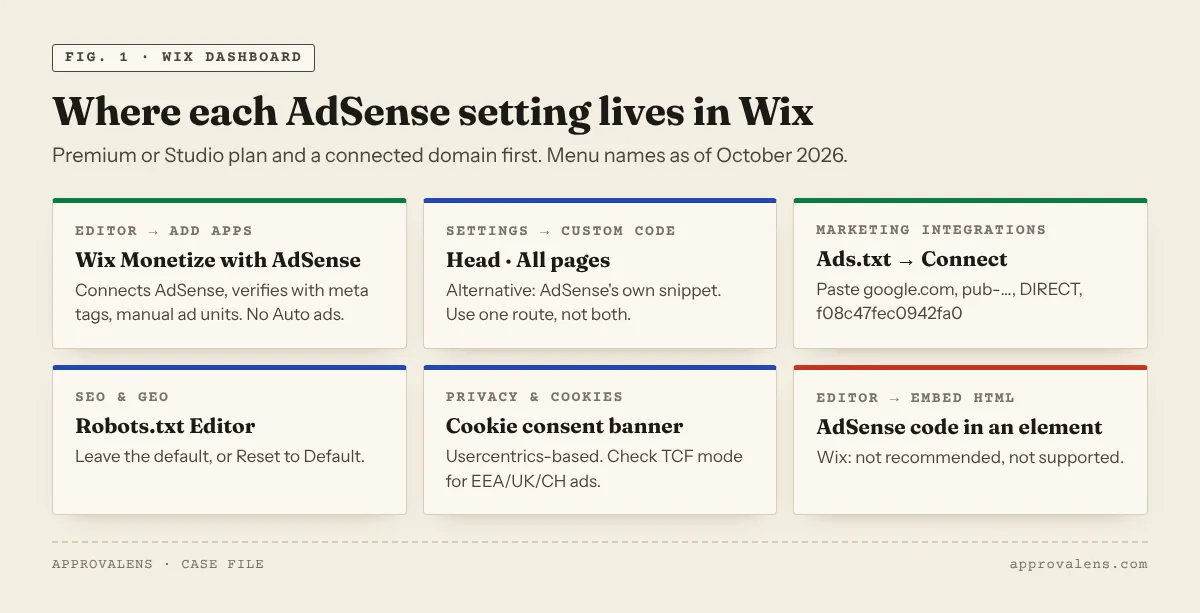
Wix sites can run AdSense, but not on the free plan. Wix's own help is explicit: "You need a custom domain. Sites with a free Wix URL (e.g. yoursite.wixsite.com) can't use AdSense" (Wix Monetize with AdSense). Once you have a premium plan and a connected domain, Wix gives you a no-code route through its own app, a built-in ads.txt editor and an editable robots.txt. What usually stands between a Wix site and approval is the content: designer templates with big images, little text and leftover placeholder paragraphs.
What you need first
| Requirement | Why | Where it comes from |
|---|---|---|
| A Premium or Studio plan | The AdSense app requires it | "Make sure your site is upgraded with a Premium or Studio plan" (about the app) |
| A connected domain | No AdSense on wixsite.com addresses |
Wix app FAQ, quoted above |
| A published site | AdSense must be able to reach it | AdSense: "Make sure your site is published and live on the web" (site not ready) |
A free plan also shows a Wix banner ad at the top of every page. Wix says you need "a Premium plan" to remove it (Wix banner).
Route 1: the Wix Monetize with AdSense app (recommended)
Wix's app handles the code for you: "You have no need for code, everything is done from your Wix dashboard", and it "uses meta tags to … verify site ownership" (setup article).
- In the editor, click Add Apps on the left, search for Wix Monetize with AdSense and click Add to Site.
- Click the app in the editor, then Manage Ads (if you don't see it, click Settings first).
- Click Get Started, then Connect Account, and sign in with the Google account for AdSense.
- Once the site is approved, create ad units: in the dashboard go to Manage Apps, click Open next to the app, then New Ad Unit. Choose Responsive or Fixed, save, place the unit in the editor and publish.
Two limits to know. The app doesn't support Auto ads: "the ability to optimize your site using Auto Ads in the Wix Monetize with AdSense app is not available" (Auto ads request). And Wix says the review "usually takes a few days but can take up to four weeks".
Route 2: custom code in the head
If you prefer AdSense's own snippet (for example to use Auto ads), add it as custom code (embedding custom code):
- In the dashboard, go to Settings and click Custom Code in the Development & integrations section.
- Click + Add Custom Code at the top right and paste the snippet.
- Under Place Code in, choose Head, apply it to all pages, and save.
Wix's notes on this page matter for AdSense: custom code needs a published site with a connected domain; "If you assign a different domain to your site, your code snippets will be deleted"; and since December 2025, new security measures mean "some code snippets that previously worked may now be blocked". After any domain change, check that the snippet is still in the page source.
Don't paste AdSense code into an Embed HTML element on a page. Wix says this is "not recommended" and that it "cannot provide support for Google AdSense ads placed on your site using this method" (HTML element). Use one route, not both: the app and a manual snippet together means duplicate code.
ads.txt on Wix
Wix has a built-in editor, so you don't upload a file (adding ads.txt):
- Go to Marketing Integrations in your site's dashboard.
- Click Connect under Ads.txt, then Add ads.txt.
- Paste your line(s) and click Save.
google.com, pub-1234567890123456, DIRECT, f08c47fec0942fa0
Marketing integrations require that you "upgrade your site and connect a domain" (about marketing integrations). Use pub- (not ca-pub-), and if you run other networks, add their lines in the same box.
Wix serves custom domains with www. Wix says "it is not possible to remove 'www' from your domain name", and visitors who leave it out are sent to the www address (Wix URLs). That fits Google's rule that www.domain.com/ads.txt is read when domain.com/ads.txt redirects to it (crawl rules). Check both addresses with the ads.txt checker.
robots.txt and rendering
Wix lets you edit robots.txt: SEO & GEO → Tools and settings → Robots.txt Editor → View File (robots.txt editor). If you never touched it, leave it alone. If someone added rules, look for Disallow: / under *, Googlebot or Mediapartners-Google, or use Reset to Default. Wix adds: "Wix Customer Care cannot help you with any changes you make to your robots.txt file." The robots.txt tester shows what each rule blocks.
Rendering is less of a worry on Wix than on hand-built JavaScript sites: "Wix sites use Server Side Rendering (SSR)", which Wix says helps search engines "retrieve all of the content on your pages" (viewing source like search engines).
Why Wix sites get rejected
The platform isn't the problem. These patterns are common on Wix because of how its templates are built:
- Mostly images, little text. Wix templates are visual: big hero images, galleries, short captions. AdSense says "sites that contain mostly images, videos or Flash animations may not be approved" and wants "complete sentences and paragraphs, not only headlines" (not approved).
- Template placeholders. Sample paragraphs, demo testimonials and stock "Lorem ipsum" left on the page. AdSense: don't apply while your site "only consists of a site template".
- One-page sites. A single long landing page gives a reviewer very little to evaluate. Wix's own app FAQ asks for "sufficient original content (text, images, etc.)".
- Store or booking pages only. A shop with product photos and short descriptions, or a booking page, is a business tool, not content. Add guides, articles or explanations that are worth reading on their own.
- Missing privacy policy. AdSense requires one that mentions Google's use of cookies (privacy requirements guide). Test yours with the privacy policy checker.
Cookie consent for EEA, UK and Swiss visitors
Wix's cookie banner (Privacy & Cookies in the dashboard) comes from a partnership with Usercentrics and supports Google Consent Mode v2 (cookie banner). For personalised ads to visitors in the EEA, UK and Switzerland, Google requires a Google-certified CMP that integrates with the IAB TCF (consent requirements). Usercentrics is on Google's certified list, but Wix's help doesn't say the Wix banner runs in TCF mode. Check that with Wix before you rely on it. Google's own Privacy & messaging tool in AdSense is the alternative. The CMP guide explains the options.
Wix pre-application checklist
- Premium or Studio plan, custom domain connected, site published
- One code route: the Wix app or a Head snippet in Custom Code
- ads.txt added in Marketing Integrations with your
pub-line - robots.txt unchanged or reset to default
- Every page has real paragraphs of your own text, not just images and headings
- No template placeholder text or demo testimonials
- Privacy policy, about and contact pages linked in the menu or footer
- A consent banner that meets Google's rules if you have EEA, UK or Swiss visitors
Check your Wix site
The free Approvalens scan reads your Wix site like a crawler: it counts the real text on each page, finds placeholder content, checks ads.txt on both www and the bare domain, and tests the privacy policy.
FAQ
Can I use AdSense on a free Wix site?
No. Wix says sites with a free wixsite.com URL can't use AdSense. You need a premium plan and a connected domain.
Does the Wix app support Auto ads?
No. Wix says Auto ads are not available in the Wix Monetize with AdSense app. Use manual ad units, or add AdSense's snippet yourself through Custom Code.
Which URL do I enter in AdSense?
Your domain. In its Wix Blog AdSense article, Wix notes: "If you get an error, delete 'www' from the URL" (Wix Blog and AdSense).
Is Wix bad for AdSense approval?
No. Wix renders pages on the server and gives you ads.txt and robots.txt controls. Rejections come from thin, image-heavy pages and leftover template content, which you can fix.
Spotted something out of date or wrong? Tell us and we'll correct it.
Read this guide in Turkish →Check it on your own site. Free, no sign-up.
Free tools for this
- /tools/ads-txt-checkerads.txt CheckerValidates every line of /ads.txt and confirms Google is listed with your publisher ID.Open the tool
- /tools/robots-txt-testerrobots.txt TesterTests a path against robots.txt for the AdSense crawler, Googlebot and AdsBot.Open the tool
- /tools/privacy-policy-checkerPrivacy Policy CheckerChecks that your privacy policy covers what AdSense requires about Google's cookies.Open the tool
Free scan
Check your own site
Free scan: readiness score and every issue, usually in a few minutes.