On this page (9)
The "Earnings at risk" alert means AdSense checked the ads.txt file on one of your sites and didn't find what it needs: either there's no file at all ("Not found") or there's a file that doesn't list your publisher ID ("Unauthorized"). Those two are very different. A missing file is a recommendation you haven't followed yet; Google calls ads.txt "not mandatory, but it's highly recommended". A file without your ID is a hard stop: Google says "all ad requests from this site are being rejected". Add the one correct line, make sure Google can fetch it, then give the crawler a few days.
This guide is about the warning itself. For the full setup on each platform, see the ads.txt setup guide.
What the alert says and where it comes from
The banner on the AdSense home page has been reported for years with the wording "Earnings at risk - You need to fix some ads.txt file issues to avoid severe impact to your revenue" (Search Engine Roundtable, 2019); other reported versions name the problem directly: a site without an ads.txt file, or a file that doesn't contain your publisher ID. Google's own help describes the mechanism rather than the banner: "If there's an issue with ads.txt on your site, you'll have an alert in your AdSense account" (Ads.txt guide).
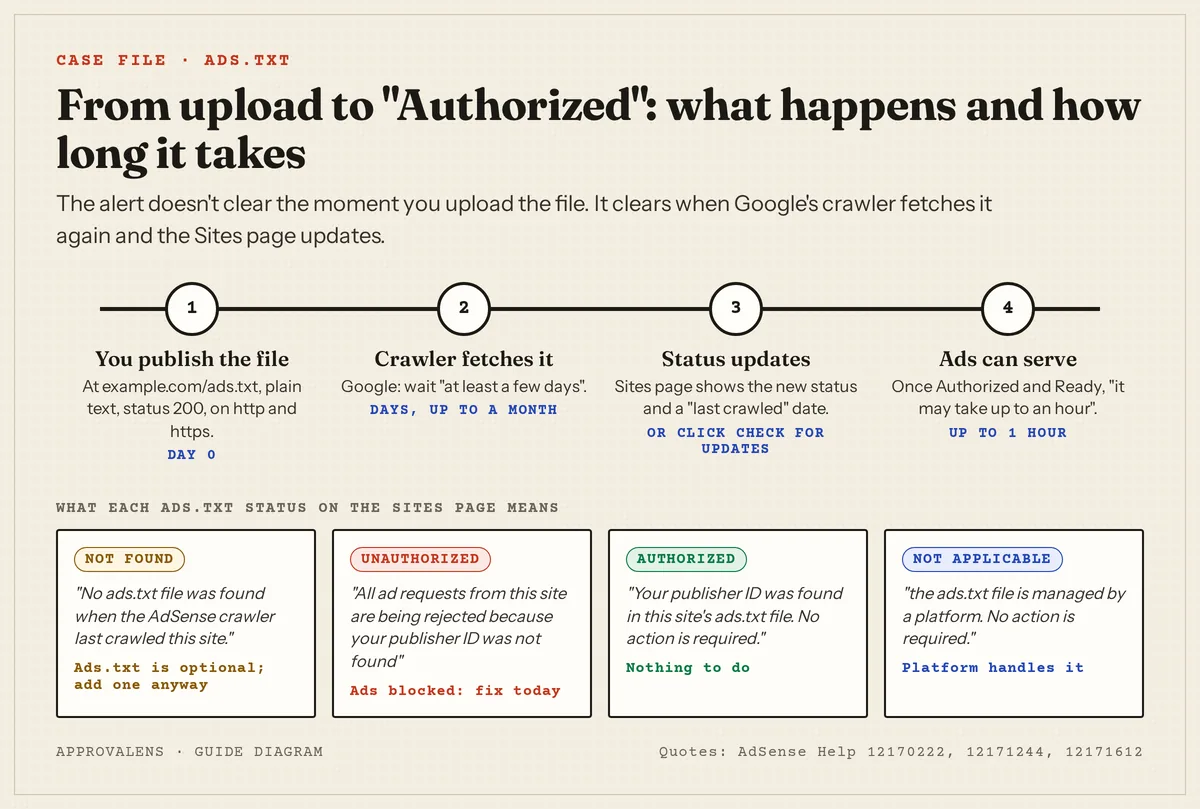
The useful information isn't in the banner, it's on the Sites page. Each site there has an ads.txt status, and Google defines all four (Check the status of your AdSense sites):
| Status | Google's definition | What it means for you |
|---|---|---|
| Not found | "No ads.txt file was found when the AdSense crawler last crawled this site." | Optional file missing. Google doesn't say ads are rejected in this state, but recommends adding it |
| Unauthorized | "All ad requests from this site are being rejected because your publisher ID was not found in this site's ads.txt file." | A file exists without your ID. Ads are blocked until you fix it |
| Authorized | "Your publisher ID was found in this site's ads.txt file. No action is required." | Done |
| Not applicable | "Your publisher ID isn't needed in this site's ads.txt file because the ads.txt file is managed by a platform." | Hosted platforms such as Blogger handle it |
Why "Unauthorized" is so strict: the Publisher Policies say you must not "place Google-served ads on a domain that uses ads.txt where you are not included as an authorized seller" (Authorized inventory), and the ads.txt FAQ adds that "If the identifier in the file is incorrect, an auction is not run for that request" (Ads.txt FAQs).
Does it block AdSense approval?
A missing file doesn't. ads.txt is one of three ways to connect a site, next to the AdSense code snippet and the meta tag (Connect your site), and it's optional. If you connected the site with the code or the meta tag, "Not found" doesn't stop the review.
A wrong file is a different story. If a plugin, theme or another ad network created an ads.txt without your Google line, your ad requests are rejected once the site is approved. Fix that before you request a review. If the site status itself says "Getting ready" or "Needs attention", that's a separate issue; see Getting ready.
The one line you need
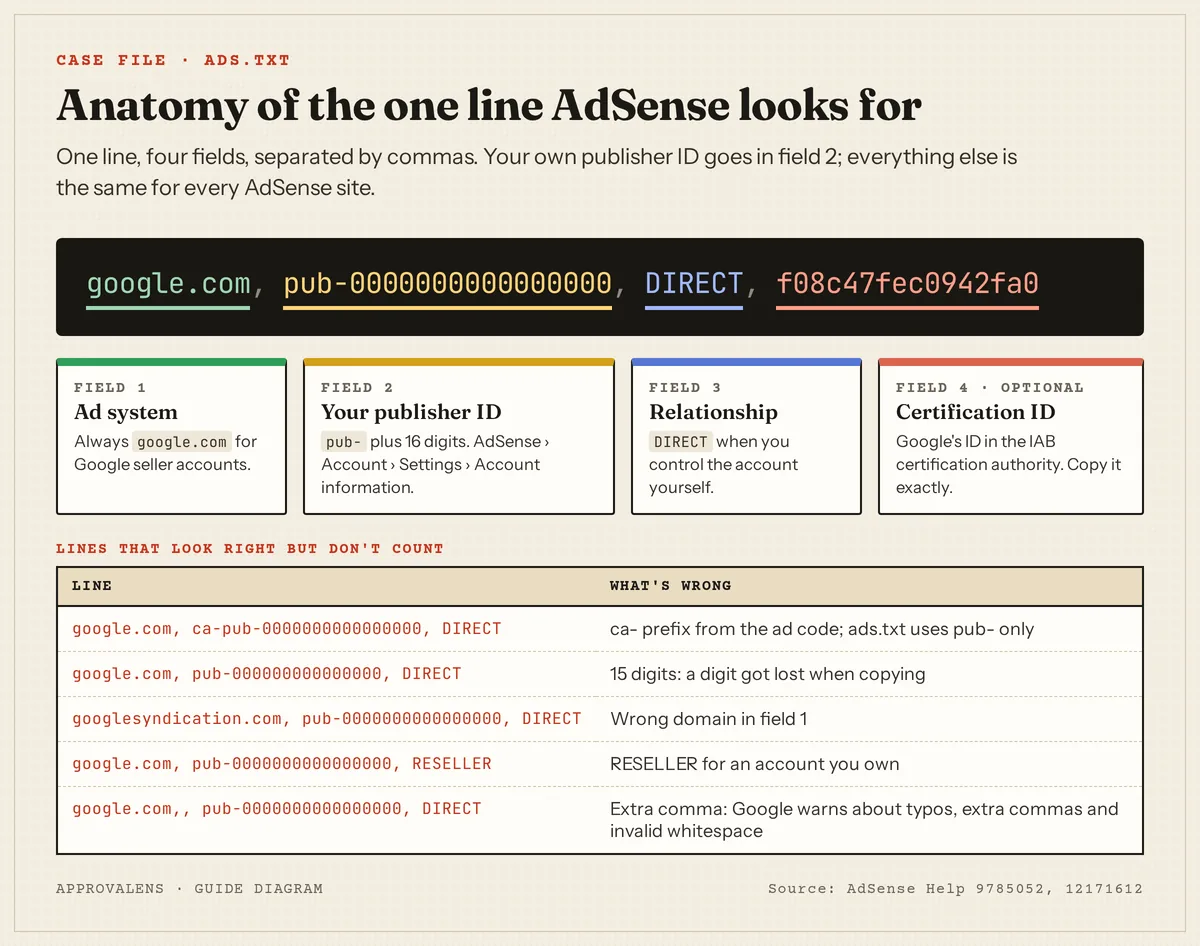
Google's format is google.com, pub-0000000000000000, DIRECT, f08c47fec0942fa0, "where pub-0000000000000000 is your own publisher ID" (Ads.txt guide). You'll find the ID in AdSense under Account, Settings, Account information. The easiest route: on the Sites page, open the site with the "Not found" or "Unauthorized" status and use Copy in the ads.txt snippet, then paste it into the file.
If the site also runs other ad networks, keep their lines; each network gives you its own. Your Google line just has to be among them.
Why the warning stays after you uploaded the file
This is the most common question, and the first answer is usually time. Google: "It may take a few days for AdSense to automatically crawl and verify your ads.txt file. Wait at least a few days for your ads.txt status to update. If your site doesn't make many ad requests it may take up to a month" (Resolve common ads.txt issues). Google also asks you not to keep editing: "Don't remove your ads.txt if it is correctly set up. Any changes made to your ads.txt file will affect the review time" (Ensure your ads.txt files can be crawled).
If a few days have passed, work down this table. Every row comes from Google's crawl requirements in that same article.
| Symptom | Cause | Fix |
|---|---|---|
File works at www.example.com/ads.txt but not example.com/ads.txt |
Crawling "will start at the root domain" | Redirect example.com/ads.txt to the www version, or serve it on both |
| Works on https, error on http (or the reverse) | Google "attempts to crawl ads.txt files on both HTTP and HTTPS" | Serve both, or redirect one to the other |
| Browser shows the text, but the response code is 404 | A 404 "will be ignored" even if a body is returned | Serve the file with status 200 |
| A "page not found" HTML page appears instead | A soft 404 | Make your CMS or host serve the real file |
robots.txt has Disallow: /ads or blocks Googlebot |
The file "may be ignored by crawlers" | Allow /ads.txt |
| Line is there but status says Unauthorized | Typo, ca-pub-, missing digit, extra comma |
Recopy the line from AdSense |
| File on a subdomain only | Subdomain files are only used when "referenced from the ads.txt file on the root domain" | Put the file on the root domain, add subdomain= lines if needed |
Check it yourself in two minutes
- Open the file in a browser:
https://example.com/ads.txt(with your domain). Google's own test: "If the ads.txt file displays in your web browser, then it's likely that AdSense will successfully find it." It should show plain text, not a styled page. - Check the status code and type:
curl -sI https://example.com/ads.txt
curl -sI http://example.com/ads.txt
curl -sI https://www.example.com/ads.txt
You want 200 (directly or after a redirect) and ideally content-type: text/plain.
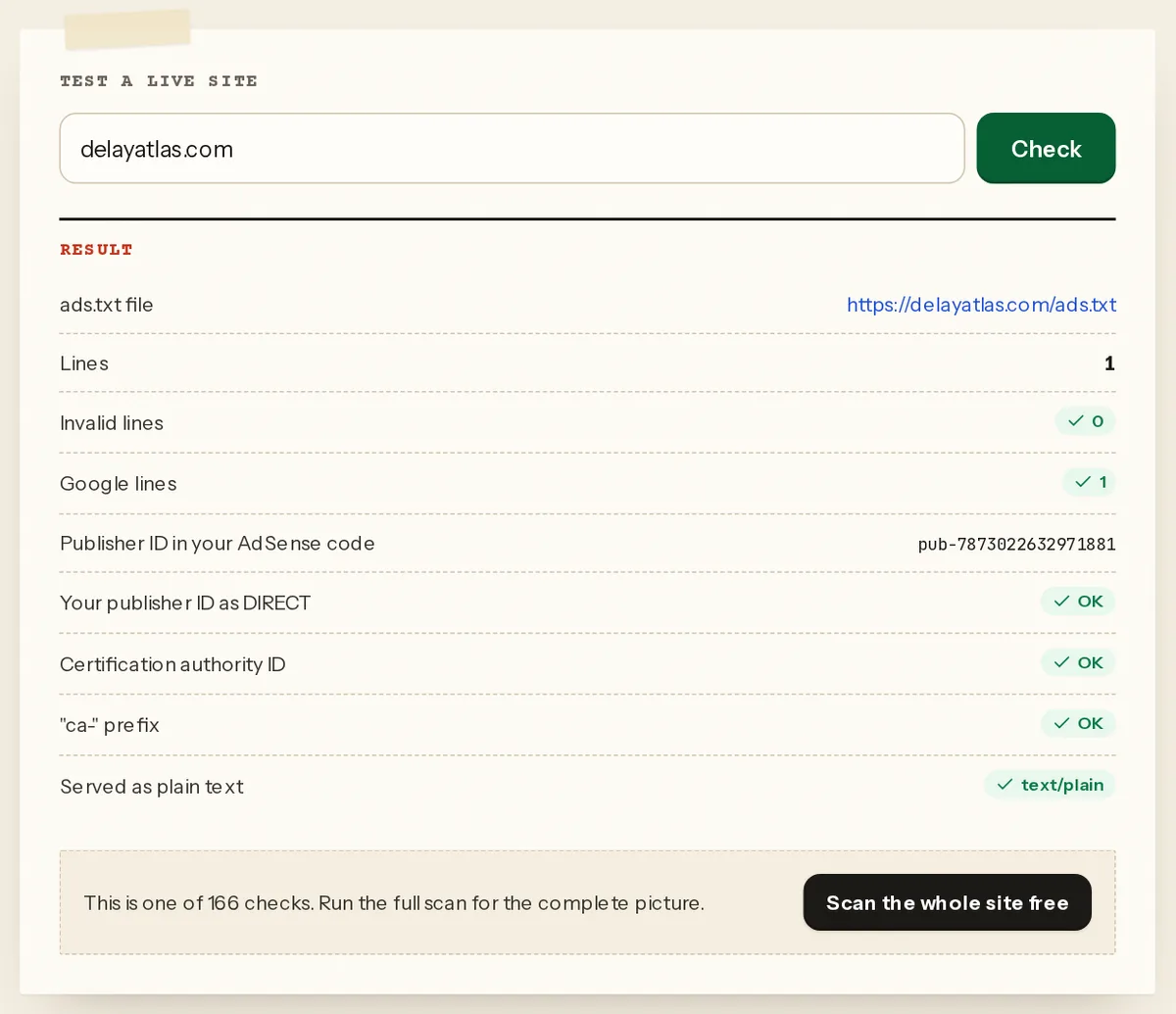
- Run the free ads.txt checker. It fetches the file, parses each line and compares the publisher ID with the one in your AdSense code.
- Test robots.txt with the robots.txt tester using the path
/ads.txt. - Ask AdSense to look again. On the Sites page, open the site and use Check for updates. Google added it so you can "ask AdSense to recheck your ads.txt file", along with a "last crawled" date that tells you when the crawler last looked (Improvements to site management). If the last-crawled date is older than your fix, the status simply hasn't caught up yet.
Once it says Authorized
Google: "If your ads.txt status is now 'Authorized', your site status is 'Ready', and you've set up ads on your site, then ads will start to show. Note, it may take up to an hour for ads to appear on your pages." If the status is Authorized but the site still "requires a review", request it from the same page.
Check every site, not just the main one
The banner often refers to a site you forgot: an old domain, a subdomain, a test site that once had the code. Look at the full Sites list and the status of each one. A site you no longer use doesn't need a file if it doesn't show your ads; a site that does show them needs the line.
Validate the whole setup in one scan
The free ads.txt checker covers one file. A free Approvalens scan checks ads.txt on both schemes and host names, the redirects, the content type, robots.txt rules, and whether the publisher ID in the file matches the one in your ad code and meta tag. Scan your site and see the ads.txt result.
FAQ
Can "Earnings at risk" get my account suspended?
Google's documents describe the effect on ads, not on the account: "Not found" leaves ads.txt unconfirmed, "Unauthorized" rejects the site's ad requests. Fix it either way, because an unauthorized file costs you every impression on that site.
I uploaded ads.txt a week ago and it still says Not found. What now?
Check that the file opens on the bare domain over both http and https, returns 200 and isn't blocked by robots.txt. If all of that's fine, look at the "last crawled" date and use Check for updates. Low-traffic sites can take "up to a month".
Do I need ads.txt on Blogger?
Blogger can manage it for you, which is what the "Not applicable" status means. If you use a custom ads.txt on Blogger, it must include your Google line.
Should I delete ads.txt if it's causing problems?
Only if it's wrong and you can't fix it quickly. A file without your ID blocks ads; no file at all doesn't. But a correct file is better than either, and Google asks you not to remove a correctly set up file.
The site uses another ad network too. Do I need two files?
No. One ads.txt per domain, with one line per authorized seller. Add the Google line to the existing file.
Spotted something out of date or wrong? Tell us and we'll correct it.
Read this guide in Turkish →Check it on your own site. Free, no sign-up.
Free tools for this
Free scan
Check your own site
Free scan: readiness score and every issue, usually in a few minutes.