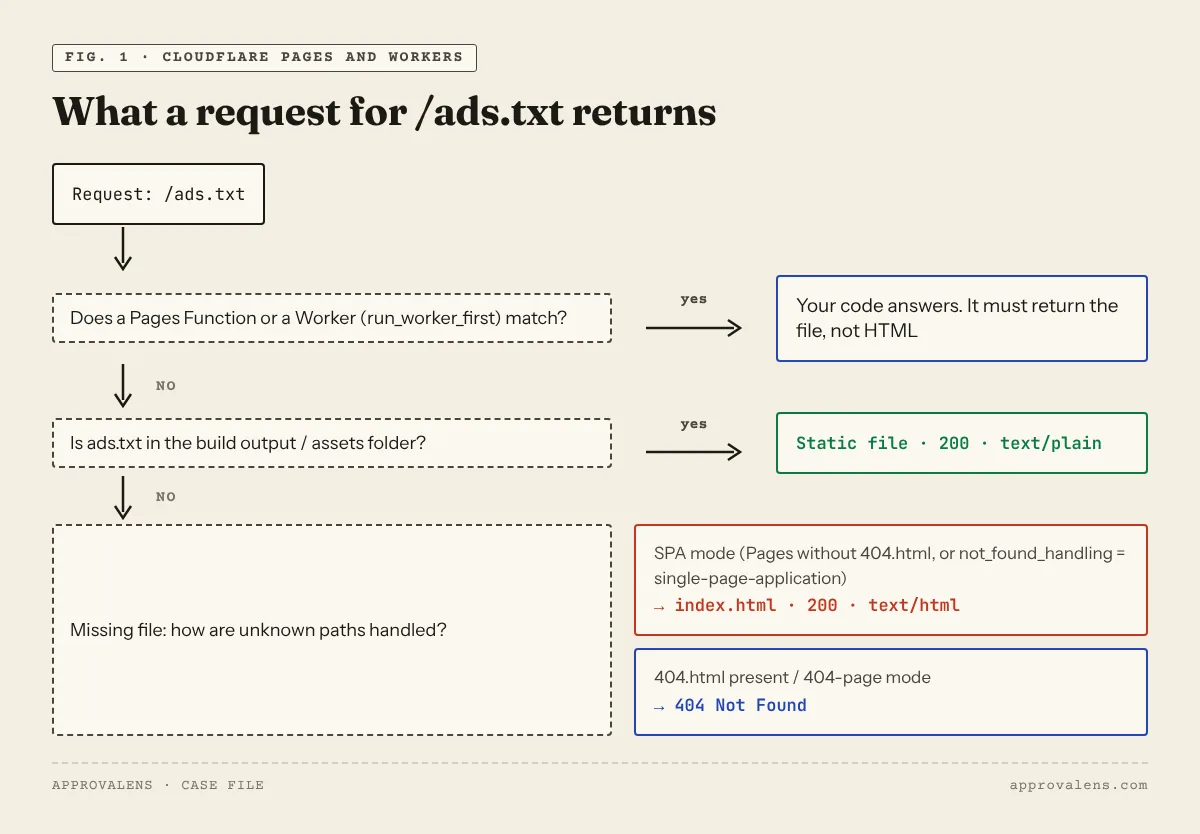
On Cloudflare Pages and on Workers with static assets, ads.txt is just a file in the folder you deploy. Put ads.txt in the build output (for most frameworks, the public/ or static/ folder that gets copied there), deploy, and it's served at /ads.txt. The Cloudflare-specific part is what happens when the file isn't found. In single-page-application mode Cloudflare answers with your index.html and status 200, so AdSense's crawler reads an HTML page where it expected a list of sellers.
The line you need
google.com, pub-1234567890123456, DIRECT, f08c47fec0942fa0
Use your own 16-digit ID with pub- (not ca-pub-). Add lines from any other ad networks below it. Formatting rules are in the ads.txt setup guide.
Cloudflare Pages
- Put
ads.txtin the folder your framework copies into the build output:public/for Vite, Next.js, Astro and Create React App,static/for Hugo and SvelteKit. For a plain HTML site, put it next toindex.html. - Deploy, then open
https://yourproject.pages.dev/ads.txtto confirm the file is in the build. - Check the same path on your custom domain.
Why a missing file returns your home page
Cloudflare's docs: "If your project does not include a top-level 404.html file, Pages assumes that you are deploying a single-page application", and "Pages' default single-page application behavior matches all incoming paths to the root (/)" (serving Pages).
So when ads.txt didn't make it into the build, /ads.txt doesn't return 404. It returns your home page with status 200. Google treats a "real page returned for a URL that doesn't actually exist" as a soft 404 (crawl rules), and a human glancing at the browser may think the file exists. Two defences:
- add a
404.htmlto the build output, so missing paths return a real 404; - after every deploy, look at the content type and the body, not only the status code (see the checks below).
Pages Functions
A matched Function takes priority. "If no Function is matched, it will fall back to a static asset if there is one" (Functions routing). A catch-all such as functions/[[path]].js therefore also answers /ads.txt. Exclude it in _routes.json, which lives in the build directory:
{
  "version": 1,
  "include": ["/*"],
  "exclude": ["/ads.txt", "/robots.txt"]
}
"Exclude always take priority over include", so the static file is served.
Content type with _headers
Pages sends a Content-Type for every static file. If the type for /ads.txt is wrong, override it in a _headers file in the build output. Headers defined there "override what Cloudflare ordinarily sends" (headers):
/ads.txt
  Content-Type: text/plain; charset=utf-8
Don't use _redirects for www or apex problems. Cloudflare's own table marks "Domain-level redirects" as not supported there (redirects).
Workers with static assets
With Workers, the assets folder is set in the Wrangler config ("assets": { "directory": "./public/" }). Two settings decide what /ads.txt returns (static assets, binding options):
| Setting | What happens on /ads.txt |
|---|---|
run_worker_first false (default) and the file exists |
Cloudflare serves the file. The MIME type comes from the file extension |
not_found_handling = "single-page-application" and the file is missing |
"a 200 OK response with index.html". This is the trap |
not_found_handling = "404-page" and the file is missing |
The nearest 404.html with status 404 |
run_worker_first = true |
Your Worker runs on every request. It must hand /ads.txt to the assets binding or answer it itself |
run_worker_first also accepts a list of path patterns, including ! exclusions. That lets you run the Worker on /api/* only and leave files alone.
A Worker without static assets
If your Worker has no assets folder, answer the path in code:
export default {
  async fetch(request, env) {
    const url = new URL(request.url);
    if (url.pathname === "/ads.txt") {
      return new Response("google.com, pub-1234567890123456, DIRECT, f08c47fec0942fa0\n", {
        headers: { "Content-Type": "text/plain; charset=utf-8" },
      });
    }
    // …the rest of your app
  },
};
Custom domains and the root domain
Google starts at the root domain: "An ads.txt file on www.domain.com/ads.txt will only be crawled if domain.com/ads.txt redirects to it" (crawl rules). On Pages:
- add the domain under Workers & Pages → your project → Custom domains → Set up a domain. For an apex domain like
example.com, "you will need to add your site as a Cloudflare zone" (custom domains); - if you serve the site on
www, redirect the apex to it (or the reverse) with a Redirect Rule or Bulk Redirect. Fixing www vs non-www in Cloudflare walks through both.
Also submit the custom domain to AdSense, not the pages.dev or workers.dev address.
Cloudflare in front of another host
If Cloudflare only proxies a site hosted elsewhere (WordPress, cPanel), ads.txt lives on that server and the steps above don't apply. Cloudflare can still get in the way: security rules or bot challenges that block Google's crawlers. The Cloudflare and AdSense guide covers those settings.
Check it yourself
curl -sI https://example.com/ads.txt | grep -iE "^HTTP|content-type"
curl -s  https://example.com/ads.txt | head -3
curl -sI http://example.com/ads.txt | grep -iE "^HTTP|location"
Good result: 200, text/plain, and your Google line as the first non-comment line. If you see text/html or <!doctype html>, you're looking at the SPA fallback, not your file. The ads.txt checker does the same tests and flags HTML bodies and wrong IDs. To see whether Cloudflare treats Google's crawlers differently from browsers, use the Googlebot access checker.
Then run a free scan of the custom domain. It checks ads.txt on HTTP and HTTPS, with and without www, along with the rest of what AdSense reviews.
Spotted something out of date or wrong? Tell us and we'll correct it.
Read this guide in Turkish →Check it on your own site. Free, no sign-up.
Free tools for this
Free scan
Check your own site
Free scan: readiness score and every issue, usually in a few minutes.