Blogger has a built-in ads.txt editor, so you never upload a file. Whether you should touch it depends on how you show ads. Blogger's help says you need to set up the content yourself "if your blog is monetized with third-party providers or you've manually integrated AdSense in your blog" (Blogger Help). If you only use AdSense through the Earnings tab, leave the setting alone and just check what your blog already serves.
Do you need a custom ads.txt?
| How you show ads | Custom ads.txt? | What the file must contain |
|---|---|---|
| AdSense only, set up through Earnings | Not according to Blogger's help. Check /ads.txt anyway |
Nothing to do |
| AdSense code pasted into the theme or an HTML gadget | Yes | Your Google line |
| AdSense plus another network (Ezoic, Media.net, …) | Yes | Your Google line and every line the other network gives you |
| Another network only | Yes | That network's lines |
| No ads | No | — |
The second and third rows are where blogs go wrong. When you turn on the custom setting, the file contains exactly what you type. A file that lists only another network tells buyers Google isn't authorised to sell your ad space, and Google's policies don't allow its ads on a domain "that uses ads.txt where you are not included as an authorized seller" (ads.txt policy).
Steps in Blogger
From Blogger Help:
- Sign in to Blogger.
- In the top left, choose the blog.
- From the menu on the left, click Settings.
- Under Monetization, turn on Enable custom ads.txt.
- Click Custom ads.txt.
- Paste your lines into the text box.
- Click Save.
What to paste if you use AdSense plus one other network:
google.com, pub-1234567890123456, DIRECT, f08c47fec0942fa0
examplenetwork.com, 12345, DIRECT
Take your publisher ID from AdSense (Account → Settings → Account information) and write it with pub-, not ca-pub-. If you copy lines from a network's dashboard, paste them as plain text. Smart quotes or extra spaces from a document editor break the format. The general ads.txt guide explains every field.
Where Google looks on Blogger
Google starts at the root domain: "An ads.txt file on www.domain.com/ads.txt will only be crawled if domain.com/ads.txt redirects to it" (crawl rules). What that means depends on your address.
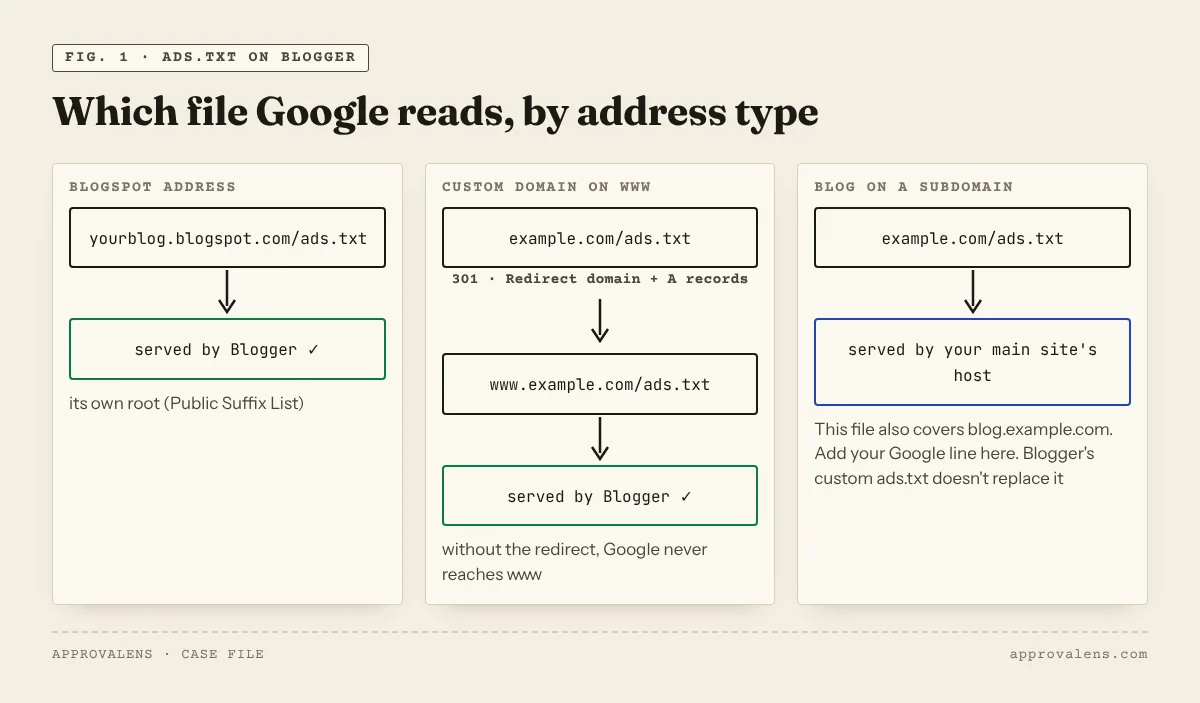
yourblog.blogspot.com. blogspot.com is on the Public Suffix List, so AdSense treats your blogspot address as a site of its own (site management). The file at yourblog.blogspot.com/ads.txt is the one that counts.
www.example.com (custom domain). Blogger serves custom domains on a subdomain like www. Google first asks example.com/ads.txt, so the bare domain must redirect to www. In Blogger that means the four A records from the custom domain setup plus Settings → Publishing → Redirect domain. Without them, the file in Blogger is correct but unreachable.
blog.example.com (blog on a subdomain of another site). Here the root domain is example.com, which is hosted somewhere else: your main website, a shop, a landing page. Google's crawl starts there, so example.com/ads.txt has to authorise the ads on your blog too. Add your Google line to the main site's ads.txt. Blogger's custom ads.txt for the subdomain doesn't replace it.
Check it yourself
Blogger's own tip: "To check the content of your ads.txt file, go to http://<your blog address>/ads.txt". From a terminal you also see the status code and content type:
curl -sI https://yourblog.blogspot.com/ads.txt | grep -iE "^HTTP|content-type"
curl -s  https://yourblog.blogspot.com/ads.txt
curl -sI http://example.com/ads.txt | grep -iE "^HTTP|location"     # custom domain: should redirect to www
On public blogspot blogs with AdSense that we checked in October 2026, /ads.txt returned a google.com, pub-…, DIRECT, f08c47fec0942fa0 line with text/plain. If yours returns a line with someone else's ID, or a 404 while you run ads, fix it before you apply. The ads.txt checker fetches the file from the root domain the way Google does and compares the ID with the AdSense code on your pages.
Common Blogger ads.txt mistakes
| Mistake | What happens | Fix |
|---|---|---|
| Custom ads.txt turned on with only another network's lines | Google isn't listed as an authorised seller | Add your Google line |
ca-pub-1234… instead of pub-1234… |
The line doesn't match your account | Remove ca- |
| Lines edited on the blogspot address while visitors use a custom domain | Google checks the custom domain's root | Check example.com/ads.txt after saving |
| Bare domain without A records | example.com/ads.txt fails, so www is never read |
Add Blogger's A records and turn on Redirect domain |
| Expecting AdSense to update the same day | Status stays "Not found" or "Unauthorised" | Google says changes "may take a few days", up to a month on low-traffic sites (ads.txt guidance) |
The rest of the Blogger setup (HTTPS, robots.txt, templates) is in the Blogger AdSense guide. When you're ready, the free scan checks ads.txt on every variant of your address along with the other approval checks.
Spotted something out of date or wrong? Tell us and we'll correct it.
Read this guide in Turkish →Check it on your own site. Free, no sign-up.
Free tools for this
Free scan
Check your own site
Free scan: readiness score and every issue, usually in a few minutes.