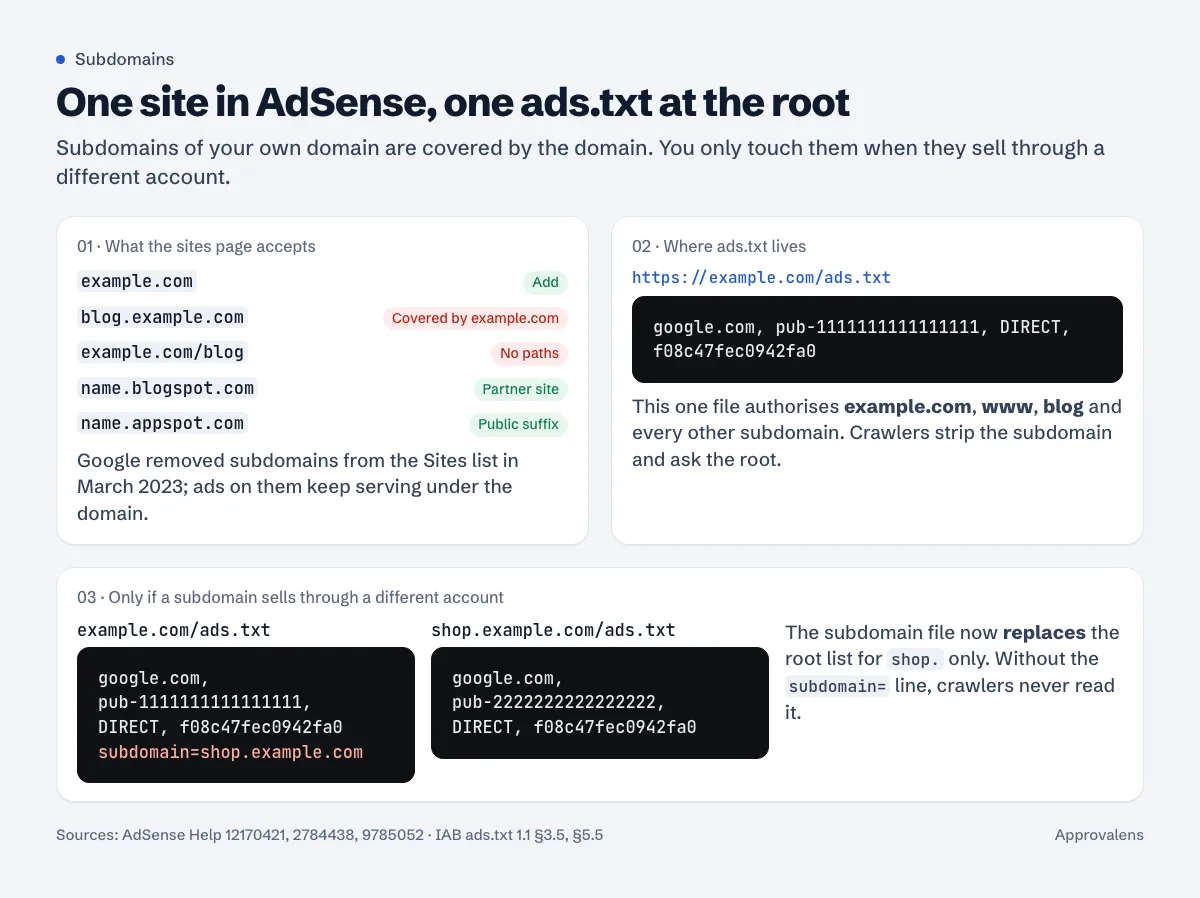
Short answer: you don't add blog.example.com to AdSense, you add example.com, and the subdomain is covered by it. Since 2023 the Sites page only accepts domains, subdomains on platforms listed in the Public Suffix List, and partner platforms such as Blogger. Your ads.txt goes on the root, at example.com/ads.txt, and that one file covers every subdomain. A separate ads.txt on a subdomain only matters when that subdomain sells through a different account, and then the root file has to point to it with a subdomain= line.
What the Sites page accepts
Google changed this in 2023. From Site management is changing in AdSense, you can only add these as sites:
- "Domains (e.g., website.com, website.net)"
- "Subdomains on platforms that are already part of the public suffix list (e.g., site.appspot.com)."
- "Sites that are managed by AdSense platform partners (e.g., site.blogspot.com)"
And for subdomains of your own domain: "You'll no longer be able to add or manage subdomains that are part of an existing site on your Sites page. Any existing subdomains in your account that belong to a site will be removed. This will not impact ad serving or your earnings."
The sign-up page follows the same rule. Google's list of valid and invalid URLs puts example.com and example.blogspot.com on the valid side and subdomain.example.com on the invalid side, with the note "We only allow subdomains on host partner sites." Paths are out too: example.com/directory is invalid.
So how do ads on a subdomain work?
Add the parent domain in Sites, get it approved, then put your ad code on pages under any of its subdomains. Google's own note on the 2023 change says removing subdomain entries "will not impact ad serving or your earnings", which is the clearest sign that subdomains serve under the domain's approval.
Blocking controls moved the same way: "if you have blocking controls configured for example.com and subdomain.example.com, the combination of those settings will be applied to example.com."
One practical trap: an empty front door
The site you add, and the one that gets reviewed, is example.com. If the root is a holding page and all your writing lives on blog.example.com, you're asking for approval of a domain whose home page has nothing on it. Google doesn't document exactly which URLs a reviewer opens, so don't make it guess. Either move the content to the root (example.com/blog/), or make the root a real page that links clearly into the content.
Where ads.txt has to be
On the root of the domain. Google's ads.txt guide says to "Upload your ads.txt file to the root directory of your site", meaning example.com/ads.txt. Its FAQ explains how it's used: "Google uses the content of any ads.txt files hosted on a root domain to determine which seller accounts are allowed to serve ads on that domain" (Ads.txt FAQs).
The IAB specification says the same from the crawler's side. Crawlers "should strip the subdomains when creating the crawler's URL list", and "Publishers should always post the /ads.txt file on their root domain" (ads.txt 1.1, section 5.5). The root domain is defined as "the "public suffix" plus one string in the name", so for blog.example.com it's example.com, and for shop.example.co.uk it's example.co.uk.
Redirects are fine within the domain. Google lists example.com/ads.txt redirecting to www.example.com/ads.txt as supported, along with "a single HTTP redirect to a destination outside the original root domain". So if your main site is www.example.com, the usual www redirect doesn't break anything.
A quick check:
$ curl -sIL https://example.com/ads.txt | grep -iE "^HTTP|^location|^content-type"
HTTP/2 301
location: https://www.example.com/ads.txt
HTTP/2 200
content-type: text/plain

$ curl -sL https://example.com/ads.txt
google.com, pub-0000000000000000, DIRECT, f08c47fec0942fa0
You want a 200 at the end, text/plain, and your own publisher ID. The ads.txt setup guide covers the line itself and the common mistakes.
When a subdomain needs its own ads.txt
Almost never, for a single-owner site. Google's FAQ is specific: "You only need to do this if the authorized seller or your publisher ID are different for the subdomain when compared to the root domain."
Real cases where it applies: a subdomain run by a partner who monetises it with their own AdSense account, a forum on community.example.com sold through a different ad network, or a news section managed by an ad sales company.
In those cases, do two things:
- Put an ads.txt on the subdomain listing the sellers for that subdomain.
- Add a
subdomain=line to the root file, otherwise nobody reads the subdomain file. Google: "Google crawls and enforces ads.txt files placed on subdomains, where one exists, and is referenced from the ads.txt file on the root domain."
# https://example.com/ads.txt
google.com, pub-1111111111111111, DIRECT, f08c47fec0942fa0
subdomain=shop.example.com

# https://shop.example.com/ads.txt
google.com, pub-2222222222222222, DIRECT, f08c47fec0942fa0
Be careful with what that does. Per the IAB spec, "When the ads.txt on the root domain declares a subdomain and an ads.txt exists on that subdomain, only advertising systems listed in the subdomain ads.txt are authorized to sell inventory on that subdomain." The subdomain file replaces the root list for that subdomain; it doesn't add to it. If your own Google line should also be valid on shop.example.com, it has to be in the subdomain file too.
Two other rules from the spec: "Only root domains should refer crawlers to subdomains. Subdomains should not refer to other subdomains." And if the root doesn't declare the subdomain, "only advertising systems listed in the root domain ads.txt are authorized to sell inventory on that subdomain." A stray ads.txt sitting on a subdomain with no subdomain= line pointing to it is simply ignored.
You can build each file with the free ads.txt generator (paste the subdomain= line with the other lines; valid variables are kept), then fetch the root file the way a crawler does with the ads.txt checker.
Blogspot and other free subdomains
Blogger (name.blogspot.com). Blogger is an AdSense host partner, so a blogspot address can be added and approved on its own. blogspot.com is on the Public Suffix List, which makes name.blogspot.com the root for ads.txt purposes. Blogger serves the file for you; you set its content in the blog's settings. See AdSense for Blogger and ads.txt on Blogger.
Static hosts. We checked the Public Suffix List on 7 October 2026: github.io, netlify.app, vercel.app, pages.dev, web.app and appspot.com are all on it. Under Google's 2023 rule, an address like name.github.io can therefore be added as a site, and its ads.txt goes at name.github.io/ads.txt. Whether a site on a free host address gets approved is a separate question that Google's help pages don't answer; a custom domain removes the doubt and costs little.
Platforms that aren't on the list. wordpress.com wasn't on it when we checked, so name.wordpress.com is a subdomain of someone else's domain and can't be added. The fix is a custom domain.
If you're on a free subdomain and planning to move to your own domain, do it before you apply, not after: the approval belongs to the domain you added.
Common mistakes
- Adding
www.example.comandexample.comas two sites. It's one domain. Addexample.com. - Putting ads.txt only on
blog.example.com. Crawlers askexample.com. If the root has no file, the subdomain file isn't read. - Declaring
subdomain="just in case". If the subdomain's file then misses your Google line, you've de-authorised your own ads there. - Applying with the subdomain URL. The sign-up form rejects it; add the domain instead.
Check the root and the subdomains in one go
A free Approvalens scan tells you when you've scanned a subdomain rather than the domain AdSense reviews, and checks the ads.txt on the root: scan your site.
FAQ
Do I need separate AdSense approval for each subdomain?
No. Add and get approval for the domain. Subdomains of it can't be added separately and serve under the domain.
Can I use the same ad code on blog.example.com and shop.example.com?
Yes, the same publisher ID and code work across the domain's subdomains. One ads.txt at the root covers all of them.
My blog lives at blog.example.com. What do I enter in AdSense?
example.com. Then make sure the root home page isn't empty, and that example.com/ads.txt exists.
Does www count as a subdomain for ads.txt?
Technically yes, and that's why the file belongs on the root. A redirect from example.com/ads.txt to www.example.com/ads.txt is supported.
Spotted something out of date or wrong? Tell us and we'll correct it.
Read this guide in Turkish →Check it on your own site. Free, no sign-up.
Free tools for this
Free scan
Check your own site
The free scan reads the first 50 pages and shows your score and every problem it finds.