Squarespace has no AdSense integration of its own, but it allows it: "Although we don't have built-in advertisement integrations, you can include ads on your site using third-party services like Google AdSense" (Squarespace: adding ads). Whether you can actually do it comes down to three gates: a paid site that is public, a plan that includes Code Injection, and content a reviewer can evaluate. ads.txt is the one thing Squarespace doesn't offer, and you can get approved without it.
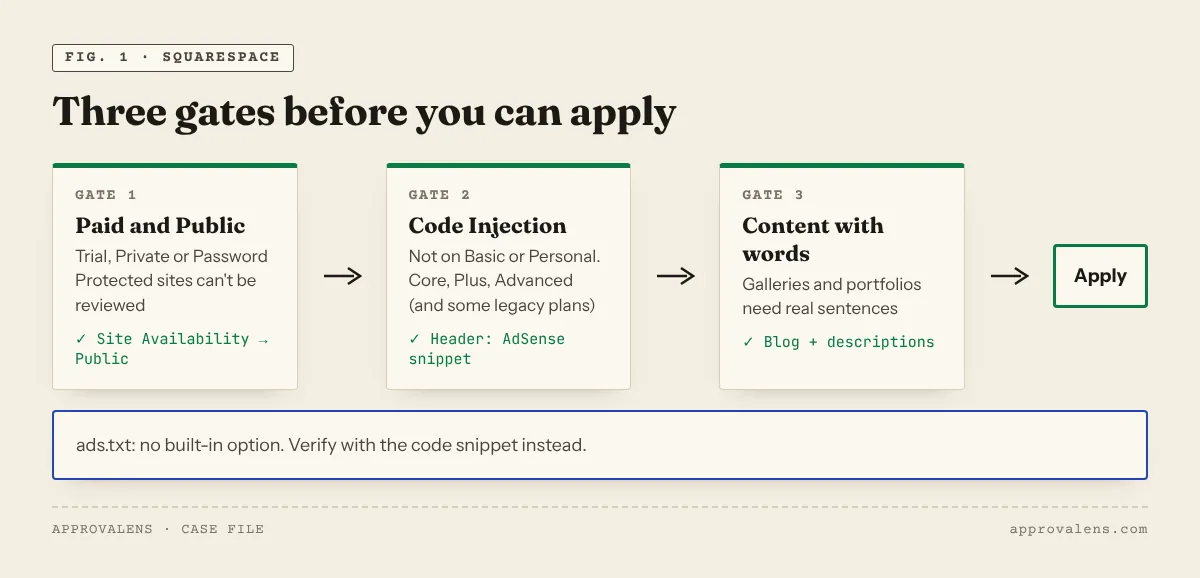
Gate 1: a paid, public site
Squarespace's Site Availability has three options: Public, Password Protected and Private. "All sites are set to private by default", and "When your site is private, search engines can't find or index it" (site availability). During a trial you can't change that: "Only paid sites can be public", and private or password-protected trial sites are hidden from search engines (trial sites).
AdSense needs to reach the site without a password (site not ready). So subscribe first, then open the Site Availability panel and select Public.
Gate 2: a plan with Code Injection
AdSense requires that you can place code "between the
tags of your pages" (AdSense eligibility). On Squarespace that means Code Injection, which is "available in the Core, Plus, Advanced, and some legacy billing plans" and is "not available in the Basic or Personal plans" (Code Injection, plan features). Older help pages list Business and Commerce plans as well, which are legacy plan names.Adding the code
- Open the Code Injection panel. In the current editor it's reached from Pages → Website Tools → Code Injection.
- Paste the AdSense snippet into the Header field. Squarespace: "Code added here is injected into the tag on every page in your site."
- Save, then check your home page source for
adsbygoogle.
<script async src="https://pagead2.googlesyndication.com/pagead/js/adsbygoogle.js?client=ca-pub-1234567890123456" crossorigin="anonymous"></script>
That's also how Squarespace describes Auto ads: "add the activation code from your Adsense homepage to the Header field in site-wide code injection". For manual ad units, Squarespace suggests disabling Auto ads, creating a unit in AdSense and "pasting the code into a code block". JavaScript in code blocks needs one of the same plans (Code Blocks). Squarespace adds that code-based ads "fall outside the scope of our support", so keep a note of what you pasted where.
The ads.txt gap
Squarespace is direct about it: "There isn't a built-in way to do this in Squarespace, but you may be able to add a text file to your site by making a custom modification", which it points to a forum post for and calls outside its support (adding ads).
What that means in practice:
- You can still get approved. ads.txt is one of three verification methods, next to the code snippet and the meta tag (connect your site). The Header snippet above is enough.
- The redirect idea is untested. Google accepts "a single HTTP redirect to a destination outside the original root domain" for ads.txt (ads.txt FAQ), and Squarespace's URL mappings can send a path to an external
https://address with a 301. But Squarespace's docs also say "Redirects only work if the page you're redirecting from has been deleted or disabled" and "You can't redirect image or file URLs" (URL mappings). Whether a mapping for/ads.txtworks isn't documented. If you try it, test the live result with the ads.txt checker and confirm the status on your AdSense Sites page. - Don't create a broken one. If a workaround produces an HTML page at
/ads.txt, or a file without your Google line, that's worse than no file. Google doesn't allow its ads on a domain "that uses ads.txt where you are not included as an authorized seller" (ads.txt policy).
Crawlers: one toggle to leave alone
"All Squarespace sites use the same robots.txt file and Squarespace users can't access or edit the file" (robots.txt). You control crawlers through Settings → Crawlers, and the two options there do very different things:
| Setting | Effect | For AdSense |
|---|---|---|
| Block known artificial intelligence crawlers | Blocks a list of AI crawlers (it includes Google-Extended, GPTBot and ClaudeBot). Off by default (AI crawlers) | Doesn't block Googlebot or the AdSense crawler |
| Block Search engine crawlers | Adds Disallow: / to robots.txt, and "your site won't be indexed by search engines" (plan features) |
Leave it off. A site that blocks Googlebot can't be properly evaluated |
Individual pages also have a Hide page from search results toggle in their SEO tab. Make sure it's off on your main content. Open yourdomain.com/robots.txt and paste it into the robots.txt tester to see what Google's crawlers are allowed to fetch.
Domain and www
"By default, all Squarespace domains come with the 'www' domain and naked domain automatically linked", and visitors who type the bare domain see the www address (www setting). You can switch that with the Use "www" prefix toggle in the Domains panel. Either way, one version redirects to the other, which is what Google expects. Submit your own domain to AdSense, not the squarespace.com address.
Content: portfolios need words
Squarespace's templates are built for visual work: portfolios, galleries, a homepage of full-width images. That's exactly the kind of site AdSense warns about: "sites that contain mostly images, videos or Flash animations may not be approved", and content "should contain complete sentences and paragraphs, not only headlines" (not approved).
- Add a Blog page and write about your work: process, techniques, gear, case studies.
- Give gallery and portfolio pages real descriptions, not just titles.
- Remove template demo pages and sample text you didn't replace.
- Publish a privacy policy that covers Google's ad cookies (requirements) and check it with the privacy policy checker.
Consent banner
Squarespace's cookie banner is switched on in the Cookies & Data Privacy panel (cookie banner). Squarespace's help doesn't describe IAB TCF support, and for ads added through code it recommends "a specialist third-party cookie consent management tool". For personalised ads to EEA, UK and Swiss visitors, Google requires a Google-certified CMP that integrates with the TCF (consent requirements). Google's Privacy & messaging in AdSense is one option. The CMP guide covers the others.
Squarespace pre-application checklist
- Paid plan with Code Injection (Core, Plus, Advanced or a legacy plan that includes it)
- Site Availability set to Public
- AdSense snippet in Code Injection → Header, once
- Settings → Crawlers: "Block Search engine crawlers" is off
- Main pages don't have "Hide page from search results" turned on
- Blog or text pages with your own writing, not just galleries
- Privacy policy with Google's ad cookie statements, linked in the footer
- A certified CMP if you have EEA, UK or Swiss visitors
Scan your Squarespace site
Once the site is public, run the free Approvalens scan. It checks that the AdSense code is in the head, reads robots.txt as Google does, measures how much real text each page has, and tells you whether /ads.txt returns anything that could hurt you.
FAQ
Can I use AdSense on the Squarespace Basic plan?
Not with the usual setup. Code Injection isn't available on Basic or Personal, and AdSense needs its code in the head of your pages.
Do I need ads.txt for approval on Squarespace?
No. Verify with the code snippet in the Header field. ads.txt is optional, and Squarespace has no built-in way to add it.
Can I apply during the free trial?
No. Trial sites can't be public, so AdSense can't review them.
Does blocking AI crawlers affect AdSense?
The toggle targets AI crawlers such as Google-Extended, GPTBot and ClaudeBot, not Googlebot or the AdSense crawler. The separate "Block Search engine crawlers" toggle is the one that hurts.
Spotted something out of date or wrong? Tell us and we'll correct it.
Read this guide in Turkish →Check it on your own site. Free, no sign-up.
Free tools for this
- /tools/robots-txt-testerrobots.txt TesterTests a path against robots.txt for the AdSense crawler, Googlebot and AdsBot.Open the tool
- /tools/ads-txt-checkerads.txt CheckerValidates every line of /ads.txt and confirms Google is listed with your publisher ID.Open the tool
- /tools/privacy-policy-checkerPrivacy Policy CheckerChecks that your privacy policy covers what AdSense requires about Google's cookies.Open the tool
Free scan
Check your own site
Free scan: readiness score and every issue, usually in a few minutes.