In Next.js, ads.txt is a plain file: save it as public/ads.txt, deploy, and it's served at https://yourdomain.com/ads.txt. This works the same in the App Router and the Pages Router. Most problems come from what sits between the file and Google: a proxy (formerly middleware) that rewrites the path, a www setup that leaves the root domain without the file, or a hosting rule that answers unknown paths with HTML.
1. Get your exact line
AdSense gives you one line with your own publisher ID (ads.txt guidance):
google.com, pub-1234567890123456, DIRECT, f08c47fec0942fa0
Use pub- plus 16 digits. The ca- prefix from your ad code doesn't belong in ads.txt. If you run other ad networks, their lines go in the same file. Formatting rules and errors are in the general ads.txt setup guide.
2. Put the file in /public
my-app/
├── app/            (or pages/)
├── public/
│   └── ads.txt     ← served at /ads.txt
└── next.config.ts
Next.js serves everything in public from the root: "Files inside public can then be referenced by your code starting from the base URL (/)" (public folder). There's no special ads.txt file convention in app/. The metadata conventions cover icons, the manifest, Open Graph images, robots.txt and sitemap.xml, nothing else (metadata files).
Save the file as UTF-8 plain text, in a code editor rather than a word processor, with a newline at the end.
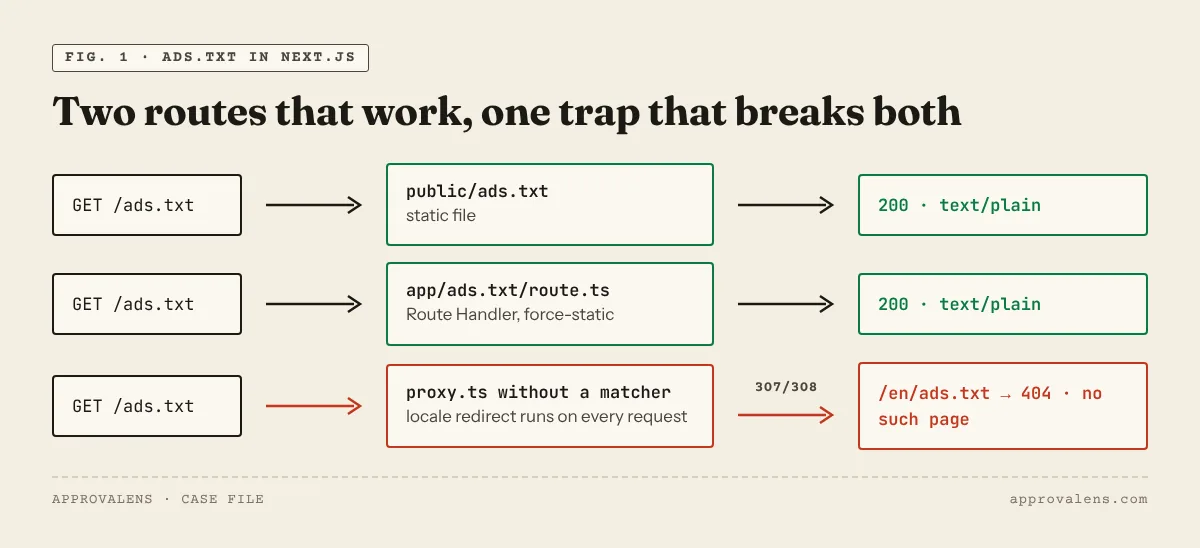
Alternative: a Route Handler
If the publisher ID should come from an environment variable, or you deploy the same code to several domains, generate the file. Route Handlers can return non-HTML responses, and the docs use a dotted folder name for exactly this (app/rss.xml/route.ts) (Route Handlers):
// app/ads.txt/route.ts
export const dynamic = "force-static";

export function GET() {
  const line = `google.com, ${process.env.ADSENSE_PUB_ID}, DIRECT, f08c47fec0942fa0`;
  return new Response(line + "\n", {
    headers: { "Content-Type": "text/plain; charset=utf-8" },
  });
}
force-static builds the response once. It's also required if you use output: 'export', where Route Handlers must be marked static (static exports). Check that ADSENSE_PUB_ID is set in the production environment. Otherwise the file says google.com, undefined, DIRECT…, which is worse than no file. Keep either public/ads.txt or the Route Handler, never both.
We tested both versions on Next.js 16.3 in development. Each returned status 200 with a text/plain content type.
3. Keep proxy.ts away from the file
Next.js 16 renamed middleware.ts to proxy.ts. The docs warn: "Without a matcher, Proxy runs on every request, including static files … and assets in the public/ folder" (proxy.js). Typical consequences for ads.txt:
- an i18n proxy that adds a locale prefix sends
/ads.txtto/en/ads.txt, which doesn't exist; - an auth proxy sends Google's crawler to
/login; - a bot filter returns 403 to anything that isn't a browser.
Exclude files from the matcher. The official example leaves out favicon.ico, sitemap.xml and robots.txt by name. Skipping every path with a dot covers ads.txt too:
// proxy.ts
export const config = {
  matcher: ["/((?!api|_next|.*\\..*).*)"],
};
Also check next.config rewrites. Files in public are served after beforeFiles rewrites but before regular ones (rewrites), so a catch-all beforeFiles rewrite to an external CMS can capture /ads.txt.
4. Make the root domain answer
Google starts at the root domain: "An ads.txt file on www.domain.com/ads.txt will only be crawled if domain.com/ads.txt redirects to it" (crawl rules). The crawler also tries both HTTP and HTTPS.
- On Vercel, Netlify and similar hosts, add both
example.comandwww.example.comto the project and set one to redirect to the other in the host's domain settings. Then confirm the redirect keeps the path:example.com/ads.txtshould land onwww.example.com/ads.txt, not on the home page. - In
next.config, you can redirect by host.permanent: truesends a 308. If you prefer a classic 301, usestatusCodeinstead (redirects):
// next.config.ts
async redirects() {
  return [{
    source: "/:path*",
    has: [{ type: "host", value: "www.example.com" }],
    destination: "https://example.com/:path*",
    statusCode: 301,
  }];
}
Redirects in next.config "are checked before the filesystem which includes pages and /public files", so this also applies to /ads.txt. They don't work with output: 'export', where the redirect has to be set up at the host. The www redirect guide for Cloudflare shows the DNS side.
5. Static export and other hosts
With output: 'export', public/ads.txt is copied into out/. What happens next depends on the host. Cloudflare Pages without a 404.html treats the project as a single-page app and serves the home page for missing paths, so a missing ads.txt looks like a 200 HTML page. The details are in ads.txt on Cloudflare Pages and Workers.
Check it on the live domain
curl -sI https://example.com/ads.txt
curl -sI http://example.com/ads.txt
curl -s  https://example.com/ads.txt
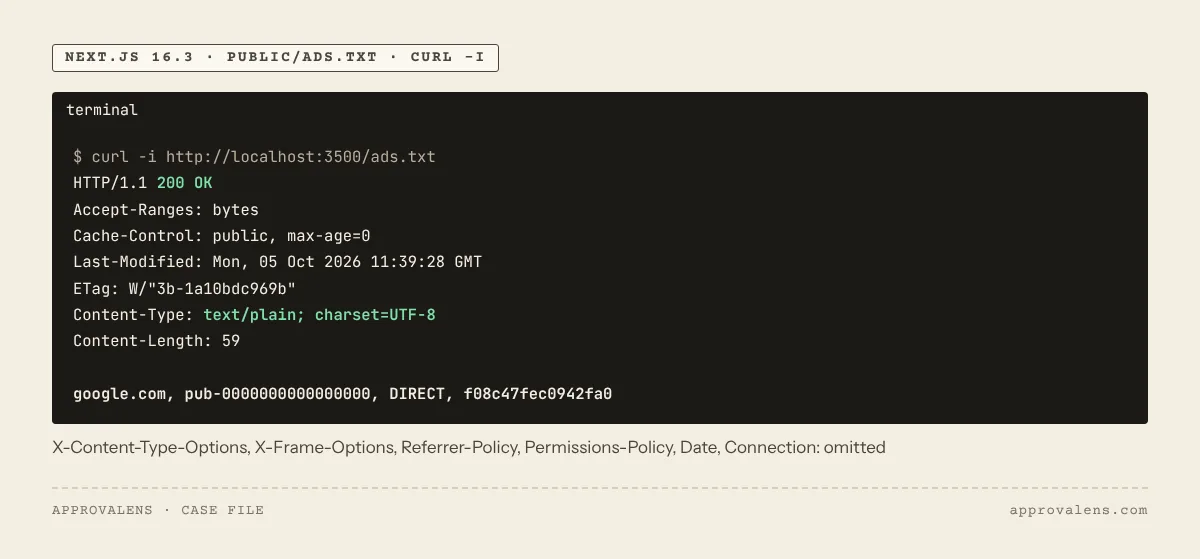
You want status 200 (directly or after one redirect), text/plain, and your Google line in the body, with no <html> anywhere. The ads.txt checker runs these checks and compares the ID with your AdSense code. If your robots.txt has a rule like Disallow: /ads, it also blocks /ads.txt. Test it with the robots.txt tester.
| What you see | Likely cause in Next.js | Fix |
|---|---|---|
404 on /ads.txt |
File outside public, or under public/static/ |
Move it to public/ads.txt |
307/308 to /en/ads.txt |
i18n proxy without a file exclusion | Add the matcher above |
302 to /login |
Auth proxy | Exclude files and public pages from the matcher |
| 200 with HTML | Catch-all rewrite or host SPA fallback | Let the file be served before rewrites; add a 404.html on static hosts |
undefined in the line |
Route Handler without the env var in production | Set ADSENSE_PUB_ID or switch to a static file |
| Works on www, 404 on the root domain | Root domain not connected or not redirecting | Add the root domain and redirect it |
AdSense needs time to notice changes. Google says it "may take a few days", and up to a month for sites with few ad requests (ads.txt guidance).
Before you apply, run the free site scan on the production domain. It fetches ads.txt over HTTP and HTTPS with and without www, so you see exactly what Google's crawler gets. The Next.js AdSense guide covers the rest of the setup: rendering, script placement and consent.
Spotted something out of date or wrong? Tell us and we'll correct it.
Read this guide in Turkish →Check it on your own site. Free, no sign-up.
Free tools for this
Free scan
Check your own site
Free scan: readiness score and every issue, usually in a few minutes.