Google's answer is that the site review "usually takes a few days, but in some cases can take 2-4 weeks". That's the review itself. The full path from sign-up to the first ad on your page has more steps around it: account setup tasks you have to finish before the review starts, identity verification if Google asks for it, and after approval a short wait for ads to appear. The steps you control are the ones that usually stretch the timeline, so they're the ones worth getting right first.
Google's official timings
Every timing below is from Google's own help pages.
| Step | How long, according to Google | Source |
|---|---|---|
| Site review ("Getting ready") | "usually takes a few days, but in some cases can take 2-4 weeks" | Check the status of your AdSense sites |
| Account setup review | "This usually takes a few days, but in some cases it can take 2-4 weeks." | Complete your AdSense account setup |
| Site ownership check | "we'll now verify your site ownership in real time" | Improvements to site management |
| Identity verification (from June 2026, if asked) | "Most publishers finish in 5-10 minutes"; a manual review instead of the video selfie "takes 2–3 business days"; 45 days to complete | Complete your AdSense account setup |
| First ads after approval | "it may take up to an hour for ads to appear on your pages" | Ads.txt guide |
| ads.txt status update | "a few days", up to a month for sites with few ad requests | Resolve common ads.txt issues |
| Temporary serving limit for new accounts, if applied | "Unfortunately, we can't say how long this will take." | Ad serving limits |
| Address PIN by post (for payments) | "It usually takes 3 weeks for your PIN mail to arrive." | Address verification (PIN) overview |
The whole path, step by step
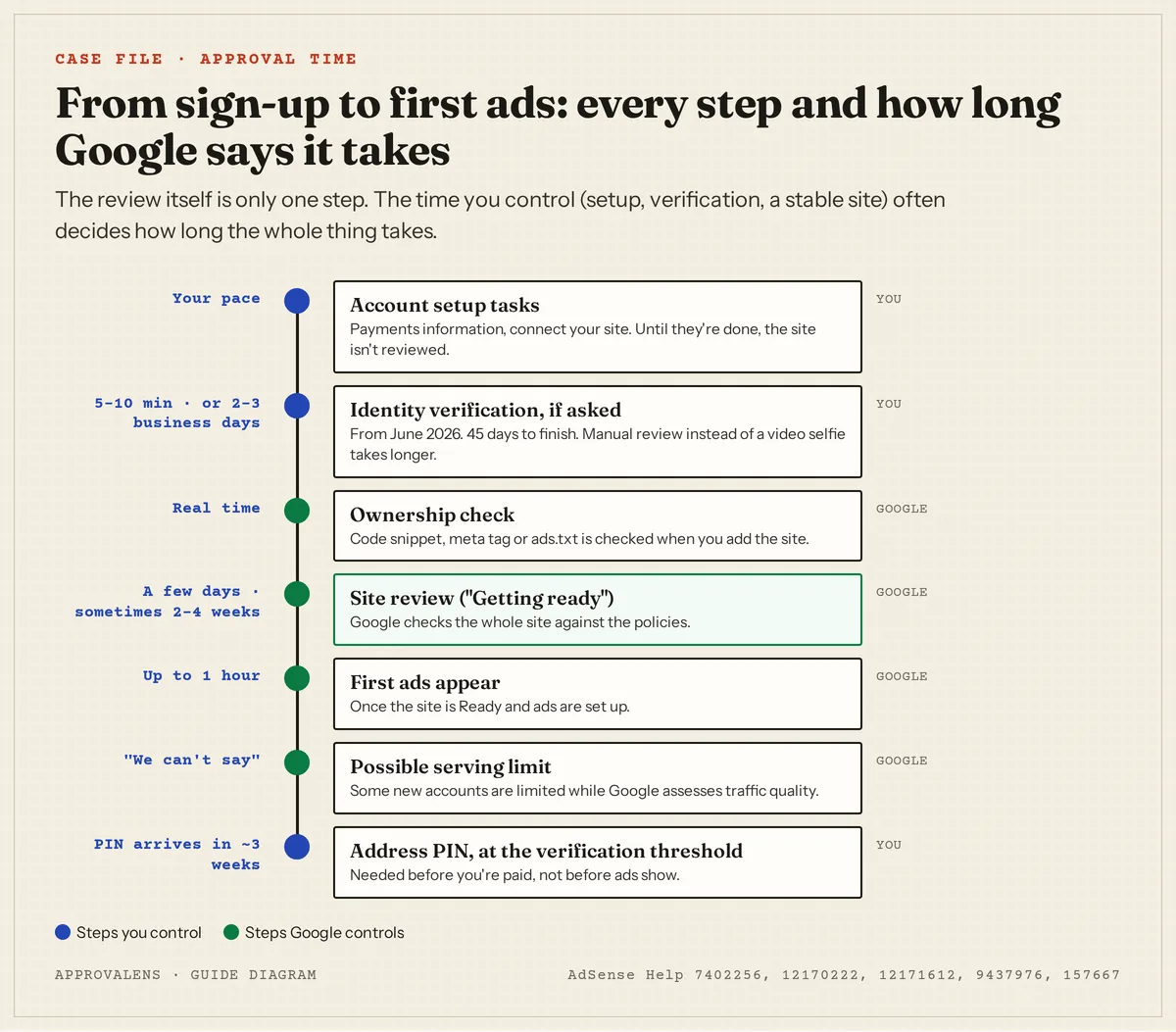
- Finish the setup tasks. Your AdSense home page lists them: payments information and connecting your site. Google is explicit that skipping them stalls everything: "If you request a review without completing the required account setup tasks, your site will not be reviewed and will remain in the 'Getting ready' status."
- Verify your identity if asked. Google says you "may need to verify your identity before your account can start showing ads and receiving payments". If you don't finish within 45 days, "we'll pause the activation of your account".
- Connect the site. With the code snippet, the meta tag or ads.txt. The ownership check happens in real time; if it fails, see site verification failed.
- Request the review and wait. The status shows "Getting ready". This is the few-days-to-four-weeks part.
- Approval. The status turns "Ready". Set up Auto ads or ad units; ads can take up to an hour to appear.
- Early weeks. Some new accounts get an ad serving limit "while we get to know you and evaluate your traffic quality". Google can't say how long that lasts. See does AdSense require traffic for what traffic matters.
- First payment. Address verification by PIN comes when your earnings reach the verification threshold. It doesn't affect approval.
What makes it take longer
- Unfinished account tasks. The most direct cause Google names. Check the home page task list before anything else.
- Removing and re-adding the site. Google: "Make sure you don't remove your site and resubmit it because this can delay the process."
- A site that wasn't reachable during the checks. Firewalls, country blocks, maintenance plugins and downtime. See site down or unavailable.
- Code that disappeared. A theme change or cache plugin can remove the snippet or meta tag mid-review.
- A rejection and a second round. Each "Needs attention" means fixing and another full review period on top of the first. The way to avoid that is to check the site properly before the first request.
What doesn't change the timing
- Your domain's age. Google doesn't currently set a minimum domain age; see the domain age myth.
- Asking repeatedly. There's no button that speeds up a review in progress.
- Your country, as such. Google's timings are the same on every help page we checked. What can differ by location is identity verification: Google says that "Depending on your location, you may also be asked to take a video selfie."
While you wait
Keep the site stable, keep the code in place, keep publishing at your normal pace and check the AdSense home page and email every few days. If the status hasn't changed after four weeks, go through the checks in the Getting ready guide before assuming the review itself is stuck.
Avoid the second round
The fastest approval is the one that passes the first time. A free Approvalens scan runs the access, verification, content and policy checks behind the most common rejection reasons before you request the review. Check your site before you request a review.
FAQ
Is two weeks without an answer normal?
Yes. Google's own range is "a few days" to "2-4 weeks". Beyond four weeks, check your account tasks, the code and the site's reachability.
I was rejected. How long until I can apply again?
There's no published waiting period for a new site review. You can request a review as soon as you've fixed the reason. (Sites already in the Policy center can have the review button disabled for a while after several recent rejections; AdSense shows the date.)
Does approval take longer for a new website?
Google doesn't say so, and it doesn't use domain age as a requirement. A new site is more likely to need a second round because it's thin or unfinished, which is what makes it slower in practice. See the new website checklist.
How long does it take for ads to show after approval?
Google says ads may take up to an hour to appear once the site is Ready and ads are set up. If you see blank spaces for longer, check the ads.txt status.
Can my account be closed if I never finish setup?
Google deactivates accounts that aren't set up within 6 months, after an email warning at 5 months; you can reactivate from your account (Your AdSense account was deactivated).
Spotted something out of date or wrong? Tell us and we'll correct it.
Read this guide in Turkish →Check it on your own site. Free, no sign-up.
Free tools for this
Free scan
Check your own site
Free scan: readiness score and every issue, usually in a few minutes.