A new website can get AdSense; Google doesn't currently require any minimum domain age or traffic. What a new site usually lacks is not age but finish: enough real content, the basic pages, a clean build and a setup Google's crawler can reach. Plan for that from the first day and you'll apply once instead of three times. This checklist follows the order you'll actually work in, from picking the domain to requesting the review. For a final pre-flight check on a site that already exists, use the approval checklist instead.

The five phases at a glance
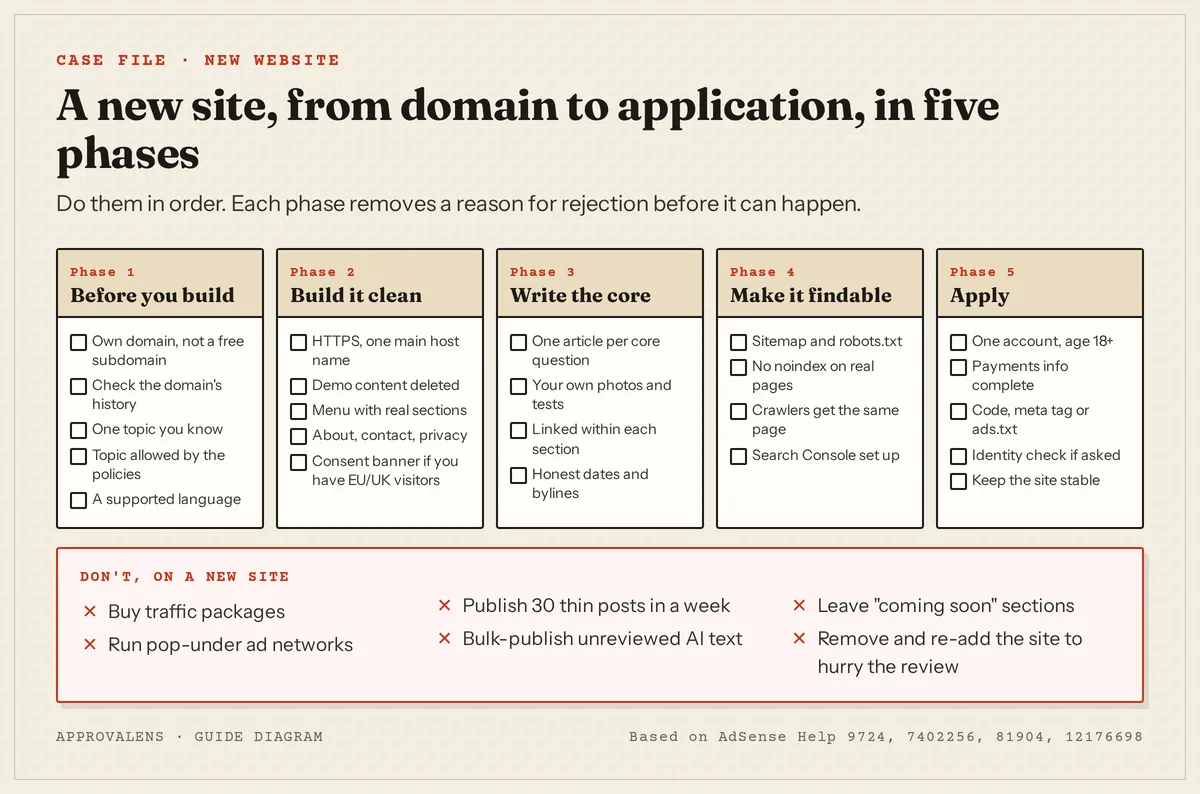
Phase 1: Before you build
Pick your own domain. You can monetise some hosted platforms (Blogger, for example, through its own AdSense flow: "If your site is on one of our host partner sites (like Blogger), you'll need to go to your host partner to add your site to AdSense", per Add a new site). For a site you build yourself, your own domain avoids a class of problems: Google notes that if adding a site keeps failing, "your site or subdomain might not yet be eligible for AdSense" (site status help). There's no published list of eligible subdomains, so a domain you control is the predictable choice.
Check the domain's past. If you're buying a used or expired domain, look at what it hosted before (the Wayback Machine is free). Google's spam policies describe expired domain abuse as buying an expired domain and repurposing it "primarily to manipulate search rankings by hosting content that provides little to no value to users". The expired domains guide covers what to check.
Choose one topic you know. Google's helpful content guidance asks: "Does your site have a primary purpose or focus?" and "Does your content clearly demonstrate first-hand expertise and a depth of knowledge …?" (Creating helpful content). See niche focus.
Make sure the topic is allowed. Check it against the prohibited content list before you invest months. Restricted topics (alcohol, gambling and others) can show ads with fewer advertisers; see restricted content.
Write in a supported language. Google lists "Unsupported language" as a rejection reason when "The majority of your site's content is in a language that AdSense doesn't currently support" (account not approved). English and Turkish are both supported.
Phase 2: Build it clean
- HTTPS everywhere, one main host name. A valid certificate,
http://redirecting tohttps://, andwwwand non-wwwending on the same address. Google asks: "Does your site have a valid SSL Certificate from a recognized certification authority ... and does it also redirect HTTP to HTTPS?" (Site not ready to show ads) - Delete demo content. Themes and site builders import sample posts, pages, products and testimonials. Google warns against signing up when the site "only consists of a site template". The under construction guide has the full list of leftovers.
- A menu with real sections. Only link to sections that exist. Google lists "pages under construction or not yet launched" and "broken links" among navigation problems (account not approved). See site navigation.
- About, contact and privacy pages. The privacy policy isn't optional: the Publisher Policies require one "that clearly discloses any data collection, sharing, and usage that takes place as a consequence of your use of Google products and services" (Google Publisher Policies). Check yours with the free privacy policy checker, and see privacy policy requirements and about and contact pages.
- A consent banner if you'll have visitors from Europe. Google requires "a consent management platform (CMP) that has been certified by Google and integrates with the IAB's Transparency and Consent Framework (TCF) when serving personalized ads to users" in the EEA, the UK and Switzerland (consent requirements). See the CMP guide.
- Mobile-friendly and reasonably fast. See mobile usability and speed.
Phase 3: Write the core
This is where new sites fall short most often, and the fix is to plan coverage rather than a number.
- List the questions your readers ask about your topic.
- Group them into a few sections, which become your menu.
- Write one complete, original article for each core question, linked to the others in its section.
The post count guide walks through this, and the word count guide explains why "complete" matters more than "long". Use your own photos, tests and examples; Google asks you to "contribute your own original content, whether it's specialist knowledge, improvement ideas, reviews, or your personal thoughts" (site readiness). If you use AI to draft, review everything; see AI content and AdSense.
Show who writes: a byline on articles and an About page that says who runs the site (author pages). Keep dates honest.
Phase 4: Make it findable
- robots.txt that doesn't block Googlebot or Mediapartners-Google. Test it with the robots.txt tester.
- An XML sitemap listing your real articles, referenced from robots.txt.
- No
noindexon the home page or articles. Development settings such as WordPress's "Discourage search engines from indexing this site" are easy to leave on by accident. - Crawlers see the same page as visitors. Run the home page through the Googlebot access checker.
- Search Console isn't required for AdSense, but it shows indexing problems and lets you test pages from Google's own network.
Phase 5: Apply
- One account, 18 or older. "AdSense policies only allow one account per publisher" (more than one account), and applicants must be "at least 18 years of age" (eligibility). If you already have an account, add the new site to it.
- Finish every task on the AdSense home page, including payments information; Google says a site won't be reviewed without them.
- Connect the site with the code snippet, the meta tag or ads.txt. If it fails, see site verification failed.
- Verify your identity if asked. Google says that from June 2026 you "may need to verify your identity before your account can start showing ads".
- Request the review and keep the site stable until the result arrives. It "usually takes a few days, but in some cases can take 2-4 weeks"; see how long approval takes.
What can wait until after approval
- Ad placements and formats. Auto ads or a few units are enough to start.
- Traffic growth. There's no minimum to apply; see does AdSense require traffic.
- Domain age. There's no requirement; see the domain age myth.
- ads.txt is optional for approval if you connect another way, though worth adding soon after.
Run the whole checklist in one go
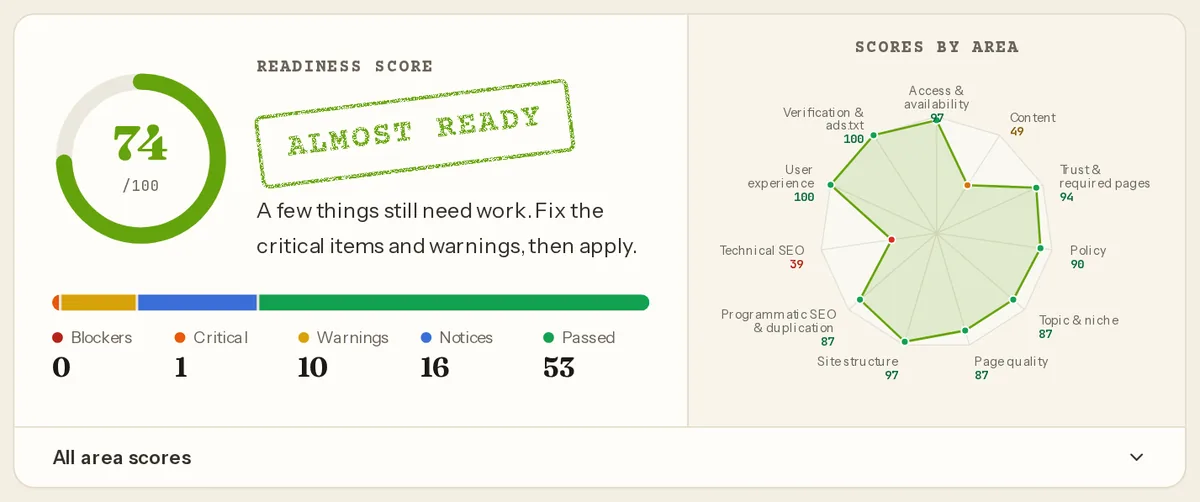
Before you request the review, a free Approvalens scan checks most of this list automatically: domain and hosting signals, HTTPS and redirects, crawler access, required pages, consent banner, content depth, demo leftovers and policy signals. Here's what the top of a report looks like:
Scan your new site before you apply.
FAQ
How old does my domain need to be?
There's no current minimum. The six-month rule people quote was for some locations only and was removed from Google's eligibility page in 2019.
Can I apply while I'm still writing?
You can, but a site that looks unfinished is the reason for a whole class of rejections. Apply when the core sections are written and every menu item leads to real content.
Should I use a free subdomain or a hosted builder?
Blogger has its own AdSense route. For other free subdomains there's no published eligibility list, and Google notes that a subdomain "might not yet be eligible". Your own domain is the predictable choice.
I already have AdSense for another site. Do I need a new account?
No. Add the new site to your existing account from the Sites page. Google allows only one account per publisher.
Spotted something out of date or wrong? Tell us and we'll correct it.
Read this guide in Turkish →Check it on your own site. Free, no sign-up.
Free tools for this
- /tools/privacy-policy-checkerPrivacy Policy CheckerChecks that your privacy policy covers what AdSense requires about Google's cookies.Open the tool
- /tools/robots-txt-testerrobots.txt TesterTests a path against robots.txt for the AdSense crawler, Googlebot and AdsBot.Open the tool
- /tools/googlebot-access-checkerGooglebot Access CheckerLoads your home page as Googlebot and the AdSense crawler and compares what each one gets.Open the tool
- /tools/ads-txt-checkerads.txt CheckerValidates every line of /ads.txt and confirms Google is listed with your publisher ID.Open the tool
Free scan
Check your own site
Free scan: readiness score and every issue, usually in a few minutes.