An ad serving limit means Google has capped how many ads your AdSense account can show. Your site is approved, the code works, but most ad requests come back empty. Google gives two reasons: it's still assessing a new account's traffic, or it has seen invalid traffic. In both cases the limit is reviewed automatically, and Google says it "typically impacts publishers for less than 30 days". There's no button that lifts it. What you can do is keep your traffic clean so the review has nothing to hold against you, and avoid the handful of things that turn a temporary limit into a longer one.
Where you see it and what it says
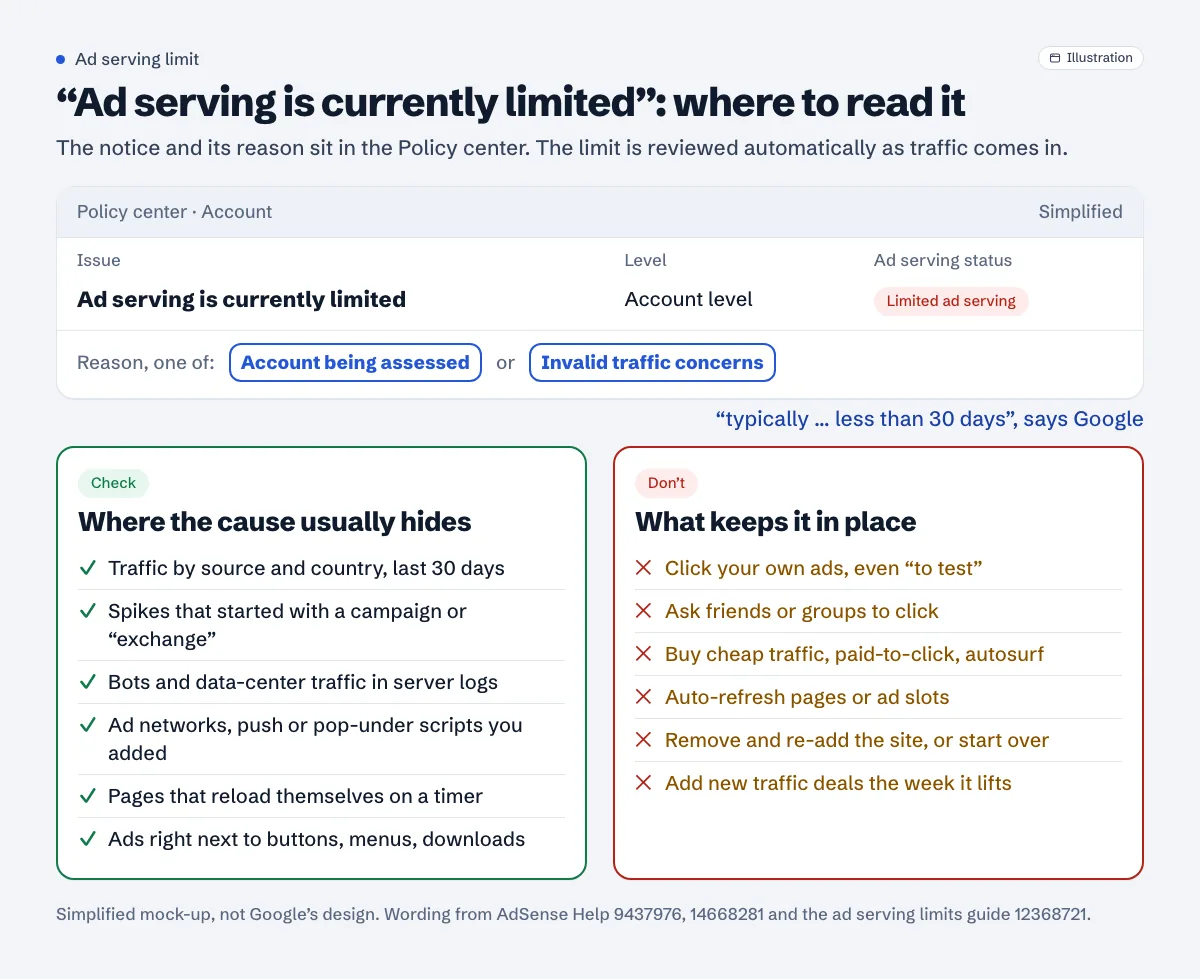
The place to read it is the Policy center in AdSense, not the home page alert. Google's ad serving limits troubleshooter names the notification "Ad serving is currently limited" and marks it as account level. The limited ad serving vs. limited ads page adds: "You'll be notified in the Policy center of your account if your ad serving has been limited. You'll see an ad serving status of "limited ad serving"."
Open the notification and you'll see one of two reasons: Account being assessed or Invalid traffic concerns. Which one you have changes what you should do, so read it before anything else.
Don't confuse it with limited ads. That's a consent setting, not a penalty. Google's definition: "Limited ads disable the collection, sharing, and use of personal data for personalization of ads." It's about visitors from the EEA, the UK and Switzerland, and the fix is a certified consent banner, covered in the CMP guide.
The two reasons, in Google's words
Both come from the Ad serving limits help page.
| Reason | What Google says | What it usually means for you |
|---|---|---|
| Account being assessed | "Ad serving on your account is being temporarily limited while we assess your traffic quality." | A new or newly active account. Nothing is necessarily wrong. |
| Invalid traffic concerns | "Ad serving on your account is currently being limited due to invalid traffic concerns." | Google saw clicks or impressions it doesn't trust. Find the source. |
For the first one, Google's advice is short: "Continue to build your content and audience while we assess your site traffic." For the second, it points to four pages on invalid traffic and adds a warning worth reading twice: "If we do detect invalid activity on your account or if any other issues are found, your account may be subject to further enforcement actions or may be permanently closed."
Invalid traffic is wider than people expect. Google's definition "covers intentionally fraudulent traffic as well as accidental clicks", and the list includes "Clicks or impressions generated by publishers clicking their own live ads", "Repeated ad clicks or impressions generated by one or more users", "ad implementations that may cause a high volume of accidental clicks" and "Automated clicking tools or traffic sources, robots, or other deceptive software." The same page also says: "if we are unable to verify the quality of your traffic, we may limit your ad serving or disable your ad serving."
How long the limit lasts
Google gives one number and one caveat. The number: "this ad serving limit typically impacts publishers for less than 30 days, it may take longer in some cases." The caveat, for accounts being assessed: "Unfortunately, we can't say how long this will take."
The troubleshooter explains how it ends: "We automatically review and update the ad serving limit on an account as we monitor and evaluate the traffic. If we detect any issues after lifting a limit or no longer have sufficient information to evaluate, we may need to reinstate the limit while we evaluate further."
Two practical points follow from that sentence. The limit can come back after it's lifted, so don't change anything risky the week it disappears. And Google evaluates the traffic you actually get. A site with a few dozen visits a day gives the review very little to go on. Google doesn't publish a traffic number for this, so we won't guess one, but steady organic visits are the thing the review is looking at. The traffic guide covers which sources are fine.
What not to do while the limit is on
These are the things that keep a limit in place or bring it back.
Clicking your own ads, even once to "test". The program policies are blunt: "Please note that clicking your own ads for any reason is prohibited." If you want to see which ads run on your pages, Google's tips on invalid traffic point to the Ad review center instead. They also say filtered self-clicks aren't ignored: "even when we filter clicks on your own ads, we don't ignore those clicks completely."
Asking anyone to click. Friends, a WhatsApp group, a "support us by clicking an ad" line under your posts. The policies forbid encouraging clicks "using phrases such as "click the ads", "support us", "visit these links" or other similar language."
Buying traffic to "speed up" the assessment. It's the tempting one on a new account. Sites must not "Use third-party services that generate clicks or impressions such as paid-to-click, paid-to-surf, autosurf and click-exchange programs." For paid traffic in general, Google warns that some services "generate clicks and impressions using click bots, or by providing users incentives to visit sites or click on ads." Cheap "10,000 visitors for $5" offers are the kind of service Google means.
Auto-refreshing pages or ad slots. The ad placement policies say: "Publishers are not permitted to refresh a page or an element of a page without the user requesting a refresh. This includes placing ads on pages or in placements that auto-redirect or auto-refresh." News themes, live-score widgets and some "boost pageviews" plugins can do this quietly.
Removing and re-adding the site, or starting over. The limit is on the account, and it's reviewed as traffic comes in. Google's pages don't describe any reset from doing this, and the troubleshooter even asks "Is this your only AdSense account?" as one of its diagnostic questions.
What to check, in this order
Work through these with the Policy center reason in mind. For "Account being assessed" a quick pass is enough. For "Invalid traffic concerns", go slowly.
1. Where your visitors come from
In Google Analytics, open the acquisition report and look at the last 30 days by source and by country. Things that deserve a closer look:
- a referrer you don't recognise sending a large share of sessions
- a country you don't write for suddenly near the top
- sessions with almost no engagement time, all on pages with ads
- a spike that started the day you joined a "traffic exchange", ran a cheap ad campaign or posted in a click-for-click group
Google's own advice is to segment your traffic with URL channels, custom channels or ad units, so you can see which source drives which ad activity: "Once you've segmented your traffic sources, you can proactively monitor how they're performing and make educated decisions about sources that appear to be sending invalid traffic."
2. Bots
Look at raw server logs or your CDN's traffic analytics, not just Analytics (many bots don't run its script but do load your pages). Watch for hundreds of requests from one data-center network, identical user agents hammering article URLs, or traffic at a constant rate through the night.
If you block bots with Cloudflare or a security plugin, be precise. A rule that challenges "all bots" can also hit Google's own crawlers, which brings a different set of problems. After changing anything, run the Googlebot access checker to confirm the AdSense crawler (Mediapartners-Google) still gets your page. The Cloudflare guide shows which settings usually cause it.
3. Third parties you've added
Another ad network, a "revenue booster" script, a push-notification service that opens pages, a pop-under. The policies say it's "your responsibility to ensure that no ad network or affiliate uses such methods to direct traffic to pages that contain your AdSense code." Pause anything you added in the weeks before the limit and watch the numbers.
4. Your own pages
Two things to look for. Ads placed right next to buttons, menus or download links, which produce accidental clicks (the accidental clicks guide covers placements). And pages that reload themselves. A quick test for a meta refresh:
$ curl -s https://example.com/ | grep -io '<meta[^>]*http-equiv="refresh"[^>]*>'
<meta http-equiv="refresh" content="300">
Any output means the page reloads on a timer (here every 300 seconds). Also search your theme and plugins for location.reload inside a setInterval or setTimeout. Remove both unless the visitor asked for the refresh.
After the limit lifts
Keep the channels you set up. They cost nothing and they're how you'll spot the next bad source in days instead of weeks. Expect some difference between estimated and finalized earnings for the limited period; Google says that "Due to invalid clicks, you may also see a difference between your estimated and finalized earnings." And leave your setup alone for a while: new ad networks, traffic deals and aggressive placements can wait a month.
If ads are still blank after the Policy center is clear, the cause is somewhere else. The ads not showing checklist goes through site status, ads.txt, code and the rest in order.
Check the parts you control
A free Approvalens scan flags pages that reload themselves, paid-to-click or traffic-exchange wording, and Google crawlers being blocked, so you can rule those out while the limit runs: scan your site.
FAQ
Can I ask Google to remove the limit?
Google's help pages don't describe a review request for it. They say the limit is reviewed automatically: "We'll automatically review and update this limit as we continue to monitor your traffic." The troubleshooter only collects feedback.
Will my account be closed?
Not because of the limit itself. Google warns that further action or closure may follow "If we do detect invalid activity on your account". Fix the traffic, not the symptom.
Should I remove the ad code until it lifts?
No. Google's advice is to keep building content and audience, and the review needs traffic with ads on it to evaluate.
Is "limited ads" the same thing?
No. Limited ads is a way of serving ads without personal data, tied to consent in the EEA, the UK and Switzerland. It's set by your consent banner, not by Google's traffic review.
Does low traffic cause the limit?
Low traffic isn't a violation. It does mean there's less for Google to evaluate, and the troubleshooter says a limit can be reinstated when Google has too little to go on ("or no longer have sufficient information to evaluate"). Steady organic traffic is the safe way through.
Spotted something out of date or wrong? Tell us and we'll correct it.
Read this guide in Turkish →Check it on your own site. Free, no sign-up.
Free tools for this
Free scan
Check your own site
The free scan reads the first 50 pages and shows your score and every problem it finds.