"Getting ready" means Google is still checking your site. It isn't a rejection, and Google says the review "usually takes a few days, but in some cases can take 2-4 weeks". "Needs attention", or a message that your site isn't ready to show ads, means the checks are finished and found something to fix. If you've been in "Getting ready" for longer than four weeks, don't assume a slow reviewer. Check first for an unfinished task on your account, a site Google can't reach, or code that's no longer on the page.
The four statuses, in Google's words
The Sites page shows one approval status per site. Google defines them in Check the status of your AdSense sites:
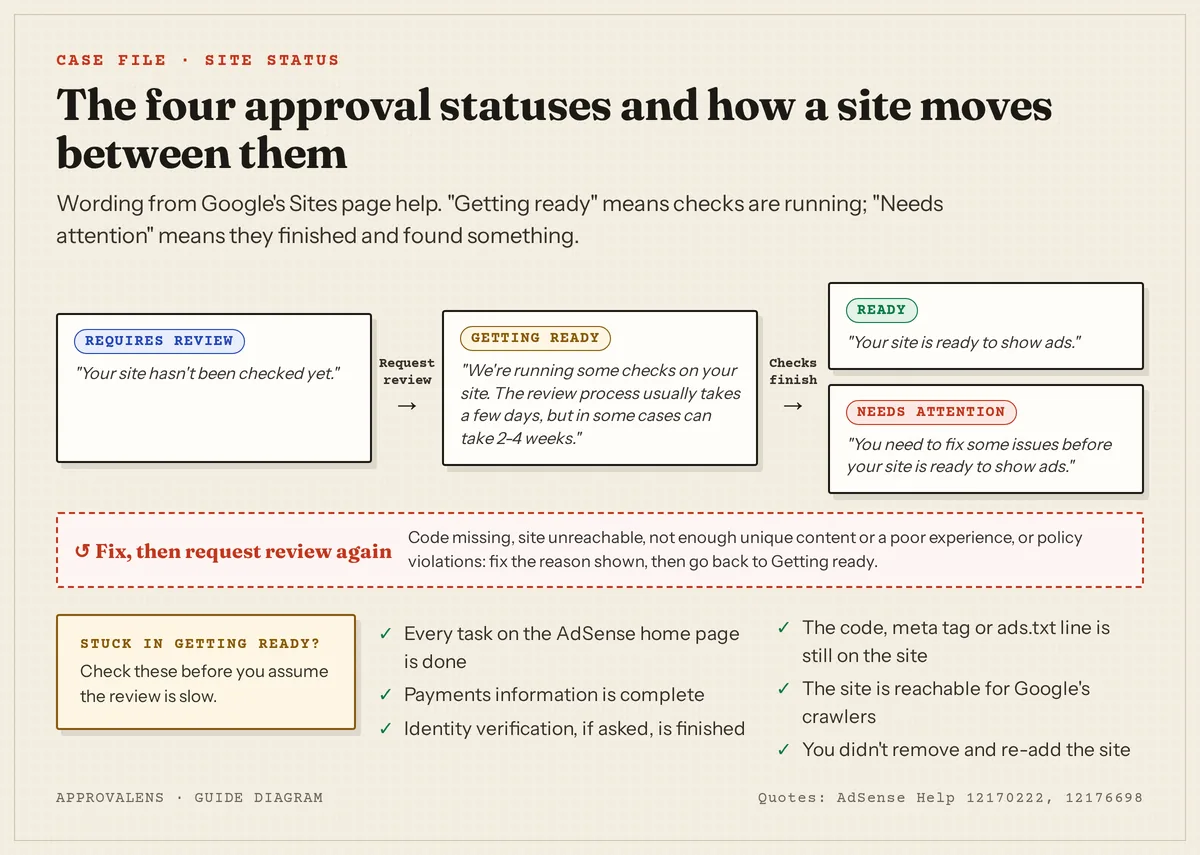
| Status | Google's description | What you do |
|---|---|---|
| Requires review | "Your site hasn't been checked yet." | Finish setup tasks, then click Request review |
| Getting ready | "We're running some checks on your site. The review process usually takes a few days, but in some cases can take 2-4 weeks." | Wait, and keep the site stable |
| Needs attention | "You need to fix some issues before your site is ready to show ads." | Read the reason, fix it, request a review again |
| Ready | "Your site is ready to show ads." | Set up ads; keep following the policies |
The same article adds a warning for the waiting period: "Make sure you don't remove your site and resubmit it because this can delay the process."
Why "Getting ready" can last longer than it should
An account task isn't finished
This is the one Google calls out directly: "If you request a review without completing the required account setup tasks, your site will not be reviewed and will remain in the 'Getting ready' status." It gives payments as the example: "you might first need to set up your payments information to initiate the review process. Your AdSense homepage has a list of the tasks you need to complete."
So the first place to look isn't the site. It's the task list on your AdSense home page. The account setup article lists them: enter your payments information, optionally see how ads look on your site, and connect your site.
Identity verification is pending
Google's setup article now says: "Starting June 2026, you may need to verify your identity before your account can start showing ads and receiving payments from Google AdSense." You get 45 days from the first request; if you don't finish, "we'll pause the activation of your account". Most people finish "in 5-10 minutes", but if you opted out of the video selfie for a manual review, Google says that "takes 2–3 business days".
The site wasn't reachable when Google checked
A firewall, a geo-block, a maintenance plugin or downtime can stop the checks. Google's list for an unreachable site: the correct URL, the site live on the web, access without a password, the crawler not blocked in robots.txt, and a valid certificate with HTTP redirecting to HTTPS (Site not ready to show ads). The site down guide shows how to test each one.
The code came off the site
Theme switches, cache plugins, a new header template or a site rebuild can remove the AdSense code or meta tag. Google's check: "Did you paste the code between the <head> and </head> tags?" and "Did you paste the code into the site you used to sign up for AdSense?" If you connected with ads.txt instead, the file has to stay in place too. See site verification failed for how to confirm each method is still visible.
You removed and re-added the site
Doing this to "nudge" the review is exactly what Google asks you not to do.
When the status changes to "Needs attention"
That's the outcome of the review. Google's Site not ready to show ads article groups the reasons into four, and each has its own fix:
| Reason on the Sites page | Start here |
|---|---|
| Your ad code is missing or incomplete | Site verification failed |
| Your site is unreachable / Site down or unavailable | Site down or unavailable |
| Not enough unique content or a good user experience: Low value content, Valuable inventory | Low value content, No content, Under construction, Scraped content |
| Your site has policy violations | Policy violations |
When you've fixed the cause, the same article describes the resubmission: open Sites, select the site, confirm the code is placed, click Next, then Request review.
What to do while you wait
- Keep the setup stable. Don't change hosting, DNS, CDN or security settings, and don't switch themes.
- Leave the code, meta tag or ads.txt line in place.
- Keep publishing normally. Adding good articles is fine. Deleting half the site or importing hundreds of pages isn't.
- Watch uptime. A free monitor tells you if the site was down during the review window.
- Check the AdSense home page and your email every few days for new tasks or a verdict.
If it has been more than four weeks
- Go through the six checks in the diagram above. Fix anything that's off.
- Run the home page through the free Googlebot access checker to confirm Google's crawlers get a normal page, and the ads.txt checker if you connected with ads.txt.
- Don't remove and re-add the site.
- If everything checks out, ask in the AdSense Help Community, which Google points to for questions it can't answer in the help pages. Include your site URL, the date you requested the review and what you've already checked.
"Something went wrong. Please try again later"
This message can appear when you add a site, before any status. Google: "check you've added the correct URL, then try again. If the message persists, your site or subdomain might not yet be eligible for AdSense." It's a different problem from a slow review; the new website checklist covers what makes a site eligible in the first place.
Use the waiting time well
The days in "Getting ready" are a good moment to find the issues a reviewer might still raise. A free Approvalens scan checks crawler access, the ad code and ads.txt, content depth and the policy signals behind the most common "Needs attention" reasons. Check your site while the review runs.
FAQ
Is "Getting ready" the same as being rejected?
No. It means checks are still running. A rejection shows as "Needs attention" with a reason.
Can I speed up the review?
Not directly. What you can do is make sure nothing slows it down: finished account tasks, a reachable site, code in place, and no removing and re-adding.
Should I keep posting during the review?
Yes, if it's your normal publishing. Avoid big structural changes until the result is in.
How long does approval take in total?
The site review is "a few days" to "2-4 weeks" according to Google, but the whole path from sign-up to first ads has more steps. See how long AdSense approval takes.
Spotted something out of date or wrong? Tell us and we'll correct it.
Read this guide in Turkish →Check it on your own site. Free, no sign-up.
Free tools for this
Free scan
Check your own site
Free scan: readiness score and every issue, usually in a few minutes.