No. Google's eligibility rules for AdSense don't set a minimum number of visitors, page views or months of traffic. What they require is content that is "high-quality, original, and attract[s] an audience", compliance with the policies, and an applicant who is at least 18. Traffic matters in other ways: where your visitors come from is tightly regulated, invalid clicks can cost you the account, and very low traffic slows down a couple of things after approval. The sections below cover each one.
What the eligibility rules say
Google's eligibility requirements list three things to check before you sign up:
- "Your content must be high-quality, original, and attract an audience."
- Your content complies with the AdSense Program policies.
- You're at least 18 years old.
There's no traffic threshold in that list, or anywhere else in the AdSense help pages we checked. "Attract an audience" is about what kind of content it is (something people would come to read), not about a visitor count you must reach before applying.
One setup tip often gets read as a traffic rule. Google's account setup article says to "Paste the code between the <head> and </head> tags of a page that contains content and gets regular traffic" (Complete your AdSense account setup). That's advice about where to put the code (a real, visited page rather than an empty test page), not a minimum. The same article's rule about the site itself is "Your site must be live and contain enough content for our specialists to evaluate."
Where traffic comes from matters much more than how much
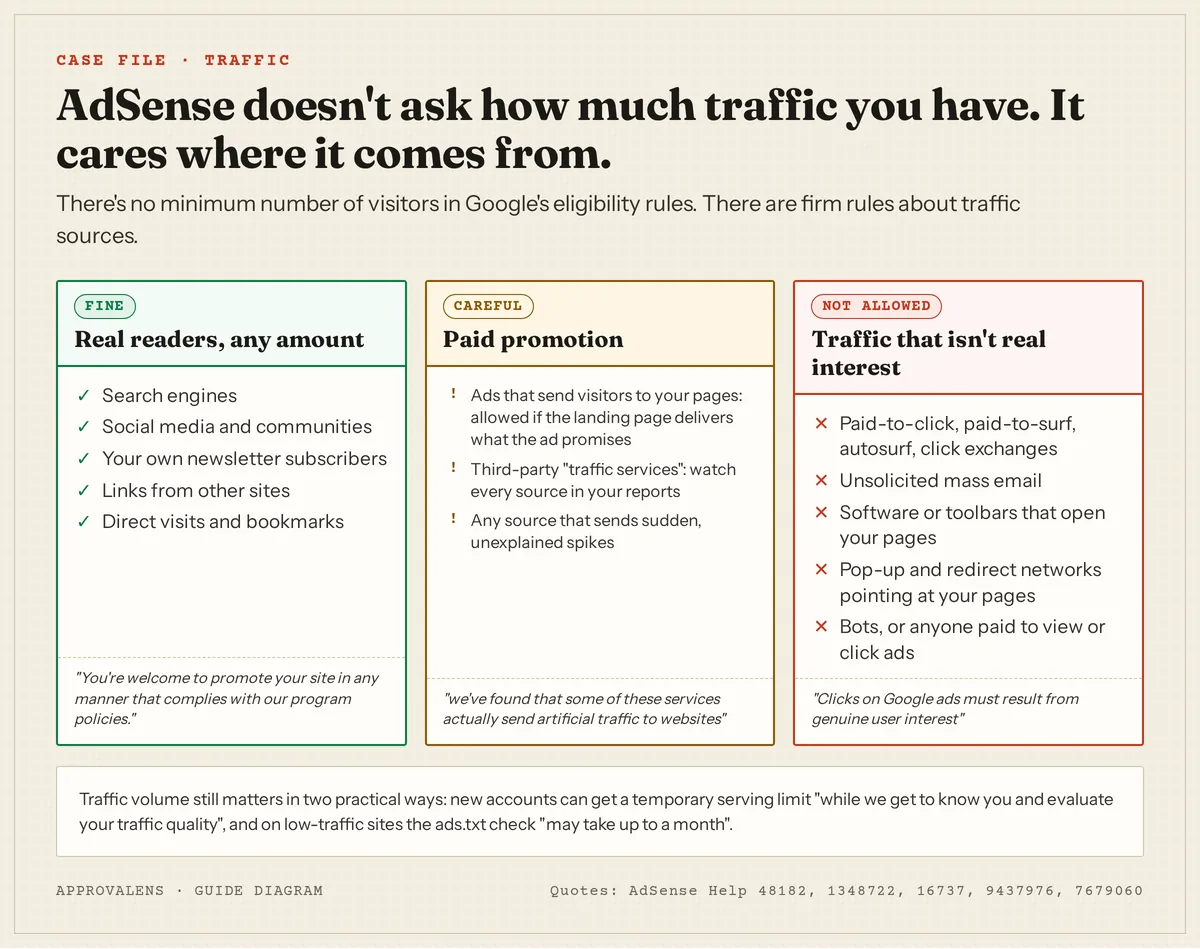
The AdSense Program policies have a whole section on traffic sources. Sites showing Google ads may not:
- "Use third-party services that generate clicks or impressions such as paid-to-click, paid-to-surf, autosurf and click-exchange programs."
- "Be promoted through unsolicited mass emails or unwanted advertisements on third-party websites."
- "Display Google ads, search boxes or search results as a result of the actions of software applications such as toolbars."
- "Be loaded by any software that can trigger pop-ups, redirect users to unwanted websites, modify browser settings or otherwise interfere with site navigation."
And the line that catches people who buy cheap traffic: "It is your responsibility to ensure that no ad network or affiliate uses such methods to direct traffic to pages that contain your AdSense code."
Paying for promotion isn't banned. Google's article on purchasing traffic starts with "You're welcome to promote your site in any manner that complies with our program policies", then warns that "we've found that some of these services actually send artificial traffic to websites", and that "AdSense publishers are ultimately responsible for the traffic to their ads." If you run ads to your own pages, the Program policies add that the site must comply with "the spirit of Google's Landing Page Quality Guidelines. For instance, users should easily be able to find what your ad promises."
Invalid traffic: the real traffic risk
Google defines invalid traffic as "any clicks or impressions that may artificially inflate an advertiser's costs or a publisher's earnings". It includes your own clicks, repeated clicks, wording that encourages clicks and "Automated clicking tools or traffic sources, robots, or other deceptive software". The consequence is spelled out: "If we observe high levels of invalid traffic on your account, we may suspend or close the account."
For a new site, the practical advice is short:
- Never click your own ads, not even to "test" them.
- Don't ask friends, family or a WhatsApp group to visit and click.
- Don't buy traffic packages promising thousands of visitors for a few dollars.
- Keep an eye on sudden spikes from sources you don't recognise, and stop the source if something looks wrong.
Where low traffic does slow you down
There are two places Google mentions traffic volume, and both come after you've applied:
- The ads.txt check. "If your site doesn't make many ad requests or has low traffic, the review may take up to a month" (Ensure your ads.txt files can be crawled). The file still works; the status just updates more slowly. See the ads.txt warning guide.
- A temporary serving limit. Google may limit the number of ads a new account shows: "This might be a temporary ad serving limit while we get to know you and evaluate your traffic quality." Its advice for that period: "Continue to build your content and audience while we assess your site traffic" (Ad serving limits).
Neither is a reason to wait before applying.
What to do instead of chasing a number
- Make the site findable. No
noindexon the home page, a working XML sitemap, and nothing in robots.txt blocking Googlebot. Check it with the robots.txt tester and the Googlebot access checker. - Build for an audience you can name. A clear topic, and articles that answer that audience's questions. See how many posts you need.
- Promote honestly. Share where your readers already are; link from your social profiles; start a newsletter.
- Measure sources from day one with an analytics tool, so you can spot a bad source quickly.
Check what Google sees before you apply
A free Approvalens scan checks the things that matter more than visitor numbers: whether Google can crawl and index the site, whether the content is enough to evaluate, and whether any scripts on the page come from pop-under, redirect or traffic-exchange networks. See what a reviewer would find on your site.
FAQ
Can a brand new site with almost no visitors be approved?
Google's rules don't prevent it. A new site is judged on its content, structure and policy compliance. What usually holds new sites back is thin or unfinished content, not the visitor count; see the new website checklist.
Do I need Google Analytics or Search Console to apply?
No, neither is a requirement. Both are useful: Search Console shows whether Google can crawl and index your pages, and analytics shows where visitors come from.
Is it okay to run Facebook or Google ads to my site?
Yes, if the ads are honest and the landing page delivers what the ad promises. Watch the quality of that traffic in your reports.
Will low traffic get my account closed later?
Google's documents don't link low traffic to account closure. Invalid traffic is what puts accounts at risk.
Spotted something out of date or wrong? Tell us and we'll correct it.
Read this guide in Turkish →Check it on your own site. Free, no sign-up.
Free tools for this
Free scan
Check your own site
Free scan: readiness score and every issue, usually in a few minutes.