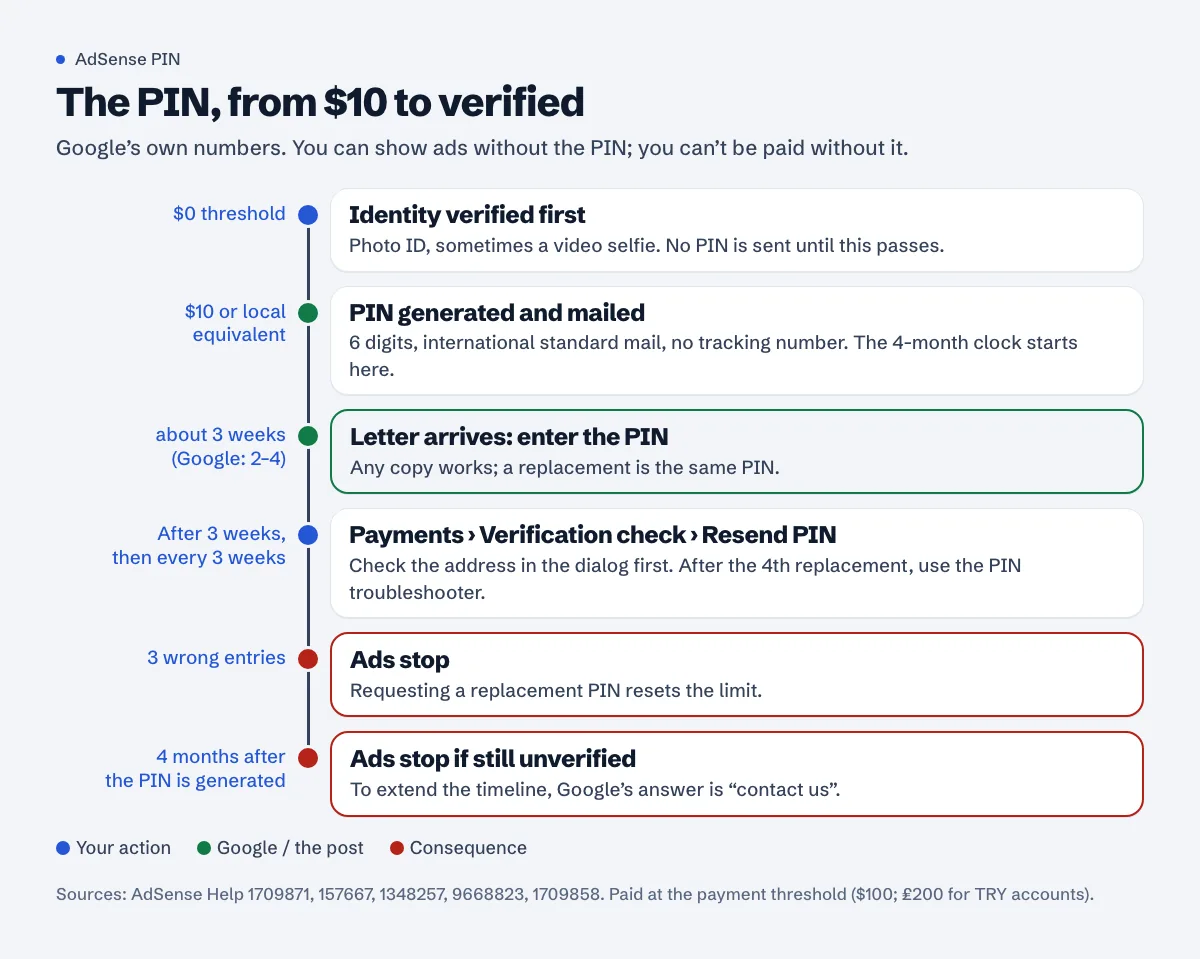
The AdSense PIN is a 6-digit code Google posts to your payments address once your earnings reach the address verification threshold, $10 or the local equivalent. It travels by ordinary international mail with no tracking, and Google's own pages put delivery at about three weeks. If it hasn't arrived after three weeks, you can request a replacement from Payments > Verification check > Resend PIN, once every three weeks. You don't need the PIN to show ads, but you can't be paid without it, and after four months without it Google stops showing ads.
The usual reasons a PIN doesn't come are three: the account hasn't reached the threshold yet, identity verification isn't done (so the PIN was never sent), or the address can't receive international letters. All three are checkable from your account in a couple of minutes.
When AdSense sends the PIN
Google's payment thresholds page lists the verification threshold separately for identity and address:
- "Your identity verification threshold is now $0."
- "Your address verification is still $10 (or local equivalent)."
So the order is: identity first, then the PIN. The PIN overview says "If we've asked you to verify your identity, we won't send your PIN until after you've successfully completed identity verification." Identity verification is a government photo ID (sometimes a video selfie); Google's account setup page says "Most publishers finish in 5-10 minutes", or 2-3 business days if you choose manual review instead of the selfie. Get the payments name right before you start: "You can't change your payments name if you've already verified your identity" (change payments name or address).
Once both conditions are met, "Google sends a unique 6-digit Personal Identity Number (PIN) to your payments address through international standard mail. Google doesn't provide a tracking number for the PIN mail, so make sure your payments address can receive standard mail."
Note that the PIN and payment thresholds are different numbers. In Google's table, a USD account verifies its address at $10 and gets paid at $100. For accounts reporting in Turkish lira (TRY), the same table lists "$0 / $10 equivalent" for verification, ₺20 for choosing a payment method and ₺200 for payment.
How long the PIN takes to arrive
Google's pages give three slightly different figures, which is a fair picture of how variable post is:
- "It usually takes 3 weeks for your PIN mail to arrive." (PIN overview)
- "PINs are typically delivered within 2-4 weeks after being mailed, though delivery times can vary depending on your location." (request a replacement PIN)
- "Your PIN will be sent by standard post and may take up to 2-3 weeks to arrive." (steps to getting paid)
Plan on three weeks and don't panic before then. To see when your PIN was actually generated, go to Payments, then Verification check. Counting from that date is more useful than counting from the day you hit $10.
Why your PIN hasn't arrived
Google's PIN problems page lists the reasons. Here they are in the order we'd check them:
- You haven't reached the threshold. Look for a PIN notification on your AdSense home page. If there isn't one, "wait until your new account balance reaches the verification threshold."
- Identity verification isn't done. "Your PIN will only be sent after you successfully verify your identity." Check Payments > Verification check.
- It hasn't been three weeks. "PIN mails are sent via international standard mail and can take up to 3 weeks to reach you."
- The address can't take standard mail. A PO box that doesn't accept international letters, an office without a mailroom, an address with the building or flat number missing.
- The address has been flagged. If "Your payments address is invalid because it has been associated with fraudulent activity", you need a different address.
- You changed address after the PIN was sent. The verification page will then show the old address. "The PIN was likely sent to your old payments address."
Requesting a replacement PIN
The steps, from Google's replacement PIN page:
- Sign in to AdSense.
- Click Payments, then Verification check.
- Click Resend PIN.
The rules around it:
- "You can only request a new PIN every 3 weeks." Click earlier and AdSense just tells you you've already requested one.
- After three weeks, a dialog lets you check and update the payments address before you click Resend. Fix the address here, not afterwards.
- "Your replacement PIN will be an exact duplicate of the original PIN." If the first letter turns up late, use it. Any copy works.
- After the fourth replacement: "If you've requested your 4th replacement PIN mail and you still haven't received it after 3 weeks, go to our PIN troubleshooter." The PIN troubleshooter runs inside your account and takes it from there.
Only payments admin users can change the address. If someone else set up the account for you, they'll need to do it or give you that access.
What happens if you never enter it
Three consequences, each from Google's pages:
- No payments. "Google requires you to verify your payments address before we can send you any payments."
- Ads stop after four months. "You'll have 4 months from the date your PIN is generated to complete address verification. If you haven't verified your payments address after 4 months, we'll stop showing ads on your pages." To get more time, Google's answer is "To extend your address verification timeline, contact us."
- Three wrong entries stop ads. "If you enter your PIN incorrectly 3 times, your account will stop showing ads." Requesting a replacement PIN resets that limit. The PIN is not your publisher ID (
pub-...); people do mix them up.
Your earnings aren't lost while you wait. The balance stays in your account; Google just can't send it until the address is verified. Once the PIN is in, you're paid when the balance reaches the payment threshold, "as long as there are no holds on your account".
Getting the letter delivered
Google's own advice on the address is short, and worth following to the letter:
- Use an address in the same country as your account: "Don't use an address in a country/territory that's different from your account's country/territory."
- "It's best to enter your payments address in local language characters." The valid address page says the same: the address should be "written in the local official language and includes all the information necessary for international standard mail to arrive."
- "We recommend using a payments address where you currently physically reside or work."
- Ask your post office whether mail is being forwarded or held: "Sometimes, PINs can get held up at the post office."
Google's example format puts the house or block number, street and district on line 1 and the unit number, floor and building name on line 2. A missing flat number is an easy way for a letter to reach the building and go no further.
Note that the US tax form is the opposite: it accepts only plain letters a-z. If you're filling that in too, the tax info guide explains why.
If you're in Turkey
Google says "In most locations, PINs are delivered by the local postal service", which in Turkey means PTT. It arrives as an ordinary letter, without a tracking number. In practice:
- Write the full Turkish address with Turkish characters: mahalle, cadde/sokak, bina no, daire no, ilçe, il and the posta kodu. If you live on a site, add the site and blok name.
- Make sure the name on the payments profile is on your mailbox or known to the building manager or doorman, if letters go through them.
- If three weeks pass, ask at your local PTT branch whether a letter is waiting, then request the replacement.
- A workplace address is fine if letters reach you there reliably. Google suggests an address where you "reside or work".
Check the rest of the account while you wait
The PIN only affects payments. If you're also waiting on ads to appear, the ads not showing checklist and the approval time guide cover the other clocks. A free Approvalens scan checks the site side (crawler access, ads.txt, the policy signals reviewers look at): scan your site.
FAQ
Can I verify my address without the PIN, by uploading a document?
Not as an option you can pick yourself. After the fourth replacement PIN, Google sends you to the PIN troubleshooter, which decides the next step. If Google does ask you for documents, its acceptable forms of ID page also lists a "Bank statement, telephone bill or rent receipt" for the address, showing your payee name and address as they appear in AdSense.
Do I need the PIN to get approved or show ads?
No. The PIN is for payments. Ads stop only if you haven't verified within 4 months of the PIN being generated.
I moved. Will the old PIN still work?
Yes, it's the same PIN. If you can't get the old letter, update the address and request a replacement three weeks after the last one was sent.
Can I change my payment country to receive the PIN elsewhere?
No. Google says "it's not possible to change the country of your payment address in AdSense" (change payments name or address).
Is the PIN the same as my publisher ID?
No. The PIN is a 6-digit number in the letter. The publisher ID starts with pub- and is shown in your account.
Spotted something out of date or wrong? Tell us and we'll correct it.
Read this guide in Turkish →Free scan
Check your own site
The free scan reads the first 50 pages and shows your score and every problem it finds.