"Valuable inventory: Under construction" means the reviewer saw a site that looks unfinished. Sometimes it literally is: a "coming soon" page, a maintenance plugin, a parked domain. More often the site is mostly done but still carries the marks of a build in progress: menu items that lead nowhere, a "Hello world!" post, lorem ipsum in a widget, empty categories, theme demo testimonials. Clean those up, make sure every link a visitor can click goes somewhere real, and request a review. It's usually a short job.
What Google says about unfinished sites
There's no help page with this exact title; publishers see the label in AdSense after a review. Several official texts describe the same thing:
- The Publisher Policies don't allow Google-served ads on screens "that are under construction" (Inventory value).
- The account setup article: "If your site is under construction, doesn't load, or is difficult to navigate, we can't set up your account" (Complete your AdSense account setup).
- The account not approved article: "Make sure that your site is fully built and launched - don't sign up while your site's still under construction or only consists of a site template."
- The same article lists navigation problems that count against you: "redirects, pages behind a login or restricted access, broken links, excessive pop-ups, dialers, and pages under construction or not yet launched."
- The AdSense Program policies list "Linking to content that doesn't exist" as deceptive site navigation.
So "under construction" isn't only a banner that says so. A site built from a template that still shows the template, or a menu that promises sections you haven't written, reads the same way.
The eight usual leftovers
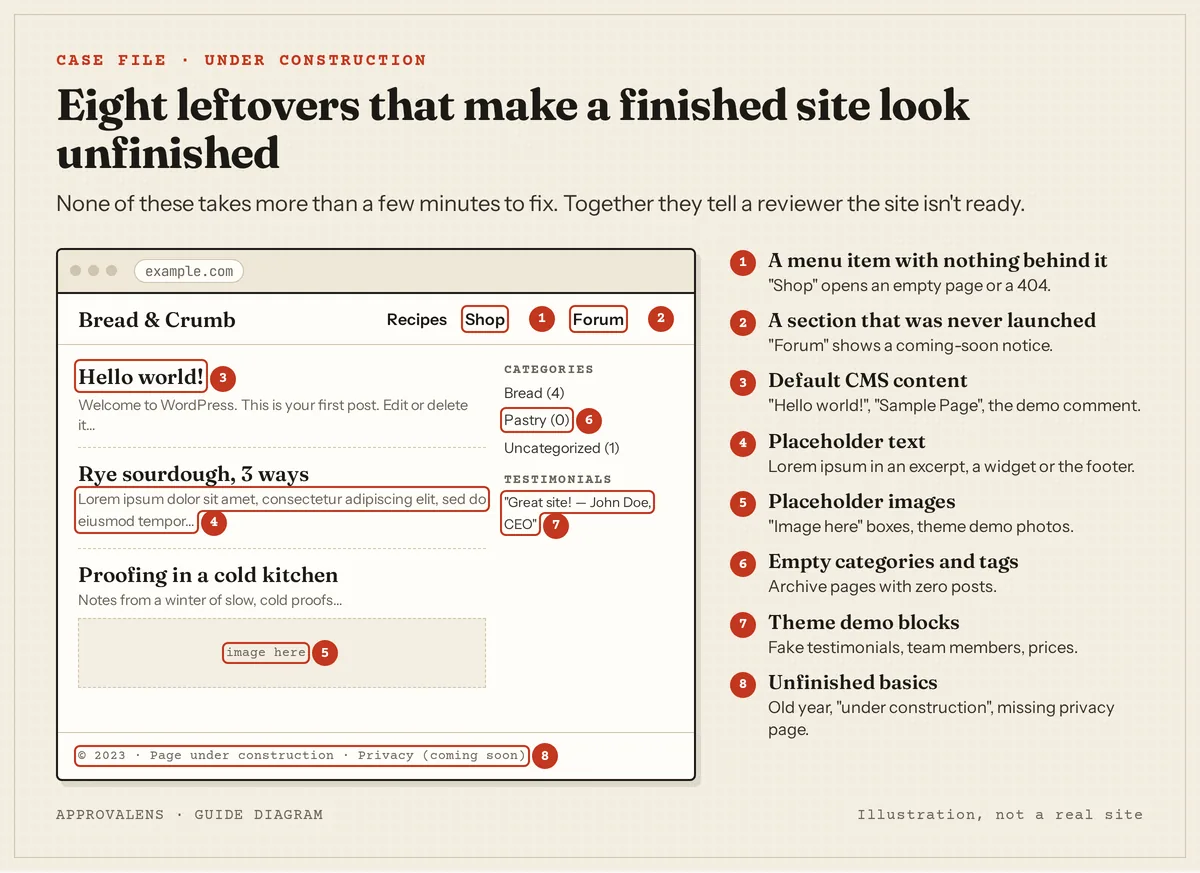
| Leftover | Where it hides | Fix |
|---|---|---|
| Menu item with nothing behind it | Header menu, footer links | Remove the item until the section exists |
| Section that was never launched | Shop, Forum, Courses, Members | Delete the page or switch the feature off |
| Default CMS content | "Hello world!", "Sample Page", the demo comment | Delete them, empty the trash |
| Placeholder text | Excerpts, widgets, the footer, About page | Search for "lorem" and replace it |
| Placeholder images | Featured images, sliders, team photos | Use your own images or none |
| Empty categories and tags | Sidebar, category menu, tag cloud | Delete, or merge into a used category |
| Theme demo blocks | Testimonials, pricing tables, team sections | Remove anything that isn't true of your site |
| Unfinished basics | Footer year, "coming soon" privacy page | Publish the real page; update the year |
Fake testimonials and demo team members aren't just untidy. Google's Publisher Policies don't allow content that "misrepresents, misstates, or conceals information about the publisher" (Google Publisher Policies). A testimonial from "John Doe, CEO" that came with the theme is exactly that.
Dead links are the hidden version
Leftovers you can see are easy. Links to pages that don't exist yet are harder, because the page that links to them looks fine. Here's a real example from an Approvalens scan of gunlukrituel.com.tr, a live Turkish site whose owner let us use the report:
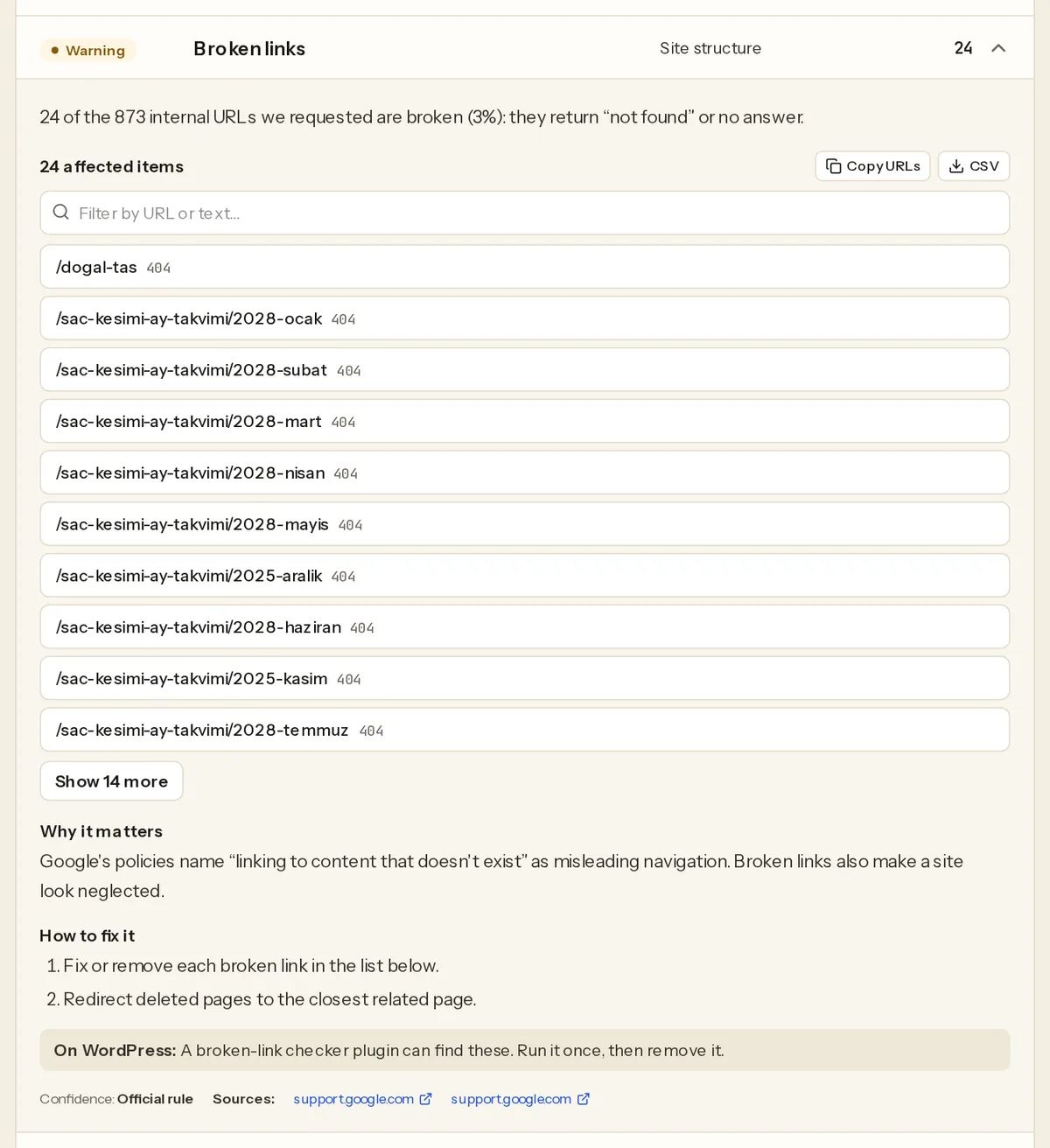
Nothing on the calendar page looks broken. But a reviewer who clicks "next month" a few times lands on a "not found" page, which is the "linking to content that doesn't exist" pattern from the Program policies. The fix is to only render links to pages that exist, or to generate those pages before linking to them.
Check your own site
- Open the site logged out. Use a private window. Maintenance and "coming soon" plugins often show the real site to the logged-in owner and a placeholder to everyone else, including Google.
- Click every menu item. Header, footer, sidebar. Each one should open a page with real content, not a 404, an empty archive or a notice.
- Search your own content for leftovers. In your CMS search, and in Google with
site:example.com, look forlorem,ipsum,hello world,sample page,coming soon,under construction,testanddemo. - List categories and tags with post counts. In WordPress that's Posts › Categories and Posts › Tags. Anything with 0 or 1 posts is a candidate to delete or merge.
- Run a link check. A broken-link checker (a WordPress plugin you run once and remove, or any desktop crawler) lists internal links that return 404.
- Check that missing pages return 404. Request a made-up URL with
curl -sI https://example.com/no-such-page. If the first line says200, your "not found" page looks like a real empty page to a crawler. - Run the home page through the Googlebot access checker to confirm Google's crawlers get the same page you see, not a maintenance screen.
Clean-up order
- Switch off maintenance or "coming soon" mode, or uninstall the plugin.
- Trim the menu to what exists. It's fine to launch with three sections. You can add the shop later.
- Delete default and demo content, including what the theme imported: demo posts, pages, products, comments, testimonials and team members.
- Replace placeholder text and images with your own, or remove the blocks that hold them.
- Delete or merge empty categories and tags. See the navigation guide for a structure reviewers can follow.
- Fix or remove dead links, and 301-redirect pages you've deleted to the closest related page.
- Publish the basics properly: a real privacy policy, an About page and a way to contact you (about and contact pages).
- Make sure there's enough real content behind the clean front. If the reviewer could only find a handful of short pages, you may also be looking at no content.
Request the review
Once a stranger could click through the whole site without hitting a dead end, request a review from the Sites page in AdSense and leave the code in place. Google says reviews "usually take a few days, but in some cases can take 2-4 weeks" (Site not ready to show ads). Don't add new sections, switch themes or run big plugin updates during the review.
Find the leftovers automatically
A free Approvalens scan crawls up to 5,000 pages and flags placeholder home pages, lorem ipsum and other placeholder text, default CMS content, broken internal links, empty sections and "not found" pages that return 200. Scan your site for unfinished pages.
FAQ
Do I have to wait until the domain is a few months old?
No. Google doesn't currently require a minimum domain or site age; the old six-month rule applied only to some locations and disappeared from the eligibility page in 2019 (see the domain age guide). "Under construction" is about what's on the site, not how old it is.
Can I keep a "Shop – coming soon" page while I build the store?
Not during the review. A menu item that promises something that isn't there is the clearest under-construction signal. Remove it, launch the store, then add it back.
Is a short About page a problem?
A short but true About page is fine. An About page that still contains the theme's placeholder text isn't.
My site is finished, but I plan to add sections later. Is that a problem?
No. Every site grows. The problem is only showing visitors sections that don't exist yet.
Spotted something out of date or wrong? Tell us and we'll correct it.
Read this guide in Turkish →Check it on your own site. Free, no sign-up.
Free tools for this
Free scan
Check your own site
Free scan: readiness score and every issue, usually in a few minutes.