Back button hijacking is when a page stops visitors from going straight back to where they came from, usually by adding a fake entry to the browser history as the page loads and then sending the "back" press somewhere else. Google announced on 13 April 2026 that it's an explicit violation of the "malicious practices" part of its spam policies, with enforcement from 15 June 2026: pages doing it can get a manual action or an automated demotion in Search. Often the code isn't in your theme at all but in a widget, a library or an ad tag, and Google says so itself. Find it, remove or switch it off, and request a review if you have a manual action.
What Google's policy says
The definition is in the Malicious practices section of the spam policies for Google web search (page last updated 2026-08-28):
"Back button hijacking is when a site interferes with user browser navigation by manipulating the browser history or other functionalities, preventing them from using their back button to immediately get back to the page they came from."
The announcement on the Search Central blog, Introducing a new spam policy for "back button hijacking", dated April 13, 2026, explains what Google has in mind. Instead of going back, "users might be sent to pages they never visited before, be presented with unsolicited recommendations or ads, or are otherwise just prevented from normally browsing the web." It also sets the consequences: "Pages that are engaging in back button hijacking may be subject to manual spam actions or automated demotions", and "we're publishing this policy two months in advance of enforcement on June 15, 2026."
The sentence most site owners need is this one:
"Notably, some instances of back button hijacking may originate from the site's included libraries or advertising platform. We encourage site owners to thoroughly review their technical implementation and remove or disable any code, imports or any configurations that are responsible for back button hijacking"
In other words, "I didn't write that" isn't a defence. If it runs on your page, it's your page.
Google had flagged the behaviour before, outside Search. Its abusive experiences list includes "Browser History Manipulation": it "Prevents the normal function of the "Back" button by keeping the user from returning to the previous destination. For example, the site adds a page to the browser history."
What the scripts actually do
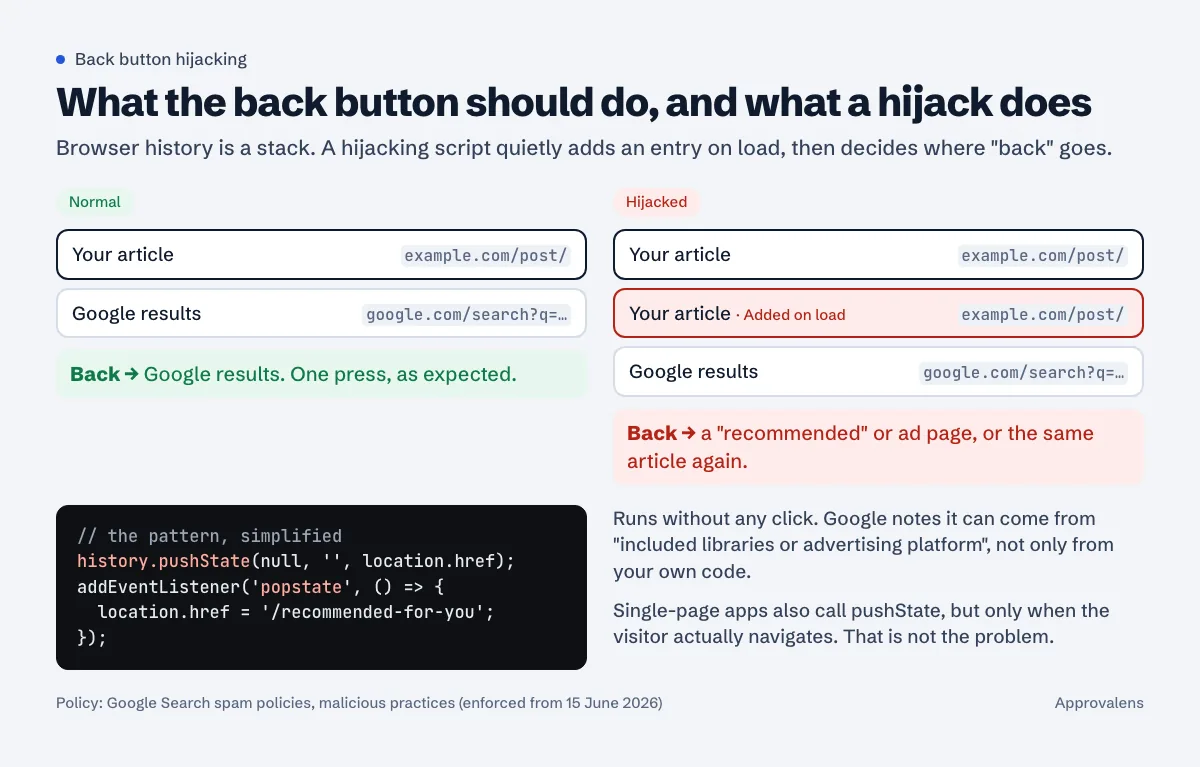
The browser keeps a stack of pages for each tab. history.pushState() "adds an entry to the browser's session history stack" (MDN). That's a normal tool; single-page apps use it every time you click a link. The abuse is calling it when nobody clicked anything:
// The pattern (simplified)
history.pushState(null, '', location.href);      // fake entry on load
window.addEventListener('popstate', function () {  // fires when back is pressed
  location.href = '/recommended-for-you';          // or an ad page
});
Variations you'll meet:
- "Recirculation" or "you may also like" widgets that show a full-screen list of articles or ads when the visitor presses back.
- Ad or monetisation tags with an "exit" or "back button" feature, controlled from the vendor's dashboard rather than your code.
- Several pushes in a row, so it takes three or four presses to leave.
location.hashchanges on load (for example jumping to#top), which also add history entries. Often accidental, but the effect on the back button is the same.- Redirect chains that land on a page which immediately pushes state. If redirects are part of the picture, redirect chains and loops explains how to see each hop.
What doesn't count: a single-page app updating the URL when the visitor clicks a link, a filter that uses replaceState so the URL reflects the current view without adding an entry, a gallery that pushes an entry when the visitor opens a photo. The policy is about entries that prevent people "from using their back button to immediately get back to the page they came from".
How to find it on your site
1. The phone test
Search for one of your pages on Google, tap your result, wait ten seconds, press back once. You should be on the results page. Repeat with two or three different templates (article, category, home). If one press doesn't get you out, you have it.
2. Compare with JavaScript off
In Chrome, open DevTools, press Control+Shift+P (Command+Shift+P on a Mac), type javascript, and run Disable JavaScript (Chrome DevTools). Reload and run the phone test again on desktop. If back works with scripts off and fails with them on, a script is responsible, and it's not your server config or a redirect.
3. Search every loaded script
Open the DevTools Search panel with Control+Shift+F (Command+Option+F on a Mac) (Search panel) and search for:
pushState
replaceState
popstate
onpopstate
Each hit shows the file it's in. Your own theme and framework will show up too; what you're looking for is a call that runs on load rather than inside a click handler, usually in a third-party file.
4. Knock out suspects one by one
In the Network panel, right-click a third-party script and block its URL or its whole domain; DevTools adds the rule to the Request conditions drawer (Request conditions). Reload and test back again. When it starts working, you've found the vendor.
5. Log every history call with a script
For a repeatable check, or to test many URLs, a headless browser can wrap pushState before any page script runs and print where each call came from. This uses Playwright for Python:
# check_history.py: log every pushState/replaceState a page makes on load
# pip install playwright && playwright install chromium
import sys
from playwright.sync_api import sync_playwright

HOOK = """
for (const fn of ['pushState', 'replaceState']) {
  const orig = history[fn];
  history[fn] = function (...args) {
    const where = (new Error().stack || '').split('\\n')[2] || '';
    console.log('[' + fn + '] ' + where.trim());
    return orig.apply(this, args);
  };
}
"""

with sync_playwright() as p:
    browser = p.chromium.launch()
    page = browser.new_page()
    page.add_init_script(HOOK)
    page.on("console", lambda m: m.text.startswith("[") and print(m.text))
    page.goto(sys.argv[1], wait_until="networkidle")
    page.wait_for_timeout(5000)
    print("history.length =", page.evaluate("history.length"))
    browser.close()
Example output for a page with a hijacking widget, then a clean page:
$ python3 check_history.py https://www.example.com/some-post/
[pushState] at https://widgets.example.com/recirc.js:2:11
history.length = 3

$ python3 check_history.py https://www.example.com/clean-post/
history.length = 2
In a fresh headless tab the baseline is 2 (the blank start page plus yours). Anything above that on load, with a file name next to it, is your culprit.
How to fix it
- Remove or disable the code. If it's a vendor tag, look in the vendor's dashboard for settings around "back button", "exit", "history" or "recirculation on back" and switch them off. If you can't find a switch, ask the vendor in writing which setting does it, or remove the tag.
- Check every template. Vendors often load different features on mobile and desktop, or on articles and the home page. Run the tests on each.
- If you didn't add the code and can't find where it comes from, treat it as a possible compromise: injected scripts that redirect visitors are a classic sign of a hacked site. The hacked site guide covers the clean-up order.
- Keep the fix stable. Don't re-enable the feature on a subset of pages to "test" it.
If you also run AdSense, the same scripts are a problem there too. The AdSense Program policies, under "Site behavior", say sites may not "redirect users to unwanted websites" (AdSense Program policies). Anything that turns a back press into an ad page is worth removing for that reason alone; the accidental clicks guide covers the placement side.
If you got a manual action
Search Console's Manual actions report has a dedicated entry. Its text: "Google has detected that a portion of your site may exhibit back button hijacking behavior, which violates our spam policy on malicious practices." The recommended actions are to "Disable or remove any code or imports that are responsible for back button hijacking" and then "Click Request review in the Manual actions report once you're sure your site is no longer violating our spam policies."
Google's general advice for the reconsideration request applies: a good request "Explains the exact quality issue on your site", "Describes the steps you've taken to fix the issue" and "Documents the outcome of your efforts." Name the script or vendor, say what you removed or switched off, and list the URLs you tested. Reviews "can take several days or weeks", and Google asks you not to resubmit while one is pending. The report also warns that repeated violations "may lead to further manual actions and affect your site's overall ranking."
If there's no manual action but traffic dropped after 15 June 2026, an automated demotion is possible. There's nothing to submit for those; Google doesn't publish how long recovery takes once the behaviour is gone.
Check the history entries your home page adds
A free Approvalens scan loads your home page in a browser and reports how many history entries it adds on load, along with the policy checks AdSense reviewers care about: scan your site.
FAQ
Is every use of pushState against the policy?
No. Single-page apps and galleries use it when the visitor navigates, and that's fine. The problem is adding entries the visitor didn't create, so that one back press doesn't return them to the page they came from.
When did this start?
Google announced it on 13 April 2026 and said enforcement starts on 15 June 2026.
The script comes from my ad network. Am I still responsible?
Yes. Google says some cases "may originate from the site's included libraries or advertising platform" and asks site owners to remove or disable the code or configuration responsible.
Does an "Are you sure you want to leave?" prompt count?
That's a different browser feature (the beforeunload dialog), and the policy text doesn't mention it by name. It still gets in the way of leaving, so use it only where a visitor could lose unsaved work.
How do I know if I have a manual action?
Open the Manual actions report in Search Console. If there's a back button hijacking entry, it says whether it affects some pages or the whole site.
Spotted something out of date or wrong? Tell us and we'll correct it.
Read this guide in Turkish →Free scan
Check your own site
The free scan reads the first 50 pages and shows your score and every problem it finds.