On this page (9)
This Policy center issue means your ad code is running on pages that have nothing of yours to read: internal search results, tag archives full of excerpts, thank-you screens, 404 pages, logins, image attachment pages, half-built pages. Your articles are usually fine. The fix is to stop loading ads on those templates (or give the pages real content), then ask for a review. Adding noindex on its own doesn't fix it, because the ads still load.
What the issue says, word for word
In AdSense it appears in Policy center with the issue name "Google-served ads on screens without publisher-content". The policy behind it, from the Google Publisher Policies, reads:
"We do not allow Google-served ads on screens: without publisher-content or with low-value content, that are under construction, that are used for alerts, navigation or other behavioral purposes"
The tips on the same page name the pages Google has in mind: "Ads should not be placed on 'dead end' or no content screens (e.g., Thank You, Exit, Error pages, etc.)", and "Don't place ads on automatically generated content without manual review or curation."
The AdSense Program policies say the same thing more bluntly in their ad placement list: Google ads may not be "Placed on any non-content-based page" (AdSense Program policies).
What it does to your ads
Google's own table of example issues lists this one as "enforced with Restricted ad serving" (Understand policy issues and ad serving statuses). Restricted ad serving means "There are restrictions on the advertisers that can bid on your inventory", and the same page warns that "Your site is likely to have little or no buyer demand because not all ad sources can bid."
So ads don't necessarily vanish, but on the flagged pages or site they earn far less. It isn't an account warning by itself. The same article does say "Repeated policy violations may lead to an account suspension", so don't leave it sitting there.
Which pages trigger it in practice
The URLs Google flags are almost never your posts. They are pages a theme, plugin or framework generates on its own, and they load the same header that carries the AdSense script.
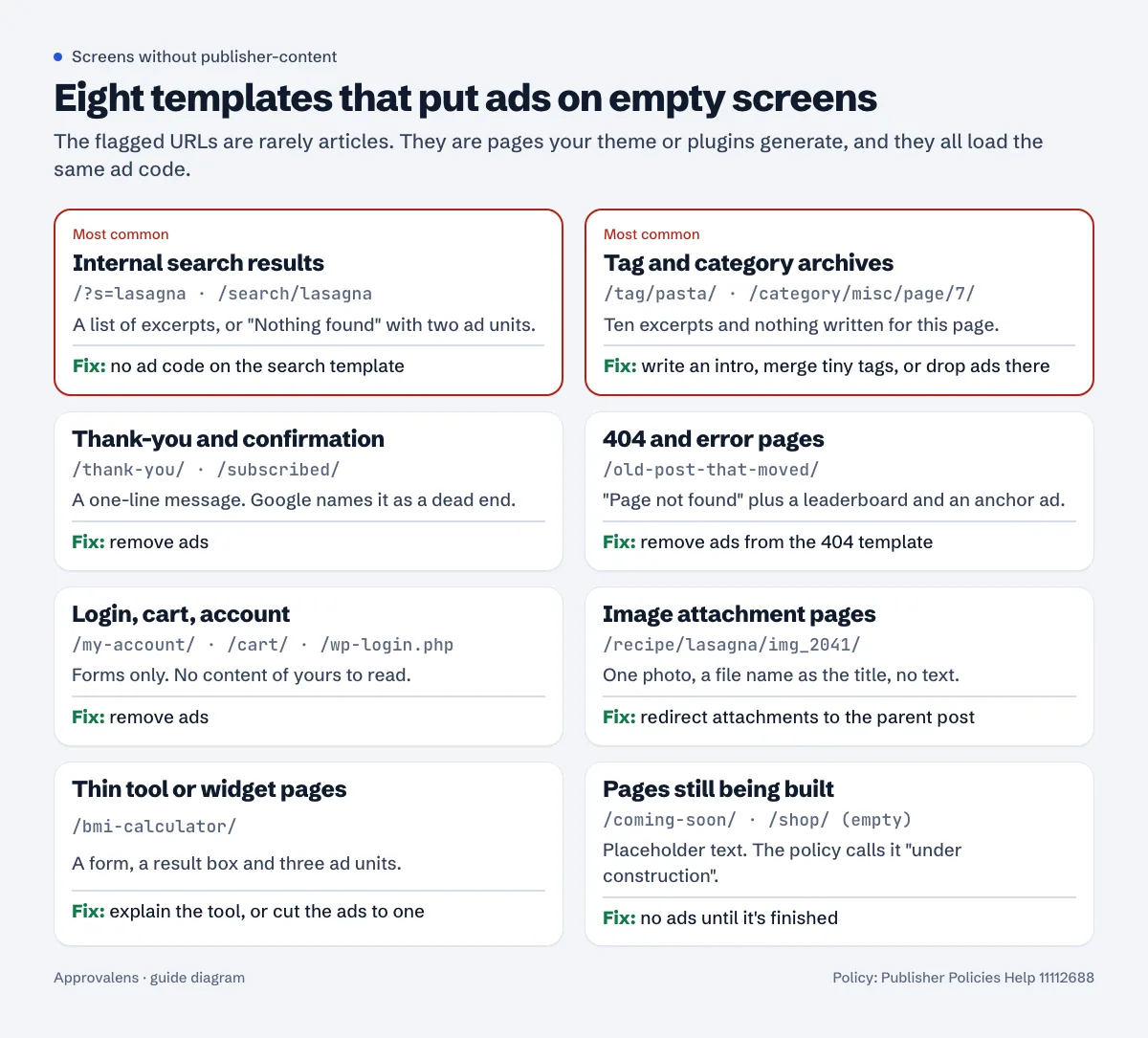
A few notes on the ones that catch people out:
- Internal search results.
/?s=anythingproduces a fresh page for every query, and many of them say "Nothing found" with two ad units around it. Anyone can create a new one by linking to it, spam bots included, so you can't predict which ones Google will see. - Tag and category archives. A tag page with ten excerpts and no text of its own is a list of links to content, not content. Deep pagination (
/category/misc/page/14/) is worse. - Image attachment pages. WordPress made one for every upload until version 6.4. The 6.4 dev note says attachment pages are disabled for new installs, but "On existing sites, the option is set to 1 on upgrade, so that attachment pages continue to work as is." Older blogs still have thousands of them.
- Thin tool pages. A calculator with a form, a result box and three ad units is the textbook example. The calculator and tool sites guide covers how much text a tool page needs around it.
- Anchor and vignette ads. With Auto ads, an anchor ad can still load on a 404 page even if you placed no units there. The script is what counts, not where you put manual units.
Find the flagged pages in Policy center
There's no separate "Issues" menu. The list of issues is the Policy center page itself. The path, per Overview of the Policy center:
- Sign in to AdSense and click Policy center.
- Find the row with the issue. Rows are sorted by the number of ad requests they affect.
- Click Fix in the "Action" column. That opens the Issue details page.
- Under Issues found, look at the URLs and the View issue column. Some issues come with a screenshot; Google notes that "only some issues are eligible for screenshots" (View examples of your policy issues).
Two things to know before you start fixing. First, the URLs are examples. Google's policy FAQ says plainly that "the URL we provide in the notification email is just an example and the same violations may exist on other pages of this site" (AdSense policy FAQs). If /?s=test is flagged, every search URL has the same problem. Second, the issue can be site-level or page-level. To see only page-level ones, use Add filter > Issue location > Sites: Page-level issues (Fix policy issues that affect ad serving).
Then check your own templates. This tells you in a few seconds whether the ad script loads where it shouldn't:
# 404 page: should print 0
curl -s https://example.com/no-such-page-8f3k2 | grep -c adsbygoogle

# Internal search: should print 0
curl -s "https://example.com/?s=zzqqxx" | grep -c adsbygoogle

# A normal article: should print 1 or more
curl -s https://example.com/a-real-post/ | grep -c adsbygoogle
Repeat for a tag page, an attachment URL, the thank-you page after your contact form, and /cart/ or /my-account/ if you run a shop.
How to fix it, page type by page type
There are only two real fixes: don't load ads on the page, or make the page worth reading. Pick per template.
Stop the ad code on templates that can't have content
Search results, 404, login, cart, account, thank-you and "coming soon" pages should simply not load the AdSense script. On WordPress, the cleanest way is to load the script from functions.php with a condition instead of pasting it into header.php:
// Load AdSense only on screens that carry your content
add_action('wp_head', function () {
    if (is_search() || is_404() || is_attachment()
        || is_page(['thank-you', 'my-account', 'cart', 'checkout'])) {
        return;
    }
    echo '<script async src="https://pagead2.googlesyndication.com/pagead/js/adsbygoogle.js?client=ca-pub-0000000000000000" crossorigin="anonymous"></script>';
});
Swap in your own publisher ID and page slugs. If an ad plugin inserts the code, look in its settings for per-page-type rules and switch them off for search and 404. On a static or Next.js site, put the script in the article layout only, not in the root layout that every route shares.
If you use Auto ads, AdSense has page exclusions: Ads > edit your site > Page exclusions > Manage, with "This page only" or "All pages under this section". One catch matters here: "Auto ads doesn't support URLs that contain fragments (e.g., www.example.com/page#top) or parameters (e.g., www.example.com/page?q=target)." WordPress search lives at /?s=, so a page exclusion can't cover it. Use the template condition above, or switch search to a path such as /search/ and exclude that section.
Add content where the page deserves to exist
Tag and category archives can be worth keeping. Give each one you keep a short written introduction (what the topic is, what to read first), merge tags with one or two posts into broader ones, and stop ads on deep pagination. If you have 400 tags and can't write for them, remove ads from tag templates entirely.
Thin tool pages need an explanation around the tool: what it calculates, the formula, a worked example, the limits. That's content. A form isn't.
Redirect attachment pages
On WordPress 6.4 or later you can switch attachment pages off with the wp_attachment_pages_enabled option described in the dev note (set to 0), and they redirect to the file.
Why noindex and robots.txt don't fix this
noindex controls Google Search. It doesn't stop the AdSense script from loading or ads from serving, so a noindexed search page with ads on it is still a screen with ads and no content. Blocking the path in robots.txt doesn't help either: Google says that for the AdSense crawler, Mediapartners-Google, "The global user agent ( * ) is ignored" (special-case crawlers), and the placement policies warn that Google "may disable ad serving on content that cannot be evaluated", including content blocked by robots.txt (Ad placement policies). Noindexing tag and search pages is often a good idea for Search. Just do it in addition to removing ads, not instead.
Request a review
Fixing the pages doesn't clear the issue. Google's FAQ: "You'll need to request a review of your site before the issue can be removed" (Policy center FAQs).
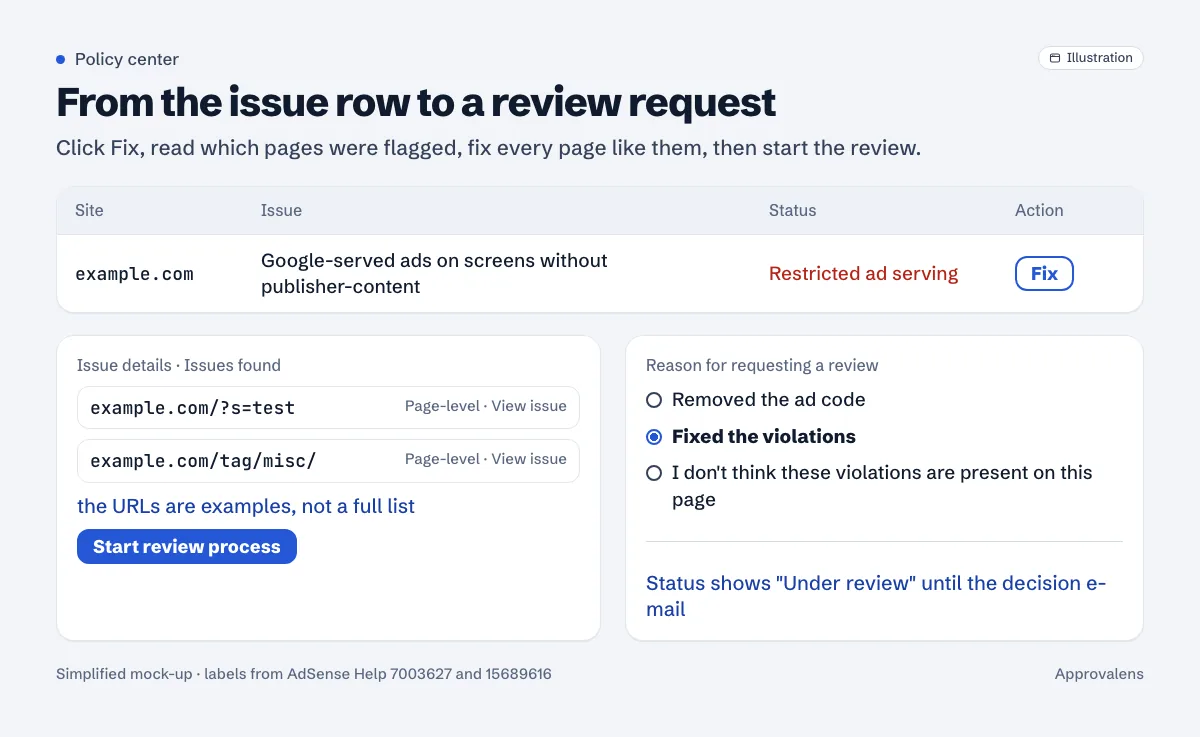
The steps from Fix policy issues that affect ad serving:
- Policy center > Fix next to the site.
- In Issues found, click Start review process.
- Choose a reason: "Removed the ad code", "Fixed the violations", or "I don't think these violations are present on this page".
- Tick the confirmation box and click Request review.
For several page-level issues at once, select them in the list and use Start review process in the banner. Google notes "You can request a certain number of page-level reviews during a 30 day period", so don't spend them on half-done fixes. The button also goes grey "if your site has been reviewed and rejected several times recently", with a date showing when you can try again.
While it's being checked, the "Status" column shows Under review. You get an e-mail either way. If it's rejected, the URLs in the new notice tell you which template you missed; it's often pagination or an archive type you forgot existed.
If you'd rather not run ads on those pages at all and they're already gone, "Removed the ad code" is the honest choice. Google says the issue disappears from Policy center "Within 7–10 days of removing the ad code".
Not the same as "Valuable inventory: No content"
People mix these up because the wording is close.
| Policy center issue | Application rejection | |
|---|---|---|
| Where you see it | Policy center, on an approved site | Sites, after the site review |
| Wording | "Google-served ads on screens without publisher-content" | "Valuable inventory: No content" |
| Usual cause | Ads load on search, 404, thank-you or archive pages | Site too thin overall, or content Google can't see |
| Fix | Remove ads from those templates or add content, request review | Build out content or make it crawlable, reapply |
If you're still waiting for approval and got the second message, the Valuable inventory: No content guide is the one you need. Fixing the templates above before you apply does help there too, since reviewers look at the whole site. If the problem is a site full of short posts rather than empty templates, start with thin content.
Check every template in one pass
A free Approvalens scan loads your 404 page and a sample of pages, flags ad code on error and near-empty pages, and counts ad units against text: scan your site.
FAQ
Will this get my AdSense account suspended?
Not on its own. Google enforces it with restricted ad serving, but it also says repeated policy violations can lead to suspension. Fix it and request a review rather than ignoring it.
I fixed everything. Why is the issue still in Policy center?
Because nothing clears without a review request. Click Fix, then Start review process, and pick "Fixed the violations".
Can I keep ads on tag and category pages?
Yes, if the page has content of its own: an introduction written for that topic, not only excerpts. If you can't write one for each, remove ads from that template.
Is noindex on search pages enough?
No. Noindex affects Google Search, not ad serving. Remove the ad code from the search template as well.
How long does the review take?
Google doesn't publish a time for Policy center reviews. Watch the "Status" column and your e-mail, and don't change the fixed templates back while it's under review.
Spotted something out of date or wrong? Tell us and we'll correct it.
Read this guide in Turkish →Check it on your own site. Free, no sign-up.
Free tools for this
Free scan
Check your own site
The free scan reads the first 50 pages and shows your score and every problem it finds.