AdSense doesn't let you encourage clicks on ads, and it counts a layout that causes accidental clicks as encouragement even when you didn't mean it. In practice the problems are a short list: ads touching download buttons or Prev/Next links, ads inside or next to games and galleries, home-made sticky units on phones, ads that push content off the screen, misleading labels above units, and any sentence that asks visitors to click or "support us". Fix the placement, then either request a review in Policy center or wait for Confirmed Click to lift.
What Google's policies actually say
There are three overlapping texts, and it helps to know all of them because the notices quote different ones.
The AdSense ad placement policies have a section called "Encouraging accidental clicks" (Ad placement policies):
"Publishers are not permitted to encourage users to click on Google ads in any way. This includes implementing the ads in a way that they might be mistaken for other site content, such as a menu, navigation, or download links."
And the sentence that surprises people most: "Even if the layout unintentionally leads to accidental clicks, publishers may still receive a violation notification."
The AdSense Program policies, under "Encouraging clicks or views", list what you may not do (AdSense Program policies), including:
- "Encourage users to click the Google ads using phrases such as "click the ads", "support us", "visit these links" or other similar language."
- "Direct user attention to the ads using arrows or other graphical gimmicks."
- "Place ads in a floating box script."
- "Format site content so that it is difficult to distinguish it from ads."
- "Place misleading labels above Google ad units. For instance, ads may be labelled "Sponsored Links" or "Advertisements", but not "Favorite Sites" or "Today's Top Offers"."
The Google Publisher Policies add "Ads interfering" (Ads interfering). Google doesn't allow ads that "overlay or are adjacent to navigational or other action items and may lead to unintended ad interactions" or that "severely interfere with consumption of content including overlaying the content or pushing the content off the display".
How you find out
It shows up in one of three ways.
- A Policy center issue on the site, with a description of the placement problem and sometimes a screenshot.
- Confirmed Click on in the Policy center "Status" column. Google describes it as a Google Ads feature that "adds a confirmation to ad placements that may be generating accidental clicks": the visitor has to tap a second button such as "Visit site" (About Confirmed Click). It's listed as an advertiser preference, not a policy violation, and it "may be applied at the site or ad unit level".
- Account closure for invalid traffic, the worst case. Google's list of top closure reasons includes "Ad placement deceptive for users or generating accidental clicks", with "placing ads too close to elements on the page or screen that require heavy mouse or touch interaction" as one example (Top invalid traffic and policy violations).
The first two are fixable warnings. Treat them as the reason to fix the layout before the third happens.
The placements that cause it
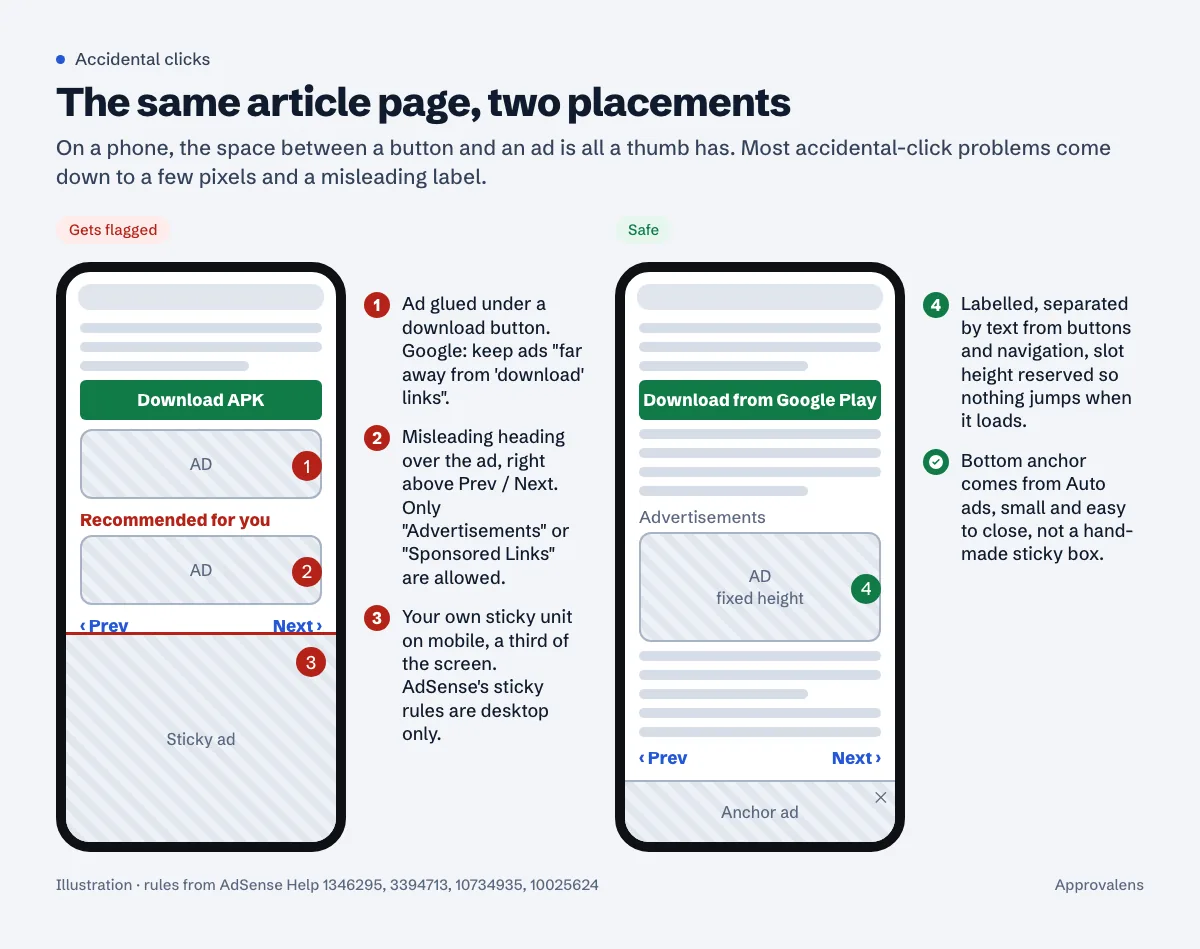
Next to download, play and navigation buttons
The policy names them one by one: "links, play buttons, download buttons, navigation buttons (e.g., "Previous" or "Next"), game windows, video players, drop-down menus, or applications". Google's policy FAQ is direct about download buttons: "please always keep your ads far away from "download" links and make "download" buttons readily seen" (AdSense policy FAQs).
The usual offenders are APK and software sites, wallpaper and image galleries with a big Download button, and multi-page articles with an ad wedged between the last paragraph and the "Next page" link. The APK sites guide and wallpaper sites guide cover those niches.
Google doesn't publish a minimum distance for web pages. The one number it gives is for games: "we strongly recommend a distance of at least 150 pixels between the ads and the edge of a game". On a phone, a sensible test is whether a slightly careless thumb aimed at the button could land on the ad. If yes, put a paragraph of text between them.
Games, galleries and anything people tap fast
Ads interfering lists "an image in an image gallery" and "a game play screen where users are continuously interacting" as interactive content an ad shouldn't sit next to. Swipe galleries are a classic trap on mobile, and Google's code modification rules separately forbid "Triggering an ad click during user drag actions on a mobile web page."
Labels and headings
Only two labels are allowed. The policy FAQ: "The only labels we allow to be put above ads are "sponsored links" or "advertisements"." Anything else that sits above an ad becomes its label in the reader's eyes, including a heading your theme puts there such as "Resources", "Helpful links" or "Recommended for you". The placement policy warns that "a site's heading might be interpreted as an inappropriate ad label".
Wording that asks for clicks
"If you like this site, click an ad", "Support us by visiting our sponsors", "Our server costs money, check out the ads below". All of these break the rule, however polite. Google's examples include "Help keep this site running. Check out our sponsors!" and "We need a new server. Support us!". If you want support, link to a donation or membership page and don't mention ads at all.
Ads that look like content
Matching ads to your design is fine: the FAQ says you "can choose the appropriate ad size, color, and background to match with the design of your page". Formatting your own content to look like ads, or putting images next to individual ads so they look related, is not: "Publishers may not attempt to associate specific images with the individual ads appearing on their sites."
Arrows and animation
"flashy animations that draw a user's eyes to the ads" and "arrows or other symbols pointing to the ads" are listed under unnatural attention. That includes a hand-drawn "look here" arrow in a header image.
Mobile: sticky ads, overlap and layout shift
Phones are where these problems are easiest to create: there's less room, and a thumb is less precise than a mouse.
Your own sticky units. AdSense allows sticky ads with conditions, and one of them ends the debate for phones: "These implementations are for desktop only and ads should not be sticky on tablet or mobile optimized versions of a site" (Ad formats FAQ). The same FAQ allows only units 300px wide or less, "only one sticky ad visible in the viewport at a time", and ads that "must not overlap or underlap any other page content". A CSS position: fixed wrapper around a manual unit on mobile breaks these rules.
Anchor ads from Auto ads are different. They're Google's own overlay format: "Anchor ads stick to the top or bottom of the user's screen and are easily dismissible. These ads mainly serve on mobile but can appear on desktop too" (Auto ads settings). If you want something at the bottom of a phone screen, turn on anchor ads under Ads > edit your site > Overlay formats instead of building a sticky box.
Overlap. The code modification rules forbid "Placing ad units on a mobile site or a responsive design site in such a way which will cause content and ads to overlap." Check this on a narrow phone width, not only on your own handset. A 336px unit in a 320px column overflows.
Ads that push content away. Google's Confirmed Click page lists "Reflow of site content causing confusion" as a cause: an ad loads late, the paragraph the reader was about to tap jumps down, and the tap lands on the ad. Its recommended fix is to "Fix the size of the ad unit container especially on in-article ads, so it doesn't push your site's content out of the way when it loads." Reserve the height with CSS:
/* Example: reserve space for an in-article unit so text doesn't jump */
.ad-slot { min-height: 280px; margin: 24px 0; }
@media (min-width: 768px) { .ad-slot { min-height: 250px; } }
Density. The Publisher Policies don't allow screens "with more ads or other paid promotional material than publisher-content", and they define publisher content as "images, videos, games, article text and user-generated content" but not "whitespace, header or footer content, or links to other content on the site" (More ads than publisher-content). Google also requires that pages conform to the Better Ads Standards (Better Ads Standards). For mobile, the Coalition for Better Ads lists ad density higher than 30% of the main content's height, and large sticky ads that take "more than 30% of the screen's real estate", among the experiences to avoid (mobile ad density, large sticky ads).
Above the fold is allowed as long as there's content there. The FAQ: "Displaying ads above the fold is not a violation as long as there is enough content above the fold for the users to read."
Audit your pages in 15 minutes
Do this on a real phone, logged out, with an ad blocker off. Don't click any ads while testing; Google's own advice is that clicking your own ads "for any reason is prohibited".
- Open your three most visited pages and one page of every template (article, gallery, download, tool, category).
- For each ad, ask: what's directly above, below and beside it? A button, link, menu, video or game within thumb reach is a problem.
- Read the text above every unit. If it isn't "Advertisements", "Sponsored Links" or plain article text, change it.
- Scroll slowly while the page loads. If text jumps as ads appear, reserve the slot height.
- Look for any element with
position: fixedorstickythat contains an ad. On mobile, remove it. - Count: on a typical article, are there more ad slots than screens of real text? Cut the extras.
- Search your templates and widgets for "click", "support us", "sponsors" and "ads" near ad units.
Chrome's device toolbar in DevTools helps for checking narrow widths, but finger accuracy is the point, so finish on a phone.
After you fix it
- Policy center issue: click Fix, then Start review process and choose "Fixed the violations" (Fix policy issues that affect ad serving). The same flow is shown step by step in the screens without publisher-content guide.
- Confirmed Click: there's nothing to submit. Google: "There are no manual reviews" and Confirmed Click "is automatically lifted when Google Ads no longer detect ongoing accidental clicks". It also says this "does not happen immediately"; it waits for "a sustained improvement in the click quality".
- Still applying for AdSense: these layouts count during the site review too. The policy violations rejection guide covers what else reviewers look at.
If you're deciding between hand-placed units and Auto ads to avoid this in the first place, see Auto ads vs manual ad units. For the layout-shift side, ads and Cumulative Layout Shift goes into reserving space per format, and mobile usability and speed covers the rest of the phone experience.
Catch the wording and the density before Google does
A free Approvalens scan flags "click our ads" and "support us" wording and pages that carry more ad units than their text supports: scan your site.
FAQ
Can I put an ad right above the fold?
Yes, if there's readable content above the fold as well. Google doesn't allow layouts that push all content below the fold so that only ads are visible.
Is "Sponsored" an allowed label?
Google's wording is "Sponsored Links" or "Advertisements". Stick to one of those two exactly.
Are anchor ads on mobile against the sticky ad rules?
Anchor ads are an Auto ads overlay format Google serves and lets visitors dismiss. The desktop-only rule is about sticky units you build yourself.
How long does Confirmed Click last?
Google doesn't give a time. It's lifted automatically once Google Ads sees a sustained improvement in click quality, so fix the layout and leave it stable.
I didn't ask anyone to click. Can I still get flagged?
Yes. The placement policy says a violation notice can come "even if the layout unintentionally leads to accidental clicks".
Spotted something out of date or wrong? Tell us and we'll correct it.
Read this guide in Turkish →Free scan
Check your own site
The free scan reads the first 50 pages and shows your score and every problem it finds.