A redirect chain is one address sending you to a second, which sends you to a third, before a page finally loads. A loop is a chain that never ends, and the browser gives up with "too many redirects". Both usually come from two layers of your stack (CDN, web server, CMS, plugin) each enforcing its own idea of https, www or the trailing slash. The fix is to give each job to one layer and make every old address reach the final URL in a single 301.
Chain, loop, or a normal redirect?
One redirect is fine; that is what redirects are for. Google's guidance is to prefer server-side permanent redirects: "We recommend that you use a permanent server-side redirect whenever possible" (redirects and Google Search).
The status code tells Google how to treat the move:
| Code | Type | What Google does with it |
|---|---|---|
| 301, 308 | Permanent | Follows it and uses it as a signal "that the redirect target should be canonical" |
| 302, 303, 307 | Temporary | Follows it, but "doesn't use the redirect as a signal that the redirect target should be canonical" |
| Instant meta refresh | Permanent | "Google Search interprets instant meta refresh redirects as permanent redirects" |
| Delayed meta refresh | Temporary | Interpreted as temporary |
| JavaScript | Last resort | "Only use JavaScript redirects if you can't do server-side or meta refresh redirects" |
Chains are where it starts to cost you. Google's crawlers stop at a fixed depth: "By default, Google's crawlers follow up to 10 redirect hops. However, specific products' crawlers may have different limits" (HTTP status codes). Its crawl documentation is blunter: "Avoid long redirect chains, which have a negative effect on crawling" (crawl budget). A loop never reaches a page at all, and Search Console lists it under "Redirect error" next to "A redirect chain that was too long" (Page indexing report).
Why it matters for AdSense
AdSense's site-readiness checklist asks two redirect questions. About your certificate: "does it also redirect HTTP to HTTPS?" And: "Did you provide the correct URL?" (AdSense help). A homepage that bounces through three hosts blurs which one is the site, and a loop looks exactly like a site that is down. And given the "different limits" line above, do not assume the AdSense crawler is as patient as Googlebot.
ads.txt has its own redirect rules. AdSense says "An ads.txt file on www.domain.com/ads.txt will only be crawled if domain.com/ads.txt redirects to it", and if your site is HTTPS-only, http://domain.com/ads.txt must redirect to the HTTPS version (ads.txt guidance). If the root-domain request loops or dies, the file is not found even though it exists. The ads.txt setup guide covers the file itself.
What Approvalens checks
Every check runs on what we actually fetched: the pages we crawled plus up to 120 internal links tested separately, so a link buried deep in an archive may be missed. The methodology page explains the crawl.
| Finding | What we fetch | When it fires |
|---|---|---|
access.redirect_chain |
https://yourdomain/ (what you typed, normalised to https and /), following up to 8 redirects |
3 or more hops before the homepage loads. A loop or more than 8 hops means the homepage counts as unreachable |
access.http_redirect |
http://yourdomain/, without following |
Fails as a notice on 302/307 to https, as a warning if there is no redirect to https at all |
access.alt_host |
The other host (www ↔ bare domain) | Warning if it does not resolve or serves a separate copy; notice if it serves a copy with a canonical to your main host |
seo.internal_redirects |
Internal links on crawled pages | 3 or more links go through any redirect |
seo.redirect_chains |
Same links | Any link that takes 2 or more hops |
seo.temporary_redirects |
Same links | The first hop is 302, 303 or 307 |
seo.meta_refresh |
Crawled pages | The HTML contains <meta http-equiv="refresh">, whatever the delay |
seo.trailing_slash |
Two articles, requested with the slash flipped | The other form returns 200 with no redirect and no canonical pointing back |
Not every flagged redirect is a mistake. On one site we scanned, the only internal chain, the only temporary redirect and the only meta refresh all came from the same "Sign in with Google" link: a 302 to Google's sign-in page, which itself answers with a meta refresh. That is normal for a login button and needs no fix. The site's other internal redirects were worth fixing, including a link still pointing at a path that had moved.
Trace the hops yourself
curl shows every hop with its status and Location:
$ curl -sIL http://www.example.com/guide | grep -iE '^(HTTP|location)'
HTTP/1.1 301 Moved Permanently
Location: https://www.example.com/guide
HTTP/2 301
location: https://example.com/guide
HTTP/2 301
location: https://example.com/guide/
HTTP/2 200
Three hops, each from a different rule. To count them:
$ curl -sL -o /dev/null -w '%{num_redirects} hops -> %{url_effective}\n' http://www.example.com/guide
3 hops -> https://example.com/guide/
A loop looks like the same location repeating until curl stops:
$ curl -sSIL https://example.com/ | grep -iE '^(HTTP|location|server)'
HTTP/2 301
location: https://example.com/
server: cloudflare
HTTP/2 301
location: https://example.com/
server: cloudflare
...
curl: (47) Maximum (10) redirects followed
In Chrome DevTools, tick Preserve log on the Network panel (otherwise each redirect wipes the list) and load the old URL; each hop is its own row. Use a private window, because browsers cache 301s and a fixed rule can still look broken.
Our free Googlebot access checker fetches your homepage as a browser, a phone and three Google user agents and shows the final URL for each. If one agent ends somewhere different, something is redirecting by user agent. The ads.txt checker follows redirects on /ads.txt and shows where the file was actually found.
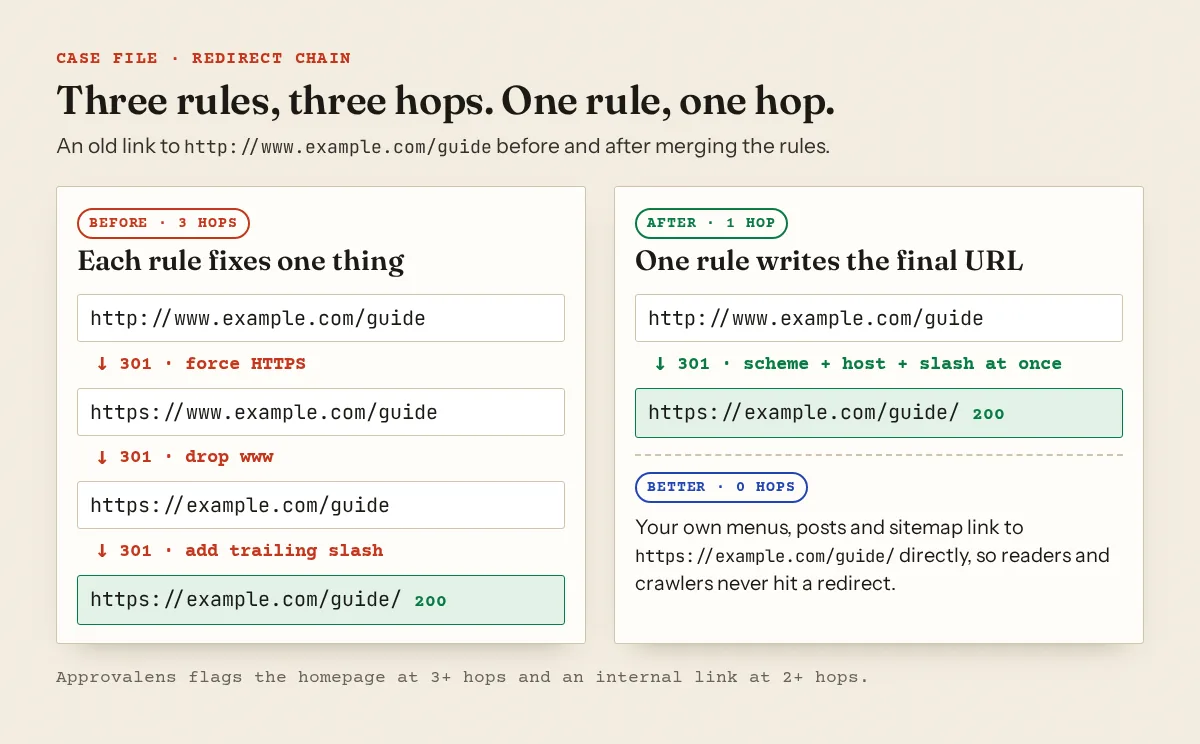
Where loops and chains come from
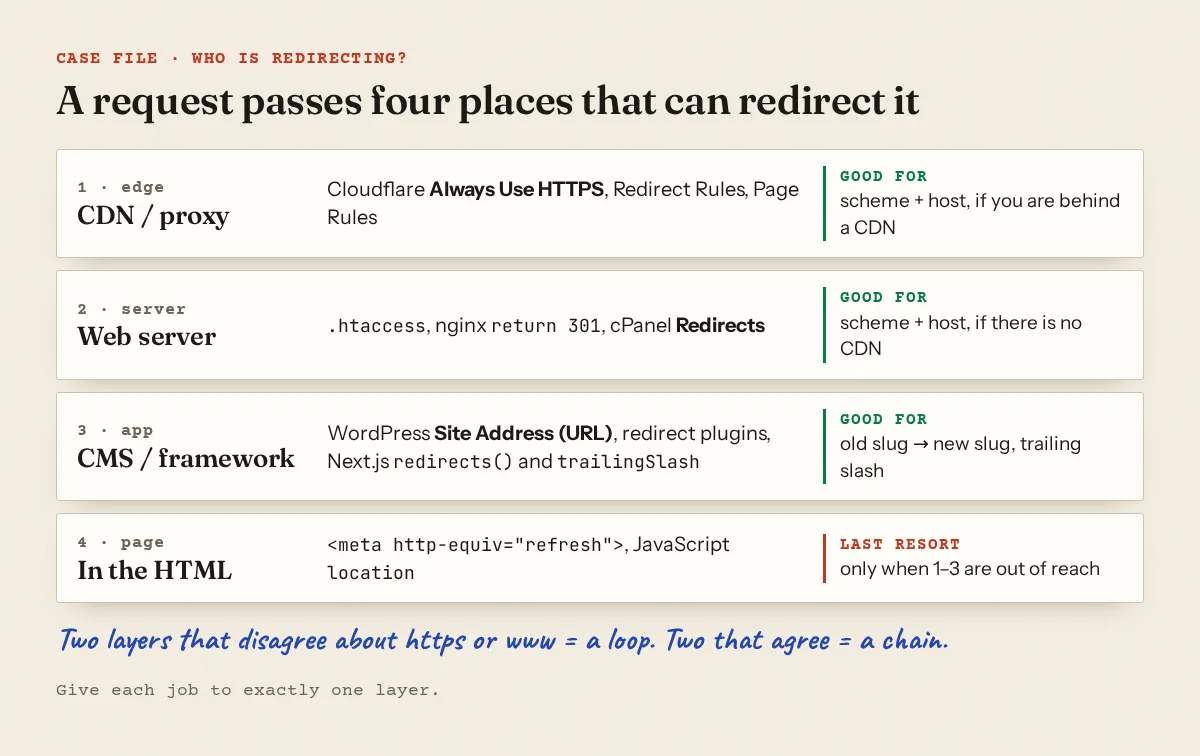
| Symptom | Usual cause | Fix |
|---|---|---|
| Loop only behind Cloudflare | SSL/TLS mode Flexible while the origin forces HTTPS | Set Full (strict) with an origin certificate, or remove the origin's HTTPS rule |
| Loop after enabling Cloudflare Always Use HTTPS | The origin redirects HTTPS back to HTTP | Remove the origin's HTTP redirect |
| Loop on WordPress after a move | WordPress Address (URL) and Site Address (URL) disagree with the host's www/https rule | Make both match the final URL |
| Two or three hops on every old link | Separate rules for https, www and slash | Merge into one rule |
| A 302 where you expected 301 | Redirect plugin default, or Apache R without a code |
Set 301 explicitly |
Cloudflare documents the first case directly: in Flexible mode, "Redirect loops will occur if your origin server automatically redirects all HTTP requests to HTTPS", because Cloudflare talks to your origin over plain HTTP (Cloudflare: ERR_TOO_MANY_REDIRECTS). The encryption mode is on the SSL/TLS overview page; Always Use HTTPS is under SSL/TLS → Edge Certificates. The Cloudflare guide covers the bot-blocking side of the same dashboard.
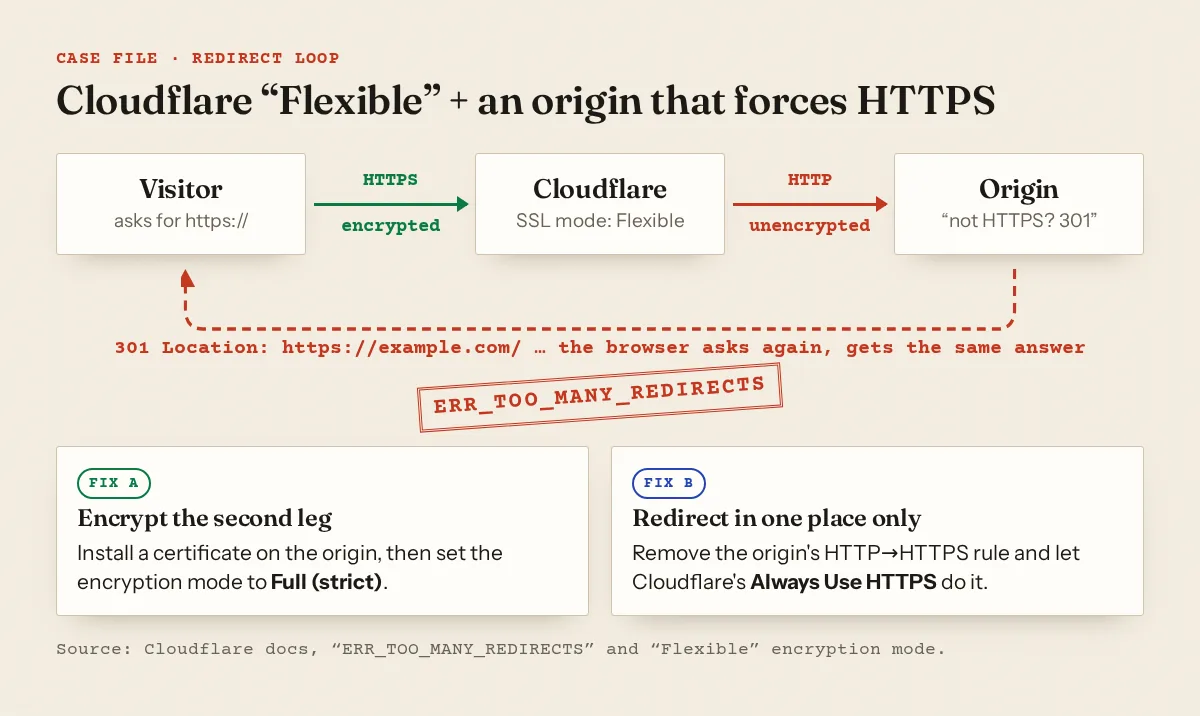
On WordPress, both URL fields live in Settings → General. WordPress sends visitors to the host in Site Address, so if that says www and the server strips www, the two send the request back and forth. If you are locked out by the loop, WordPress documents setting WP_HOME and WP_SITEURL in wp-config.php, while noting "This is not necessarily the best fix, it's just hard-coding the values into the site itself" (moving WordPress).
One-hop recipes
Pick the canonical form first: here https://example.com with no www. Then put the rule in exactly one layer.
Apache (.htaccess), above the # BEGIN WordPress block:
RewriteEngine On
RewriteCond %{HTTPS} off [OR]
RewriteCond %{HTTP_HOST} ^www\. [NC]
RewriteRule ^ https://example.com%{REQUEST_URI} [R=301,L,NE]
%{HTTPS} is "on" for TLS connections (mod_rewrite), so plain HTTP or any www request goes straight to the final host with the path and query string kept. Behind Cloudflare Flexible, %{HTTPS} is always off at the origin and this rule loops; fix the SSL mode first. Apache's own docs prefer a Redirect in a separate virtual host when you can edit the server config (canonical hostnames).
Nginx, one server block per variant, each answering with the final URL:
# plain HTTP, both names
server {
    listen 80;
    server_name example.com www.example.com;
    return 301 https://example.com$request_uri;
}
# HTTPS on www
server {
    listen 443 ssl;
    server_name www.example.com;
    ssl_certificate     /etc/ssl/example.com/fullchain.pem;
    ssl_certificate_key /etc/ssl/example.com/privkey.pem;
    return 301 https://example.com$request_uri;
}
# the real site: server_name example.com; no redirect rules here
return 301 URL is the documented way to send a redirect (ngx_http_rewrite_module). The certificate must cover www as well, or the www request fails before it can be redirected.
cPanel: the Domains page has a Force HTTPS Redirect toggle that needs a valid certificate (cPanel Domains). The Redirects page offers "Permanent (301)" or "Temporary (302)", and cPanel warns it writes these rules at the bottom of .htaccess, where some applications ignore them (cPanel Redirects). Pick one of the two and do not add a hand-written rule on top.
Next.js: by default "Next.js will redirect URLs with trailing slashes to their counterpart without a trailing slash"; trailingSlash: true flips that. Both use a permanent 308. In redirects(), permanent: true gives 308 and false gives 307, so check that flag on every moved page:
// next.config.js
module.exports = {
  async redirects() {
    return [
      {
        source: '/:path*',
        has: [{ type: 'host', value: 'www.example.com' }],
        destination: 'https://example.com/:path*',
        permanent: true,
      },
      { source: '/blog/old-slug', destination: '/blog/new-slug/', permanent: true },
    ]
  },
}
Write destinations in their final form (with the slash if trailingSlash is on), or the trailing-slash redirect adds a second hop.
Clean up the links that still redirect
Once old addresses reach the final URL in one hop, stop sending readers through redirects in the first place:
- Internal links. Point menus, widgets and in-post links at the final URL. After an http→https or domain move, a search-and-replace plugin does this in bulk; back up the database first.
- Temporary codes. Use 301/308 for permanent moves. Keep 302 for login or language redirects that really are temporary.
- Meta refresh. Replace
<meta http-equiv="refresh" content="0; url=/new/">with a server-side 301. A page that reloads itself on a timer is a different problem; remove that tag. - Trailing slash. If
/guideand/guide/both return 200, redirect one to the other and canonical to the survivor. See canonical tag problems and duplicate content and AdSense. - Links to dead pages. Redirect a deleted post only to a close replacement; redirecting everything to the homepage creates soft 404s. See broken links and soft 404s.
If the redirect problem shows up as an AdSense "site down" rejection, the site down or unavailable guide walks through DNS, SSL and firewall checks as well.
Run a free scan to see your homepage's redirect path and every internal link that takes more than one hop.
FAQ
How many redirects is too many?
Google's crawlers follow up to 10 hops by default, but other Google products may stop sooner. Aim for zero hops on your own links and one hop for old or alternative addresses. Approvalens warns at three on the homepage and two on any internal link.
Is 308 as good as 301?
For Google, yes: both are permanent and both signal that the target should be canonical. Next.js uses 308 by default for permanent redirects, and that is fine.
Why does my site loop only in some browsers?
Usually one browser has a cached 301 or an HSTS entry from an earlier setup. Test with curl or a private window. If curl loops too, the problem is on the server or CDN.
Should ads.txt redirect from the bare domain to www?
Only if your site lives on www. AdSense crawls domain.com/ads.txt and will follow a redirect to www.domain.com/ads.txt; it will not find a www-only file without that redirect.
Spotted something out of date or wrong? Tell us and we'll correct it.
Read this guide in Turkish →Check it on your own site. Free, no sign-up.
Free tools for this
Free scan
Check your own site
Free scan: readiness score and every issue, usually in a few minutes.