A broken link is a link on your site that leads to an address returning 404, 410 or nothing at all. A soft 404 is the reverse problem: a page that doesn't exist but answers "200 OK", or quietly redirects to your home page. Fix the first by correcting or removing the link, or by redirecting the dead URL to a page that answers the same need. Fix the second by making unknown addresses return a real 404 status, with a helpful page on top.
The site navigation guide covers the basics in two paragraphs. This page is the workshop version.
Why AdSense cares about dead ends
AdSense's program policies list "Linking to content that doesn't exist" under deceptive site navigation, next to fake download buttons. A few dead links from an old post won't be read as deception. A menu where half the items 404 looks like a site that was never finished, and the account setup page is direct about that: "If your site is under construction, doesn't load, or is difficult to navigate, we can't set up your account."
Soft 404s matter for a different reason. They don't look broken to a reviewer, but they hide your broken links from you. If every mistyped URL lands on the home page, you never see the error, and neither does your link checker.
What the scan checks
Five findings in an Approvalens report touch this topic. Each one has its own rule:
| Finding | What we request | What counts as a problem |
|---|---|---|
| Broken links | Every page we opened, plus up to 120 more internal links we didn't open (archive, tag and pagination URLs skipped) | A 4xx status or no answer (a server error on a page we opened goes to the next row instead). 401, 403, 429 and 503 are ignored: they usually mean we were rate limited. Notice below 3%, warning from 3% or 10 URLs, critical from 15% |
| Pages load without errors | Every page we opened | Server errors, timeouts, refused connections. 404s go to Broken links instead, so nothing is counted twice |
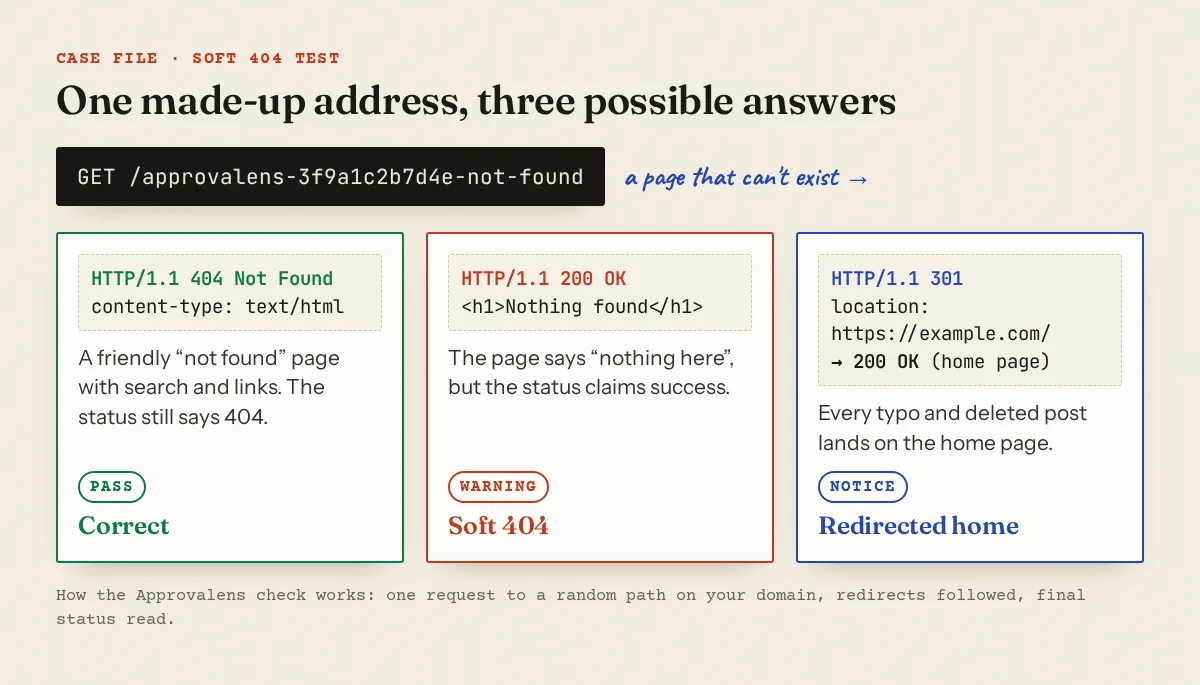
| Missing pages return 404 | One random address: /approvalens-<12 hex characters>-not-found |
200 after redirecting to the home page (notice) or 200 anywhere else (warning) |
| Broken images | Up to 40 images hosted on your domain | Flagged when 10% or more fail to load |
| Broken outbound links | Up to 25 external links from the text of pages we opened | 404, 410, or a domain that no longer resolves |
The soft 404 test is a single request, so you can find it in your access log by searching for approvalens-. Full details are on the methodology page.
Here is a real example. One site we scanned had 24 broken URLs out of 873 internal URLs requested, about 3%:
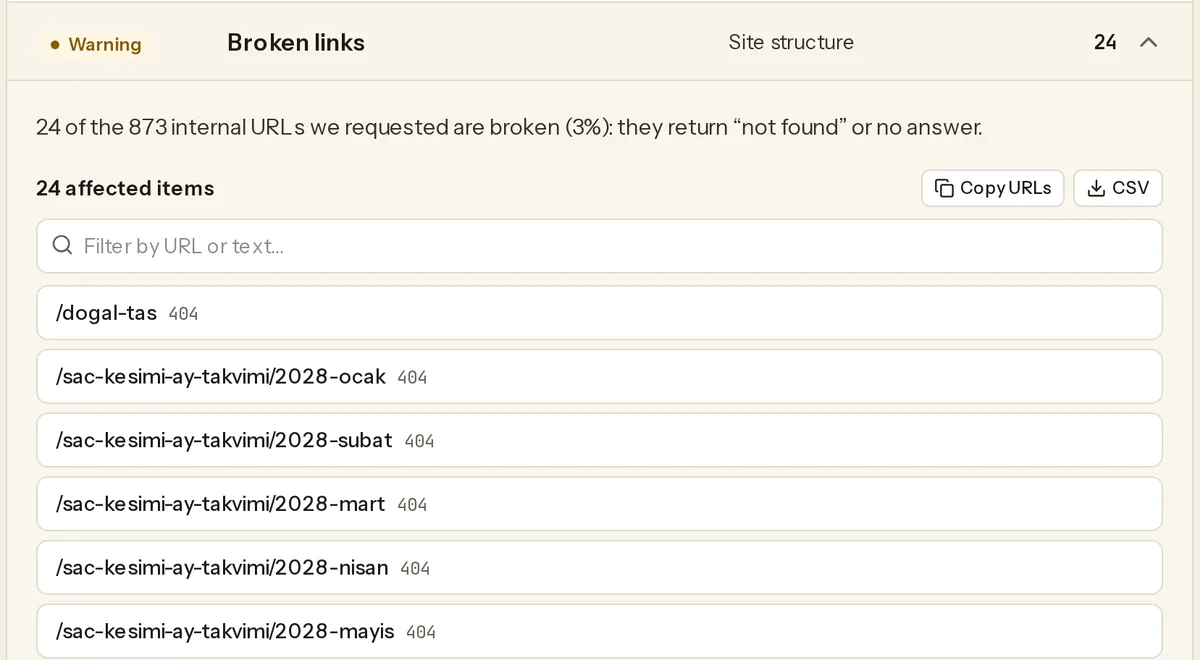
The evidence list shows the dead URL and its status, not the page that links to it. On that site, opening the December 2027 calendar page and searching its HTML for 2028-ocak found the "next month" link in seconds.
Soft 404s and the redirect-everything-home pattern
Google's crawling errors page defines a soft 404 as "a URL that returns a page telling the user that the page does not exist and also a 200 (success) status code". It also says custom error pages are fine, as long as the status stays honest: "Custom 404 pages are created solely for users."
Redirecting every missing URL to the home page is the most common version of this on small sites. Google's site move guide warns: "Don't redirect many old URLs to one irrelevant single URL destination, such as the home page of the new site." Such redirects "might be treated as a soft 404 error."
Test it yourself:
$ curl -sI https://example.com/this-page-does-not-exist-123 | head -3
HTTP/2 301
location: https://example.com/
That is the pattern. The result you want:
$ curl -sI https://example.com/this-page-does-not-exist-123 | head -1
HTTP/2 404
Where it usually comes from:
- A WordPress plugin whose job is to "redirect all 404s to the home page". Turn it off.
- Apache with
ErrorDocument 404 https://example.com/. Apache's core docs explain that with a full URL "the client will not receive the original error status code, but instead will receive a redirect status code." Use a local path:ErrorDocument 404 /404.html. - nginx with
error_page 404 https://example.com/;. For URL targets, nginx says "the response code 302 is returned to the client". Useerror_page 404 /404.html;instead. - A JavaScript app that renders "Not found" on any route with a 200 status. Next.js specifics are below.
404, 410 or a redirect?
Google treats them almost the same. Its HTTP status code page says "All 4xx errors, except 429, are treated the same". 410 states your intent more clearly, but don't expect a faster cleanup from it: Search Console's Page indexing help admits "there is no way to tell Googlebot to permanently forget a URL", and adds that "404 responses are not necessarily a problem, if the page has been removed without any replacement."
The real decision is whether a redirect is honest. Google: "If your page has moved or has a clear replacement on your site, return a 301 (permanent redirect) to redirect the user."
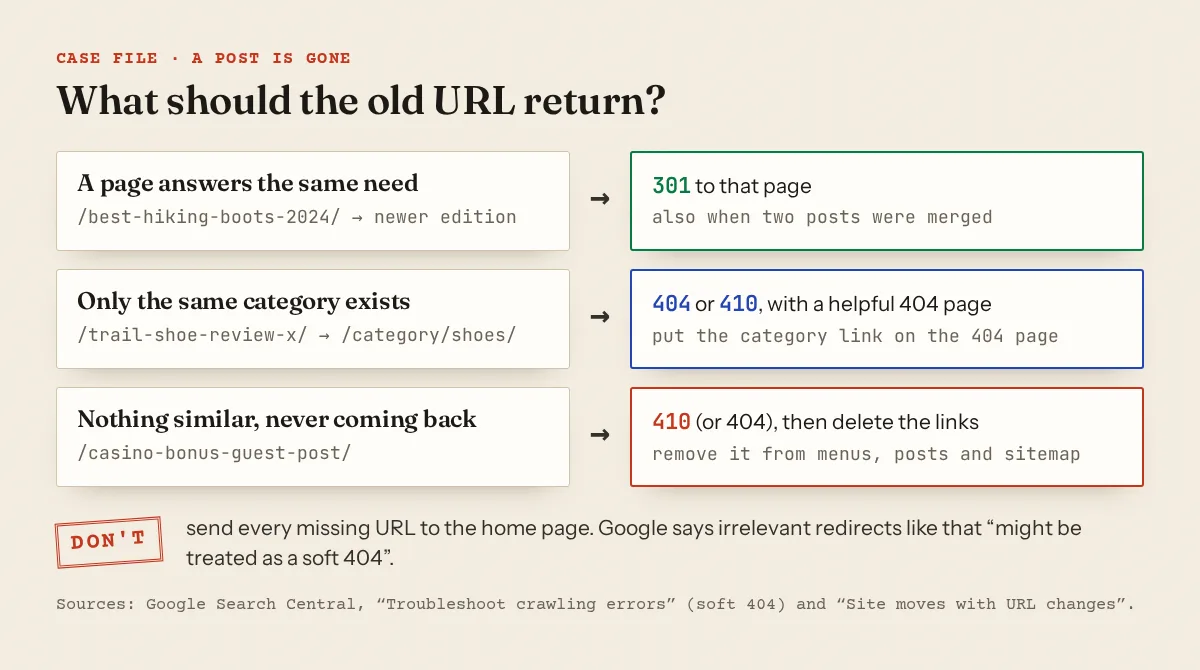
A 2024 buying guide replaced by the 2026 edition is a clear 301. A deleted review of one product isn't replaced by the category page; send that URL to a 404 page that links the category. If you're deleting thin posts in bulk, the low-value content guide helps you decide which to merge and which to drop.
Finding every broken link
No single source is complete, so combine them:
| Source | What it gives you | Limit |
|---|---|---|
| Approvalens report | Dead URLs with status codes; Copy URLs and CSV buttons | Only what the crawl reached; doesn't name the linking page |
| Search Console, Page indexing report | Reasons "Not found (404)" and "Soft 404" | URLs Google has seen, including old ones from other sites |
| URL Inspection | A "Referring page": "A page that Google possibly used to discover this URL" | One URL at a time |
| Server access log | Every real 404 request with its referrer | Needs log access |
| WordPress link-checker plugin | Every link in your posts, checked | Can slow the site; run it once, then remove it |
For logs in the common "combined" format (nginx's default), status is field 9, the path field 7 and the referrer field 11:
$ awk '$9 == 404 {print $7, $11}' access.log | sort | uniq -c | sort -rn | head
     41 /wp-content/uploads/2023/04/starter.jpg "https://example.com/sourdough-starter/"
     12 /category/uncategorized/ "https://example.com/old-post/"
The referrer column tells you which page to edit.
Where broken links come from
| Cause | What it looks like | Fix |
|---|---|---|
| Permalink structure changed | /2023/05/sourdough/ → /sourdough/ |
One pattern redirect, then update links in posts |
| Post deleted or merged | Related-post links and menus still point to it | 301 to the replacement, or 404 and remove the links |
| HTTP→HTTPS or domain move | Absolute http://old-domain.com/... links in post content |
Database search-replace, plus a site-wide redirect |
| Images after a migration | /wp-content/uploads/... files missing on the new host |
Re-upload the media folder, or remove the images |
| Relative link typo | href="blog/post" on /guides/ resolves to /guides/blog/post |
Start internal paths with / |
| Template links | "Next month", "next page" or tag links generated for pages that don't exist | Only output a link when the target exists |
| Outbound link rot | Sources that moved or vanished | Replace with a working source or an archived copy |
Platform recipes
WordPress
WordPress already redirects a post's old slug to its new one with a 301 (`wp_old_slug_redirect`). A change of permalink structure or a deleted post needs a redirect plugin. Yoast SEO Premium has a redirect manager under Yoast SEO → Redirects, with types including "301 Moved Permanently" and "410 Content Deleted". Rank Math's Redirections module lives under Rank Math SEO → Redirections and also offers "410 Content Deleted". Standalone redirection plugins do the same job. Use one, not three.
For old absolute URLs after a move, WP-CLI's search-replace handles serialized data. Run it with --dry-run first:
wp search-replace 'http://old-domain.com' 'https://example.com' --skip-columns=guid --dry-run
Blogger
Blogger has both tools built in (Blogger Help): Settings → "Errors and redirects" → Custom redirects → Add. Enter the deleted URL and the target, and "If the original article was deleted, turn on Permanent." Custom 404, in the same section, changes the message on Blogger's not-found page (settings reference). Put your search box and best label links there.
Next.js (App Router)
Call notFound() from next/navigation when a slug has no content, and design the page in app/not-found.tsx. Mind the streaming caveat in the not-found.js docs: "Next.js will return a 200 HTTP status code for streamed responses, and 404 for non-streamed responses". In the streamed case, Next.js adds <meta name="robots" content="noindex">, so Google won't index the page. Our check reads only the status code, though, so it will still flag it. If you want a true 404, check that the content exists before streaming starts.
For statically generated routes, export const dynamicParams = false makes unknown slugs return 404. Redirects go in next.config:
async redirects() {
  return [{ source: '/blog/:slug', destination: '/guides/:slug', permanent: true }]
}
permanent: true sends a 308, which Google treats like a 301. After any redirect work, check for hops with the redirect chains guide. Remove deleted URLs from your sitemap too; see XML sitemap errors.
When the whole site is the problem
If many pages fail with 5xx errors or timeouts, the Pages load without errors finding fires instead. That is a hosting problem, not a linking one. Start with the site down or unavailable guide.
A free scan requests your internal links, tests a made-up URL for soft 404s and lists every dead address it finds.
FAQ
How many broken links will get my AdSense application rejected?
Google publishes no number. The risk grows with how visible they are: a dead menu item or category link matters more than one old source link deep in a 2019 post.
Should I redirect all 404s to my home page to be safe?
No. Google warns that redirecting many old URLs to one irrelevant page, such as the home page, might be treated as a soft 404. Redirect only where there's a real replacement.
Do I need 410 instead of 404 for deleted posts?
No. Google treats all 4xx codes except 429 the same way. Use 410 if your redirect tool offers it and you want to record that the removal was deliberate.
Search Console shows 404s for URLs I never had. Should I fix them?
Usually not. If the URL never existed or was removed with no replacement, a 404 is the correct answer. Fix only the ones your own pages still link to.
Spotted something out of date or wrong? Tell us and we'll correct it.
Read this guide in Turkish →Free scan
Check your own site
Free scan: readiness score and every issue, usually in a few minutes.