"Valuable inventory: No content" means that when Google looked at your site, it found screens without enough of your own content to put ads next to. That has two very different causes. Either the site really is too thin (mostly images, videos, headlines, or a handful of short pages), or the content exists but Google didn't receive it: it loads by JavaScript, hides behind a wall, or the pages carrying your ad code are error, search or thank-you screens. Work out which one you have before you write a single new word, because the fixes have nothing in common.
Where the label comes from
Google doesn't have a help page with this exact title. Publishers see it in AdSense after a site review. The policy behind it sits in the "Inventory value" section of the Google Publisher Policies: "We do not allow Google-served ads on screens: without publisher-content or with low-value content, that are under construction, that are used for alerts, navigation or other behavioral purposes" (Google-served ads on screens without publisher-content).
The tips on that page name the screens Google has in mind: "Ads should not be placed on 'dead end' or no content screens (e.g., Thank You, Exit, Error pages, etc.)".
AdSense's account not approved article gives the application-side version under "Insufficient content":
Your site was found to have too little text, and/or your site was deemed to be "under construction."
Its checklist is short and specific:
- "Make sure that your pages have sufficient text - sites that contain mostly images, videos or Flash animations may not be approved."
- "Your content should contain complete sentences and paragraphs, not only headlines."
- "Make sure that your site is fully built and launched."
- "When connecting your site to AdSense, place the ad code on a live page of your site. Test pages that are empty except for the code won't be approved."
If the "under construction" part sounds like you, read the under construction guide as well; the two labels often travel together.
Two causes, two different fixes
| Cause A: the site really is thin | Cause B: the content is there, Google didn't get it | |
|---|---|---|
| Typical site | New blog with a few posts, photo or video gallery, link directory, one-page tool | JavaScript app (React, Vue, Angular without server rendering), heavy consent or age wall, site whose ad code also runs on 404 and search pages |
| What a visitor sees | Little to read | A full article |
| What the crawler sees | Little to read | An empty shell, an overlay, or an error page with an ad slot |
| First fix | Write and publish real articles | Make the text arrive in the HTML, and keep ad code off empty screens |
Most people assume A and start writing. If you're in B, a hundred new articles won't change the outcome, because the reviewer still won't see them.
Check what Google actually receives
Five minutes of checking tells you which column you're in.
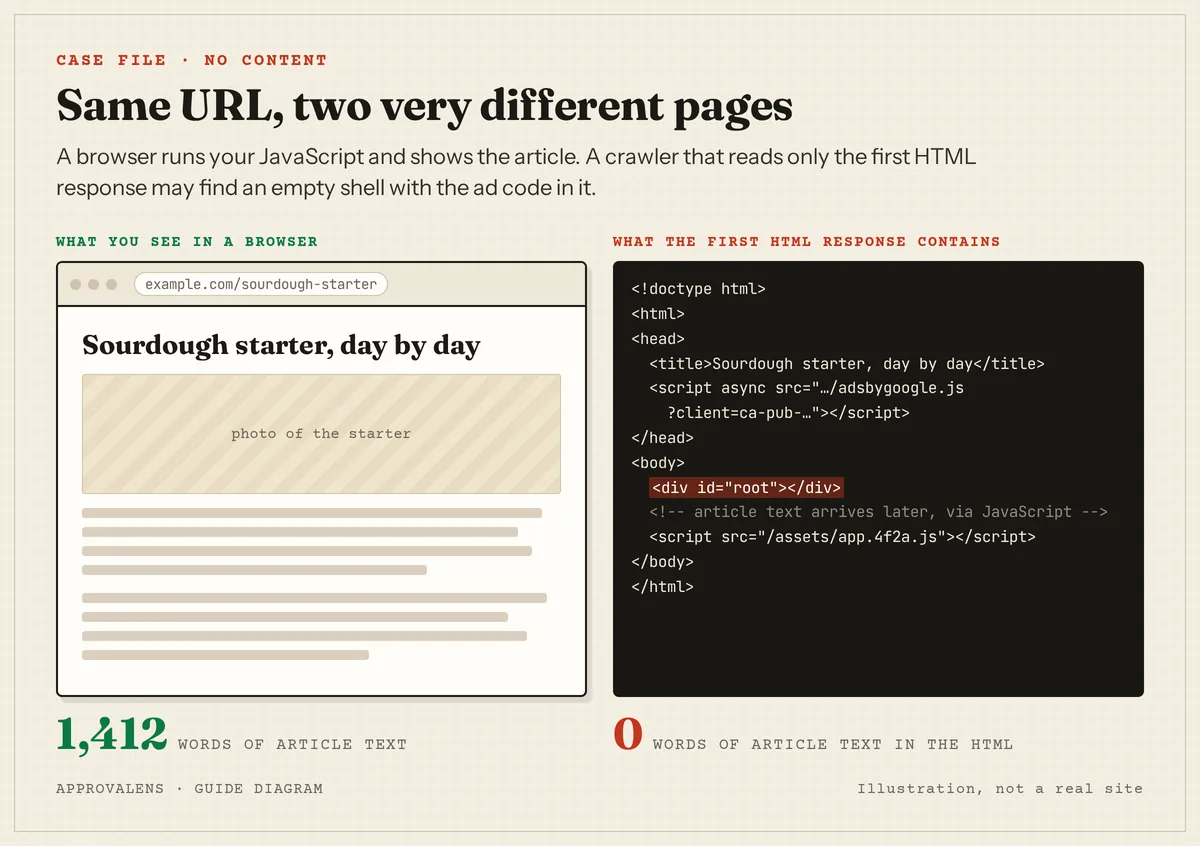
- View the source, not the page. Open an article, press
Ctrl+U(orCmd+Option+Uon a Mac) and search the source for a sentence from the middle of your article. If it's not there, your text is added by JavaScript after the page loads. - Compare word counts. Run the URL through the free Googlebot access checker. It fetches the page as a browser and as Google's crawlers and shows the words each one got. A browser row with 1,200 words and crawler rows with 15 is cause B in one line.
- Ask Google's own crawler. If the site is in Search Console, run URL Inspection, then Test live URL and View tested page. The screenshot and HTML show what Googlebot rendered. Google Search renders JavaScript, but Google doesn't document whether or how the AdSense review does, so treat a page that only works after rendering as a risk, not a pass.
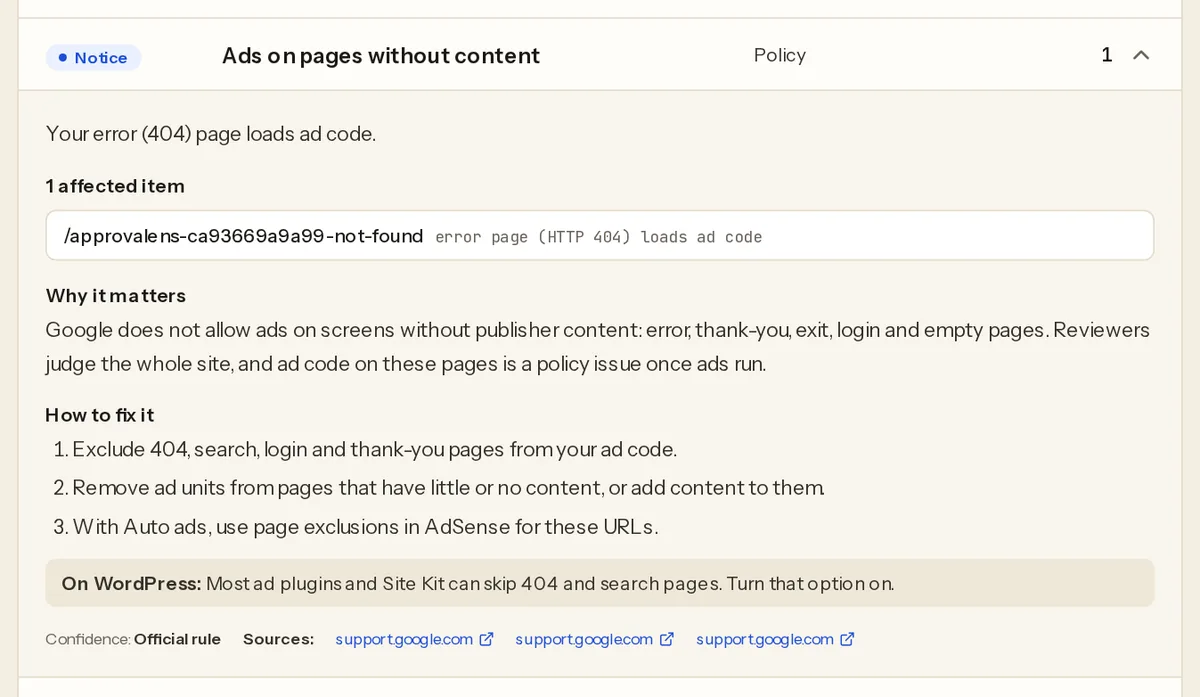
- Open your error page. Visit a URL that doesn't exist, such as
/this-page-does-not-exist, and view the source. Ifadsbygoogle.jsor yourca-pub-ID appears there, your ad code runs on a no-content screen. - Open your site search, tag and thank-you pages. Same check. Search results for a nonsense word, an empty tag archive and a form confirmation page are all "no content" screens.
- Count real articles. Ignore the About, Contact and Privacy pages. How many pages are left that someone would read from top to bottom?
Here's what step 4 looks like when a scan finds it. This is from an Approvalens report on a live site whose owner let us use it:
Fixing cause A: the site really is thin
- Write complete articles, not headlines. Google's own wording asks for "complete sentences and paragraphs, not only headlines". A recipe needs the method and your notes, not just an ingredient list. A product page needs your assessment, not just the spec sheet.
- Give media pages words. A photo gallery or video page needs text that adds something: where and how the photos were taken, what the video shows, what to watch for. Google says sites "that contain mostly images, videos or Flash animations may not be approved."
- Cover the topic from several angles. Five long posts on one subject read as a site; five short posts on five subjects read as a test. The post count guide and the word count guide explain what "enough" looks like without a magic number.
- Put the code on a real page. If you added the AdSense snippet to a blank test page, move it to your live home page or articles.
- Tool and app sites: a page that's only a form or a calculator is a screen "used for … navigation or other behavioral purposes" unless it also explains something. Add the explanation, worked examples and edge cases on the same page.
Fixing cause B: the content is there but hidden
- Serve the text in the HTML. If your site is a JavaScript single-page app, turn on server-side rendering or static generation (Next.js, Nuxt, SvelteKit, Astro and Angular all support it) or prerender your article pages. The goal is that
Ctrl+Ushows your article text. - Don't hide the content behind an overlay the crawler can't pass. Consent banners, newsletter pop-ups and age gates should sit on top of a page whose content is already in the HTML. Google's Search guidance on intrusive interstitials is a good model for what to avoid.
- Keep ad code off empty screens. Remove the AdSense script from your 404 template, internal search results, login, cart, checkout and thank-you pages. If you use Auto ads, AdSense lets you exclude specific pages or whole sections in the Ads settings (page exclusions); for the 404 page, take the code out of the template, because a not-found page can appear at any URL.
- Make sure missing pages return 404. A "page not found" message served with status 200 looks like a real page with no content. Check it with
curl -sI https://example.com/this-page-does-not-existand look for404on the first line. - Unlock login-only content. If most of your content is for members, AdSense's advice is to "consider temporarily removing the login so that we can reach your site" during the review.
Request a review
When the fix is live, request a review from the Sites page in AdSense and leave the code in place. Google says it "usually takes a few days, but in some cases can take 2-4 weeks" (Site not ready to show ads). If the reviewer then reports low value content instead, that's progress: it means they now see your pages and are judging their quality.
Find out which cause you have
A free Approvalens scan compares what a browser and Google's crawlers receive, flags pages whose content needs JavaScript, checks whether your 404 page loads ad code, and counts how many real articles your site has. Check what the crawler sees on your site.
FAQ
Is there a minimum number of words or posts?
Google doesn't publish one. The official wording is "sufficient text" and "complete sentences and paragraphs". What's sufficient depends on the topic; see the word count guide.
My site is a photo portfolio. Can it be approved?
It can be hard. Google says sites with mostly images or videos "may not be approved". Add real writing around the work: project notes, how a shot was made, what the client needed. Text that only you could write is what turns a gallery into publisher content.
My site is built with React. Do I have to rebuild it?
Not necessarily. Server-side rendering or prerendering the content pages is usually enough. What matters is that the article text is in the HTML response, not only in the browser after scripts run.
Do I need to remove ad code from the About and Contact pages?
Google's example list of no-content screens is "Thank You, Exit, Error pages". About and Contact pages are part of your site and usually fine, but there's little reason to run ads on a two-line contact form.
Spotted something out of date or wrong? Tell us and we'll correct it.
Read this guide in Turkish →Check it on your own site. Free, no sign-up.
Free tools for this
Free scan
Check your own site
Free scan: readiness score and every issue, usually in a few minutes.