An ad slot starts as an empty element with no height. When the ad arrives a second later, it takes up 250 or 280 pixels and pushes the paragraph you were reading down the screen. That jump is a layout shift, and Cumulative Layout Shift (CLS) is how Google measures it. The fix is boring and reliable: give every ad slot its height in CSS before the ad loads.
What CLS measures, and what counts as good
web.dev's CLS article defines it as "a measure of the largest burst of layout shift scores for every unexpected layout shift that occurs during the entire lifecycle of a page." Each shift is scored by how much of the screen moved and how far, so a big block jumping a long way near the top of a phone screen scores badly.
The thresholds:
| CLS (75th percentile) | Rating |
|---|---|
| 0.1 or less | Good |
| above 0.1 up to 0.25 | Needs improvement |
| above 0.25 | Poor |
In web.dev's words: "sites should strive to have a CLS score of 0.1 or less", measured at "the 75th percentile of page loads, segmented across mobile and desktop devices." Search Console's Core Web Vitals report uses the same bands.
Shifts right after a tap or click don't count: "Layout shifts that occur within 500 milliseconds of user input will have the hadRecentInput flag set, so they can be excluded from calculations." Scrolling isn't input in this sense, so an ad that loads and expands while someone scrolls does count.
How ads cause layout shift
web.dev's Optimize CLS guide doesn't soften it: "Ads are one of the largest contributors to layout shifts on the web." The reason is in the same paragraph: ad networks support dynamic sizes because that brings more bids, and the price is "ads pushing visible content you're viewing down the page."
Google's Publisher Tag guide on layout shift (written for Ad Manager, but the mechanics are the same for any ad code) lists the moments it happens: when the slot is set up and may expand or collapse, when the creative renders and the slot resizes, and after rendering for creatives "designed to expand after they appear on the page." It adds the point that matters most for blogs: "the higher an ad slot is within the viewport, the more content it has the potential to displace."
The usual offenders on an AdSense site:
- A responsive unit between the title and the first paragraph, with no reserved height.
- An in-article unit that lands while the reader is already reading below it.
- CSS that hides unfilled units (
display: noneondata-ad-status="unfilled") above the fold, so the space collapses after the page has shown it. - Cookie banners and "subscribe" bars inserted at the top of the page after load. Not ads, but they show up in the same reports.
AdSense itself is careful about the third one. Its help page on unfilled units says: "We only collapse ad units when they are not going to cause page reflow, meaning only ad units outside of the viewport are collapsed. For all other unfilled ad units, we retain the ad unit size, and instead show a blank space." If you add your own CSS to hide every unfilled unit, you undo that.
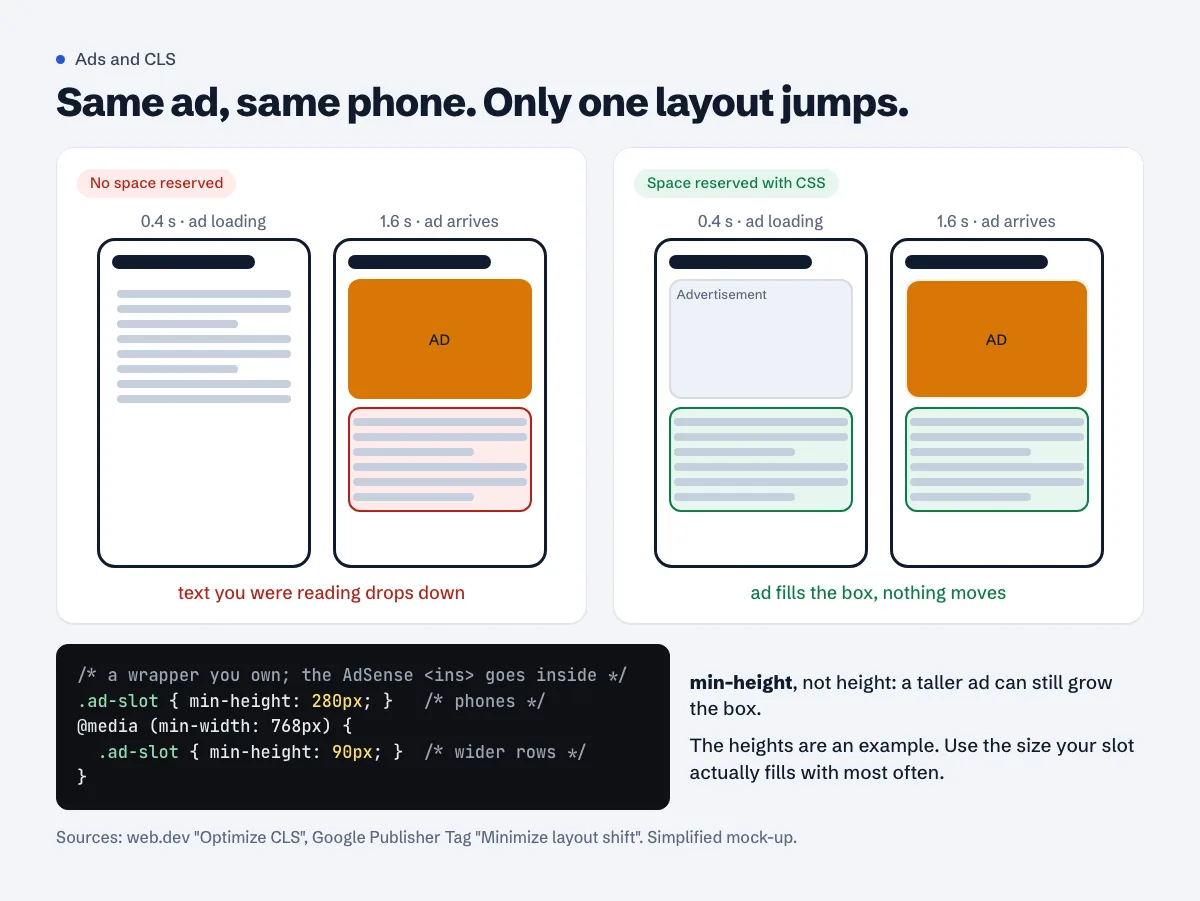
Reserve the space before the ad loads
The Publisher Tag guide is blunt: "The only guaranteed way to avoid layout shift is to reserve a sufficient amount of space for a given ad slot using CSS."
Option 1: a wrapper with min-height
Put the AdSense code inside a container you control and give the container a minimum height per screen size. You don't touch the ad code itself.
<div class="ad-slot ad-slot--in-article">
  <ins class="adsbygoogle" style="display:block"
       data-ad-client="ca-pub-1234567890123456"
       data-ad-slot="1234567890"
       data-ad-format="auto" data-full-width-responsive="true"></ins>
  <script>(adsbygoogle = window.adsbygoogle || []).push({});</script>
</div>
.ad-slot--in-article { min-height: 280px; }
@media (min-width: 768px) {
  .ad-slot--in-article { min-height: 90px; }
}
Why min-height and not height: Google's guide says it lets you "reserve a minimum amount of space for your ad slot, while still allowing the browser to increase the size of the container as necessary. This ensures that no content gets cut-off in the event that a larger creative is served."
Two rules from the same guide that people skip. Do it in CSS, not in JavaScript: "Reserving space with JavaScript should be avoided, since doing so can result in a layout shift at the time the script loads." And use media queries, because the right height on a phone is rarely the right height on a laptop.
Option 2: fix the unit's size per screen width
AdSense allows you to set exact sizes on a responsive unit with media queries. Its responsive ad code page gives this example and says these are "acceptable modifications of the AdSense ad code":
<style type="text/css">
.adslot_1 { width: 320px; height: 100px; }
@media (min-width:500px) { .adslot_1 { width: 468px; height: 60px; } }
@media (min-width:800px) { .adslot_1 { width: 728px; height: 90px; } }
</style>
<ins class="adsbygoogle adslot_1"
     style="display:block;"
     data-ad-client="ca-pub-1234567890123456"
     data-ad-slot="5678"></ins>
The trade-off: a fixed size gives zero shift but limits which ad sizes can compete for the slot. Note the small print on the same page: "setting the size of the ad unit via CSS in external style sheets is not officially supported", so keep that <style> block in the page, as in Google's example.
How tall should the box be?
Google doesn't publish a height for responsive AdSense units, so measure your own. On a phone-sized viewport in Chrome DevTools, reload the page five or six times and inspect the filled <ins> element's height each time. Then pick, as the Publisher Tag guide describes:
- The largest size you see. No shift at all, but blank space when a smaller ad fills.
- The smallest. No wasted space, some shift when a bigger ad comes.
- The most common. Its example: when 70% of impressions are 300x250, "reserving 250px vertically can greatly reduce CLS".
If no ad is returned, keep the space. web.dev: "Removing the space set aside for elements can cause just as much CLS as inserting content." A neutral background and a small "Advertisement" label make an empty box look intentional.
Move the first ad down a little
"Dynamically injected content closer to the top of the viewport usually causes greater layout shifts than content injected lower in the viewport" (web.dev). An ad after the second or third paragraph usually loads before anyone scrolls to it, and when it doesn't, it shifts less of the screen. It also helps with accidental clicks, which jumping ads tend to cause.
Anchor, vignette and Auto ads
AdSense's Auto ads settings page puts anchor and vignette ads in "Overlay formats" and says: "Overlay ads are placed over a page's content without affecting its layout." Anchor ads "stick to the top or bottom of the user's screen", and vignette ads "are full-screen ads that appear between page loads". By that description neither should push your content around. If you want anchors only at the bottom, AdSense documents a data-overlays="bottom" parameter on the ad script (anchor ad code).
In-page Auto ads are different. They're "placed within areas of a page based on the page's layout and amount of content", which means they're inserted into the flow after the page loads, and you can't reserve space for a position you don't know. Google doesn't publish how in-page Auto ads affect CLS. If your field CLS is poor and you use them, test with fewer in-page ads (there's a slider for the maximum number) or with excluded areas near the top of articles, then compare the field data a month later. The Auto ads vs manual units guide covers the trade-off.
Measure it where it counts: real users
Lab tests load the page once, without scrolling. web.dev warns that lab tools "are thus only able to measure layout shifts that occur during page load. As a result, CLS values reported by lab tools for a given page may be less than what real users experience in the field." Ads that load as people scroll are exactly the kind of shift a lab test misses.
Where to look:
- PageSpeed Insights. It shows both. web.dev puts it this way: PSI shows "the user-perceived CLS from a URL in its "Discover what your real users are experiencing" section, and the lab-based load CLS in its "Diagnose performance issues" section." The real-user data comes from the Chrome UX Report over "the previous 28-day collection period" (PSI docs). Small sites often don't have enough traffic for page-level data; PSI then falls back to the whole origin, or shows nothing.
- Search Console > Core Web Vitals. Groups similar URLs and shows "Group CLS: 75% of page requests had this score or less for cumulative layout shift in the last 28 days." After a fix, use the report's validation ("Start Tracking"), which watches for 28 days.
- Chrome DevTools. Record a reload in the Performance panel. Layout shifts appear in their own track; click one to see which elements moved.
To catch shifts while you scroll a real page, paste web.dev's snippet into the console:
new PerformanceObserver((entryList) => {
  for (const entry of entryList.getEntries()) {
    console.log('Layout shift:', entry);
  }
}).observe({type: 'layout-shift', buffered: true});
Expand each logged entry and look at sources: it lists the nodes that moved. If they all sit right below an ins.adsbygoogle, you've found your slot.
Expect a delay. Field data is a 28-day window, so a fix you ship today shows fully in the numbers about four weeks later.
Does CLS affect AdSense approval?
Google doesn't list a CLS threshold among AdSense requirements. On the Search side, Google writes: "We highly recommend site owners achieve good Core Web Vitals for success with Search and to ensure a great user experience generally." For an ad site there's a more direct reason: content that jumps under a reader's thumb makes them lose their place and sometimes tap an ad they didn't mean to. Our mobile usability guide covers the other mobile checks, and slow server response the loading side.
Test your pages on a phone
A free Approvalens scan opens your pages at two phone sizes, measures how much the layout moves while loading, and shows Google's real-user Core Web Vitals for your site when they exist: scan your site.
FAQ
Do AdSense ads always cause CLS?
No. An ad that loads into a box already the right height causes no shift. The shift comes from the page not knowing the height in advance.
Is it against AdSense policy to set a height on the ad?
Not when you follow Google's documented methods. Wrapping the code in your own container is outside the ad code, and AdSense's responsive ad code page lists exact sizes per screen width as acceptable modifications.
My PageSpeed Insights lab CLS is 0 but Search Console says Poor. Which is right?
Both, for different things. The lab test loads the page once without scrolling. Search Console reflects real visits over 28 days, including ads that load as people scroll. Fix for the field number.
Will reserving space leave ugly gaps?
Sometimes, when a smaller ad fills a taller box. Center the ad in the box and give it a light background. A small gap is a better trade than text jumping.
Do sticky anchor ads hurt CLS?
AdSense describes anchor ads as overlays "placed over a page's content without affecting its layout." If you see shifts when an anchor appears, record it in DevTools and check whether your own theme adds padding to make room for it.
Spotted something out of date or wrong? Tell us and we'll correct it.
Read this guide in Turkish →Free scan
Check your own site
The free scan reads the first 50 pages and shows your score and every problem it finds.