Yes. Nothing in Google's AdSense or publisher policies rules out calculators, converters or other online tools, and none of those pages names them as a banned or "low value" niche. What makes tool sites hard to approve is that a page with just a form and a button gives a reviewer almost nothing to read, and that tool sites tend to grow by cloning one page hundreds of times. Both run into written rules. This guide shows which ones, and what a tool page needs before ads belong on it.
The rules that actually apply to tool pages
| Rule | What it says | How tool sites run into it |
|---|---|---|
| Ads on screens without publisher content | Google doesn't allow ads on screens "without publisher-content or with low-value content", or that are "used for alerts, navigation or other behavioral purposes" (policy) | A page that is only an input box, a button and a result is close to a behavioural screen |
| AdSense program policies | Ads may not be "placed on any non-content-based page" or "on pages published specifically for the purpose of showing ads" (program policies) | Thin tool pages built to rank and carry ads |
| Insufficient content | "Make sure that your pages have sufficient text" and content with "complete sentences and paragraphs, not only headlines" (not approved) | Tool UI plus a one-line description |
| Doorway and scaled content | "Creating substantially similar pages that are closer to search results than a clearly defined, browseable hierarchy" (spam policies) | /kg-to-lbs/1, /kg-to-lbs/2 … or one calculator per city |
| Misleading functionality | Google's own example: "A site that claims to provide certain functionality (for example, PDF merge, countdown timer, online dictionary service), but intentionally leads users to deceptive ads rather than providing the claimed services" (spam policies) | Tools that don't work, or bury the result under ads |
Google's search spam policies count for AdSense too: publishers "must not place Google-served ads on screens that violate the Spam policies for Google web search" (publisher policy).
What a tool page needs
The tool is the reason people come. The text is what makes the page content rather than a widget. Each tool page should carry text that only fits that tool:
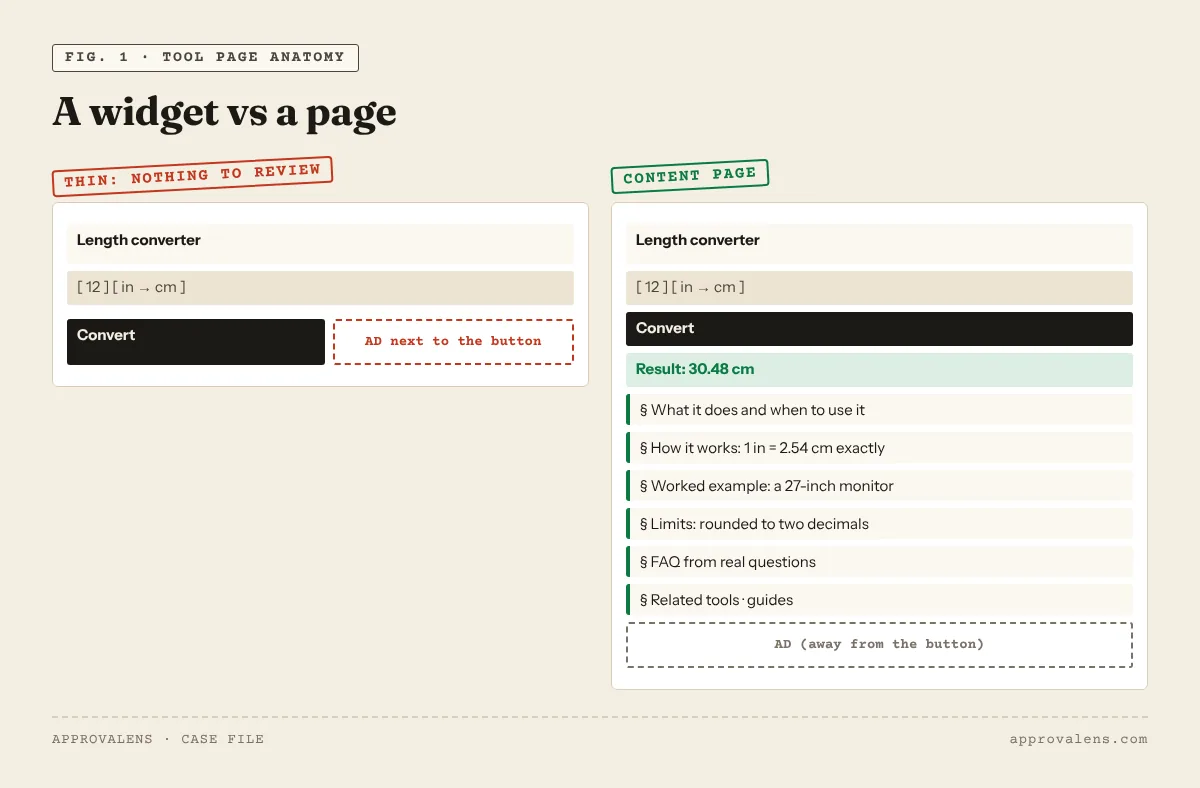
- What it does and when you'd use it. The concrete situation, not "this free online tool helps you convert easily".
- How it works. The formula, the standard, the algorithm, the data source. For a loan calculator, the amortisation formula. For a file converter, what happens to quality, metadata and transparency.
- A worked example. Real numbers or a real file, with the result explained.
- Limits and edge cases. Rounding, file size limits, unsupported formats, when not to trust the result.
- An FAQ built from real questions. The ones your users send, or the ones you had while building it.
- Links to related tools and guides. A browseable structure is the opposite of a doorway.
Write this for every tool separately. If you can swap the tool name in a paragraph and use it on another page unchanged, it's template text, and a reviewer reading three of your pages will notice.
A real example: omnvert.com
omnvert.com is a tool site run by the team behind Approvalens. Its home page lists 126 tools in 11 categories (October 2026). Its tool pages follow the pattern above. Take the STL size reducer: the tool sits at the top, then comes a section of quick links for common upload limits, then About, which explains the method (re-exporting to binary STL first, then curvature-aware mesh decimation) and gives real use cases, then How it works, an FAQ, related tools, and guides and tutorials. The HEIC converter, PDF merger and EXIF remover pages each have their own steps and questions rather than a shared template.
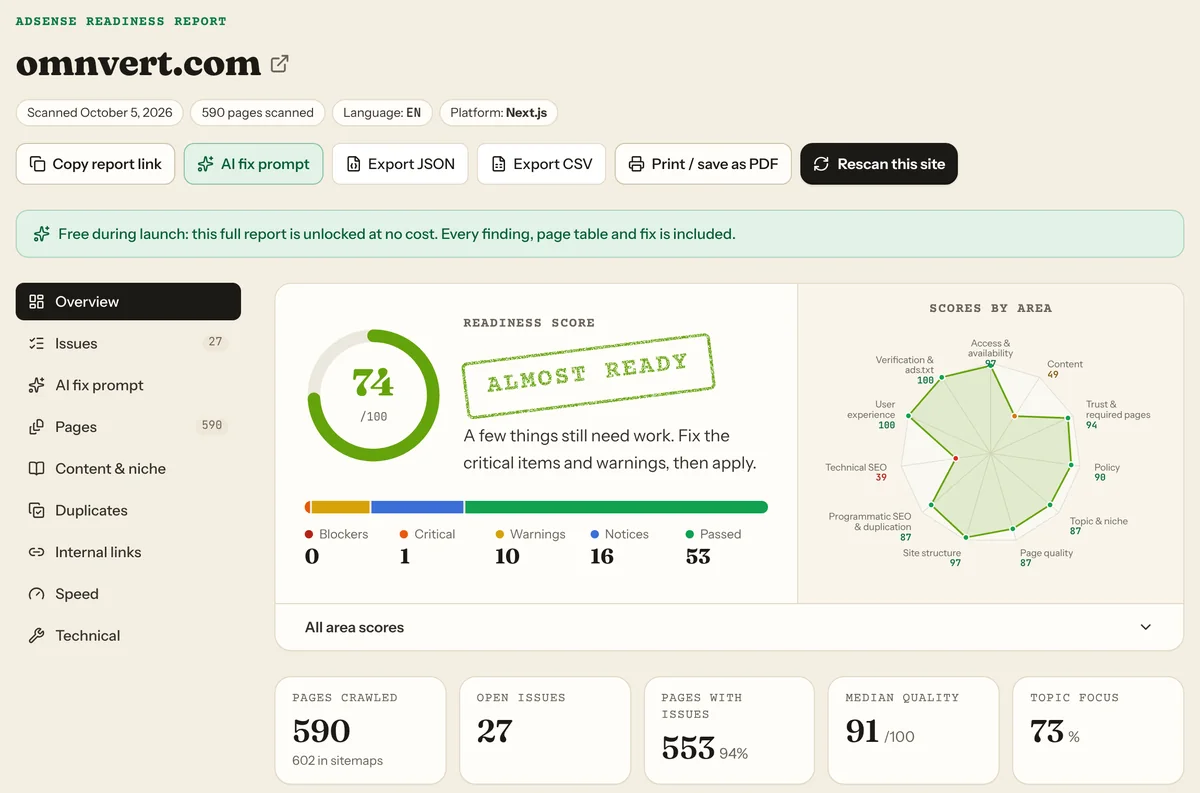
We ran a free Approvalens scan of omnvert.com for this guide. It came back "Almost ready" at 74/100. Its single critical finding wasn't about thin tool pages. It was 10 near-duplicate articles out of 570. Once a tool site has hundreds of pages, overlapping content becomes the main risk.
Programmatic pages: where tool sites get into trouble
Tool sites often generate pages for every input: every unit pair, every amount, every currency, every city. Some of these are genuinely useful (a page per currency pair can carry a live rate and history). Many are the same page with one number changed. That's the pattern Google describes as doorway abuse and scaled content abuse.
A quick test: pick ten generated pages at random and ask whether each one answers a question the others don't. If not, keep one strong page per tool and let users type the value. The programmatic SEO guide goes deeper.
Placing ads around a tool
Tools have buttons, fields and results, and that's where accidental clicks happen. From Google's ad placement policies (placement policies):
- "Be careful when placing links, play buttons, download buttons, navigation buttons … game windows, video players, drop-down menus, or applications near ads because they might lead to accidental clicks."
- Ads must not be implemented "in a way that they might be mistaken for other site content, such as a menu, navigation, or download links."
- Publishers "may not display the ads for a preset time (i.e., pre-roll) before users can view content such as videos, games, or downloads."
In practice: keep ads away from the Convert or Calculate button and the download link, don't put an ad in the space where the result will appear, and never make the user wait through an ad to get their output.
Technical checks that matter more for tools
- Content in the HTML. If the tool is a React or Vue app, make sure the explanatory text is server-rendered, not injected after load. See the Next.js and React guide. The Googlebot access checker compares what crawlers and browsers get.
- No login wall. If the tool needs an account, the page explaining it shouldn't.
- API and result URLs. Block
/api/in robots.txt if you like, but never the tool pages themselves. Check with the robots.txt tester. - Result pages with no content. If every calculation creates a shareable URL, those pages are thin by definition. Keep them out of the sitemap and out of the index.
Tool site checklist
- Every tool works without login and does what its title says
- Every tool page has its own explanation, example, limits and FAQ
- No mass-generated pages that differ only by a number or a place name
- Clear categories and related-tool links, not just a search box
- Ads kept away from buttons, inputs, results and download links
- Explanatory text is in the server HTML
- Privacy policy, about and contact pages, like any other site
Check your tool site
The free Approvalens scan groups your URLs by pattern, measures the unique text on each tool page, finds near-duplicate pages and checks what Google's crawlers receive. It's the same scan we ran on omnvert.com above.
FAQ
Is a calculator site "low value content" by definition?
No. Google's policies don't say that. A calculator page becomes low value when it has nothing on it besides the calculator, or when it's one of hundreds of near-identical pages.
How much text does a tool page need?
Google doesn't set a number. It needs enough to explain the tool, show an example and answer the real questions. For a simple converter that might be a few short sections. For a mortgage calculator, much more.
Can I put ads on the result screen?
Only if the result screen is a real page with content around the result. A bare result with an ad next to it is the kind of screen the publisher-content policy is about.
Spotted something out of date or wrong? Tell us and we'll correct it.
Read this guide in Turkish →Check it on your own site. Free, no sign-up.
Free tools for this
Free scan
Check your own site
Free scan: readiness score and every issue, usually in a few minutes.