On this page (10)
- 01How Auto ads work
- 02The Auto ads settings that matter now
- 03What manual units give you
- 04Layout shift: where the two really differ
- 05Density: what's allowed, whichever method you use
- 06Which one to choose
- 07Mixing both on the same page
- 08Before approval, none of this matters yet
- 09Check what your pages look like with ads
- 10FAQ
Auto ads are one piece of code that lets Google decide where ads go; manual ad units are snippets you place yourself. Auto ads are the faster start and the only way to get anchor, vignette and side rail ads. Manual units give you exact positions and let you reserve space so the page doesn't jump. For most small content sites the setup that works is Auto ads with a capped number of in-page ads, plus one or two manual units in places you know are good, such as an in-article unit after the second paragraph. You can run both on the same page.
How Auto ads work
Google's description (About Auto ads): "With Auto ads, you place one piece of code on all pages across your site. Auto ads will then scan your site and automatically place ads where they're likely to perform well." They "Detect any existing Google ads on your page" and place new ones "based on different elements such as your page layout, the amount of content on your page, and your existing Google ads."
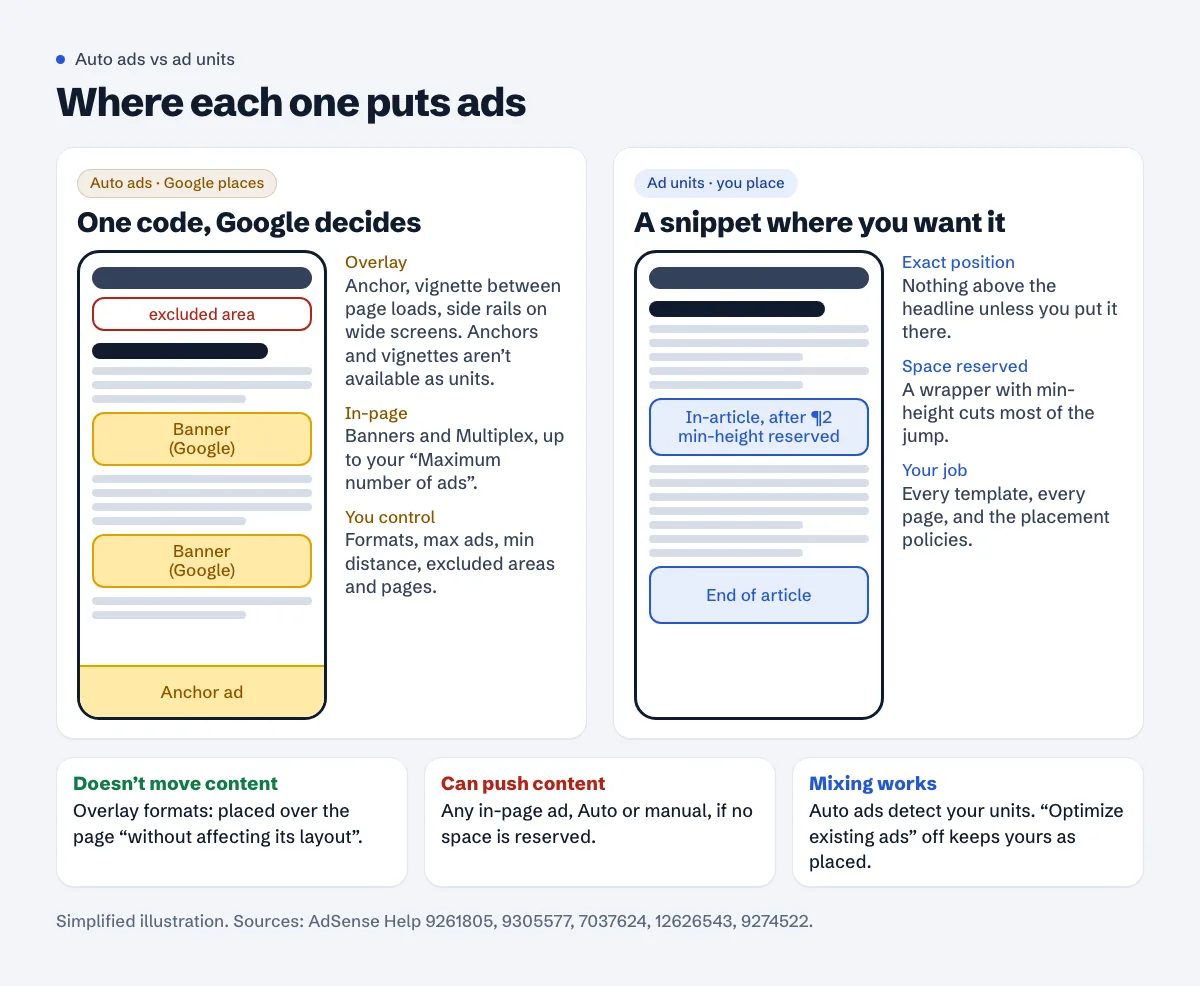
The formats come in three groups:
| Group | Formats | What they do to the page |
|---|---|---|
| Overlay | Anchor, vignette, side rail | "placed over a page's content without affecting its layout" |
| In-page | Banner (display or native), Multiplex | inserted into the content, so the page makes room for them |
| Intent-driven | Ad intents (links, anchors, chips) | turn words in your text into ad links |
Anchors "stick to the top or bottom of the user's screen and are easily dismissible"; vignettes are "full-screen ads that appear between page loads"; side rails stick to the sides "when they're viewed on widescreen devices, such as desktops." Anchors and vignettes aren't available as manual units; Google says so on Set up ads on your site: "Some ad formats such as anchors and vignettes are not available for ad units."
The Auto ads settings that matter now
Go to Ads, click Edit next to your site, and you're in the ad settings preview (Auto ads settings).
The ad load slider is gone. If an older tutorial tells you to "set ad load to minimum", that control was removed. Google's announcement from March 2026: "We're removing the ad load slider in Auto ads", with the launch "on April 16, 2026". Your old setting was migrated as an approximation, and Google says "You're encouraged to review the new values to ensure they meet your needs." The replacement, under In-page formats > Advanced settings > Banner ads:
- Maximum number of ads on a page: "the maximum number of in-page ads to show on your pages."
- Minimum distance between ads on a page: "how much space you want in between your in-page ads."
- Find more ad placements on article pages: more possible positions; Google notes it "doesn't necessarily mean that Auto ads will show more ads."
- Allow Google to optimize existing ads: lets Google manage "your existing ad units and your Auto ads together."
Overlay formats each have a switch and a few options: anchor position (top or bottom, top only, bottom only), whether anchors and vignettes may appear "on screens wider than 1000px", vignette frequency, and side rail position (left and right, left only, right only).
Excluded areas stop in-page ads in a part of your layout, for example right under the header. Note the limit: "Excluded areas only apply to in-page Auto ads... it won't prevent overlay ads such as anchors ads from appearing" (exclude areas). They're stored as CSS selectors, so a theme update that renames elements can quietly undo them.
Excluded pages switch Auto ads off on a URL or a whole section (page exclusions). URLs with # fragments or ? parameters aren't supported. Every change "can take up to an hour" to apply.
What manual units give you
Ad units are "one or more Google ads displayed as a result of one piece of the AdSense ad code." The main types are display (responsive by default), in-feed, in-article and Multiplex.
Two that suit content sites:
- Responsive display units adapt to the space. They need a parent with a real width, and Google warns that "Responsive ads should not be placed inside containers with a fixed or limited height" (responsive ad units).
- In-article units sit between paragraphs. Google suggests placing the code "two paragraphs below the start of the article", and if you use several, to "allow sufficient content between ads to minimize disruption to your readers" (create an In-article ad unit). Minimum width is 250px.
The cost of manual units is maintenance: "Ad units are manual, so don't forget to place them on all your pages where you want ads to show", and placement policy is on you: "It's up to you to ensure that your ads comply with the AdSense Program policies."
Layout shift: where the two really differ
Overlay formats don't push content around. In-page ads can, whether Google or you place them, because the browser has to make room when the ad arrives. If the reader is mid-sentence, the text jumps.
With manual units you can cut most of that by reserving the space. Google's publisher tag documentation states the principle for any ad slot: "The only guaranteed way to avoid layout shift is to reserve a sufficient amount of space for a given ad slot using CSS" (minimize layout shift). For an AdSense in-article unit that means a wrapper with a min-height close to what usually fills:
<div class="ad-slot" style="min-height:280px">
  <ins class="adsbygoogle" style="display:block; text-align:center;"
       data-ad-layout="in-article" data-ad-format="fluid"
       data-ad-client="ca-pub-1234567890123456" data-ad-slot="1234567890"></ins>
</div>
(Example values. Copy your own code from the Ads page.) In-article units are fluid (data-ad-format="fluid"), so the height can still change a little. For fluid slots on its publisher tag, Google says they "always cause layout shifts" and recommends "Only use the fluid size for slots below the fold." The same reasoning is why the in-article unit belongs after the second paragraph, not above the headline. Reserve too much and you get a gap when the unit is unfilled; reserve nothing and the page jumps. With Auto ads in-page formats you don't control that wrapper, which is why the Maximum number of ads and Minimum distance settings, plus an excluded area above the fold, matter for layout stability. Google's own threshold for a "good" page is a 75th percentile CLS "less than 0.1", counting all shifts, not just ads. The ads and layout shift guide goes deeper on measuring it.
Density: what's allowed, whichever method you use
The policy is the same for both. Google doesn't allow Google-served ads on screens "with more ads or other paid promotional material than publisher-content" (more ads than content), and publisher-content "does not include whitespace, header or footer content, or links to other content on the site." The same page: "remember less can be more."
Auto ads with a high maximum on short pages is an easy way to drift close to that line. So is a manual setup copied from a long-article template onto 300-word pages. Placement near buttons and menus is its own problem; the accidental clicks guide covers it.
Which one to choose
| Your site | What tends to work |
|---|---|
| New blog, a few templates, little time | Auto ads, banners capped low, anchors on, vignettes at a modest frequency |
| Long articles with a fixed layout | Manual in-article and end-of-article units with reserved space, Auto ads for anchors and side rails only |
| Tool or calculator pages | Manual units away from inputs and buttons; exclude tool pages from in-page Auto ads |
| Forum or user-generated content | Auto ads with page exclusions for thin pages, or manual units in thread templates |
| Strong opinions about every pixel | Manual units, plus Auto ads with in-page formats off to keep the overlay formats |
Not sure? Let AdSense test it. When you apply Auto ads settings you can choose Run experiment first: "AdSense will run an experiment on 50% of your site's traffic for 90 days" (set up Auto ads). That beats guessing from forum screenshots.
Mixing both on the same page
It's supported. Auto ads see the manual units already on the page and work around them; the preview lets you "View how Auto ads work with your existing ad units" (preview Auto ads).
Two settings decide how the mix behaves. Allow Google to optimize existing ads on: Google may manage your units and Auto ads together. Off: your units stay as they are, and Auto ads only add to them. If you've placed units carefully for layout reasons, turn it off. And set the Maximum number of ads with your manual units in mind, so the two don't add up to a page that's mostly ads.
Before approval, none of this matters yet
For the application you only need the AdSense code (or meta tag, or ads.txt) on the site. No units have to be placed. Pick the method after the site is Ready; if ads then don't appear, the ads not showing checklist goes through the usual causes.
Check what your pages look like with ads
A free Approvalens scan counts ad units against the text on each page and measures layout shift on two phone sizes, so you can see whether your setup crowds or jumps: scan your site.
FAQ
Are Auto ads better for revenue than manual units?
Google doesn't publish a general comparison, and it depends on the site. Run an Auto ads experiment on half your traffic and compare.
Can I use Auto ads and still choose where some ads go?
Yes. Place manual units where you want them; Auto ads detect existing ads and fill around them. Use excluded areas to keep in-page Auto ads out of a region.
Why can't I find the ad load slider?
Google removed it on April 16, 2026 and replaced it with "Maximum number of ads" and "Minimum distance between ads" under the banner ads advanced settings.
Do anchor ads cause layout shift?
They're an overlay format, which Google describes as placed over the content "without affecting its layout". In-page ads are the ones that can push content.
How many manual ad units can I put on a page?
There's no fixed number in the policy. The rule is that ads and paid promotion must not exceed publisher-content on a screen.
Spotted something out of date or wrong? Tell us and we'll correct it.
Read this guide in Turkish →Free scan
Check your own site
The free scan reads the first 50 pages and shows your score and every problem it finds.