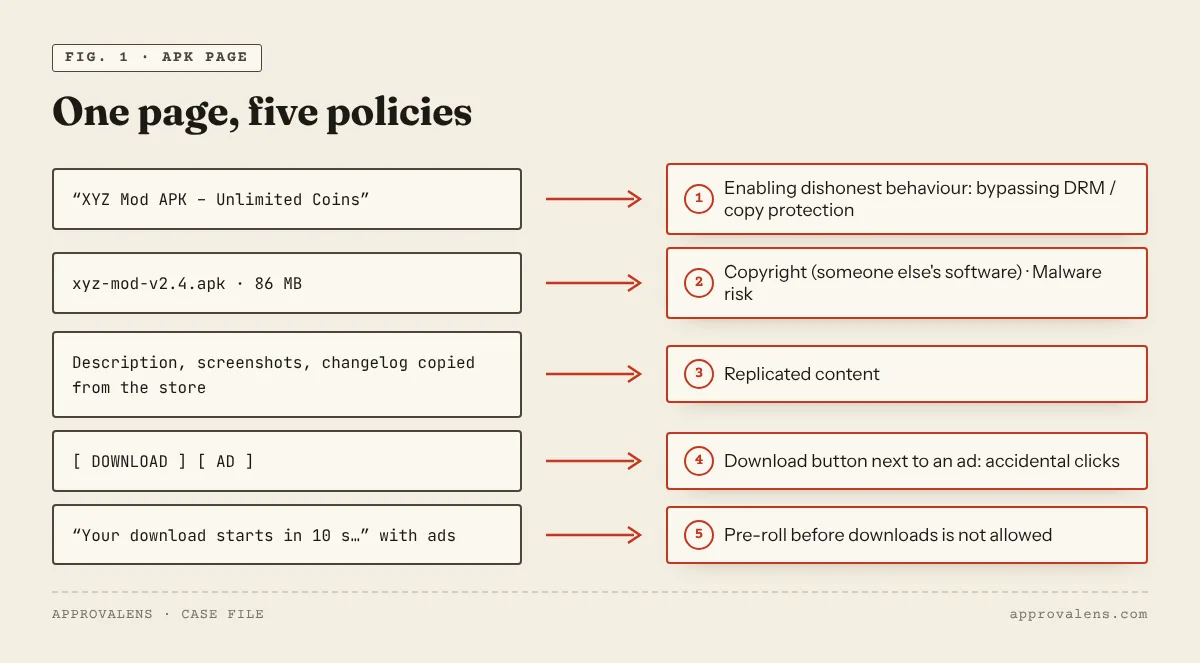
An APK site is the niche where Google's written policies line up most directly against the business model. No policy page mentions "APK" by name, and Google publishes no rejection numbers. But a typical APK download page touches four or five separate policies at once: copyright, circumvention, malware, copied content and download-button placement. Changing one setting won't fix that. This guide maps each part of the page to the rule it touches and describes what an app site AdSense can accept looks like.
Copyright: whose app is it?
An app's code, name, icon, screenshots and store description belong to its developer. Re-hosting a paid app, or a free one without permission, is distributing someone else's software. Google doesn't allow ads on content that "infringes copyright" (intellectual property abuse) and lists "software" among the copyrighted content behind account closures (account closures).
Mods, cracks and "premium unlocked"
"Mod APK", "unlimited money", "premium unlocked" and "ad-free" versions go beyond copying. Google's enabling dishonest behaviour policy covers content that "promotes any form of hacking or cracking and/or provides users with instructions, equipment, or software that tampers with or provides unauthorized access to devices, software, servers, or websites", including "products or services that bypass copyright protection, including circumvention of digital rights management technologies" (dishonest behaviour). That is exactly what a modded APK does. The same goes for "free diamond/coin generator" pages, which Google's spam policies describe as "a fake generator that claims to provide app store credit but doesn't actually provide the credit" (spam policies).
Malware: the risk you can't see
You usually can't verify what a third-party build contains, and a modified app can carry code its developer never wrote. Google's publisher policy bars ads on screens that contain "malicious software or 'malware' that may harm or gain unauthorized access to a computer, device, or network", and lists unwanted-software behaviour like "bundling software or applications without the user's knowledge" (malware or unwanted software). Google Search's spam policies add a warning that fits APK sites: "Site owners sometimes don't realize that their downloadable files are considered malware, so these binaries might be hosted inadvertently."
If Google Safe Browsing flags a file you host, the whole site can carry a warning. Check Security issues in Search Console, and remember that a clean result today says nothing about the next file you upload.
Copied store listings
Most APK pages reuse the app's Play Store description, screenshots and changelog. That's replicated content: Google bars ads on content "copied from others without additional commentary, curation, or otherwise adding value" (replicated content). Thousands of pages built from one template and an app database are also the "substantially similar pages" Google's spam policies describe as doorways.
Download buttons, countdowns and shorteners
The layout of a download page is a policy problem of its own:
- Ads must not be implemented "in a way that they might be mistaken for other site content, such as a menu, navigation, or download links", and download buttons near ads "might lead to accidental clicks" (placement policies).
- Publishers "may not display the ads for a preset time (i.e., pre-roll) before users can view content such as videos, games, or downloads". The classic "your download starts in 10 seconds" page with ads around it is a pre-roll.
- Deceptive site navigation includes "false claims of streaming content, or downloads", and sites may not "initiate downloads" or "redirect users to unwanted websites" (program policies).
- Paid link shorteners in front of the file add ad pages and countdowns before the real link. The Approvalens scan flags them separately.
What an app site AdSense can accept looks like
| Instead of | Publish |
|---|---|
| APK files of other people's apps | Links to the official store page or the developer's own download |
| Mod, cracked or "premium" versions | Nothing. There's no compliant version of this |
| Copied store descriptions | Hands-on reviews: what you tested, on which device, what works and what doesn't |
| One template page per app | Comparisons, alternatives, how-to guides and troubleshooting for real problems |
| Countdown download pages | A plain link to the official source, away from any ad |
Hosting files can still be legitimate: your own apps, or open-source apps whose licence allows redistribution, served with the licence, the source link and a checksum. Even then, the page needs your own description and content around the download, and the button needs to stay well away from the ads.
APK site checklist
- No paid, modded, cracked or "unlocked" apps
- No files of apps you don't own or have no licence to redistribute
- Downloads link to the official store or developer where possible
- Every app page has your own review or guide, not the store description
- No countdowns, link shorteners or fake download buttons
- Ads planned well away from any download link
- Search Console shows no security issues
- No "generator" or "hack" pages
Check your site
The free Approvalens scan flags wording linked to piracy and mods, fake generators, paid link shorteners and Safe Browsing status, and compares app pages for copied templates. It won't make an APK mirror approvable, but it shows which pages stand between your site and a compliant one.
FAQ
Can an APK site get AdSense if it only hosts free apps?
Free doesn't mean you may redistribute it. The developer's permission or an open-source licence is what makes hosting legitimate. And copied store text is still replicated content.
What about linking to APKs hosted elsewhere?
Google's policy covers content that "promotes" cracking, not only hosting it, so a page built around links to modded files has the same problem. Link to the official store or the developer's site.
Are app review sites OK?
Yes. Reviews, comparisons and guides you wrote yourself are content. Link to the official download instead of hosting the file.
Spotted something out of date or wrong? Tell us and we'll correct it.
Read this guide in Turkish →Check it on your own site. Free, no sign-up.
Free tools for this
Free scan
Check your own site
Free scan: readiness score and every issue, usually in a few minutes.