For a blog that runs ads, five security headers are safe one-liners you can add today: Strict-Transport-Security, X-Content-Type-Options, X-Frame-Options (or CSP frame-ancestors), Referrer-Policy and a short Permissions-Policy. The sixth, Content-Security-Policy, is the one that can stop your ads. Google supports only one kind of CSP for AdSense, a nonce-based "strict" policy; the domain allowlists most generators produce are exactly what it doesn't support. If you're not ready to put a nonce on every script, use a CSP that doesn't restrict scripts at all, or none.
None of these headers are an AdSense or Google Search requirement. They protect your readers and your site, and a scanner that flags them missing is pointing at cheap hardening, not a rejection reason.
The headers that matter, and which ones can break ads
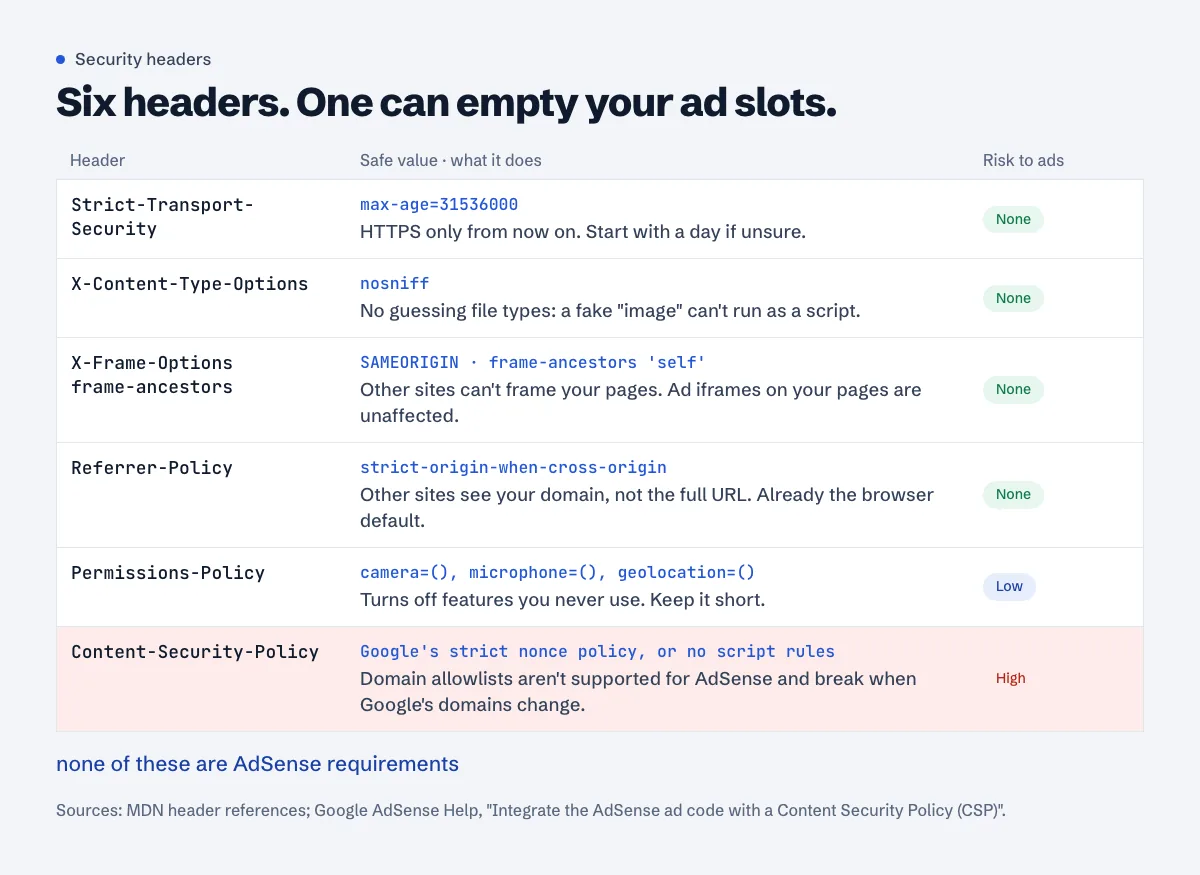
Strict-Transport-Security (HSTS)
Tells browsers to use only HTTPS for your domain from now on. MDN's summary: it "informs browsers that a host should only be accessed using HTTPS", and it also stops visitors from clicking through certificate errors (MDN, Strict-Transport-Security).
Strict-Transport-Security: max-age=31536000
That's one year. Start shorter if you're unsure every page and every subdomain works over HTTPS (a day, max-age=86400), check the site, then raise it. The risk with HSTS isn't ads, it's yourself: once a browser has seen it, a broken certificate becomes a hard error with no "continue anyway" link until max-age runs out. Keep certificate renewal in good shape before you turn it on.
Add includeSubDomains only when every subdomain has HTTPS, including ones you forgot about (mail., old., shop.). Leave preload off unless you've read the requirements at hstspreload.org: a max-age of at least 31536000, includeSubDomains, and HTTPS on all subdomains. MDN notes that removal from the preload list is slow.
X-Content-Type-Options
X-Content-Type-Options: nosniff
MDN: it "Blocks a request if the request destination is of type style and the MIME type is not text/css, or of type script and the MIME type is not a JavaScript MIME type" (MDN, X-Content-Type-Options). On a correctly configured server it changes nothing visible. It matters when someone uploads a file that looks like a script.
X-Frame-Options and frame-ancestors (clickjacking)
X-Frame-Options: SAMEORIGIN
Content-Security-Policy: frame-ancestors 'self'
These control whether other sites may show your pages inside a frame. They don't affect the ad iframes on your own pages, so they're safe for AdSense. MDN points to frame-ancestors as the modern replacement and warns that X-Frame-Options set in a <meta> tag "has no effect"; it only works as an HTTP header (MDN, X-Frame-Options). Sending both is fine. If you run a widget that other sites embed on purpose, list those sites in frame-ancestors instead of 'self'.
Referrer-Policy
Referrer-Policy: strict-origin-when-cross-origin
This is already the browser default: MDN says it is "the default policy if no policy is specified" (MDN, Referrer-Policy). Other sites you link to see https://example.com/, not the full path and query string. Setting it explicitly mostly guards against a plugin or old config that set unsafe-url. Don't go to no-referrer on a blog: the sites you link to and your own analytics on other domains then can't tell traffic came from you.
Permissions-Policy
Permissions-Policy: camera=(), microphone=(), geolocation=()
Switches off browser features your pages never use, for your page and the frames on it (MDN, Permissions-Policy). Keep it to features you're sure about. Long policies copied from header generators also turn off things like fullscreen or autoplay, which embedded videos rely on, and you'll spend an afternoon finding out why a YouTube embed won't go full screen.
Content-Security-Policy and AdSense: what Google supports
Google has a help page for exactly this: Integrate the AdSense ad code with a Content Security Policy (CSP). The key lines:
- "Note that publishers are not required to use CSP."
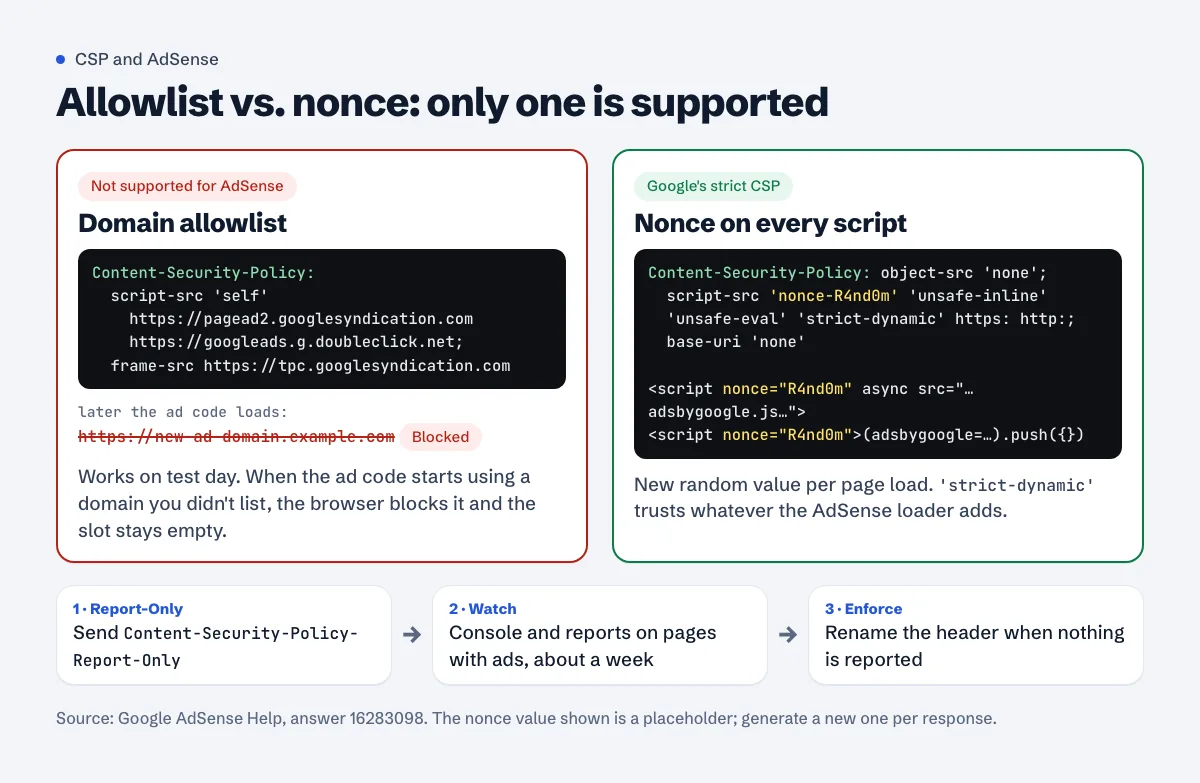
- "Because the domains that the AdSense ad code uses change over time, we only support strict CSP (option 2)." Option 2 is the nonce approach; option 1, a list of allowed domains, is the one they don't support.
- "Important: You must update your site's CSP to comply with our documented guidance. Failure to do so may result in a disruption of ad serving on your site."
- After the example policy: "You can choose a more permissive policy if it fits your use case. More restrictive policies may break without notice."
The policy Google documents:
Content-Security-Policy:
    object-src 'none';
    script-src 'nonce-{random}' 'unsafe-inline' 'unsafe-eval' 'strict-dynamic' https: http:;
    base-uri 'none';
    report-uri https://your-report-collector.example.com/
{random} is a new random value on every page load, and every <script> tag on the page has to carry it, including both AdSense tags (the adsbygoogle.js loader and the inline (adsbygoogle = window.adsbygoogle || []).push({});). 'strict-dynamic' then lets the scripts AdSense loads run without you listing their domains. The 'unsafe-inline' and https: http: parts are fallbacks that browsers supporting 'strict-dynamic' ignore. Google Publisher Tag has the same rule on its CSP page: "we only support strict CSP".
Why the usual CSP breaks ads
The CSP you get from most header generators looks like script-src 'self' https://pagead2.googlesyndication.com ... plus a frame-src list. It works the day you test it. Then the ad code loads a script or a frame from a domain that isn't on your list, the browser blocks it, and the ad slot stays empty. AdSense won't tell you why; you'll see emptier slots and a console full of Refused to load messages. That's the "may break without notice" Google warns about.
Three sane options for a blog
No CSP. Google says it isn't required. You lose the script-injection protection, and a scanner will list it as missing.
A CSP that doesn't touch scripts. This doesn't restrict where scripts, frames or images load from, so it doesn't get in the way of ad code, but it still does useful work:
Content-Security-Policy: frame-ancestors 'self'; object-src 'none'; base-uri 'self'; upgrade-insecure-requestsupgrade-insecure-requestsalso quietly fixes leftoverhttp://images after a move to HTTPS (see mixed content after HTTPS for finding them properly).Google's strict CSP with nonces. The real protection against injected scripts. Practical when you control the HTML generation (a custom theme, Next.js, a static generator that can template a nonce, or a server that rewrites script tags). On a WordPress site with twenty plugins that print their own inline scripts, getting a nonce onto every one of them is a project, not a header.
Test with Report-Only first
Whatever you choose, Google's advice is to start with Content-Security-Policy-Report-Only: "The header reports violations but still allows them on the page." Ship it, open a few pages with ads in Chrome, and watch DevTools > Console for [Report Only] messages. No messages for a week of normal traffic (or in your report collector, if you set report-uri), then rename the header to Content-Security-Policy.
Copy-paste configs
The examples below use option 2 for CSP. Swap in Google's strict policy only if you've done the nonce work.
nginx
Inside the server { } block that listens on 443:
add_header Strict-Transport-Security "max-age=31536000" always;
add_header X-Content-Type-Options "nosniff" always;
add_header X-Frame-Options "SAMEORIGIN" always;
add_header Referrer-Policy "strict-origin-when-cross-origin" always;
add_header Permissions-Policy "camera=(), microphone=(), geolocation=()" always;
add_header Content-Security-Policy "frame-ancestors 'self'; object-src 'none'; base-uri 'self'; upgrade-insecure-requests" always;
always makes nginx send the headers on error pages too. The trap: nginx's headers module docs say add_header directives "are inherited from the previous configuration level if and only if there are no add_header directives defined on the current level." So a location block that adds its own Cache-Control header silently drops all six above for those URLs. Repeat them there, put them in a snippet you include in each block, or on nginx 1.29.3 and newer use add_header_inherit merge;. Test with sudo nginx -t, then sudo systemctl reload nginx.
Apache and .htaccess (most cPanel hosts)
<IfModule mod_headers.c>
  Header always set Strict-Transport-Security "max-age=31536000"
  Header always set X-Content-Type-Options "nosniff"
  Header always set X-Frame-Options "SAMEORIGIN"
  Header always set Referrer-Policy "strict-origin-when-cross-origin"
  Header always set Permissions-Policy "camera=(), microphone=(), geolocation=()"
  Header always set Content-Security-Policy "frame-ancestors 'self'; object-src 'none'; base-uri 'self'; upgrade-insecure-requests"
</IfModule>
Put it at the top of .htaccess in the site root, above the WordPress block. Sending HSTS on plain HTTP responses does no harm; MDN: "The header is ignored if sent over insecure HTTP". LiteSpeed, common on shared hosting, accepts the same Header lines in .htaccess. If the site shows a 500 error after the change, mod_headers isn't available or a line has a typo: remove the block and ask the host.
Cloudflare
For HSTS use the built-in setting: SSL/TLS > Edge Certificates > HTTP Strict Transport Security (HSTS). Read Cloudflare's HSTS caution first: after enabling it, don't switch records from Proxied to DNS only, pause Cloudflare or let the certificate lapse, or "your website becomes inaccessible to visitors for the duration of the Max Age Header".
For the rest, a Response Header Transform Rule (Cloudflare docs): Rules > Overview > Create rule > Response Header Transform Rule, apply it to all incoming requests, and for each header pick Set static, then enter the name and value. One rule can modify up to 30 headers. "Set" overwrites a header your server already sends, which avoids duplicates; "Add" doesn't. If you redirect www with Cloudflare too, the www redirect guide shows where those rules live.
WordPress without server access
Some security plugins and some hosts' panels can add these headers. Pick one place. Two sources of the same header (the plugin and .htaccess, or the server and Cloudflare "Add") produce duplicates, and two different CSP headers are both enforced, so the stricter combination wins.
Check what you're actually sending
curl -sI https://example.com/ | grep -iE "strict-transport|x-content-type|x-frame|referrer-policy|permissions-policy|content-security"
Check an article URL and an image or CSS file too, not just the home page. That's where the nginx inheritance trap and cache rules show up. Then open a page with ads and look at the console for blocked requests.
What headers won't fix
Headers make some attacks harder. They don't clean a site that's already compromised: injected scripts in the database or a theme file keep running, because your own server serves them. If you're there, start with hacked site, Safe Browsing and AdSense. Headers also won't help a redirect loop; that's redirect chains and loops.
Check your headers in one go
The free security headers checker fetches a page and lists each of the headers above with what it found and what's missing.
FAQ
Does AdSense require security headers?
No. Google's CSP article even says "publishers are not required to use CSP". The headers protect readers; they're not part of the approval checks.
Will X-Frame-Options DENY stop my ads from showing?
No. It controls whether other sites can frame your pages, not whether your pages can contain frames. SAMEORIGIN is the more practical choice because some of your own tools (previews, page builders) may frame your pages.
My CSP shows "Refused to load the script" for a Google domain. What do I do?
Your policy is an allowlist, which Google doesn't support for AdSense. Switch to report-only, then either move to the strict nonce policy Google documents or drop script-src and frame-src from the policy.
How long should HSTS max-age be?
One year (31536000) is common once everything works over HTTPS. Start with a day or a week if you're unsure, because the browser enforces whatever value it saw last until it expires.
Can I set these headers with a meta tag?
Only CSP, partially. HSTS, X-Frame-Options and frame-ancestors don't work from <meta>; they must be HTTP response headers.
Spotted something out of date or wrong? Tell us and we'll correct it.
Read this guide in Turkish →Check it on your own site. Free, no sign-up.
Free tools for this
Free scan
Check your own site
The free scan reads the first 50 pages and shows your score and every problem it finds.