On this page (10)
- 01First, check what the server is actually serving
- 02How long Let's Encrypt certificates last in 2026
- 03Step 1: is renewal scheduled at all?
- 04Step 2: run a dry run and read the error
- 05Common renewal failures and fixes
- 06Then renew for real
- 07cPanel AutoSSL and Plesk (shared hosting)
- 08Does an expired certificate hurt AdSense or Google?
- 09Know before it expires
- 10FAQ
If a Let's Encrypt certificate expired, renewal didn't break yesterday. Certbot tries to renew well before the end date, so an expired certificate means renewal has been failing quietly for weeks, or the new certificate was issued and your web server never loaded it. The fix is almost always the same order: check what the server actually serves, run sudo certbot renew --dry-run, read the one line that says why it failed, fix that, renew for real and reload the web server.
First, check what the server is actually serving
The certificate on disk and the one your visitors get aren't always the same. Ask the server:
echo | openssl s_client -connect example.com:443 -servername example.com 2>/dev/null | openssl x509 -noout -dates -issuer -ext subjectAltName
Then compare with what certbot has:
sudo certbot certificates
Three outcomes:
- Both show the old date. Renewal is failing. Keep reading.
- Certbot shows a new date, the server shows the old one. Renewal worked; the web server wasn't reloaded. Run
sudo systemctl reload nginx(orapache2), and add a deploy hook so it happens automatically next time (see The web server wasn't reloaded). - The served certificate isn't from Let's Encrypt at all. Something in front of the server answers HTTPS: Cloudflare, your host's proxy, a load balancer. Renewing on the server won't change what visitors see.
How long Let's Encrypt certificates last in 2026
Let's Encrypt's certificate lifetime page says: "Since our initial launch in 2015, Let's Encrypt has offered certificates with 90-day lifetimes." That's changing. The schedule from their announcement of 2 December 2025, Decreasing Certificate Lifetimes to 45 Days:
| Date | Change |
|---|---|
| 13 May 2026 | The opt-in tlsserver profile issues 45-day certificates |
| 10 February 2027 | The default classic profile moves to 64-day certificates |
| 16 February 2028 | The classic profile moves to 45-day certificates |
The same post warns that "renewing at a hardcoded interval of 60 days will no longer be sufficient". If you renew with a monthly cron line you wrote yourself, or once every two months by hand, that stops working in February 2027.
Certbot handles this already if it's recent. Its user guide says: "As of Certbot 4.0.0, a certificate is considered ready for renewal when less than 1/3rd of its lifetime remains." Before 4.0.0 it was a fixed 30 days. Check yours with certbot --version.
One more change people miss: Let's Encrypt stopped sending expiry reminder e-mails ("We will be ending this service on June 4, 2025"). Older setups relied on those mails as a safety net. There's no warning any more unless you set one up.
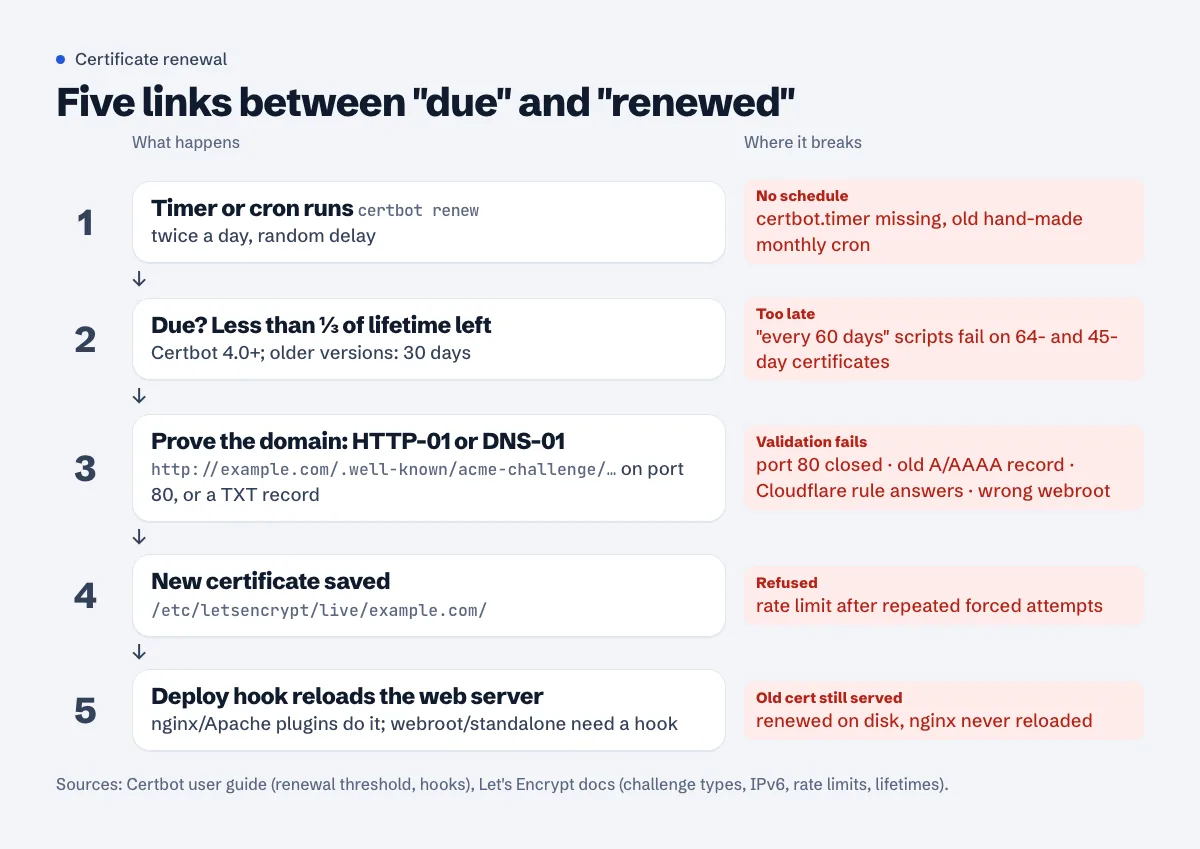
Step 1: is renewal scheduled at all?
Certbot's guide: "Most Certbot installations come with automatic renewals preconfigured." Check that yours did:
systemctl list-timers | grep -i certbot
grep -rs certbot /etc/crontab /etc/cron.d/
On Ubuntu and Debian you'll usually see certbot.timer (apt package) or snap.certbot.renew.timer (snap). Both are fine. Systemd timers and cron do the same job here; the timer has the advantage that journalctl keeps its output:
journalctl -u certbot.service --since "-30 days" | tail -n 30
sudo tail -n 50 /var/log/letsencrypt/letsencrypt.log
If you find nothing, the certbot guide gives a cron line to add. It runs twice a day with a random delay, which is normal: "renew" only acts on certificates that are due, so running it often costs nothing.
SLEEPTIME=$(awk 'BEGIN{srand(); print int(rand()*(3600+1))}'); echo "0 0,12 * * * root sleep $SLEEPTIME && certbot renew -q" | sudo tee -a /etc/crontab > /dev/null
Don't add a second schedule if one exists. Certbot says it copes with both, but two schedules make it harder to know which one logs what.
Step 2: run a dry run and read the error
sudo certbot renew --dry-run
--dry-run talks to Let's Encrypt's staging server, "obtaining test (invalid) certificates but not saving them to disk". It does the real validation, so it fails for the same reason the real renewal does, without touching your live certificate or your rate limits.
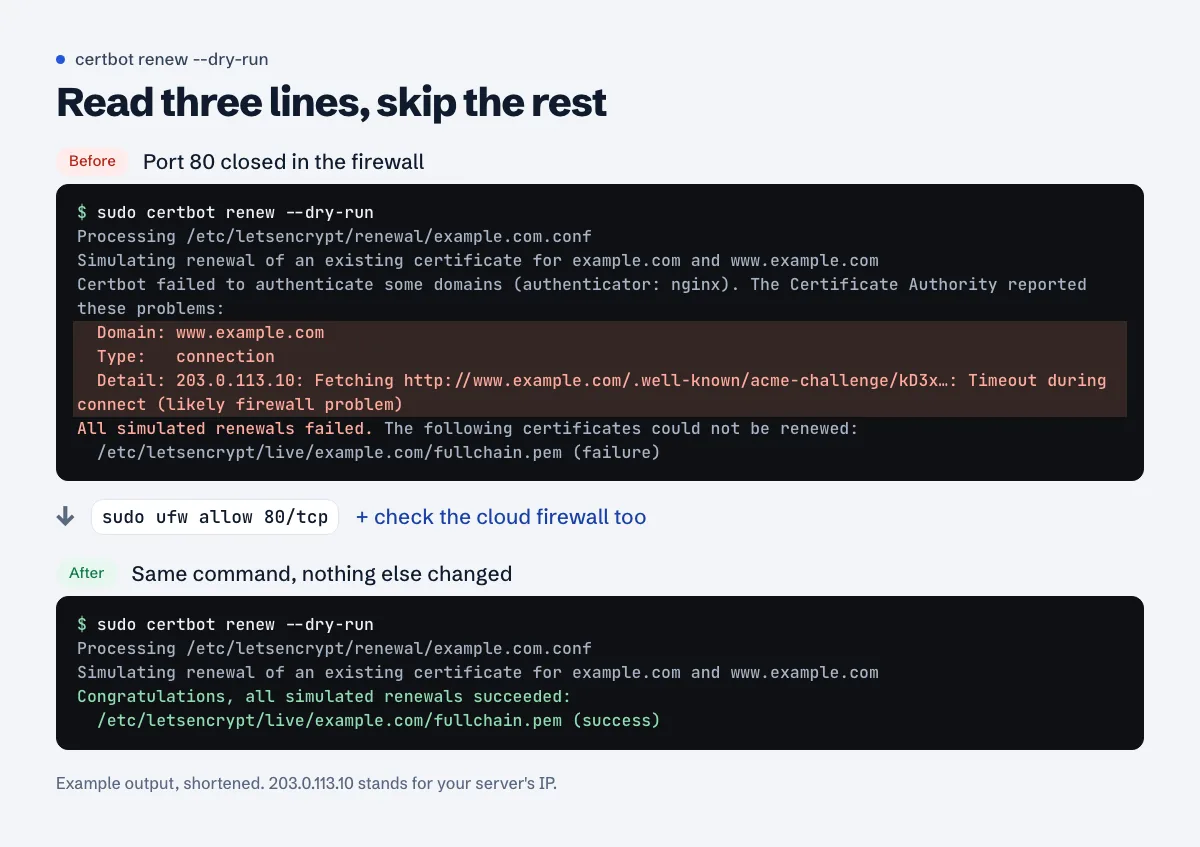
Type: and Detail: lines name the cause; everything else is boilerplate.The lines that matter are Domain:, Type: and Detail:. The common ones, and their fixes, follow.
Common renewal failures and fixes
Port 80 is blocked
Type: connection, Detail: ... Timeout during connect (likely firewall problem).
The nginx, Apache, webroot and standalone plugins all use the HTTP-01 challenge, and Let's Encrypt's challenge types page is blunt: "The HTTP-01 challenge can only be done on port 80." People close port 80 after switching to HTTPS, and renewal dies 60 days later. Open it again and keep the http → https redirect; Let's Encrypt follows redirects to HTTPS.
sudo ufw allow 80/tcp
Check your cloud provider's firewall too (security group, network firewall in the panel). Both have to allow port 80.
DNS points somewhere else, or an old AAAA record
Type: unauthorized with Invalid response ... 404, or a timeout on an IPv6 address you don't recognise.
Run dig +short A example.com and dig +short AAAA example.com for every name on the certificate. Let's Encrypt's IPv6 notes say it "will always prefer the IPv6 addresses for the initial connection", and only falls back to IPv4 when the IPv6 connection times out. A leftover AAAA record that points at an old server which answers with a 404 breaks validation even though the A record is correct. Delete or fix it.
Cloudflare proxy in front of the server
With the orange cloud on, Let's Encrypt's request for /.well-known/acme-challenge/... reaches Cloudflare first and Cloudflare passes it to your server. That often works. It fails when something at Cloudflare answers instead of your server: a WAF or bot rule that challenges the request, "I'm Under Attack" mode, a redirect rule or a Worker on that path. The Detail: line then shows a 403, a 503 or an HTML challenge page.
Two durable fixes:
- Switch to DNS-01. The certbot-dns-cloudflare plugin creates the TXT record through Cloudflare's API with a token that has "Zone:DNS:Edit" permission. Validation no longer touches port 80 or the proxy at all, and it can issue wildcards.
- Use a Cloudflare Origin CA certificate between Cloudflare and your server, with SSL/TLS mode Full (strict), and let Cloudflare handle the public certificate. Cloudflare's Origin CA docs warn that visitors see "untrusted certificate errors if you pause Cloudflare or disable proxying", so only do this if the site stays behind the proxy.
If you only need to get out of trouble today, pausing the security rule for the challenge path, or temporarily setting the record to DNS only, lets a renewal through. Then move to one of the two fixes above.
The webroot path is wrong
Type: unauthorized, Detail: ... Invalid response from http://example.com/.well-known/acme-challenge/...: 404, plus a hint about --webroot-path.
Certbot writes the challenge file into the folder saved at issue time, and you've since moved the site (new theme folder, Docker volume, public/ instead of html/). Look at /etc/letsencrypt/renewal/example.com.conf for webroot_path. Certbot's guide shows the safe way to change it: dry-run with the new path, then make it permanent.
sudo certbot renew --cert-name example.com --webroot-path /var/www/example/public --dry-run
sudo certbot renew --cert-name example.com --webroot-path /var/www/example/public --force-renewal
On Certbot 2.3.0 and newer, certbot reconfigure --cert-name example.com does the same thing more cleanly. Don't hand-edit the renewal file; certbot's own docs advise against it.
Standalone plugin, but nginx holds port 80
Could not bind TCP port 80 because it is already in use by another process. The certificate was first issued with --standalone when no web server was running. Either switch the certificate to the nginx or webroot plugin, or stop and start the web server around renewal with hook files in /etc/letsencrypt/renewal-hooks/pre/ and /post/, as the certbot guide shows.
You hit a rate limit
too many certificates or too many failed authorizations. Let's Encrypt's rate limits: "Up to 5 certificates can be issued per exact same set of identifiers every 7 days", and "Up to 5 authorization failures per identifier can be incurred by one account every hour." The second one is the one people hit, by running certbot --force-renewal in a loop while port 80 is still closed. Test with --dry-run (staging) until it passes, then do one real run.
The web server wasn't reloaded
The renewal log says success, certbot certificates shows the new date, browsers still see the old one. The nginx and Apache plugins reload for you. Webroot and standalone don't. Add a deploy hook, which runs only after a successful renewal:
sudo sh -c 'printf "#!/bin/sh\nsystemctl reload nginx\n" > /etc/letsencrypt/renewal-hooks/deploy/reload-nginx.sh'
sudo chmod 755 /etc/letsencrypt/renewal-hooks/deploy/reload-nginx.sh
Same idea for anything else that reads the certificate: a mail server, a Docker container with the files mounted, a panel that keeps its own copy.
Then renew for real
When the dry run says "Congratulations, all simulated renewals succeeded":
sudo certbot renew
sudo systemctl reload nginx
renew only renews certificates that are due. An expired one is due, so this is enough; you don't need --force-renewal. Run the openssl s_client command from the top again and check the new notAfter date and both names (example.com and www.example.com).
cPanel AutoSSL and Plesk (shared hosting)
On shared hosting you don't run certbot; the panel renews for you, and the reasons it fails are the same ones: the domain doesn't point at the server, or something in front of it answers the challenge.
cPanel. Open Security » SSL/TLS Status (cPanel docs). Filter by "Has AutoSSL Problems"; cPanel's own example of a problem is "a domain that does not resolve to an IPv4 address on the internet". The usual causes are a www or mail record pointing elsewhere, DNS hosted at Cloudflare with the proxy on, or an addon domain you no longer use. Most hosts also show a Run AutoSSL button on this page once the cause is fixed. If the button isn't there, the host runs AutoSSL on its own schedule; open a ticket with the domain and the error shown.
Plesk. Go to Websites & Domains > your domain > SSL/TLS Certificates. Plesk's SSL It! extension "automatically renews free SSL/TLS certificates from Let's Encrypt and DigiCert 30 days in advance of their expiration" (Plesk docs). The Keep websites secured option also replaces an expired paid certificate with a free one. If renewal fails, the same page shows the error; DNS pointing elsewhere is again the usual reason.
Does an expired certificate hurt AdSense or Google?
For visitors, the site is effectively down: browsers show a full-page warning and most people leave. For AdSense, Google's list for a site that isn't ready includes "Does your site have a valid SSL Certificate from a recognized certification authority (not a self-signed certificate) and does it also redirect HTTP to HTTPS?" (site not ready to show ads). An expired certificate during a review can end in the site down or unavailable rejection. If you just moved to HTTPS and some images or scripts still load over http://, that's a separate problem: mixed content after HTTPS.
Know before it expires
Renewal is automatic, but failures are silent, and with 64-day and then 45-day certificates there's less time between "renewal failed" and "site blocked". The free SSL checker shows the served certificate, its names and days left right now; site monitoring checks it for you and e-mails you 14 and 7 days before expiry, and at once if the certificate becomes invalid.
FAQ
How do I check when my SSL certificate expires?
sudo certbot certificates shows what certbot has on disk. echo | openssl s_client -connect example.com:443 -servername example.com 2>/dev/null | openssl x509 -noout -enddate shows what the server actually serves. The second one is what visitors see.
Is it safe to run certbot renew --dry-run on a live server?
Yes. It uses the staging server and doesn't save certificates. The certbot docs note it "may trigger webserver reloads to temporarily modify & roll back configuration files", which is harmless on a normal setup.
Should I use --force-renewal?
Only when you change something about the certificate (new path, new key type) and certbot's docs tell you to. For an expired or nearly expired certificate, plain certbot renew already renews it, and forcing renewals repeatedly runs into rate limits.
Certbot says the certificate is not yet due for renewal. How do I make it renew earlier?
You don't need to. If the served certificate is old but certbot's is new, reload the web server. If you really need a new one now (say, you added a name), use certbot certonly or --force-renewal once.
My host says SSL renews automatically, but it expired anyway. What happened?
The panel tried and failed, almost always because the domain (or www) pointed somewhere else at renewal time, often to Cloudflare's proxy. Fix the DNS, then ask the host to run AutoSSL or reissue from the panel.
Spotted something out of date or wrong? Tell us and we'll correct it.
Read this guide in Turkish →Check it on your own site. Free, no sign-up.
Free tools for this
Free scan
Check your own site
The free scan reads the first 50 pages and shows your score and every problem it finds.