On this page (8)
Your site has two hostnames whether you planned it or not: example.com and www.example.com. Visitors type both, old links point to both, and Google's AdSense crawler checks them separately. Its help page says: "Our crawler will access site.com and www.site.com separately" (About the AdSense crawler). The fix is always the same: pick one, make the other one load, and send a single 301 redirect to the one you picked. In Cloudflare that takes a DNS record and one Redirect Rule.
What goes wrong when you skip it
| Situation | What a visitor or crawler sees | Why it matters for AdSense |
|---|---|---|
www has no DNS record |
Browser error: the address doesn't resolve | Someone who types www. thinks the site is down |
| Both hostnames show the full site | Two identical copies | Duplicate URLs. Google asks you to "pick one of those URLs as your canonical URL, and use redirects" (consolidate duplicate URLs) |
Site lives on www, apex doesn't redirect |
example.com/ads.txt fails |
"An ads.txt file on www.domain.com/ads.txt will only be crawled if domain.com/ads.txt redirects to it" (ads.txt crawl rules) |
| http → https → www → path, one hop at a time | A chain of 2–3 redirects | Slower, and every hop is another place to break |
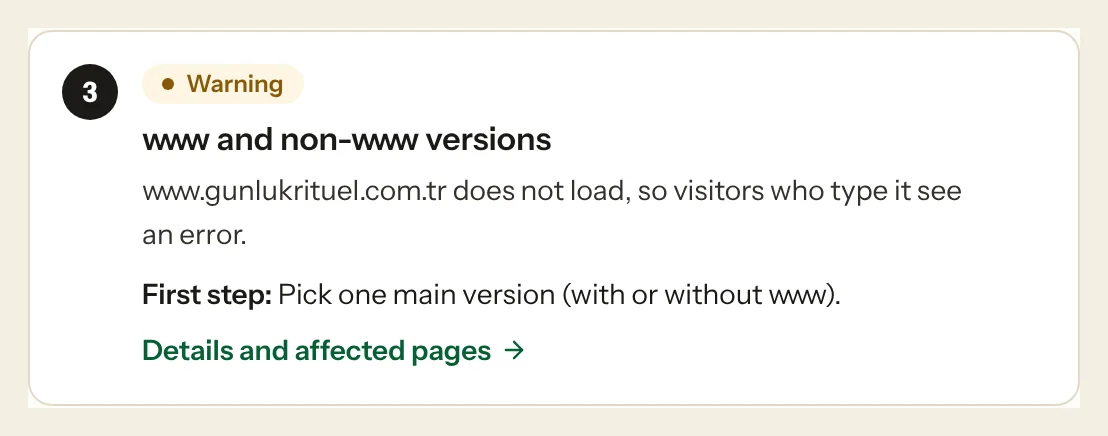
This is a real case from one of our own sites, found by an Approvalens scan. The www hostname had no DNS record at all:
Step 1: Decide which version is the real one
Either works. Google doesn't prefer one. Choose the one already used in your canonical tags, sitemap and AdSense site list, so that you change as little as possible. Below, the main version is example.com and www redirects to it. The reverse direction is at the end of step 3.
Step 2: Make sure both hostnames are proxied
Cloudflare can only redirect traffic it receives: "Single Redirects require that the incoming traffic for the hostname referenced in visitors' requests is proxied by Cloudflare" (troubleshooting).
Open DNS → Records for your zone and check:
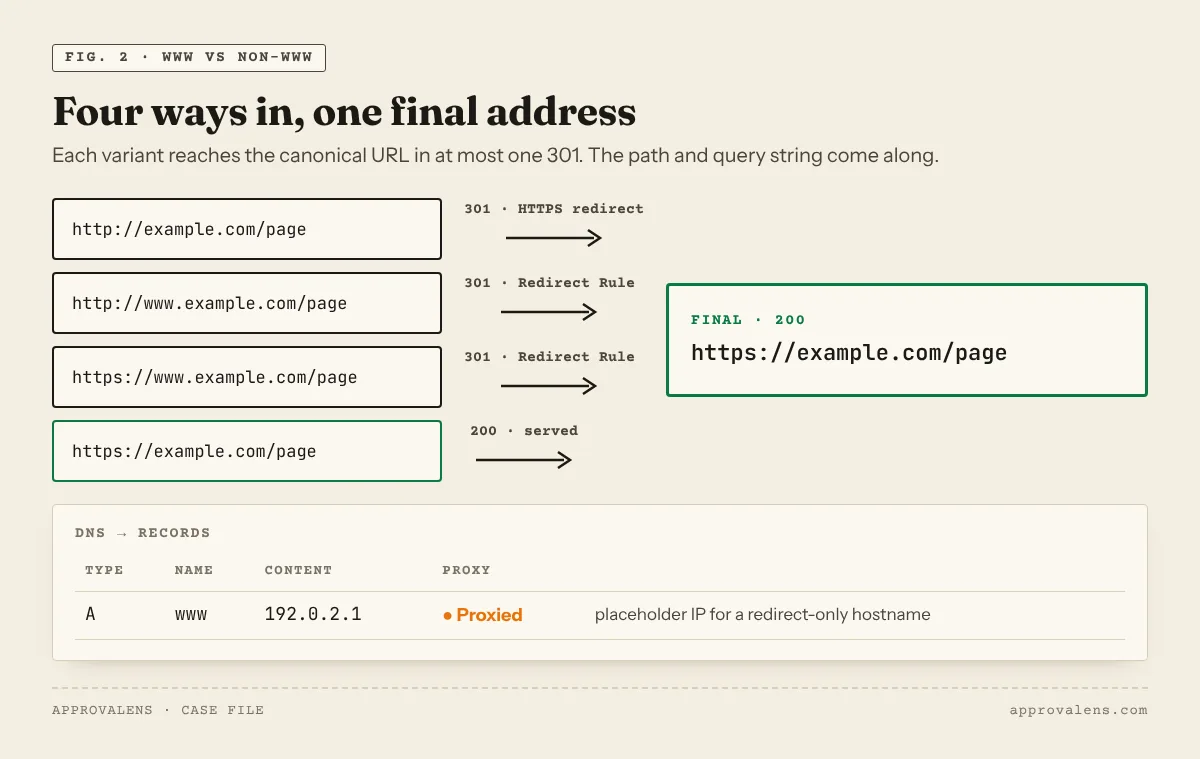
example.comhas its normal A, AAAA or CNAME record, with the orange cloud (Proxied).wwwexists and is Proxied. If it doesn't exist, add one. A CNAMEwww → example.comworks. For a hostname that only redirects, Cloudflare's own example uses a placeholder: typeA, namewww, IPv4192.0.2.1, Proxied (www redirect for Pages). The address is never contacted, because the redirect answers first.
A grey-cloud (DNS only) record skips Cloudflare entirely, and no rule will run.
Step 3: Create the Redirect Rule
Cloudflare documents this exact case as "Redirect from WWW to root" (example). In the dashboard: go to Rules → Overview, select Create rule → Redirect Rule (create a rule). You can start from the template list or fill in the fields yourself:
| Field | Value |
|---|---|
| Rule name | www to root |
| When incoming requests match | Wildcard pattern |
| Request URL | http*://www.example.com/* |
| Then: Target URL | https://example.com/${2} |
| Status code | 301 |
| Preserve query string | On |
Then select Deploy.
Why http* and ${2}? Cloudflare's example uses https://www.* → https://${1}, and its own table notes that HTTP requests to www stay "unchanged" with that version. Wildcard patterns accept http*:// to match both schemes, as shown in Cloudflare's docs. With two wildcards, ${1} is the scheme ending and ${2} is the path, so both http://www. and https://www. go straight to https://example.com/… in one hop. Test it with the commands in step 5 before you rely on it.
Reverse direction (root → www): Request URL http*://example.com/*, Target URL https://www.example.com/${2}.
On Cloudflare Pages: Bulk Redirects
Cloudflare's Pages guide uses Bulk Redirects instead (www redirect for Pages): create a list with source www.example.com, target https://example.com, status 301, and turn on Preserve query string, Subpath matching and Preserve path suffix. Then create a Bulk Redirect rule that uses the list, and add the proxied www record from step 2. Either method works. Don't use both for the same hostname. Single Redirects run before Bulk Redirects.
Don't try this in the Pages _redirects file. Domain-level redirects aren't supported there (redirects).
Step 4: Avoid the two classic loops
- Flexible SSL with an origin that forces HTTPS. Cloudflare's docs: "If your origin forces HTTPS by automatically redirecting HTTP requests to HTTPS, do not use Flexible mode … this creates a redirect loop that makes your site inaccessible. Use Full or Full (strict) mode instead" (Flexible mode). The browser shows
ERR_TOO_MANY_REDIRECTS. - Cloudflare and the origin disagree. If Cloudflare sends
wwwto the root while WordPress (Settings → General → Site Address) or your server sends the root back towww, the two redirect forever. Make the origin use the same main version.
If you still have old Page Rules with forwarding URLs, check them too. Cloudflare marks Page Rules as deprecated. Single Redirects run first and override them, so a forgotten Page Rule usually just adds confusion.
Step 5: Test all four addresses
for u in http://example.com http://www.example.com https://example.com https://www.example.com; do
  curl -s -o /dev/null -w "$u  %{http_code}  %{redirect_url}\n" "$u/ads.txt"
done
Expected result:
| Request | Status | Goes to |
|---|---|---|
http://example.com/ads.txt |
301 | https://example.com/ads.txt |
http://www.example.com/ads.txt |
301 | https://example.com/ads.txt |
https://www.example.com/ads.txt |
301 | https://example.com/ads.txt |
https://example.com/ads.txt |
200 | (the file itself) |
The first row is handled by HTTPS redirection at Cloudflare or your origin, not by this rule. Browsers cache 301s, so test with curl or a private window. The Googlebot access checker shows the full redirect path that Google's crawlers get, and the ads.txt checker confirms the file is reachable from the root domain.
After the redirect works
- Canonical tags, the sitemap and internal links should all use the main version.
- In AdSense, sites are added as domains (
example.com), not as subdomains of an existing site such aswww(site management changes). Both hostnames belong to the same site entry, which is one more reason they should lead to the same place. - On hosts like cPanel where you also control the server, you can set the same redirect there. Our cPanel www redirect guide shows how. Do it in one place only.
A free Approvalens scan tests both hostnames and both schemes, and reports redirect chains along with the rest of the AdSense checks.
Spotted something out of date or wrong? Tell us and we'll correct it.
Read this guide in Turkish →Check it on your own site. Free, no sign-up.
Free tools for this
Free scan
Check your own site
Free scan: readiness score and every issue, usually in a few minutes.