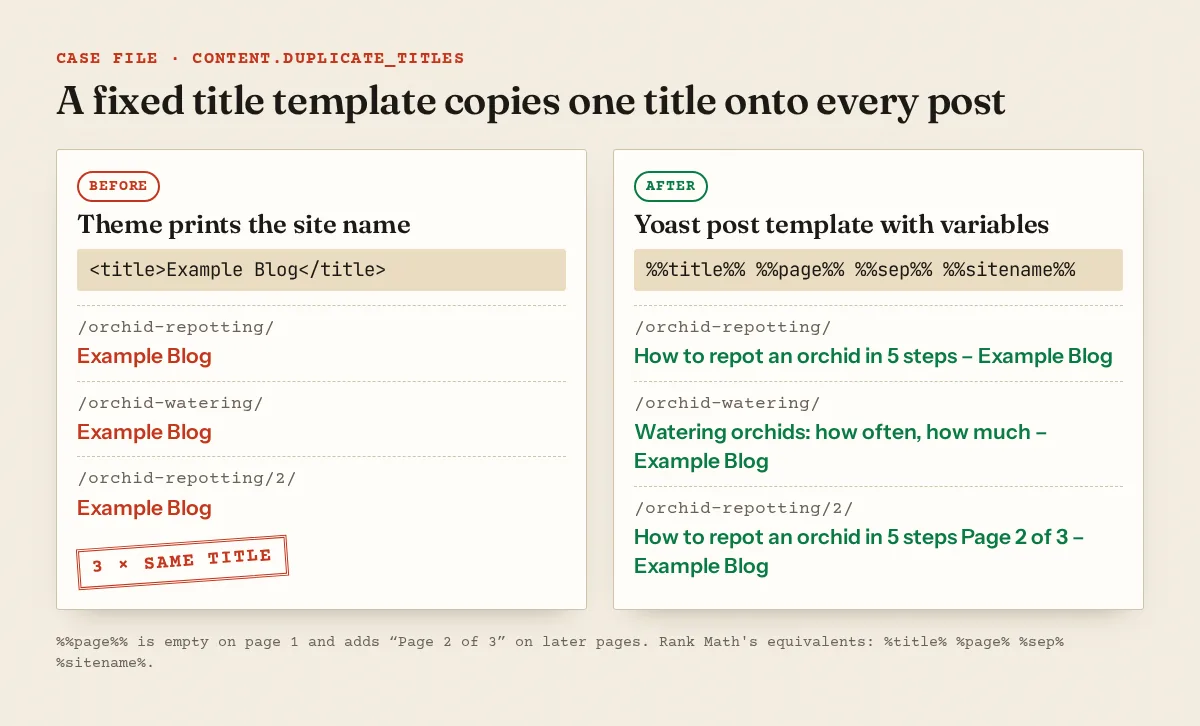
Duplicate titles and meta descriptions almost never come from someone typing the same words twice. They come from a template: a theme that prints the site name as every page's title, an SEO plugin whose default pattern leaves out the post title, a layout that hands one description to every child page, or a theme and a plugin both writing to the <head>. Find the layer that prints the tag, fix it once, then rewrite the few titles that really do clash. None of this decides an AdSense review on its own. It does decide whether a reader can tell your pages apart in search results.
What Google does with your title and description
Google treats both as suggestions. Its title link documentation says generation "is completely automated and takes into account both the content of a page and references to it" (title links). The <title> element is only the first of several sources. The others are the main visual title, heading elements such as <h1>, og:title, prominent styled text, anchor text and links pointing to the page.
The same page asks you to "Avoid repeated or boilerplate text in <title> elements", and it gives the example of a shop that titles every page "Cheap products for sale". Among the reasons Google rewrites a title it lists half-empty titles such as <title>| Site Name</title>, obsolete or inaccurate ones, and micro-boilerplate.
Descriptions work the same way. "Snippets are primarily created from the page content itself", and the meta description is used when it "might give users a more accurate description" (snippets). On repetition Google is direct: "Identical or similar descriptions on every page of a site aren't helpful when individual pages appear in search results."
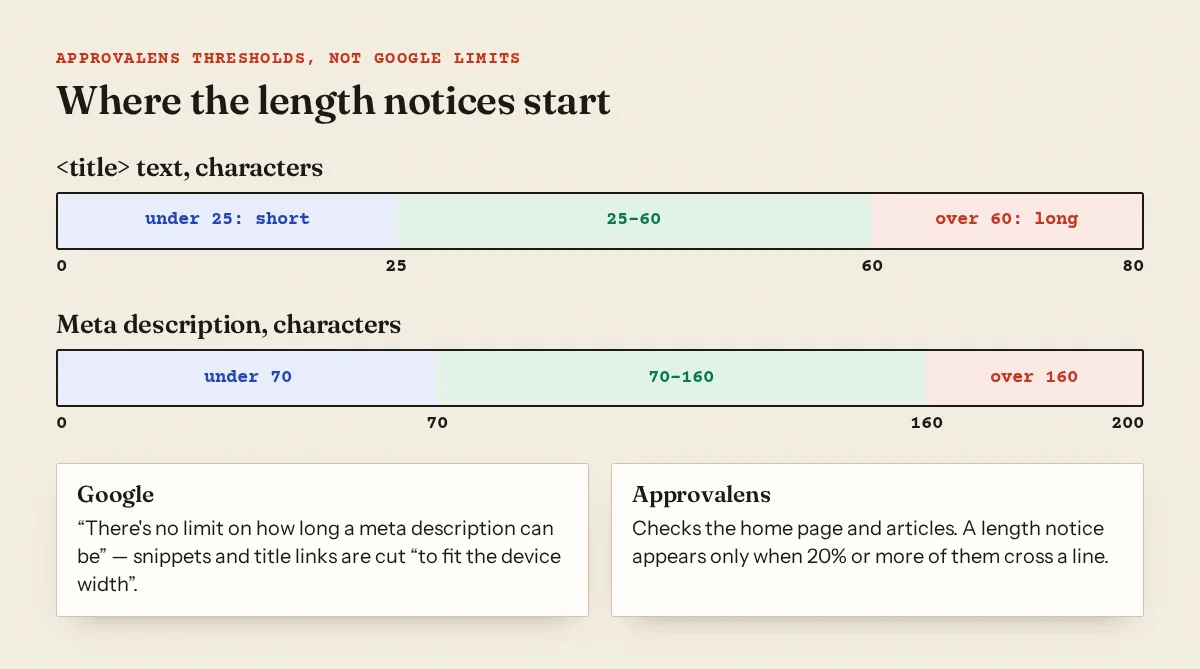
On length, Google sets no limit for either tag. Both docs say the text is "truncated in Google Search results as needed, typically to fit the device width." Any character count you've read elsewhere is a rule of thumb, including the ones Approvalens uses (explained below).
Where duplicates come from
| What you see | Usual cause | Where the fix lives |
|---|---|---|
| Every post titled "Example Blog" | Theme hard-codes the site name in <title> |
Theme template or SEO plugin title template |
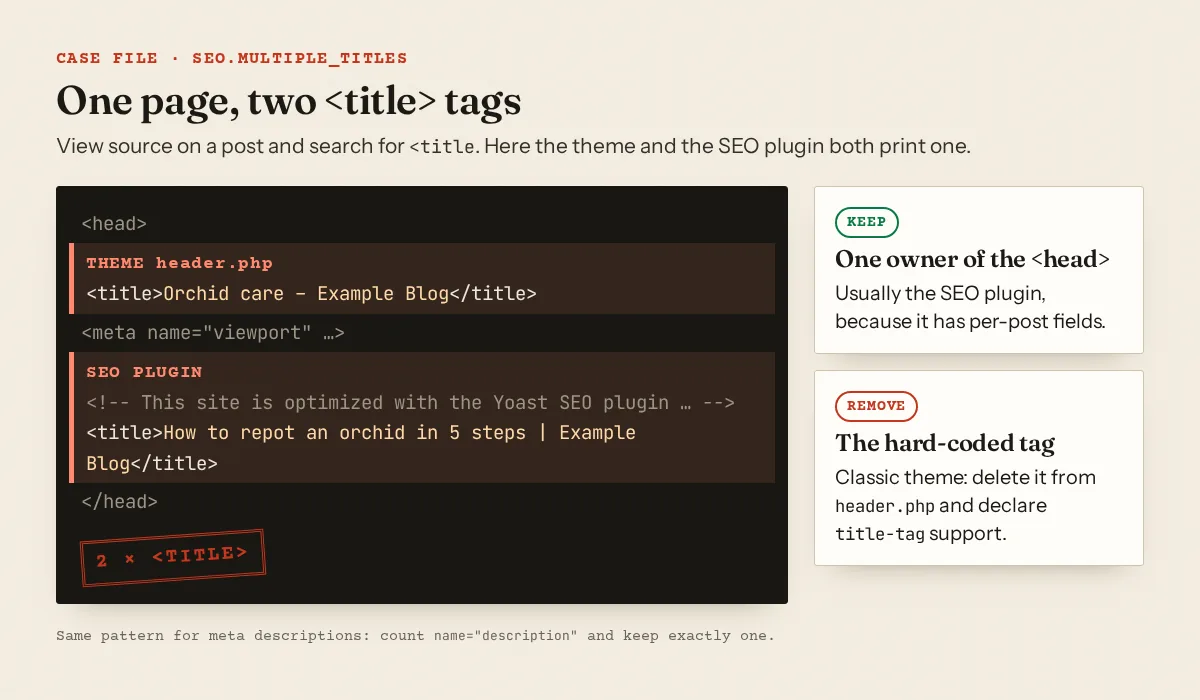
Two <title> tags in one page |
Theme prints one, SEO plugin prints another | Remove one source |
| Same description on all posts | Plugin template uses the site tagline, or a layout-level description is inherited | Post template, or per-page description |
/page/2/, /page/3/ share page 1's title |
Archive template without a page number | Add %%page%% / %page% |
| Tag and category archives with identical titles | Two taxonomies named the same ("Recipes" tag and "Recipes" category) | Rename, merge or noindex one archive |
| Two URLs, same title and description | One page reachable under two paths | Redirect or canonical |
| Translated page with the original's title | Title field not translated | Translate the title and description |
The last two show up in real scans. One site we scanned served the same tool page at /en/tools/svg-tools and /en/developer-tools/svg-tools, so both the title and the description were reported as duplicates. The same site's Turkish blog index carried the English blog's title, word for word. The fix there isn't a rewrite. Pick one URL and point the other at it (see canonical tag problems and redirect chains and loops), and translate the field that was missed.
Find which layer prints the tag
Before you change settings, look at the HTML a crawler receives. In a terminal:
$ curl -s https://example.com/orchid-repotting/ | grep -c '<title'
2
$ curl -s https://example.com/orchid-repotting/ | grep -o '<title>[^<]*</title>'
<title>Orchid care – Example Blog</title>
<title>How to repot an orchid in 5 steps | Example Blog</title>
Without a terminal, open view-source (Ctrl+U), press Ctrl+F and search for <title and then name="description". Use view-source, not the Elements panel in DevTools. View-source shows what the server sent, while DevTools shows the page after scripts have changed it.
Then look at what sits around each tag. Yoast wraps its output in <!-- This site is optimized with the Yoast SEO plugin … --> and Rank Math in <!-- Search Engine Optimization by Rank Math … -->. A tag outside those comments came from somewhere else: the theme's header.php, a page builder's SEO module, or a second SEO plugin.
Platform fixes
WordPress with Yoast SEO
Default patterns live under Yoast SEO → Settings → Content types (Posts, Pages), Categories & tags and Advanced for archives, each with a "Search appearance" section (Yoast help). A sound post title template:
%%title%% %%page%% %%sep%% %%sitename%%
Per Yoast's variable list, %%title%% is "Replaced with the title of the post/page" and %%page%% with "the current page number with context (i.e. page 2 of 4)". If your description template is just %%sitedesc%% (the tagline), every post shares a description. Use %%excerpt%%, or better, write the description field on posts that matter.
WordPress with Rank Math
The same idea, single percent signs: Rank Math SEO → Titles & Meta → Posts, fields "Single Post Title" and "Single Post Description". Rank Math documents %page% as displayed "only on pages 2 and above" (variables). Rank Math also has a "Rewrite Titles" option that only appears when a theme lacks title-tag support (Titles & Meta). If you see it, your theme is old enough that it probably hard-codes a title too.
The theme side of a double title
A classic theme should not print <title> itself. WordPress says add_theme_support( 'title-tag' ) "should be used in place of wp_title()" (developer docs). In a child theme, remove the <title><?php wp_title(); ?></title> line from header.php and add the theme support call to functions.php. Run only one SEO plugin. Two plugins, or a plugin plus a theme's built-in "SEO settings", is the usual cause of seo.multiple_titles and seo.multiple_descriptions.
Blogger
Blogger builds titles in the theme. Go to Theme, open the menu under "My theme" and choose Edit HTML (Blogger help), then find <title>. If it reads <title><data:blog.title/></title>, every page gets the blog's name. Blogger documents data:blog.pageTitle as "often the blog title, but may contain additional information on archive or post pages" (data tags), so this gives each post its own title:
<title><data:blog.pageTitle/></title>
For descriptions, Blogger's settings have a "Meta tags" section with Enable search description (Blogger settings). Once it's on, posts get a search description field in the post settings panel. Fill it per post, not with one blog-wide line.
Next.js App Router
Metadata merges from the root layout down, and "Duplicate keys are replaced" by later segments (from generate-metadata.md in the Next.js 16 docs). A description set only in app/layout.tsx is therefore inherited by every page that doesn't set its own. That's a duplicate description across the whole site. Set a template in the layout and per-page values in each route:
// app/layout.tsx
export const metadata: Metadata = {
  title: { template: '%s | Example Blog', default: 'Example Blog' },
  description: 'Orchid and houseplant care, tested at home.',
}

// app/blog/[slug]/page.tsx
export async function generateMetadata(
  { params }: { params: Promise<{ slug: string }> }
): Promise<Metadata> {
  const { slug } = await params
  const post = await getPost(slug)
  return { title: post.title, description: post.summary }
}
The output is <title>How to repot an orchid in 5 steps | Example Blog</title>. Two catches from the docs: title.template doesn't apply to a title defined in the same segment, and title.default is required when you add a template.
Rewriting titles that collide
Once the templates are right, the duplicates that remain are real editorial clashes. Fix them by saying what's different about each page:
| Before (duplicate) | After |
|---|---|
| Orchid care | How to repot an orchid in 5 steps |
| Orchid care | Orchid leaves turning yellow: 6 causes and fixes |
| Home | Example Blog: orchid and houseplant care from a balcony grower |
If you can't find a difference, the pages probably cover the same thing. Merging them beats rewording, and keyword cannibalization walks through how to choose which one survives. Pages that clash because neither says much belong in thin content. Copied text across many URLs is covered in duplicate content.
For descriptions, one or two plain sentences specific to the page is enough. Google's own guidance allows a fallback: on large database-driven sites, "programmatic generation of the descriptions can be appropriate". A missing description is better than a copied one, because Google will pull text from the page instead.
What the Approvalens scan checks
All of these checks read the HTML the crawler received. The methodology page explains how pages are crawled and sorted.
- Duplicate titles and descriptions compare the exact text, ignoring case, across pages classed as articles. URLs that look like archives (
/tag/,/category/,/page/2/,/search/label/, query strings) are left out, so a hit here means two posts or pages, not two archive pages. Titles are a warning, descriptions a notice. - Multiple titles counts
<title>elements in the<head>. Multiple descriptions counts<meta name="description">tags. One extra on the home page or any article raises it. - Missing titles checks the home page and every article.
- Missing meta descriptions appears when more than half of the articles have none.
- Length notices use our own lines, not Google's: titles over 60 or under 25 characters, descriptions over 160 or under 70. They cover the home page plus articles and are raised only when 20% or more of those pages cross the line. Individual pages still show the issue in the page table.
Check your titles across the site
A free Approvalens scan lists duplicate titles and descriptions with the URLs that share them, so you can see whether a template or two pages are to blame.
FAQ
Do duplicate titles cause an AdSense rejection?
Not on their own. AdSense reviews the site's content and policies. Duplicate titles matter as a symptom: they often point to templated or copied pages, which can get a site rejected.
Should the H1 and the title tag be identical?
No. They should describe the same thing. The title can be shorter and carry the site name, and the H1 can be the full headline. See H1 and heading structure.
Google shows a different title than mine. Is something broken?
Not necessarily. Google picks title links automatically and may use your H1 or other text. Rewrites are more likely when titles are half-empty, boilerplate or inaccurate.
Is it fine to leave meta descriptions empty?
Yes, for pages you can't write well. Google builds the snippet from page content. An empty description is better than one copied across fifty posts.
My paginated archives share a title. Do I need to fix that?
Add the page number with %%page%% or %page%. Approvalens skips archive URLs in its duplicate check, but readers and Google still see those titles.
Spotted something out of date or wrong? Tell us and we'll correct it.
Read this guide in Turkish →Free scan
Check your own site
Free scan: readiness score and every issue, usually in a few minutes.