Google doesn't penalise a page for having two H1s or for headings out of order. Its own starter guide says heading order doesn't matter "from Google Search perspective". The reason to fix headings is the reader. A heading outline is the table of contents people skim and screen readers jump through, and when it's built from the site name, sidebar widgets and empty tags, the page reads as unedited. Most heading problems come from the theme, not from what you wrote. Fix the template once and every post improves.
What Google actually says
There's a lot of folklore about H1s. Here is what the official documentation says, and nothing more:
| Claim you'll hear | What Google's docs say |
|---|---|
| "Headings must be in order or you lose rankings" | "Having your headings in semantic order is fantastic for screen readers, but from Google Search perspective, it doesn't matter if you're using them out of order." (SEO starter guide) |
| "Use exactly N headings" | "There's also no magical, ideal amount of headings a given page should have." (same page) |
| "Headings don't matter at all" | The same guide says to "Break up long content into paragraphs and sections, and provide headings to help users navigate your pages." |
| "Google ignores the H1" | Heading elements such as <h1> are one of the sources Google uses to build title links (title links) |
The title link page adds one practical point. If Google "detects that there are multiple large, prominent headings, it may use the first heading as the text for the title link." It suggests making the main title stand out, for example by "putting the title text in the first visible <h1> element on the page". A site name in the first H1 works against that.
The case for one H1 per page comes from accessibility and HTML guidance, not from a Google penalty. MDN calls multiple H1s "allowed by the HTML standard" but "not considered a best practice" (MDN). The W3C tutorial says "Skipping heading ranks can be confusing and should be avoided where possible" (W3C WAI). That is the standard the scan holds you to: a clean outline for people.
Read your page's real outline
Check one post first. If the template is the cause, every post shares the problem.
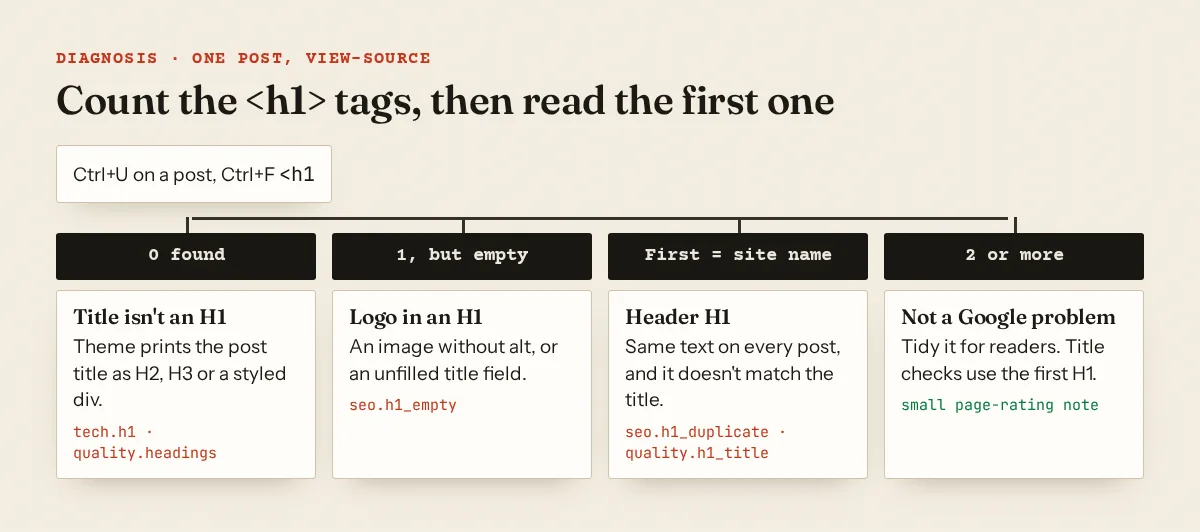
View-source (Ctrl+U) shows the HTML your server sends, which is what the scan reads. Search for <h1 and count. Then search for <h2 and <h3.
A terminal gives you the list in one line:
$ curl -s https://example.com/orchid-repotting/ | grep -oE '<h[1-6][^>]*>'
<h1 class="site-title">
<h3 class="post-title entry-title">
<h2 class="widget-title">
<h4>
<h2 class="widget-title">
The DevTools console (F12, Console tab) prints each heading with its text. Paste this and press Enter:
document.querySelectorAll('h1,h2,h3,h4,h5,h6').forEach(h =>
  console.log(h.tagName, JSON.stringify(h.textContent.trim().slice(0, 70))))
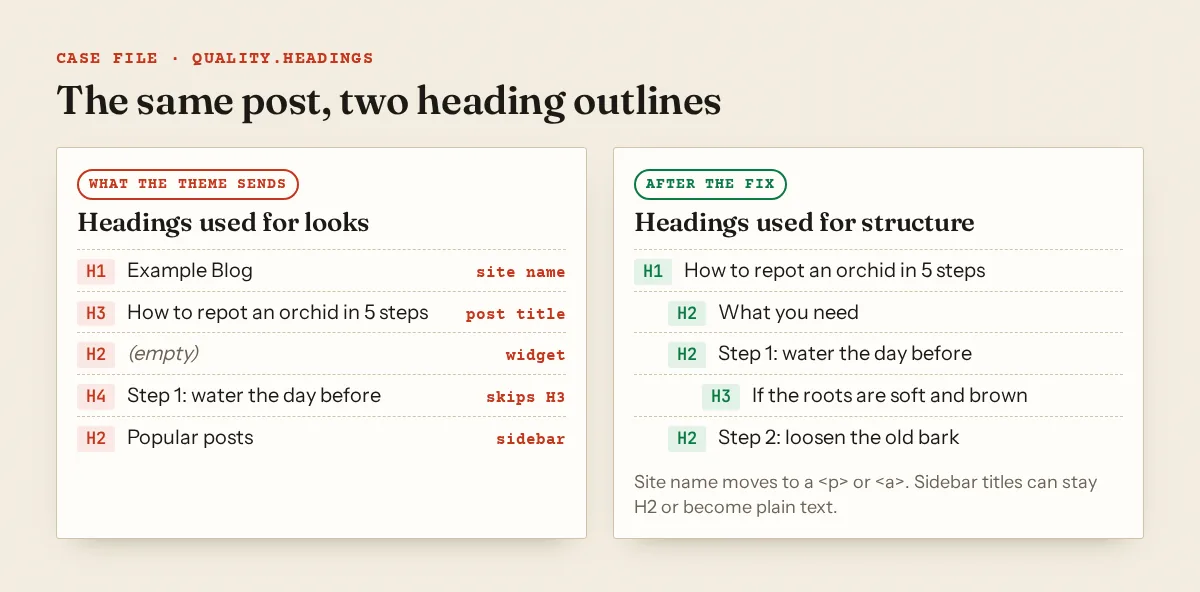
H1 "Example Blog"
H3 "How to repot an orchid in 5 steps"
H2 ""
H4 "Step 1: water the day before"
H2 "Popular posts"
The console shows the page after JavaScript has run. If it disagrees with view-source, a script is adding or changing headings, and crawlers that read raw HTML see the view-source version.
In the WordPress block editor, the Outline tab of the Document Overview shows "the headings and how they are structured" in the post body (WordPress docs). It only covers what you typed, not the theme's header, sidebar or title. Use it for content and view-source for the template.
Five patterns that break the outline
1. The site name is the H1 on every post. Some classic themes wrap the site title in <h1> everywhere. The post title then becomes a second H1 or drops to H2. Every article shares the same first H1, which is what seo.h1_duplicate reports.
2. The logo is an H1 with no text. <h1><a href="/"><img src="/logo.svg"></a></h1> has no text and no alt, so readers and screen readers get an empty heading. Adding alt="Example Blog" gives it a name. Making it a <div> on posts is cleaner.
3. The post title isn't a heading at all, or it's an H3. Some Blogger templates, especially older ones, print post titles as <h3 class='post-title entry-title'>. Some page builders render titles in a styled <div>.
4. Headings used for font size. A "Call us today" banner in H2, a pull quote in H4, a newsletter box in H3. MDN puts it bluntly: "Do not use heading elements to resize text." Check whether your page builder's heading widget lets you set its HTML tag separately from its size. If it does, use p or div for decoration.
5. Empty headings from widgets. A sidebar widget with no title still prints <h2 class="widget-title"></h2> in some themes. Give the widget a title or remove the empty tag in the widget settings or template.
Long posts have the opposite problem: no subheadings at all. A 1,500-word post in one block of text is hard to scan. Adding an H2 every few paragraphs, each phrased as the question that section answers, fixes both readability and quality.subheadings.
Fixes by platform
WordPress, block editor content
The Heading block docs say "In most cases, the page title is used as the <h1> tag, with subsequent Heading blocks added as H2, H3". So inside the post, start at H2. Type ## and a space for an H2, ### for an H3. Change a level from the block toolbar's Transform button or the H1–H6 buttons in the block settings. Don't add a second H1 inside the post body.
WordPress, classic theme template
Edit a child theme, not the parent. In header.php, keep the site name as an H1 only on the blog home and use a paragraph elsewhere:
<?php if ( is_front_page() && is_home() ) : ?>
  <h1 class="site-title"><a href="<?php echo esc_url( home_url( '/' ) ); ?>"><?php bloginfo( 'name' ); ?></a></h1>
<?php else : ?>
  <p class="site-title"><a href="<?php echo esc_url( home_url( '/' ) ); ?>"><?php bloginfo( 'name' ); ?></a></p>
<?php endif; ?>
In single.php, or the template part it loads, print the title as the page's H1:
<?php the_title( '<h1 class="entry-title">', '</h1>' ); ?>
If the theme's CSS targets h1.site-title, add the same rules for p.site-title so nothing changes visually.
WordPress, block theme
Open the Site Editor, edit the Single Posts template, select the Title block and check its heading level. Then check the Header template part. If the Site Title block there is set to a heading level, lower it for single posts or make it plain text.
Blogger
Download a backup of your theme, then go to Theme and choose Edit HTML from the menu under "My theme" (Blogger help). Search for post-title. Blogger's data:blog.pageType is "One of 'item', 'archive', or 'index'" (data tags), so you can give post pages an H1 and leave listings alone:
<b:if cond='data:blog.pageType == "item"'>
  <h1 class='post-title entry-title'><data:post.title/></h1>
<b:else/>
  <!-- keep the template's original post-title markup here -->
</b:if>
Then find the Header widget's <h1> for the blog title and use the same condition to output a <p> or <div> on item pages. Preview a post and a listing page before you save.
Next.js
Keep the site name out of headings in the layout, and give each page exactly one <h1>:
// app/layout.tsx
<header><a href="/" className="site-name">Example Blog</a></header>

// app/blog/[slug]/page.tsx
export default async function Page({ params }: { params: Promise<{ slug: string }> }) {
  const { slug } = await params
  const post = await getPost(slug)
  return (
    <article>
      <h1>{post.title}</h1>
      <PostBody source={post.body} />
    </article>
  )
}
Watch Markdown and MDX bodies. If a post file starts with # How to repot an orchid and the page component also renders post.title in an <h1>, you get two. Write post bodies starting at ##, or map h1 to h2 in your Markdown components.
H1 versus the title tag
They don't have to match word for word. The H1 is the headline on the page, and the <title> is what shows in the browser tab and often in search results. They should promise the same thing. A title of "How to repot an orchid in 5 steps | Example Blog" and an H1 of "Spring balcony jobs" make a searcher wonder whether they landed on the right page. Duplicate titles and meta descriptions covers the title side.
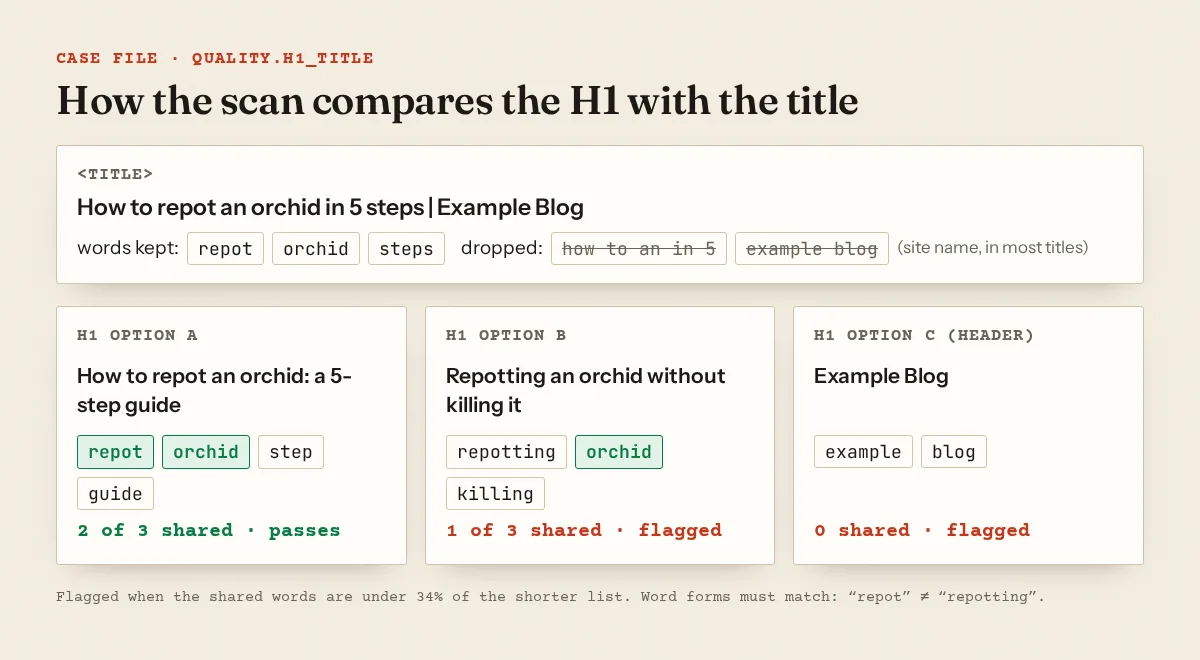
The quality.h1_title check is a word comparison, and it's worth knowing exactly how it works. It takes the first H1 and the title and drops common words, words of two letters or fewer, and words that appear in at least half of your titles (usually your site name). It then counts the shared words. If they make up less than 34% of the shorter list, the page is marked. Word forms must match exactly, so "repot" and "repotting" count as different words. Keep the H1's key nouns in the same form as the title's.
What the Approvalens scan checks
The scan reads the HTML your server sends for each page it classes as an article, before any JavaScript runs. The methodology page explains how pages are classed and rated.
| Finding | What triggers it |
|---|---|
tech.h1 |
More than 30% of articles have no <h1> |
quality.headings |
30% or more of articles have no H1, an H3 with no H2 anywhere on the page, or an empty H1 or H2 |
seo.h1_empty |
Any article has an <h1> with no text and no image with an alt attribute inside |
seo.h1_too_long |
The first H1 is over 70 characters on 20% or more of articles |
seo.h1_duplicate |
Two or more articles share the same first H1, ignoring case |
quality.h1_title |
30% or more of articles fail the word comparison above |
content.no_subheadings |
At least two articles, and 30% or more of them, have 600+ words and no H2 |
quality.subheadings |
30% or more of articles have 600+ words with no H2, or 1,200+ words with fewer than three H2s |
These are heuristics. A second H1 alone doesn't raise quality.headings. It costs a single point in that page's quality rating and is listed in the page table. The "skipped level" test is narrow too: it only catches an H3 on a page with no H2 at all, not an H2 followed directly by an H4.
Thresholds matter. One site we scanned had 32 of 835 articles without an H1. That's under the 30% line, so the site-level heading check passed while the page table still listed all 32.
Heading fixes are housekeeping. If reviewers find little worth reading under clean headings, the work is in thin content and the low value content rejection. Google page quality explained shows how raters judge the main content itself.
See your heading problems page by page
A free Approvalens scan shows which heading checks your articles fail and lists the affected URLs, so you can tell a theme-wide problem from a few stray posts.
FAQ
Is it bad to have two H1 tags?
Not for Google Search. Its documentation names no penalty and says heading order doesn't matter for Search. For readers and screen readers, one H1 that names the page is clearer. Make the post title the first H1.
Should my logo be an H1?
On the home page it can be, if it contains text or an image with alt text. On posts the H1 should be the post title, so make the logo a link inside a <p> or <div>.
Do I need an H2 every 300 words?
No. Google says there's no ideal number of headings. The scan only looks at long articles: 600+ words with no H2, or 1,200+ words with fewer than three H2s.
Must the H1 and the title tag be identical?
No. They should describe the same topic. Keep the main nouns in the same form so readers, and the scan's word match, see them as the same page.
Why does Google show my H1 instead of my title?
Google builds title links automatically from several sources, including headings. It's more likely when the title is boilerplate, half-empty or doesn't match the page.
Spotted something out of date or wrong? Tell us and we'll correct it.
Read this guide in Turkish →Free scan
Check your own site
Free scan: readiness score and every issue, usually in a few minutes.