A canonical tag tells Google which URL you consider the main version of a page. On a normal article it should point to the article's own final https:// address. When it points somewhere else, you are telling Google "this page is a copy, show the other one", and your article can drop out of results. Most broken canonicals come from one value set in a theme, layout or plugin and inherited by every page, so the fix is usually one setting, not hundreds of edits.
What the tag can and can't do
The tag goes in the <head>:
<link rel="canonical" href="https://example.com/coffee-grind-size">
Google treats it as a preference, not an order. Its canonicalization overview says "indicating a canonical preference is a hint, not a rule", and the consolidation guide calls rel="canonical" "A strong signal that the specified URL should become canonical." Google also weighs redirects, HTTPS and sitemap membership, so a wrong tag on a strong page may be overruled. You can't count on that.
Three mechanical rules from the same guide matter for the fixes below. The link "is only accepted if it appears in the
section of the HTML." Use absolute URLs: "Use absolute paths rather than relative paths". And keep signals consistent: "don't specify one URL in a sitemap, but a different URL for that same page using rel="canonical"".Six findings, six different problems
| Finding | What it means | First move |
|---|---|---|
tech.canonical_conflict |
Articles name another page on your site as canonical | Find the shared template or setting |
tech.canonical_offsite |
Articles name another domain as canonical | Look for a migration or copied template; check the content is yours |
seo.canonical_broken |
The canonical target errors, redirects or is noindex | Point it to the final working URL |
seo.canonical_http |
Canonical uses http:// on an HTTPS site |
Fix the site address setting |
seo.canonical_missing |
At least half the articles have no canonical | Turn on your SEO plugin's output or add it in the layout |
seo.canonical_multiple |
A page has two or more canonical tags | Switch off one source |
They overlap with duplication problems, but they are not the same thing. A canonical problem is a wrong label; duplicate content and keyword cannibalization are about the pages themselves.
How the scan decides "another page"
We compare each crawled page's final URL with the URL in its canonical tag. Before comparing, we strip the trailing slash, the query string and the #fragment, and we also compare paths alone, so http:// versus https:// and www versus no www do not count as "another page". Those cases are reported separately (seo.canonical_http) or not at all.
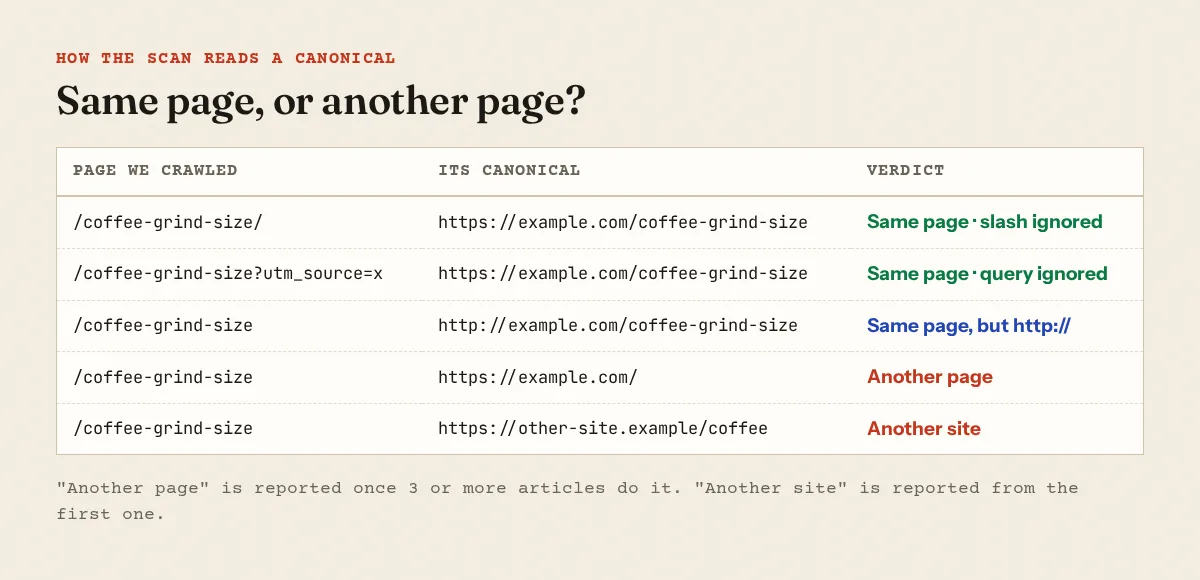
Thresholds, so you know how loud each one is:
tech.canonical_conflictappears once 3 or more articles point to another page.tech.canonical_offsiteappears from the first article, as critical, because it says the original lives on someone else's site.seo.canonical_brokenonly judges targets we actually fetched during the crawl: a 4xx or 5xx, a redirect, or a noindex page. A target we never requested is not judged.seo.canonical_missingis a notice, raised when 50% or more of articles have none.seo.canonical_multiplecounts<link rel="canonical">elements in the HTML of the home page and articles. We do not read canonical HTTP headers.
The full list of checks is on the methodology page.
Where wrong canonicals come from
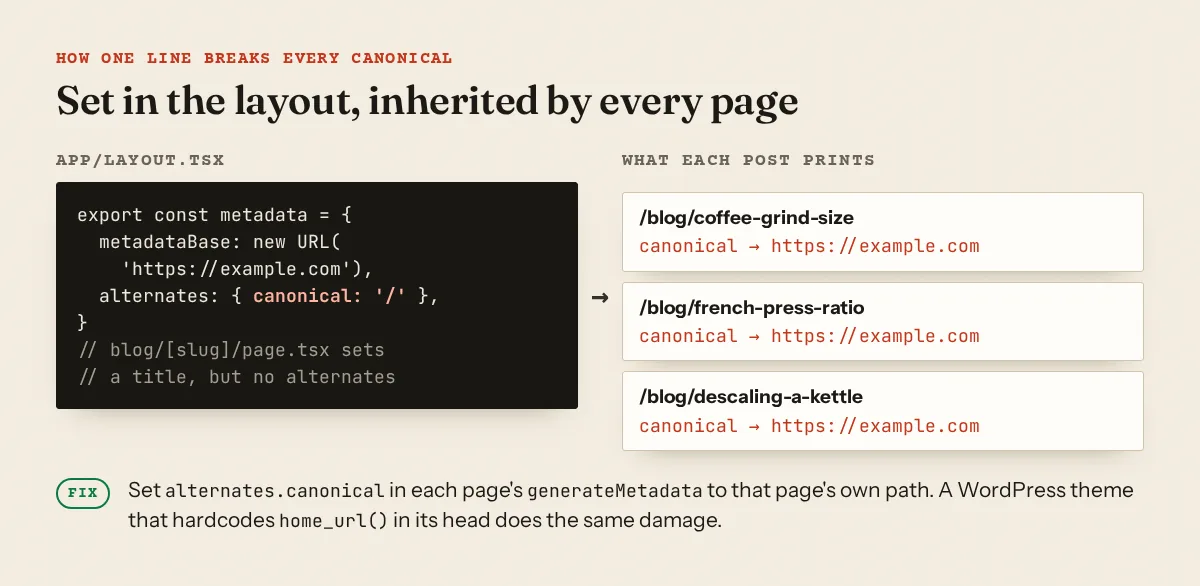
One value, inherited everywhere
This is the most common pattern we see. In Next.js, metadata from layouts and pages is merged shallowly, and a page that sets no alternates keeps the layout's. Put alternates: { canonical: '/' } in the root layout and every post that doesn't override it prints the home page as its canonical. The WordPress version is a theme header.php with a hardcoded <link rel="canonical" href="<?php echo home_url(); ?>">.
Page 2 pointing to page 1
Google is explicit: "Don't use the first page of a paginated sequence as the canonical page. Instead, give each page its own canonical URL" (pagination guidance). Some themes and older plugins still canonicalise /page/2/ to the first page.
Copied templates, migrations and syndication
Google described this in a 2013 post that is old but still accurate about the mechanics: "a busy site owner copies a page template without thinking to change the target of the rel=canonical" (5 common mistakes with rel=canonical). After a domain move, canonicals stored per post in an SEO plugin can keep the old domain. If your articles were syndicated, note that Google's troubleshooting page says the canonical element "is not recommended for those who want to avoid duplication by syndication partners".
Two tags from two sources
A theme that prints its own canonical plus an SEO plugin, or two SEO plugins left active after a switch. The same 2013 post: "In cases of multiple declarations of rel=canonical, Google will likely ignore all the rel=canonical hints." Even two identical tags are worth cleaning up, because the next theme update may change one of them.
Targets that moved
You changed permalinks or deleted a page, and canonicals still point to the old address, which now redirects or returns 404. Google's 2013 checklist asks you to check "that rel=canonical points to an existent URL with good content (that is, not a 404, or worse, a soft 404)". If the old URL redirects, point the canonical at the redirect's final destination; redirect chains and loops covers cleaning up the redirects themselves.
What it looked like on a real site
On one site we scanned, a Next.js site, four pages printed the bare home page URL as their canonical: exactly the output the inherited-layout pattern above produces.
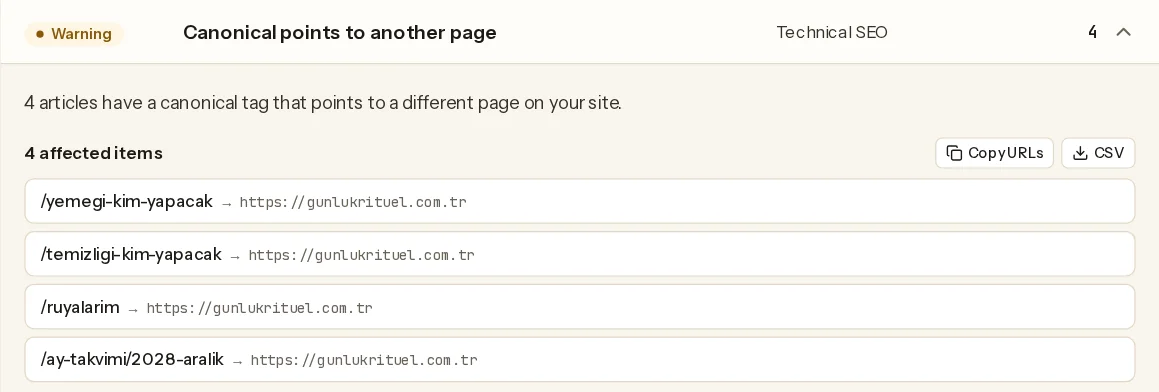
Not every hit is an article. On another site, most of the 10 hits were embed widgets and account pages pointing to the home page of their language section. A canonical to the home page is still the wrong signal there, because those pages are not copies of it. If they should not be in search at all, a noindex says that honestly; see noindex by mistake for when that is the right call.
Check one page in a minute
Count the tags and read the value:
curl -s https://example.com/coffee-grind-size | grep -o '<link[^>]*rel="canonical"[^>]*>'
<link rel="canonical" href="https://example.com/"/>
More than one line means seo.canonical_multiple. Some sites quote the attribute with single quotes, so if you get nothing, try grep -io "<link[^>]*canonical[^>]*>". Then check that the target is a final 200:
curl -s -o /dev/null -w "%{http_code} %{redirect_url}\n" https://example.com/coffee-grind-size/
301 https://example.com/coffee-grind-size
A 301 here means the canonical points at a redirect. In Search Console, URL Inspection shows "User-declared canonical" next to "Google-selected canonical", which Google describes as "The page that Google selected as the canonical (authoritative) URL" (URL Inspection help). If they differ, the Page indexing report lists the URL under "Duplicate, Google chose different canonical than user".
Fixes by platform
Yoast SEO. In the post's Advanced section there is a "Canonical URL" field. If it holds an address you did not mean to set, remove it (Yoast help). Yoast also notes that it does not output a canonical on pages set to noindex, which explains some "missing" results.
Rank Math. The Advanced tab has a canonical field; by default "Rank Math will set the post's current URL as the canonical URL of the page" (Rank Math KB). Clear any custom value that points elsewhere.
WordPress themes. Search the theme for a hardcoded tag and delete it if an SEO plugin already prints one:
grep -rn "canonical" wp-content/themes/your-theme/*.php
For seo.canonical_http, open Settings → General and make sure "WordPress Address (URL)" and "Site Address (URL)" both start with https://.
Blogger. Standard Blogger themes print the canonical themselves. On a live Blogger blog we checked, the post URL and its ?m=1 mobile version both declared the clean post URL as canonical. If you installed a third-party theme or edited the <head>, compare it with a default Blogger theme and remove any extra canonical you added.
Next.js. Set metadataBase once in the root layout, and set the canonical per page:
// app/blog/[slug]/page.tsx
export async function generateMetadata(
  { params }: { params: Promise<{ slug: string }> }
): Promise<Metadata> {
  const { slug } = await params
  return { alternates: { canonical: `/blog/${slug}` } }
}
The docs note that a relative URL in metadata "without configuring a metadataBase will cause a build error", and that metadataBase is "typically set in root app/layout.js" (generateMetadata). Remove alternates.canonical from the root layout unless it is only meant for the home page, and set it in app/page.tsx instead.
When pointing elsewhere is right
A canonical to another URL is correct when two URLs really show the same content: a ?ref= or ?utm_ variant, a print view, or a product reachable under two categories. For whole groups of near-identical pages generated from a template, the canonical alone won't solve the underlying problem; the programmatic SEO guide covers when to merge instead.
A free scan lists every crawled page whose canonical points elsewhere, is missing, doubled or uses http://, with the URL it points to.
FAQ
Does every page need a canonical tag?
No. Google does not require one, and our missing-canonical finding is only a notice. A self-referencing canonical is cheap insurance against tracking parameters and slash variants competing with each other.
Will Google always follow my canonical?
No. It is a hint. Google may pick a different page, and URL Inspection shows which one it chose.
Should I use a canonical or a 301 redirect?
If the old URL should no longer exist for visitors, redirect it. Use a canonical when both URLs need to keep working.
Can a canonical tag cause an AdSense rejection?
We know of no AdSense policy that names canonical tags. The effect is indirect: pages that point their canonical elsewhere are treated as copies, and a site whose articles look like copies can look thinner than it is.
Spotted something out of date or wrong? Tell us and we'll correct it.
Read this guide in Turkish →Free scan
Check your own site
Free scan: readiness score and every issue, usually in a few minutes.