When you paste a link into Facebook, WhatsApp, X, LinkedIn or Telegram, the app's crawler fetches your page once, reads the Open Graph tags in the <head>, downloads the og:image, and caches the result. A wrong or missing image almost always comes from one of five places: the tag is missing or doubled, the image URL doesn't work, the crawler is blocked, the file is the wrong size, or the app is still showing what it cached last time. Check them in that order, then make each app fetch the page again.
Where each part of the preview comes from
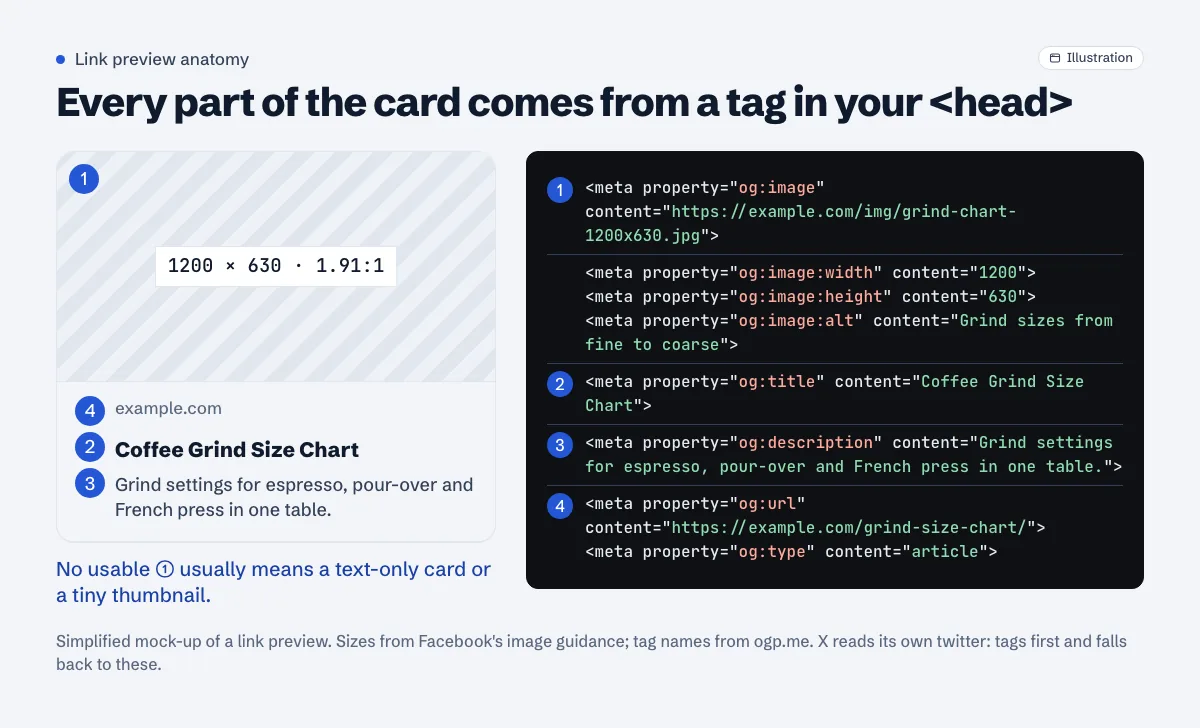
The Open Graph protocol defines four required properties: og:title, og:type, og:image and og:url. It describes og:image as "An image URL which should represent your object within the graph", and adds: "If the page specifies an og:image it should specify og:image:alt."
X reads its own twitter: tags first and falls back to Open Graph. Its card markup reference lists og:image as the fallback for twitter:image and og:title for twitter:title (X cards markup, archived copy; the live page currently doesn't load). So a correct og:image covers X too, as long as you also set <meta name="twitter:card" content="summary_large_image"> if you want the large card.
A complete set for an article looks like this:
<meta property="og:type" content="article">
<meta property="og:url" content="https://example.com/grind-size-chart/">
<meta property="og:title" content="Coffee Grind Size Chart">
<meta property="og:description" content="Grind settings for espresso, pour-over and French press in one table.">
<meta property="og:image" content="https://example.com/img/grind-chart-1200x630.jpg">
<meta property="og:image:width" content="1200">
<meta property="og:image:height" content="630">
<meta property="og:image:alt" content="Grind sizes from fine to coarse">
<meta name="twitter:card" content="summary_large_image">
The width and height lines aren't optional decoration. Facebook's image guidance says "The first person who shares a piece of content won't see a rendered image" because the crawler downloads the image in the background, and that the two tags let it "render the image immediately without having to asynchronously download and process it."
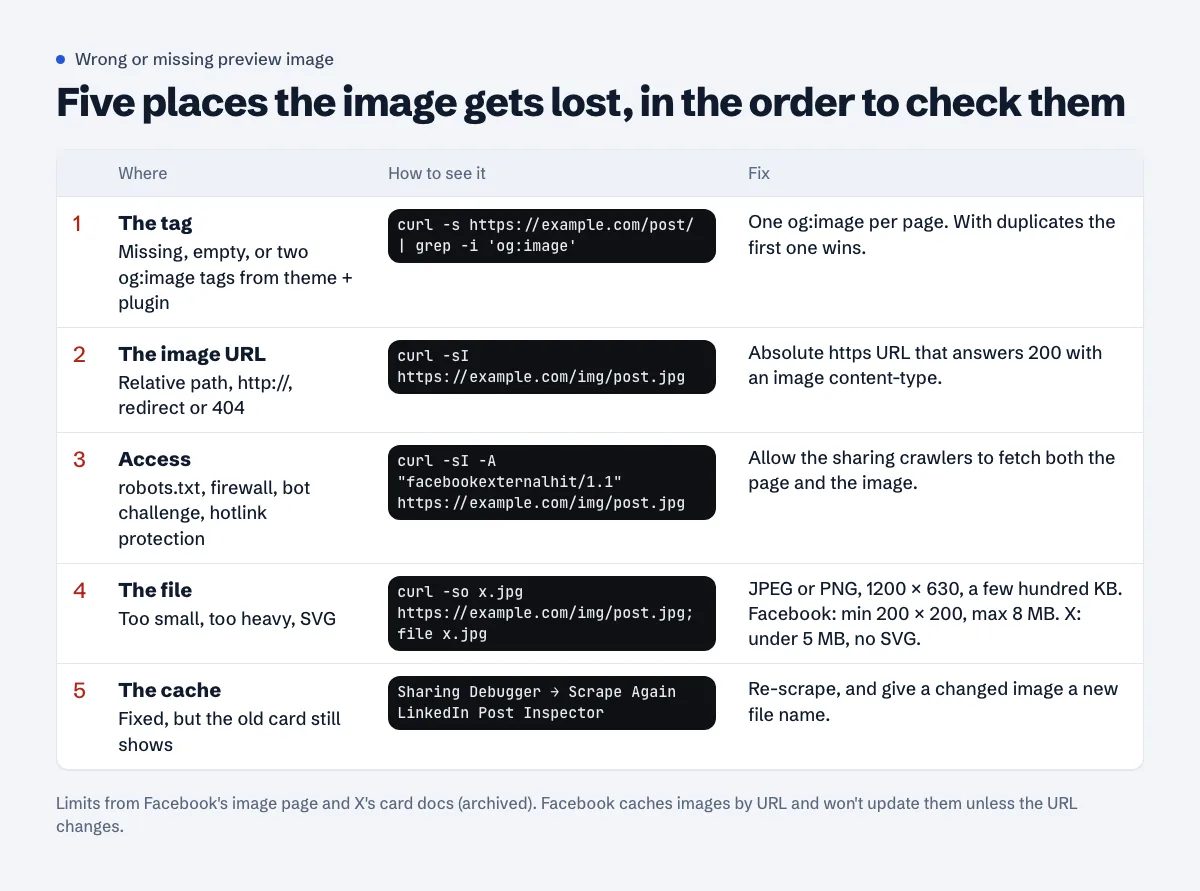
Check the tag itself
Look at the HTML your server sends, not what the browser shows after scripts run:
$ curl -s https://example.com/grind-size-chart/ | grep -i 'og:image'
<meta property="og:image" content="https://example.com/wp-content/uploads/2026/09/logo.png" />
<meta property="og:image" content="https://example.com/wp-content/uploads/2026/09/grind-chart.jpg" />
That example has two og:image tags, a classic WordPress result when the theme prints its own Open Graph tags and an SEO plugin prints another set. Open Graph's rule for repeated tags is that "The first tag (from top to bottom) is given preference during conflicts", which is how the site logo ends up on every shared post. Turn off one of the two sources (usually the theme's "social meta" option) so only one set is printed.
No og:image at all? Then you get whatever each app falls back to, often a text-only card. In WordPress, the SEO plugin normally takes the featured image, so a post without one gets the fallback:
- Yoast SEO: Yoast SEO > Settings > Site basics > Site image. Yoast renamed the old "Default image" to "Site image" in version 20.0 (Yoast release notes).
- Rank Math: Rank Math SEO > Titles & Meta > Global > OpenGraph Thumbnail. Rank Math's order is the image set in its Social tab or the featured image first, then that global fallback (Rank Math help).
Make sure the tags are in the HTML the server sends. If a JavaScript framework adds them after the page loads, curl won't show them, and you shouldn't count on a link crawler seeing them either.
Check the image URL
Use the full address: https://example.com/img/grind-chart.jpg, not /img/grind-chart.jpg. Then request it:
$ curl -sI https://example.com/img/grind-chart.jpg
HTTP/2 200
content-type: image/jpeg
content-length: 184213
You want a 200, an image/ content-type and a sensible size on the first response. Common failures: a 301 to the www or https version (fix the tag to use the final URL), a 404 after a media library clean-up or a theme change, a CDN URL that has expired, or http:// on an HTTPS site. If you migrated to HTTPS, the mixed content guide covers the old http:// URLs left in your database.
For og:url, Facebook's sharing guide asks for "the undecorated URL, without session variables, user identifying parameters, or counters". Point it at the page's canonical address.
Check the crawler can reach both the page and the image
Each app fetches with its own crawler. Facebook's is documented as facebookexternalhit/1.1 (+http://www.facebook.com/externalhit_uatext.php), X's is Twitterbot. Things that block them:
- robots.txt. X's troubleshooting page lists "Your website has a robots.txt file that is blocking the crawler from getting your Card metadata" as a cause of a missing image, and gives the allow rule
User-agent: Twitterbot/Disallow:(X troubleshooting, archived copy). ADisallow: /wp-content/line blocks every uploaded image. Remember that a crawler follows only the most specific group that names it; robots.txt user-agent precedence explains how that plays out. Meta notes crawlers "may cache the contents of robots.txt for up to 24 hours" (Meta web crawlers). - Firewalls and bot protection. A challenge page or a 403 for unknown bots means the crawler gets no tags. On Cloudflare, the same settings that trip up Google's crawlers (Bot Fight Mode, custom WAF rules, country blocks) can catch preview crawlers; the Cloudflare guide shows where each one lives. LinkedIn's help puts it this way: "your website may be blocking us from pulling the image or the image may be located on a protected directory or website" (LinkedIn help).
- Hotlink protection. Rules that refuse image requests from other sites can catch preview crawlers too. Make sure they allow requests with no Referer.
- Slow or heavy pages. Meta asks that the content "can be crawled by the crawler within a few seconds" and says Open Graph properties "need to be listed before the first 1 MB of your website or app, or it will be cutoff." X's crawler has "a limit of 2 MB for page responses". Put the tags near the top of
<head>.
Test as the crawler:
$ curl -sI -A "facebookexternalhit/1.1" https://example.com/grind-size-chart/
HTTP/2 403
server: cloudflare
A 403 or a challenge here while a normal curl gets 200 means your firewall is the problem. Allow the sharing crawlers, or exempt your image paths from the rule.
Check the image file
The documented numbers:
| App | Recommended | Limits |
|---|---|---|
| "at least 1200 x 630 pixels", ratio close to 1.91:1 | minimum 200 x 200; file "must not exceed 8 MB" | |
| X | large card image | under 5 MB; JPG, PNG, WEBP, GIF; "SVG is not supported" |
| ratio 1.91:1 | 1200 x 627 minimum, 5 MB maximum; under 401 px wide shows as a thumbnail | |
| WhatsApp, Telegram | no published requirements | — |
Sources: Facebook images, X cards markup (archived), LinkedIn help.
One JPEG at 1200 × 630, saved at a few hundred kilobytes, meets every documented limit at once. Facebook says sticking close to 1.91:1 shows "the full image in Feed without any cropping"; keep important text away from the edges anyway. Avoid SVG, and avoid a 4 MB PNG straight out of a design tool: WhatsApp publishes no limit, and a small file is the cheap way to stay clear of whatever it uses.
Clear the cache in each app
You fixed the tags, but the old card still shows. Each app caches separately:
- Facebook: open the Sharing Debugger, paste the URL and click Scrape Again. Facebook says the debugger "triggers a scrape of your page". But: "Images are cached based on the URL and won't be updated unless the URL changes." If you replaced the picture but kept the file name, upload it under a new name and update
og:image. - LinkedIn: run the URL through Post Inspector. LinkedIn notes that "The changes you make will only affect the URL's preview image and information for new posts that include it."
- X: per X's troubleshooting docs the crawler "re-indexes the Card tag information on your page roughly every seven days", and images are "cached based on URL". A new image file name, or an extra query string on the image URL, gets a fresh fetch.
- Telegram: Telegram's own
@WebpageBotre-fetches a preview when you send it the URL. - WhatsApp: no tool. New shares eventually pick up the change; a new image file name helps. Messages already sent keep the preview they were sent with, in every app.
If you use a page cache (WP Rocket, LiteSpeed Cache, Cloudflare APO or similar), purge it before you re-scrape. Otherwise the crawler gets the cached HTML with the old tags.
Does Open Graph matter for AdSense?
No. AdSense doesn't look at Open Graph tags, and the Approvalens report says so on this finding. They matter for how your links look when people share them, which affects clicks from social apps and how trustworthy a shared link looks. That's reason enough to get the image right once, in the template.
Check a page in one go
The free Open Graph checker fetches a URL, lists its og: and twitter: tags, flags duplicates and relative URLs, and shows a preview card.
FAQ
Why does Facebook show my logo instead of the post image?
Usually two og:image tags, with the logo first, or no featured image so the plugin used its site-wide fallback. Check the page source for og:image and keep one tag per page.
Why does WhatsApp show no image when Facebook does?
WhatsApp publishes no requirements, so start with what's checkable: a large file, an http:// image URL, or a firewall that treats WhatsApp's request differently. A 1200 × 630 JPEG of a few hundred kilobytes on an absolute https:// URL is the safe setup.
I changed the image but Facebook still shows the old one. Why?
Facebook caches images by URL. Re-scraping updates the tags, but the same image URL can keep the old picture. Save the new image under a new file name and update og:image, then click Scrape Again.
What size should og:image be?
1200 × 630 pixels (1.91:1). That's Facebook's recommendation and fits LinkedIn's 1200 × 627 minimum and X's large card.
Do I need twitter: tags if I have Open Graph?
For the image, title and description, X falls back to Open Graph. You still need twitter:card set to summary_large_image if you want the large image layout.
Spotted something out of date or wrong? Tell us and we'll correct it.
Read this guide in Turkish →Check it on your own site. Free, no sign-up.
Free tools for this
Free scan
Check your own site
The free scan reads the first 50 pages and shows your score and every problem it finds.