On this page (9)
- 01What Google says it means
- 02Capacity and demand: the two things that move a URL out of the queue
- 03Step 1: rule out the server (capacity)
- 04Step 2: give Google a reason to crawl (demand)
- 05When to request indexing (and when not to)
- 06What not to do
- 07Why this matters for AdSense
- 08Find the pages Google can't reach by links
- 09FAQ
"Discovered - currently not indexed" means Google has the URL on its list (it found a link or a sitemap entry) but hasn't fetched the page yet. Nothing about the page itself has been judged, because Google hasn't read it. There are two reasons a URL waits like this: your server signalled that it couldn't take more crawling, or Google didn't think the URL was worth fetching yet. On small sites the second one is far more common, and the fix is links, a clean sitemap and fewer junk URLs. Check the server first anyway, because it takes ten minutes.
What Google says it means
From the Page indexing report help: "The page was found by Google, but not crawled yet. Typically, Google wanted to crawl the URL but this was expected to overload the site; therefore Google rescheduled the crawl. This is why the last crawl date is empty on the report."
That empty Last crawl date is the quickest way to tell it apart from Crawled - currently not indexed. Inspect one of the URLs: if URL Inspection says Google has never crawled it, you're in the right place.
Google's crawl budget documentation is written mainly for big sites, but it lists one more audience explicitly: "Sites with a large portion of their total URLs classified by Search Console as Discovered - currently not indexed". So its rules apply to you even with 300 pages.
Capacity and demand: the two things that move a URL out of the queue
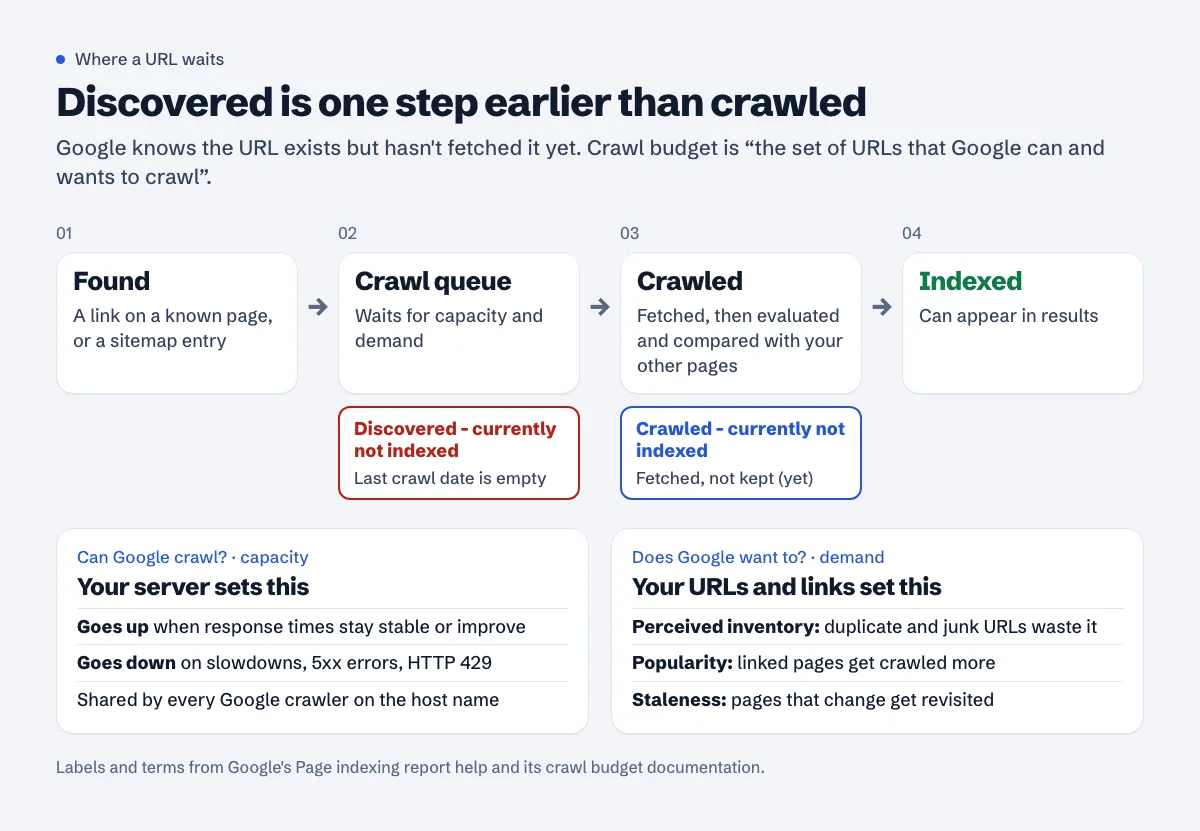
Google defines crawl budget as "the set of URLs that Google can and wants to crawl." The can part is the crawl capacity limit, set by how your server behaves. The wants part is crawl demand, set by your URLs and how the web links to them.
On capacity, the doc says "Every site starts with the same default, conservative crawl capacity limit." It goes up when "the site responds consistently and its response times (including latency and Time-to-First Byte) remain stable or improve", and goes down when the site slows or "responds with server errors (5xx HTTP status codes) or rate-limiting signals (such as HTTP 429)".
On demand, Google names three factors you can influence: perceived inventory ("If many of these URLs are duplicates, or you don't want them crawled for some other reason ... this wastes a lot of Google crawling time on your site"), popularity, and staleness. And the line that explains most small-site cases: "Even if the crawl capacity limit isn't reached, if crawl demand is low, Google will crawl your site less."
Step 1: rule out the server (capacity)
Crawl Stats in Search Console
Open Settings > Crawl stats (Google's help puts it as "(Property settings) > Crawl stats"). Look at three things:
- Host status. "Ideally your host status should be Green." Anything else means Google "encountered at least one significant crawl availability issue" in the last 90 days. Click it to see robots.txt fetching, DNS resolution and server connectivity separately.
- By response. A visible share of 5xx or 429 is the problem in plain sight.
- Average response time. A line that climbs on the days your crawl requests drop tells its own story. The slow server response guide explains how to measure and fix it.
Google's Crawl Stats help says sites under a thousand pages "should not need to use this report", and that's true for day-to-day work. For this particular status it's still the fastest capacity check you have.
Your server log
Search Console shows totals. The log shows when and why. On a VPS with nginx or Apache, two commands answer most of it:
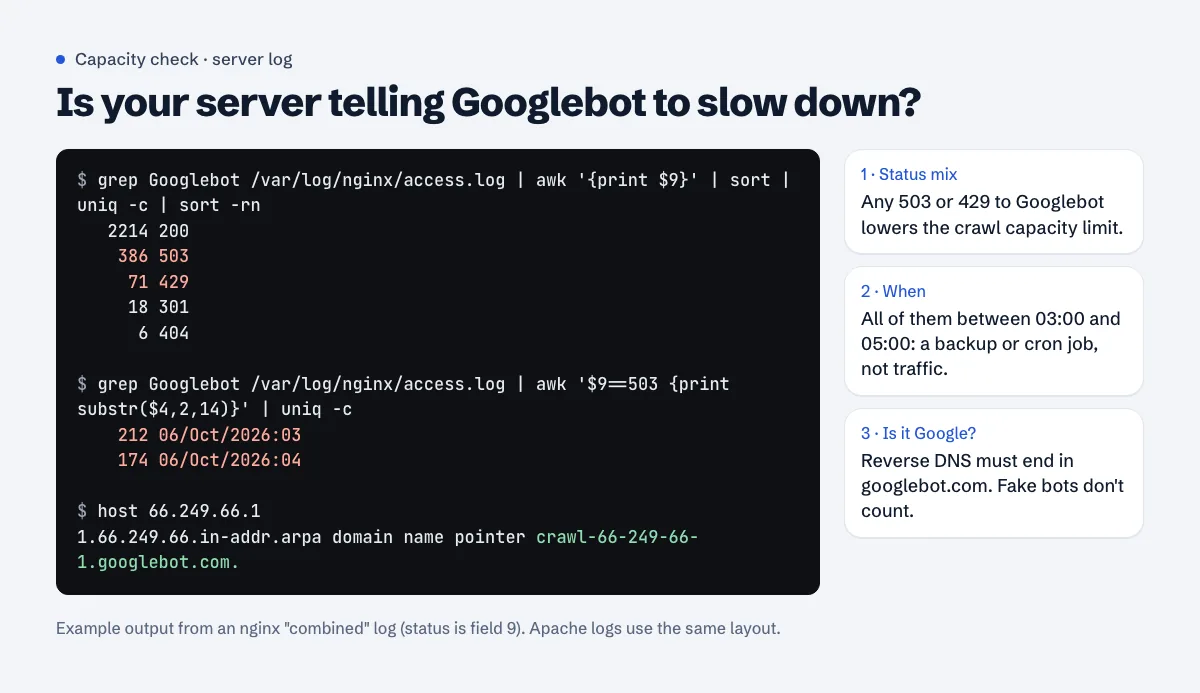
Anything can claim to be Googlebot in a user-agent string, so check a few IPs with a reverse DNS lookup. Google's verification page lists the masks: common crawlers resolve to crawl-***-***-***-***.googlebot.com or geo-crawl-***-***-***-***.geo.googlebot.com.
The usual causes on small sites:
- A security plugin or WAF rule that rate-limits "aggressive" visitors. Googlebot makes many requests in a row and trips it. Google's help says it directly: "because Googlebot often makes more requests than a human user, it can trigger these protection systems". Allow verified Google crawlers rather than raising limits for everyone.
- Shared hosting resource limits. On cPanel hosts running CloudLinux, a burst of crawling can hit the account's process limit and return 503 or "508 Resource Limit Is Reached". Ask the host for the LVE stats around the times in your log.
- Nightly jobs. Backups, image optimisers and cache rebuilds that saturate the server for an hour or two.
- Plain slowness. Uncached PHP pages taking two or three seconds each.
If URL Inspection ever shows Hostload exceeded, Google's own answer is to "add more server resources if that makes sense for your business."
A quick outside check: run a page through the Googlebot access checker. It requests the page as a browser and as Google's crawlers and shows whether the status codes differ.
Step 2: give Google a reason to crawl (demand)
If the server is fine, the URLs are waiting because Google doesn't see much demand for them. These are the levers, roughly in order of payoff.
Link to the pages from pages Google already crawls
Google's help is blunt about how pages get found: a page "must be linked from a known page, or from a sitemap." A sitemap gets the URL discovered; a link from a page Google already visits is what tends to get it crawled. Common gaps:
- New posts that only appear in the sitemap and on page 9 of the blog archive.
- "Load more" buttons and infinite scroll with no real pagination links. Google's link guidelines say it "can only crawl your link if it's an
<a>HTML element ... with anhrefattribute." A<button>that fetches posts with JavaScript isn't a link. - Category pages that list only the five newest posts.
Fix it by linking each new post from its category page and from two or three related, already-indexed posts, and by keeping important pages within three clicks of the home page. The orphan pages and internal links guide has a repair workflow.
Keep the sitemap honest
A sitemap helps, especially for a new site. Google's sitemap overview says you might need one if "Your site is new and has few external links to it." It also says a sitemap "doesn't guarantee that all the items in your sitemap will be crawled and indexed."
What hurts is a sitemap full of URLs that redirect, 404, carry noindex or point their canonical elsewhere. Every one of them is a crawl spent on nothing. Include only final, indexable, self-canonical URLs, and only change <lastmod> when the content changes. Details in XML sitemap errors.
Shrink the pile of URLs Google thinks you have
"Perceived inventory" is the factor Google says "you can positively control the most." On small WordPress sites the clutter is usually tag archives, date archives, ?replytocom= comment links, calendar or filter URLs, internal search pages and old URLs that redirect two or three times. The crawl budget doc's own list:
- "Consolidate duplicate content."
- "Avoid long redirect chains, which have a negative effect on crawling." See redirect chains and loops.
- "Eliminate soft 404 errors." See broken links and soft 404s.
- "Return a 404 or 410 status code for permanently removed pages."
Publish fewer, better pages
Google's answer to "How do I get more crawl budget?" has two parts: server resources, and content quality, which for Search "includes things like popularity, overall user value, content uniqueness, and serving capacity." A new site that publishes 2,000 near-identical location or product pages in a week usually sees most of them parked here. If that's your situation, the programmatic SEO guide is the relevant one.
When to request indexing (and when not to)
URL Inspection's Request indexing is for a handful of important pages. The URL Inspection help says "There is a daily limit to how many index requests you can submit," and "To request indexing of many new or updated pages, your best choice is to submit a sitemap, with the updated pages marked by <lastmod>."
Patience is part of the fix. Google's help says "After a page URL is known, it can take some time (up to a few weeks) before Google crawls some or all of your site." A brand-new site with a few dozen URLs in this status is normal for its first weeks.
What not to do
Don't block sections in robots.txt to "free up" budget for others. Google: "Don't use robots.txt to temporarily reallocate crawl budget for other pages ... Google won't shift this newly available crawl budget to other pages unless Google is already hitting your site's crawl capacity limit."
Don't add noindex to save crawl budget. "Google will still request, but then drop the page when it sees a noindex meta tag or header in the HTTP response, wasting crawling time." Noindex is for keeping pages out of results, not out of the crawl.
Don't resubmit the sitemap every day. Google reads it on its own schedule; resubmitting an unchanged file changes nothing.
Don't switch off your firewall. Allow verified Google crawlers instead. Turning protection off to fix a crawl problem tends to create a security problem.
Why this matters for AdSense
AdSense reviews your site with its own crawler, Mediapartners-Google, not Googlebot. But the crawl budget doc notes that "the crawl capacity limit is shared across all crawlers", and the firewall or hosting limit that's sending 429s to Googlebot is often doing the same to the AdSense crawler. That's how people end up with a "Site down or unavailable" rejection on a site that loads fine for them. If your Crawl Stats show 429s or 5xx, fix them before you apply.
Find the pages Google can't reach by links
A free Approvalens scan follows internal links from your home page the way a crawler does and flags sitemap articles that nothing links to, pages buried four or more clicks deep, and requests your server refused: scan your site.
FAQ
How long can a URL stay in "Discovered - currently not indexed"?
Google gives no maximum. Its help says crawling can take "up to a few weeks" after a URL is known. If important pages are still there after a month, work through the capacity and linking steps above.
Does "Discovered - currently not indexed" mean my content is bad?
Not directly. Google hasn't read the page yet. Low demand can reflect how Google sees the site overall, though, so many thin pages elsewhere can slow the crawling of new ones.
Will a faster server fix it?
Only if capacity is the problem. Check Crawl Stats and your log for 5xx, 429 and slow responses first. If they're clean, the fix is links and fewer junk URLs, not hardware.
Should I click Validate fix for this status?
You can, after you've fixed linking or server issues for the affected URLs. Validation rechecks only the URLs listed under the issue and typically takes up to about two weeks.
Can I ask Google to crawl my site faster?
There's no setting that makes Googlebot crawl more. The crawl budget doc says the limit adjusts by itself: "If there is demand to crawl more and the site remains healthy, Google's systems will automatically adjust this limit over time."
Spotted something out of date or wrong? Tell us and we'll correct it.
Read this guide in Turkish →Check it on your own site. Free, no sign-up.
Free tools for this
Free scan
Check your own site
The free scan reads the first 50 pages and shows your score and every problem it finds.