"Crawled - currently not indexed" means Googlebot fetched the page, looked at it, and decided not to put it in the index for now. It's not an error, not a penalty and not a crawl problem. On a small site the list is usually mostly URLs that were never meant to rank (tag archives, page 2 of the blog, feeds, URLs with ?replytocom= on the end) plus a smaller group of real articles Google didn't think were worth keeping. The fix is to sort the list first, ignore what should be ignored, and spend your time on the articles.
What Google's definition actually says
The Page indexing report help describes the status in two sentences: "The page was crawled by Google but not indexed. It may or may not be indexed in the future; no need to resubmit this URL for crawling."
That's all Google tells you. There is no per-URL reason, no score and no list of what to change. What happens in between is described in Google's crawl budget documentation: "not every page that is crawled will necessarily be indexed. After crawling, each page must be evaluated, consolidated, and assessed to determine its suitability for the index." So the page got past the crawler and stopped at the evaluation step.
Two more lines from the same help page are worth keeping in mind before you change anything:
- "Don't expect every URL on your site to be indexed. Some URLs might be duplicates or might not contain meaningful information."
- "If your site has fewer than 500 pages, you probably don't need to use this report." For small sites Google suggests checking key pages with
site:searches and the URL Inspection tool instead.
The second one surprises people, but it fits what we see. On a 300-post blog, a "Crawled" count of 400 usually says more about the theme's archive pages than about the posts.
Find the list and look at it by URL type
In Search Console, open Indexing > Pages, scroll to Why pages aren't indexed and click the Crawled - currently not indexed row. The details page shows example URLs and lets you export them. Google notes the example list "is limited to 1,000 items, and isn't guaranteed to show all URLs in a given status", so treat it as a sample.
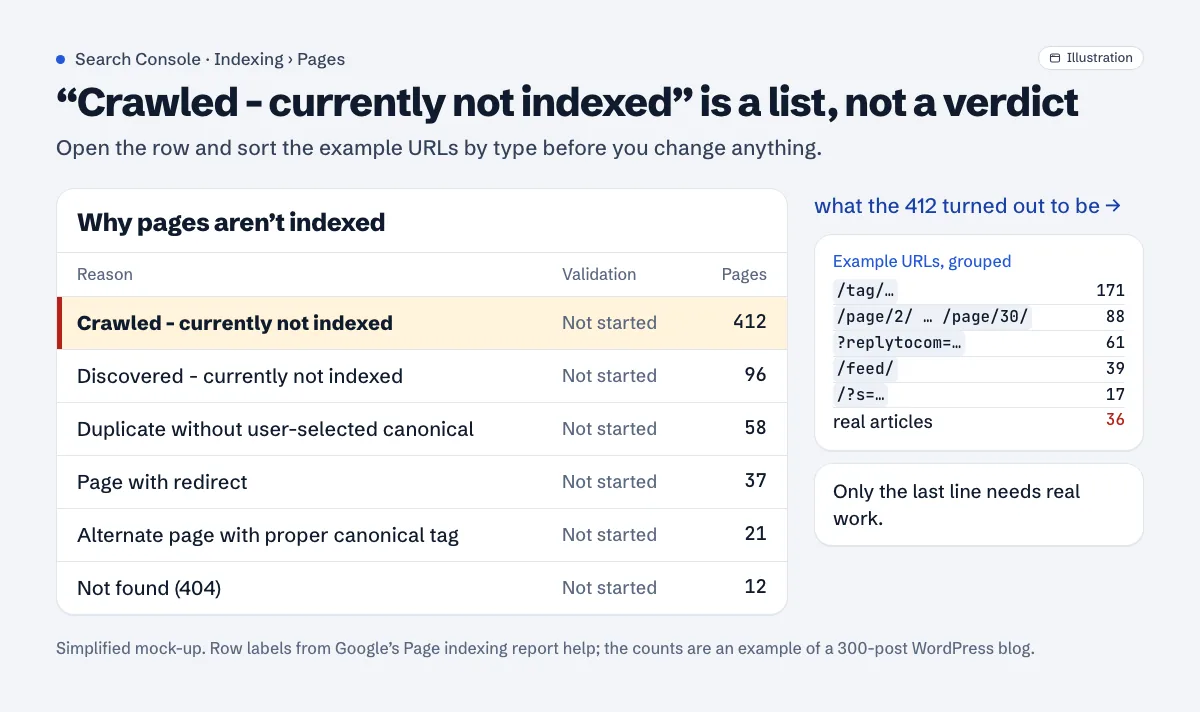
Export the list to a spreadsheet and add a column for the pattern. A quick way is to sort by URL and label blocks: everything with /tag/, everything with /page/, everything with a ?, /feed/, /?s=, attachment URLs, and what's left (articles and pages). Count each group. That one column tells you whether you have an archive problem, a duplicate problem or a quality problem, and they have different fixes.
The triage, by URL type
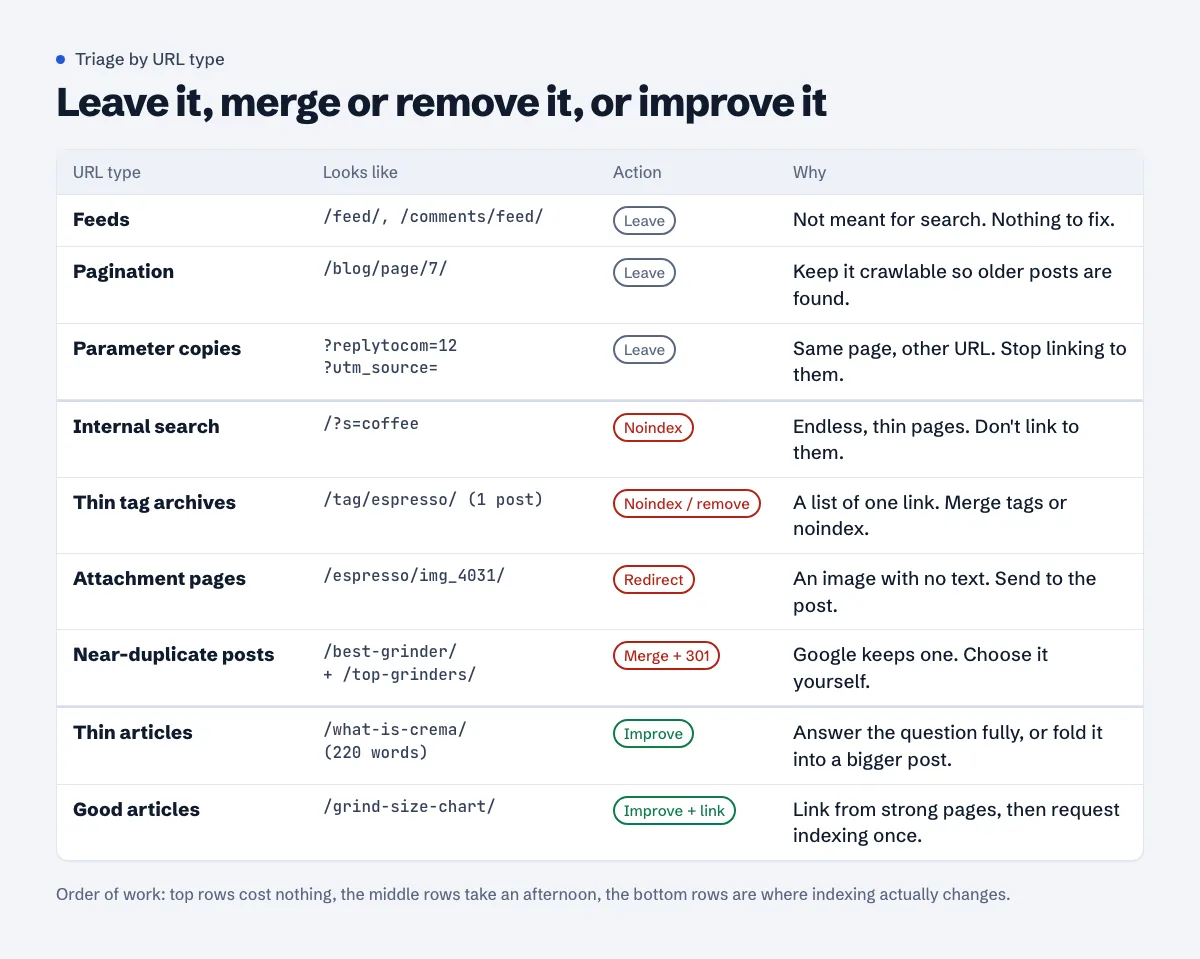
Leave these alone
Feeds (/feed/, /comments/feed/). They're XML for feed readers, linked from the head of every page, so crawlers find them and sometimes report them here. Nothing to do.
Pagination (/blog/page/7/, /category/recipes/page/3/). It's normal for deep list pages to sit in this bucket. Don't noindex them and don't block them in robots.txt: they're how crawlers reach your older posts.
Parameter copies (?replytocom=12, ?utm_source=newsletter, ?amp, ?sort=). Same content, different URL. The help page's FAQ is plain about it: "Google doesn't index duplicate copies of a page." Check two things and move on: the page's canonical tag points to the clean URL (see canonical tag problems), and your own templates don't link to the parameter versions. Tracking parameters on internal links are a common source.
Noindex, merge, redirect or remove these
Internal search results (/?s=coffee). Add noindex. Don't block them in robots.txt if you want the noindex to be read; Google's own FAQ says a robots.txt rule "will actually prevent noindex from being seen by Google". The noindex guide shows where the tag can live.
Thin tag and category archives. A tag with one post is a page with one link on it. Either merge tags so each one holds a real group of posts, or set tag archives to noindex in your SEO plugin (Yoast and Rank Math both have a per-taxonomy switch for this). If a category is a real hub, give it an intro paragraph and keep it indexed.
Attachment pages (/espresso/img_4031/). A page that shows one image and nothing else. Redirect them to the parent post or the file. Most SEO plugins have a setting for it.
Near-duplicate posts. Two posts answering the same question ("best grinder 2025" and "top grinders") compete with each other, and Google will usually keep one. Pick the stronger one yourself, merge the useful parts into it, and 301-redirect the other. Duplicate content and keyword cannibalization cover how to spot the pairs.
When a page is gone for good with no replacement, return 404 or 410. The crawl budget doc calls a 404 "a strong signal not to crawl that URL again". Then take it out of your sitemap (XML sitemap errors has the rules for what belongs there).
Improve these: the articles
This is the group that matters, and Google doesn't tell you why each one was passed over. In practice the same few causes keep coming back:
- It's thin. A 250-word answer to a question that needs a table, steps or numbers. Google's crawl budget page lists "overall user value" and "content uniqueness" among the things that decide how much crawling a site gets; it's reasonable to expect the same qualities count when a page is evaluated.
- It's a near copy of something else on your site, or of a manufacturer's description, a press release or another site's article with the words moved around.
- Nothing links to it. A post that only exists in the sitemap gets little attention. The crawl budget doc says popular URLs "tend to be crawled more often". Internal links are the part of popularity you control. See orphan pages and internal links.
- It's out of date. Prices, versions or rules that changed, with a title that still says last year.
What to do, in order: decide whether the page deserves to exist (if not, merge or remove it as above). If it does, rewrite it to answer the question better than what already ranks: add the specifics, your own photos or measurements, a clear structure. Link to it from two or three related posts that are indexed. Then open URL Inspection, click Test live URL to make sure Google can fetch it, and click Request indexing. Once.
Thin content: how to find it and fix it goes deeper on the rewriting part.
What "Validate fix" does for this status
You can click Validate fix on the row, but know what it does. Per the help page, "Search Console immediately checks a few pages. If the current instance exists in any of these pages, validation ends, and the validation state remains unchanged." Then "Only URLs with known instances of this issue are queued for recrawling, not the whole site." It "typically takes up to about two weeks, but in some cases can take much longer".
On this status, validation fails easily. Your pagination and feeds will still be "Crawled - currently not indexed" next week, because they should be. Two details from the same page make it useful anyway:
- URLs you noindexed, redirected or removed count as fixed: "If the page is not available to Google for any reason (page removed, marked noindex, requires authentication, and so on), the issue will be considered as fixed for that URL."
- You can narrow it to the pages you care about. Google's tip is to "create and submit a sitemap containing only your most important pages, then filter the report by that sitemap before requesting a fix validation."
So the workflow that makes sense: improve the articles, put just those URLs in a separate sitemap (for example sitemap-improved.xml), submit it, filter the report by it, then validate. Don't click Validate fix again "until validation has succeeded or failed".
Validation doesn't make Google index anything. It only schedules a recheck and sends you an email with the result.
What not to do
Don't request indexing over and over. Google's recrawl page says "there's a quota for submitting individual URLs and requesting a recrawl multiple times for the same URL won't get it crawled any faster." The report already told you the page was crawled. Requesting it again without changing the page asks the same question and gets the same answer.
Don't use the Indexing API or "instant indexing" plugins for blog posts. Google's Indexing API quickstart says it "can only be used to crawl pages with either JobPosting or BroadcastEvent embedded in a VideoObject."
Don't noindex everything in the list. Noindexing your articles because they weren't indexed locks the door from the inside.
Don't delete good pages in a panic. "It may or may not be indexed in the future." New sites in particular see articles move from this bucket into the index over a few weeks without any change.
Don't publish twenty new posts to make up for it. If the existing ones were judged thin, more of the same makes the ratio worse.
Why this matters for AdSense
AdSense doesn't read your Search Console report, and Google doesn't document any link between the two. But the pages Google declines to index are often the same pages an AdSense reviewer would call thin or duplicated, and "Low value content" is the AdSense rejection that names exactly that problem. If a large share of your articles (not archives) sits in this bucket, treat it as an early warning and fix the content before you apply. The low value content guide covers what reviewers look for.
If it's the opposite problem and Google hasn't fetched the pages at all, you're looking at Discovered - currently not indexed, which has different causes.
See which pages are the weak ones
A free Approvalens scan reads your first 50 pages and flags thin pages, near-duplicates and archive pages that are open to indexing, with an index plan per page: scan your site.
FAQ
How long does it take for a "Crawled - currently not indexed" page to get indexed?
Google gives no timeline. Its recrawl page says crawling "can take anywhere from a few days to a few weeks", and indexing is a separate decision after that. If you changed the page substantially, give it two to four weeks before judging.
Is "Crawled - currently not indexed" a penalty?
No. A manual action shows up in Search Console under Security & Manual Actions. This status is an indexing decision, made page by page.
Should I add noindex to pages in this list?
Only to page types that shouldn't be in search at all, such as internal search results or thin tag archives. Never to articles you want to rank.
The URL Inspection live test says "URL is available to Google". Why isn't it indexed?
The live test checks whether Google can fetch and parse the page, not whether it will index it. The help page also notes the live test doesn't check "duplicate or canonical conditions".
My new site has almost every post in this status. What now?
Check the basics first: a home page that links to your posts, categories that list them, a sitemap with only real articles. Then look hard at the posts themselves. On new sites this status usually means Google hasn't seen enough reason to keep them yet.
Spotted something out of date or wrong? Tell us and we'll correct it.
Read this guide in Turkish →Free scan
Check your own site
The free scan reads the first 50 pages and shows your score and every problem it finds.