An orphan page is a page that exists, usually in your sitemap, but that no other page on your site links to. A weakly linked article is the milder version: menus reach it, but no other article mentions it. Fix both the same way: decide whether the page deserves to stay, then link to it from the text of two to five related articles with anchor text that names the topic, and give each topic one hub page that links to all of its articles.
Google's own rule of thumb, from its link best practices: "Every page you care about should have a link from at least one other page on your site."
Three problems that look like one
"Internal linking" findings in an Approvalens report cover three different situations. They need different fixes, so separate them first.
| Problem | What a reader experiences | Typical cause |
|---|---|---|
| Orphan page | Can't reach it by clicking at all | Published without a category, dropped from the menu, generated in bulk |
| No in-content links | Reaches it only through a menu or archive | Posts written one by one, never linked back from older ones |
| Topic without a hub | Finds one post on a subject, can't see the other five | Categories used as tags, or no category page worth reading |
Google's SEO starter guide explains why this matters beyond navigation: "the vast majority of the new pages Google finds every day are through links". Its sitemap overview adds that a sitemap helps, but "on large sites it's more difficult to make sure that every page is linked by at least one other page". A sitemap entry isn't a substitute for a link.
For AdSense, this is a navigation question. The program policies say "Sites showing Google ads should be easy for users to navigate" (48182). The navigation guide covers menus; this guide covers what happens inside your articles.
How the scan measures it
The scan sorts links by where they sit in the HTML: inside nav, header, footer or aside elements, or blocks whose class names suggest a menu, footer or sidebar, versus the main text. That split decides what each check counts.
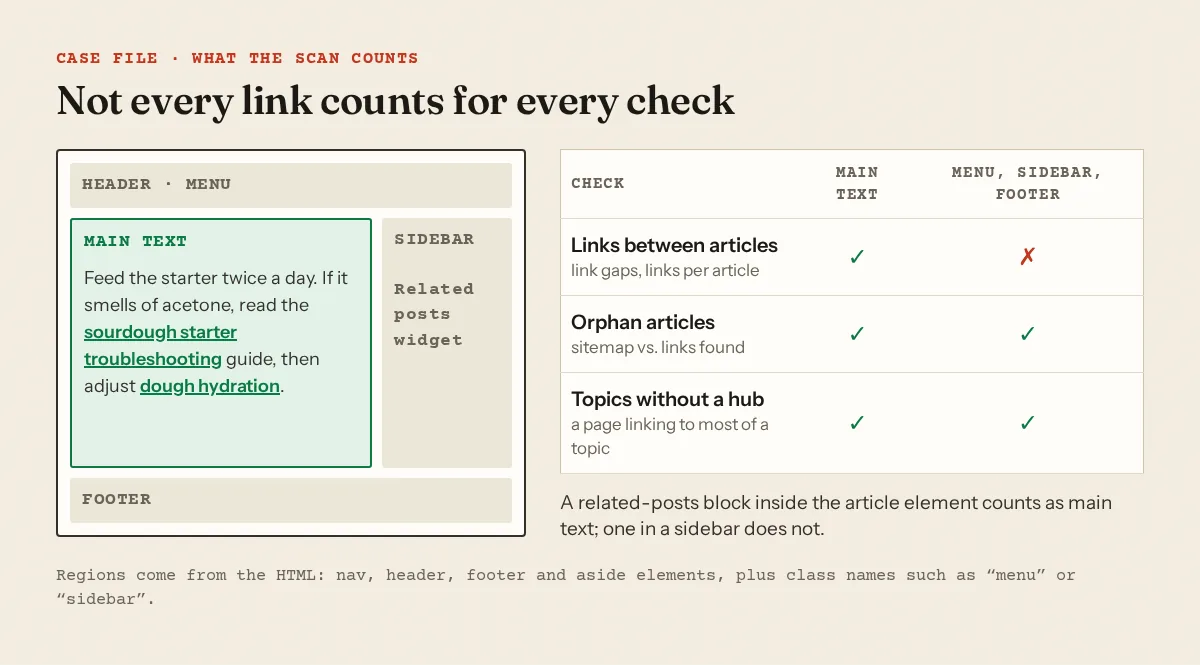
- Links between articles (warning or notice). For every article, we count how many pages we opened link to it from their main text. If 50% or more of your articles get none, it's a warning; from 25%, a notice. The scan also compares articles by their most distinctive words and counts related pairs that never link to each other. Needs at least five articles.
- Links per article (warning). The median number of distinct in-text links to your own pages per article. Below 2, it's flagged.
- Orphan articles (notice). Of the articles we opened that are also in your sitemap, how many does no crawled page link to, from any region. It needs at least eight such articles and fires above 50%. Our crawler travels by following links from your home page, so a page with no links at all is often never opened. A clean result here doesn't prove you have no orphans.
- Topics without a hub (notice). We group articles into topics by shared vocabulary in titles, subheadings and text. For each group of four or more, we check whether any crawled page links to at least half of them. Word-based grouping can merge two neighbouring topics or split one, so read the listed pages before acting.
All four are estimates from the pages we crawled, which is how the report labels them. The methodology page has the rest.
The Linking panel
The full report has an Internal links tab with six tiles (content pages, pages with no in-content links, pages that link to nothing, related pages not linked, median links in and out), two histograms, and a table you can filter to "No links in" or "No links out" and download as CSV. Below that, Suggested links lists pages where a related article isn't linked yet, with a suggested anchor taken from the target's H1 and a topic-match percentage.
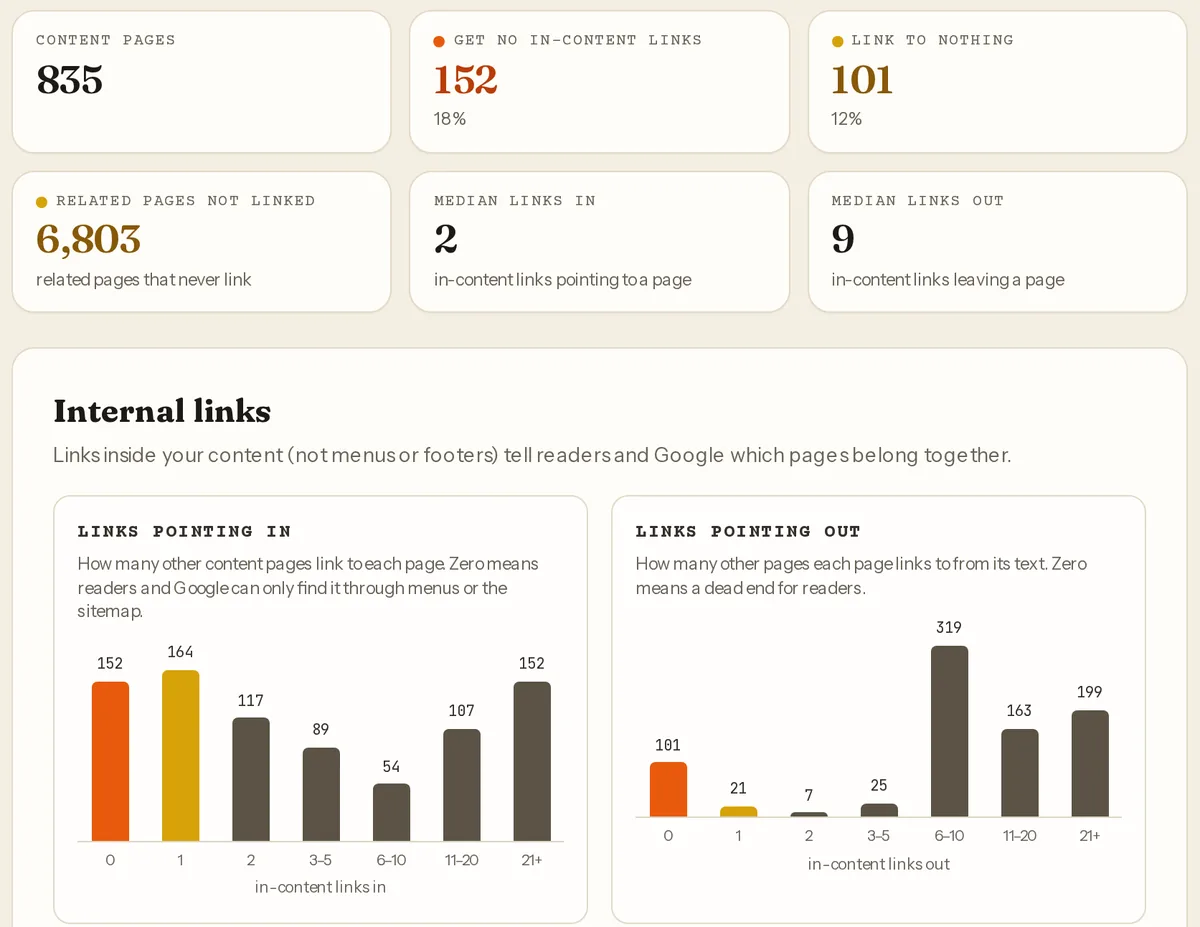
That site is a useful reminder that a pass isn't the end. The median article links out nine times, yet 152 articles receive nothing, because the outgoing links all go to the same popular pages.
The repair workflow
1. Export the list
Take the "No links in" view as CSV, or the orphan finding's URL list. Sort by section or category so you work one topic at a time.
2. Decide what each page deserves
| The page is… | Action |
|---|---|
| Useful and unique | Keep it and link to it (step 3) |
| Covering the same question as a stronger post | Merge into the stronger one and 301 the old URL; see keyword cannibalization |
| Thin, outdated or bulk-generated | Improve it, or remove it and drop it from the sitemap; see thin content |
| A utility page (thank-you, test, old landing page) | Remove from the sitemap; noindex if it must stay |
Don't link a page you'd be embarrassed to show a reviewer. Linking surfaces it.
3. Add links from the text of related posts
The report suggests 2–5 links per article. That's our suggestion, not a Google rule. Google says "There's no magical ideal number of links a given page should contain." Find the posts that already mention the subject and link the phrase where it appears:
<!-- before -->
<p>If your starter smells of acetone, feed it more often.</p>

<!-- after -->
<p>If your starter smells of acetone, feed it more often
(our <a href="/sourdough/starter-troubleshooting/">starter troubleshooting guide</a>
covers the other smells).</p>
Start with older posts that already get traffic, since readers actually pass through them.
4. Link back up to the hub
Every article in a topic should link to its hub once, in the intro or the closing paragraph. Breadcrumbs do this too.
Hub pages that are more than archives
A hub is a page that introduces a subject and links to every article on it. A bare category archive with 20 excerpts and no introduction is a list, not a guide.
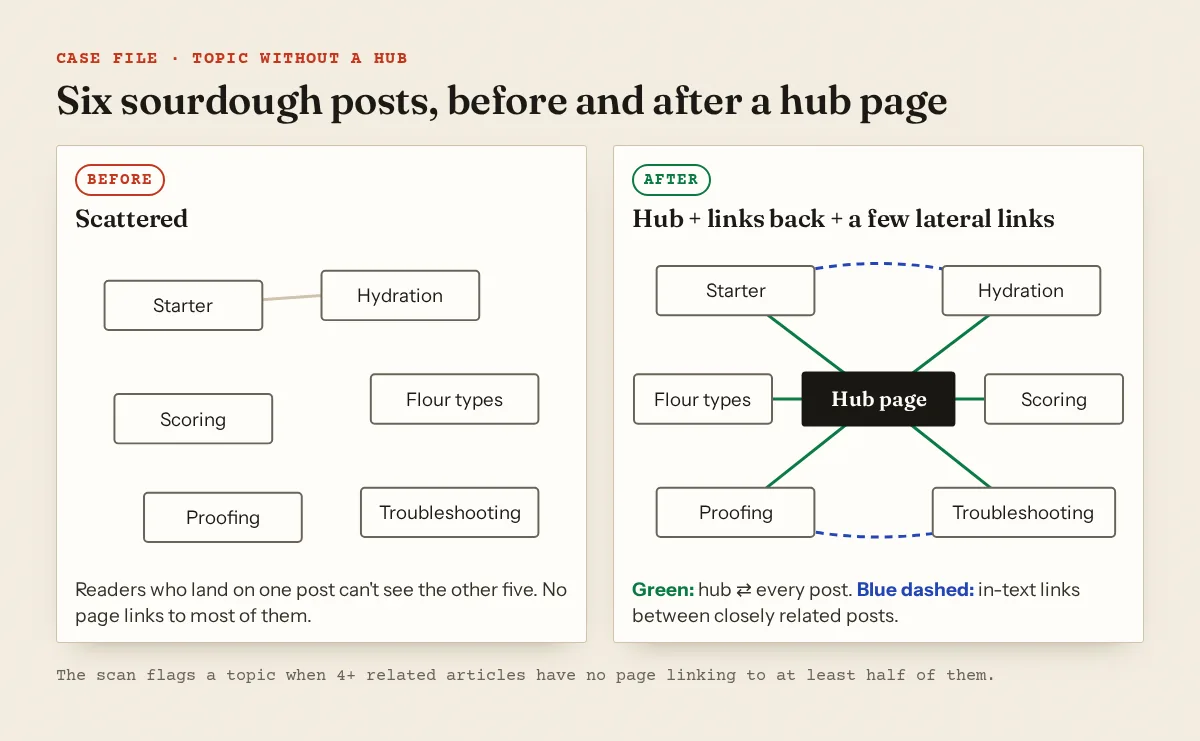
A workable hub has a real introduction in your own voice, the articles grouped by question (getting started, problems, recipes), and one line on each link saying what it answers. The report's index plan treats archive pages with fewer than 250 words of their own as thin listings, which is a fair floor. If a topic has only two posts, it isn't a hub yet; write the missing pieces first. The niche focus guide helps you decide which topics deserve one.
WordPress. A category page can be the hub. WordPress's Categories screen docs warn: "Some themes take advantage of Category descriptions, others do not". Check that your theme prints the description above the post list before writing one. Otherwise use a normal page as the hub and link it from the menu.
Blogger. Label pages live under /search/label/, and Blogger's default robots.txt has Disallow: /search for all crawlers except the AdSense one. Readers can use label pages, but Googlebot won't crawl them. Make the hub a static Page or a pinned guide post that links to every article.
Widgets help, editorial links help more
Related-posts widgets are useful: they give every article a way out. But they pick by tag or recency, repeat the same few posts, and often sit in a sidebar, which our link-gap check doesn't count. A widget inside the article element counts as main text. Either way, a sentence that says why the next article matters does a job a thumbnail grid can't. Use both.
Anchor text: "click here" and empty links
Google: "Good anchor text is descriptive, reasonably concise, and relevant to the page that it's on and to the page it links to." Its examples of bad anchors include "Click here" and "Read more". The scan flags an article when at least two links in its text are exactly one of: click here, here, read more, more, learn more, this, link (or the Turkish equivalents).
Empty anchors are icon links with nothing to read. Google can fall back to the title attribute, and for image links "Google uses the alt attribute of the img element as anchor text". The scan treats a link as having text if it has visible text, a title, an aria-label or image alt text, and flags pages with three or more internal links that have none:
<a href="/search/"><svg aria-hidden="true">…</svg></a>                    <!-- empty -->
<a href="/search/" aria-label="Search the blog"><svg aria-hidden="true">…</svg></a>  <!-- fine -->
nofollow on your own links
The qualify outbound links page reserves nofollow for links you'd rather Google not associate with your site, and says: "For links within your own site, use the robots.txt disallow rule." To keep a page out of the index, it says "allow crawling and use the noindex robots rule." There's no reason to put rel="nofollow" on links to your own articles. The scan flags pages with three or more such links; themes and plugins that add it to category or login links are the usual source. In Blogger, check the "Add 'rel=nofollow' attribute" box in the link dialog (Blogger Help).
Next.js and JavaScript menus
Google can generally crawl a link only if it's "an <a> HTML element (also known as anchor element) with an href attribute". In Next.js, <Link> "extends the HTML <a> element", so <Link href="/sourdough/"> is fine. A <div onClick={() => router.push('/sourdough/')}> isn't a link to a crawler. Grep your components for router.push inside click handlers on navigation elements.
When you remove or merge pages during this work, fix the links that pointed to them; see broken links and soft 404s. Keep the sitemap in step with XML sitemap errors.
A free scan counts in-text links per article, flags orphan and hub gaps, and in the full report suggests which pages to link from.
FAQ
Is an orphan page penalised?
Google doesn't describe a penalty. The problem is practical: it may be found late or rarely, and a reviewer browsing your site may never see it. If the page matters, link it.
Do menu and footer links fix orphan pages?
They stop a page being an orphan, and our orphan check counts them. They don't count as links between articles, because a footer link carries no context about the topic.
How many internal links should an article have?
Google says there's no magical ideal number. Our report suggests 2–5 links to related articles as a starting point, placed where the topic actually comes up.
Should I link every new post from the home page?
A home page post list helps discovery while a post is new. Long term, the links that keep it reachable are the ones from its hub and from related articles.
Spotted something out of date or wrong? Tell us and we'll correct it.
Read this guide in Turkish →Free scan
Check your own site
Free scan: readiness score and every issue, usually in a few minutes.