An XML sitemap is a list of the URLs you want Google to find and index. It is not required, and submitting one is "merely a hint", in Google's words. But a sitemap that lists redirects, 404s, noindex pages or hundreds of tag archives tells Google the opposite of what you mean, and one whose lastmod dates all change on every build teaches Google to ignore your dates. A good sitemap is short and boring: every entry returns 200, can be indexed and names itself as canonical.
The rules Google actually publishes
Most sitemap advice online is folklore. These are the parts Google documents in Build and submit a sitemap and the sitemaps overview:
| Topic | What Google says |
|---|---|
| Size | "All formats limit a single sitemap to 50MB (uncompressed) or 50,000 URLs." Larger sites split into several files and an index. |
| URLs | "Use fully-qualified, absolute URLs in your sitemaps." |
| What to list | "Include the URLs in your sitemap that you want to see in Google's search results." |
lastmod |
Used "if it's consistently and verifiably … accurate" |
priority, changefreq |
"Google ignores <priority> and <changefreq> values." |
| Encoding and place | UTF-8; a sitemap at the site root "can affect all files on the site" |
| Do you need one? | Possibly not if your site is "about 500 pages or fewer" and well linked internally |
| Guarantees | None. A sitemap "doesn't guarantee that all the items in your sitemap will be crawled and indexed." |
The canonical rule lives in another document: "All pages listed in a sitemap are suggested as canonicals" (consolidation guide). Listing a URL whose canonical points elsewhere is a direct contradiction.
Which file is your sitemap?
Before fixing anything, find out which generator is actually live. Two active generators produce two sitemaps that disagree.
| Platform | Sitemap URL | Notes |
|---|---|---|
| WordPress core | /wp-sitemap.xml |
Added in 5.5; up to 2,000 URLs per file; includes author archives; disabled when "Discourage search engines" is on (announcement) |
| Yoast SEO | /sitemap_index.xml |
Toggle under Yoast SEO → Settings → Site features → "XML sitemaps" (Yoast); on yoast.com, /wp-sitemap.xml redirects there |
| Rank Math | /sitemap_index.xml |
Rank Math SEO → Sitemap Settings, "Include in Sitemap" per post type and taxonomy (Rank Math) |
| Blogger | /sitemap.xml and /sitemap-pages.xml |
Posts in the first, static pages in the second (seen on Google's own Blogger blogs) |
| Next.js | /sitemap.xml from app/sitemap.ts |
Split large sets with generateSitemaps, served at /…/sitemap/[id].xml |
On the Blogger blogs we checked, the default robots.txt only names /sitemap.xml, so the static pages file is easy to forget. Submit both in Search Console.
What belongs in it, and what doesn't
Use the same four checks for every entry:
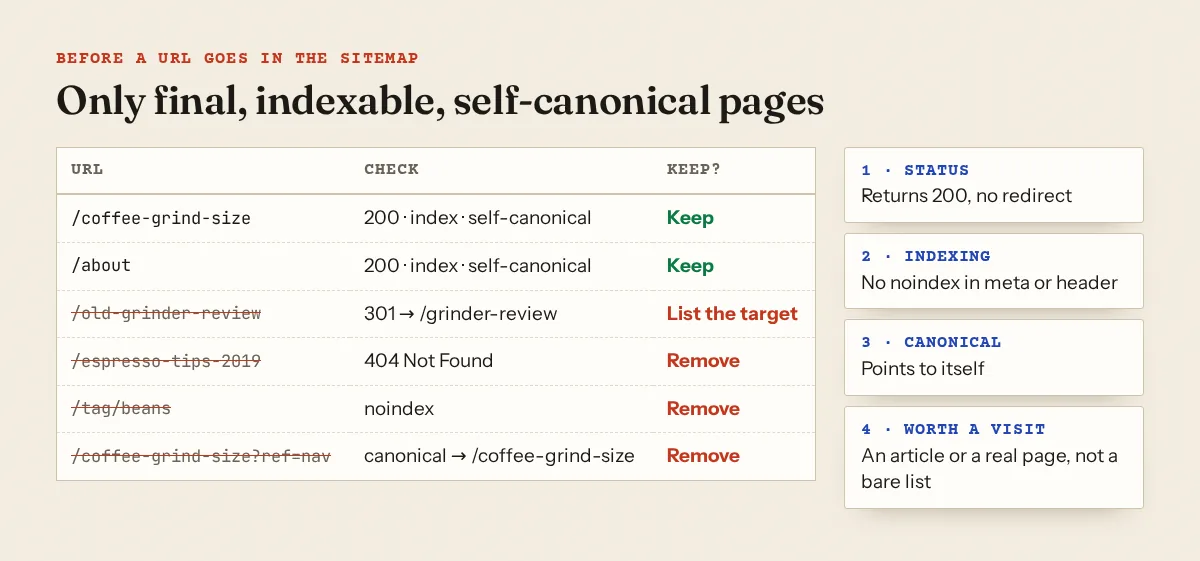
Redirected URLs should be replaced by their final destination. Deleted posts should be removed, along with the internal links that still point to them (broken links and soft 404s). A tag page you set to noindex has no business in the sitemap; Yoast says post types set to not show in search results are left out of its sitemap automatically, which is one more reason to fix the setting rather than the file. If a URL's canonical points elsewhere, list the canonical instead. Our canonical guide covers why that canonical might be wrong in the first place, and noindex by mistake covers pages that are noindex when they shouldn't be.
List pages are a softer problem. Main categories with a real introduction can stay. Hundreds of tag, author, date and page-number URLs make the sitemap mostly lists: Rank Math's per-taxonomy "Include in Sitemap" switch and Yoast's Settings → Categories & tags are where you turn those off. On Blogger, label pages are not in the sitemap, but many one-post labels still create thin pages; the navigation guide has a better structure.
When the file itself is broken
Open the sitemap URL with curl rather than a browser, because browsers prettify XML and hide the details:
$ curl -s -D - -o sm.xml https://example.com/sitemap_index.xml | head -2
HTTP/2 200
content-type: text/html; charset=UTF-8
$ head -c 80 sm.xml
<!DOCTYPE html><html lang="en"><head><title>Just a moment...</title>
That is a bot challenge page served instead of XML. The usual causes, by symptom:
| What you get | Likely cause |
|---|---|
| HTML page (challenge, login, theme 404) | Firewall or CDN challenge, a maintenance plugin, or a sitemap module that is switched off |
| XML that fails to parse | Text before <?xml, often a PHP notice or a blank line from a theme's functions.php |
| 404 or 500 | Old generator removed, rewrite rules not flushed, or the robots.txt still names the old file |
| Empty urlset | Content types excluded, or the site is set to discourage indexing |
If a CDN challenge is the cause, the Cloudflare guide shows how to let verified crawlers through; if the whole site errors for crawlers, start with site down or unavailable.
The robots.txt Sitemap line
Google lists three ways to submit: the Sitemaps report, the Search Console API, or a line in robots.txt: "Insert the following line anywhere in your robots.txt file". Multiple lines are allowed:
User-agent: *
Disallow: /wp-admin/

Sitemap: https://example.com/sitemap_index.xml
Use the live host and scheme, and update the line when you switch plugins. WordPress core's own robots.txt references its sitemap automatically; a physical robots.txt file replaces that output. In Next.js, app/robots.ts takes a sitemap field. The robots.txt tester lists the sitemaps your robots.txt declares, and the robots.txt guide covers the rest of the file.
lastmod: honest dates only
Google's rule is short: the value "should reflect the date and time of the last significant update to the page. For example, an update to the main content, the structured data, or links on the page is generally considered significant, however an update to the copyright date is not." Gary Illyes put the consequence bluntly in a 2023 post: if a page changed years ago but lastmod says yesterday, "eventually we're not going to believe you anymore". The same post says it is fine to leave lastmod out for pages where you don't know the date.
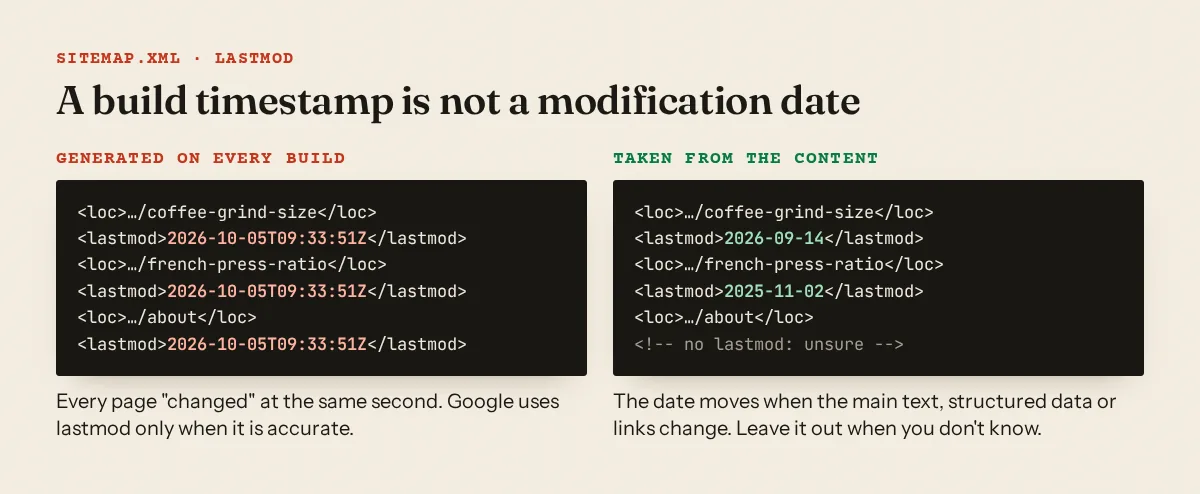
The common source is code that stamps the generation time. The example in the Next.js sitemap docs uses lastModified: new Date(), which is fine for a demo; copied as is, every URL gets the build time. Use the content's own date:
// app/sitemap.ts
export default async function sitemap(): Promise<MetadataRoute.Sitemap> {
  const posts = await getPosts()
  return posts.map((p) => ({
    url: `https://example.com/blog/${p.slug}`,
    lastModified: p.updatedAt, // set when the text really changes
  }))
}
On WordPress, the original 5.5 core sitemap had no lastmod at all; the current core sitemap on make.wordpress.org lists one per post. Plugins that "refresh" post dates on a schedule produce the page-level version of the same problem, and Google's helpful content questions ask directly: "Are you changing the date of pages to make them seem fresh when the content has not substantially changed?" (creating helpful content).
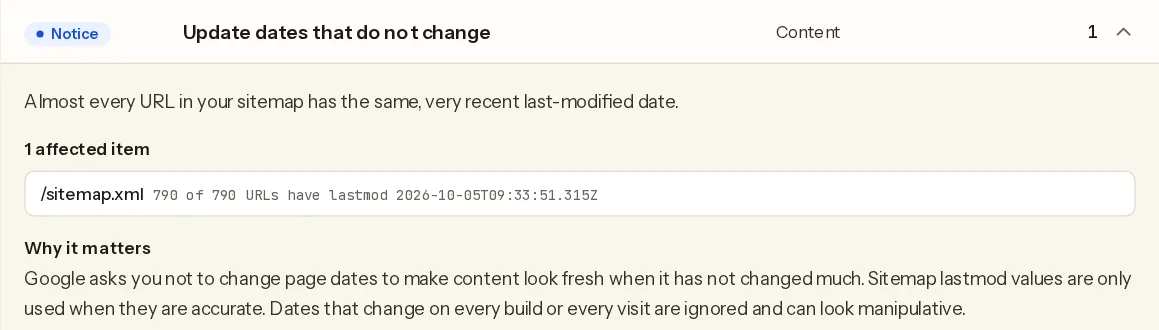
One site we scanned had this exact pattern: every one of its 790 sitemap URLs carried the same timestamp down to the millisecond.
What Approvalens checks
We look for sitemaps in the Sitemap: lines of robots.txt first, then at /sitemap.xml, /sitemap_index.xml, /wp-sitemap.xml, /sitemap-index.xml and /sitemap.txt. We follow sitemap indexes, newest child files first, and read up to 12 files and 60,000 URLs.
structure.sitemapfails when no file returns 200 with at least one URL.structure.sitemap_robotsis a notice when we found a sitemap but robots.txt names none.structure.sitemap_errorscounts files that came back as HTML, invalid XML or broken gzip, or that robots.txt names but that don't return 200.structure.sitemap_bloatfires when more than 40% of sitemap URLs, and more than 20 in total, look like list pages: tag, category, author, date, search, feed or page-number URLs, or URLs with query strings.structure.sitemap_deadlists crawled pages from the sitemap that did not return 200.seo.sitemap_qualitychecks a sample of up to 15 sitemap URLs we did not crawl for errors and redirects, and every crawled sitemap URL for noindex or a canonical pointing elsewhere.content.fake_freshnessis a heuristic with two triggers: 20 or more lastmod values where at least 95% are identical and from the last two days; or at least 5 dated articles where 70% or more were "modified" in the last two days but published 60 or more days earlier. Dates come from structured data, Open Graph tags or<time>elements.
The methodology page has the full list.
Submit it and read the report
In Search Console, open Sitemaps, paste the URL into "Add a new sitemap" and submit (Sitemaps report help). The table shows Type, Submitted, Last read, Status and Discovered pages. "Success" means it was read; "Couldn't fetch" means Google could not retrieve it; "Sitemap had X errors" lists what to fix. The report only shows sitemaps you submitted there or through the API, not ones Google found through robots.txt. For a single URL, URL Inspection has a "Sitemaps" field listing the sitemaps that point to it.
A free scan reads your sitemaps the same way and lists dead entries, redirects, noindex and non-canonical URLs, list-page bloat and lastmod values that never change.
FAQ
Do I need a sitemap for AdSense?
No. AdSense does not ask for one, and Google says small, well-linked sites may not need it. It helps Google find every article, which matters when a reviewer looks at your site.
Should I set priority to 1.0 for my best posts?
It makes no difference to Google, which ignores priority and changefreq.
Should category pages be in the sitemap?
Main categories with a written introduction can be. Thin tags, author archives, date archives and page 2, 3, 4 of lists are better left out.
Does pinging Google after updating the sitemap help?
Google announced in that same 2023 post that the sitemaps ping endpoint was going away. Rely on the robots.txt line and the Search Console submission instead.
Spotted something out of date or wrong? Tell us and we'll correct it.
Read this guide in Turkish →Check it on your own site. Free, no sign-up.
Free tools for this
Free scan
Check your own site
Free scan: readiness score and every issue, usually in a few minutes.