If a page you want in Google carries noindex, Google drops it from search once it recrawls the page. The rule can live in two places: a robots <meta> tag in the HTML, or an X-Robots-Tag HTTP header that you never see in the page source. Most accidental cases come from a setting left on after development: WordPress's "Discourage search engines" box, an SEO plugin default, a staging environment variable, or a server rule. Find which one is speaking, turn it off at the source, then ask Google to recrawl.
Two ways to say noindex
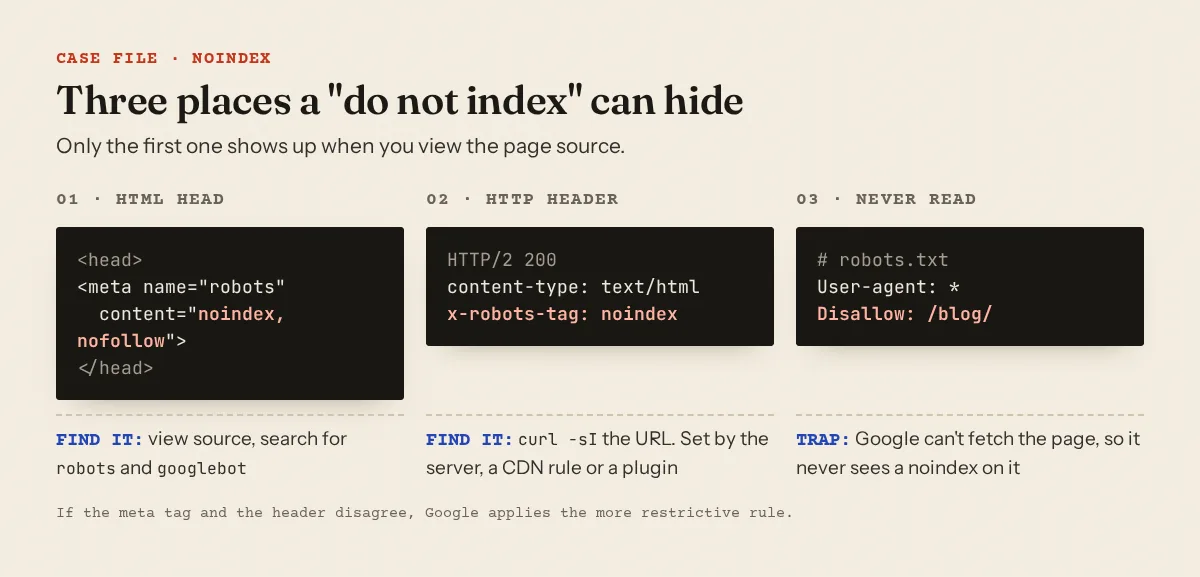
Google's robots meta tag documentation describes both: a tag in the page, or a header that "can be used as an element of the HTTP header response for a given URL".
<meta name="robots" content="noindex, nofollow">
<meta name="googlebot" content="noindex">
HTTP/2 200
content-type: text/html; charset=UTF-8
x-robots-tag: noindex
Two details cause most of the confusion. content="none" is shorthand, "Equivalent to noindex, nofollow." And when rules conflict, "the more restrictive rule applies": a page with index, follow in its meta tag and noindex in its header is a noindex page.
Find it in five minutes
1. The HTML. Open the page, view source (Ctrl+U), search for robots and then googlebot. Theme code, an SEO plugin and a cookie or membership plugin can each print their own tag, so look for more than one.
2. The headers. The header never appears in the HTML, so ask the server directly:
curl -s -D - -o /dev/null https://example.com/blog/coffee-grind-size | grep -i robots
x-robots-tag: noindex, nofollow
This sends a normal GET and prints only the headers (curl -sI sends HEAD, which a few servers answer differently). Header rules are often scoped to a folder or file type, so test an article, not only the home page.
3. What Google saw. In Search Console, URL Inspection shows "Indexing allowed?", which Google describes as "Whether or not your page explicitly disallows indexing. If indexing is disallowed, the reason is shown here" (URL Inspection help). "Test live URL" checks the current version instead of the last crawl. The Page indexing report groups affected URLs under "URL marked 'noindex'" (Page indexing report).
4. What a crawler gets. Some security plugins and CDNs answer bots differently. The Googlebot access checker fetches your home page as a browser, a phone, Googlebot, Mediapartners-Google and AdsBot and shows status, final URL and word count for each. A 403 or 5xx for Googlebot is a reachability problem, not a noindex one; a challenge page usually points to Cloudflare.
The robots.txt trap
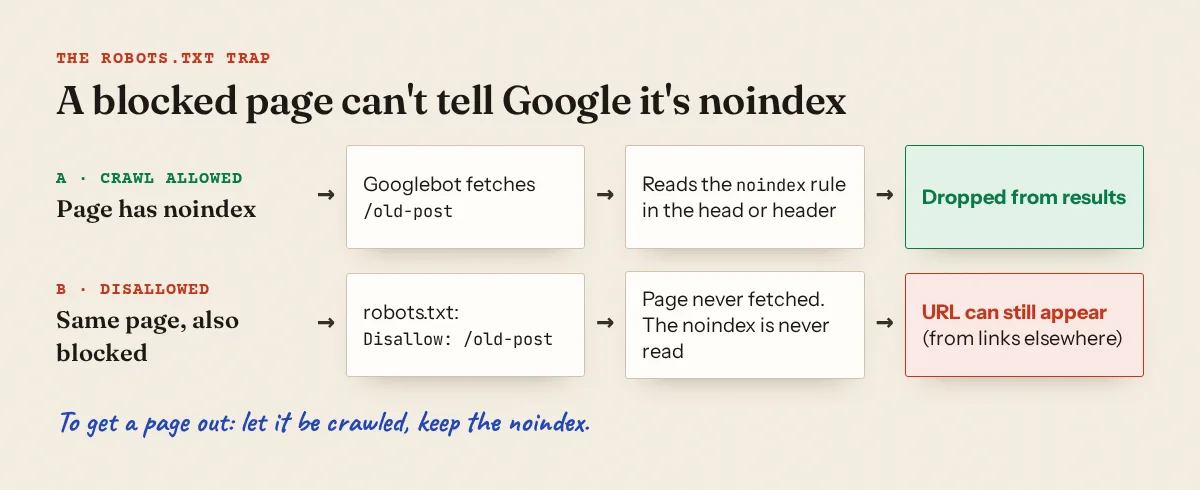
A common reflex is to "also block it in robots.txt". That breaks the noindex. Google says it plainly on its block indexing page: "If the page is blocked by a robots.txt file or the crawler can't access the page, the crawler will never see the noindex rule, and the page can still appear in search results."
The trap also runs in reverse. If you removed a stray noindex but the URL is still disallowed, Google cannot fetch the page to notice the change. Test the path with the robots.txt tester before you request indexing. The robots.txt guide covers group matching and what Mediapartners-Google reads.
Where an unwanted noindex comes from
| Source | What it outputs | Where to switch it off |
|---|---|---|
| WordPress "Discourage search engines from indexing this site" | Since WordPress 5.3, a robots meta tag with noindex,nofollow (Reading settings) |
Settings → Reading → "Search engine visibility" |
| Yoast SEO, one post | Meta robots noindex | Advanced tab → "Allow search engines to show this content in search results" → No (Yoast) |
| Yoast SEO, a whole content type | Noindex on every item of that type | Yoast SEO → Settings → Content types → "Show [type] in search results" |
| Rank Math, one post or a type | Meta robots noindex | Advanced tab → Robots Meta, or Rank Math SEO → Titles & Meta → e.g. "Post Robots Meta" (Rank Math) |
| Blogger | Robots meta from blog-wide or per-post tags | Settings → "Crawlers and indexing" → "Enable custom robots header tags"; per post, "Custom robots tags" (Blogger Help) |
| Next.js | robots in metadata / generateMetadata |
Layout or page files, often behind an environment variable |
| Apache, Nginx, CDN | X-Robots-Tag header |
.htaccess, server config, response header rules |
Rank Math says a post's own settings override the Titles & Meta defaults, so a post can stay noindex after you fix the type-level setting. Check one affected post afterwards.
Blogger
Two switches get forgotten. Under Settings → "Privacy", "Visible to search engines" must be on. Under "Crawlers and indexing", "Enable custom robots header tags" opens "Home page tags", "Archive and search page tags" and "Post and page tags"; a noindex ticked in the last group hides every article at once. Each post also has its own "Custom robots tags" panel in the editor.
Next.js
In the App Router, robots rules come from the robots field of metadata (generateMetadata reference). Segments are merged shallowly, so a page's robots object replaces the layout's whole object. The classic leak is a staging switch like this one: if SITE_ENV is missing on the production host, the whole site goes noindex.
// app/layout.tsx: noindex unless explicitly production
export const metadata: Metadata = {
  robots: process.env.SITE_ENV === 'production'
    ? { index: true, follow: true }
    : { index: false, follow: false },
}
One more Next.js case: when notFound() fires after streaming has started, the status is already 200, so Next.js "injects <meta name="robots" content="noindex"> into the streamed HTML". An article whose data lookup sometimes fails inside a Suspense boundary can reach Google as a 200 page with noindex.
Server and CDN headers
Look for the header in the places that can add it:
grep -Rni "x-robots-tag" .htaccess /etc/apache2/ /etc/nginx/ 2>/dev/null
On Apache the line usually looks like Header set X-Robots-Tag "noindex, nofollow"; delete it or wrap it in a condition that only matches the files you meant. On Nginx, add_header X-Robots-Tag "noindex"; in a server block applies to every location that has no add_header of its own, because "These directives are inherited from the previous configuration level if and only if there are no add_header directives defined on the current level" (nginx docs). On Cloudflare, check response header rules under Rules → Overview; a "Response Header Transform Rule" can add the header to every response (Cloudflare docs).
Staging leaks, and preview URLs that look broken
Staging was hidden correctly, then a database copy, a config file or an environment variable travelled to production: a WordPress database cloned from staging carries the "Discourage" setting, a copied .htaccess carries the header rule. The reverse also misleads people. Vercel "adds an X-Robots-Tag: noindex HTTP response header to every Preview Deployment automatically" (Vercel), and on Cloudflare Pages "every preview deployment … includes the X-Robots-Tag: noindex HTTP response header" (Cloudflare). If your curl test hits a preview URL, that noindex is expected; test the production domain.
When noindex is the right call
The scan also runs the other way: structure.index_bloat lists thin pages that are open to indexing. Google does not publish a rule that tag pages must be noindex, so treat this table as our recommendation, not a requirement.
| Page type | Our suggestion |
|---|---|
| Articles, guides, home, about, contact | Index |
| Category page with a written introduction | Index |
| Tag or archive page that is only a list of links | Noindex, or write a real introduction |
Internal search results (?s=, /search/) |
Noindex |
| Login, cart, checkout, account, thank-you pages | Noindex |
| Page 2, 3, 4 of a list | Optional; see below |
Pagination needs care. Google's pagination guidance says: "Don't use the first page of a paginated sequence as the canonical page. Instead, give each page its own canonical URL." It does not ask you to noindex later pages. Whatever you choose, keep the links on those pages crawlable so older articles stay reachable. For thin pages that should be improved rather than hidden, see thin content.
What Approvalens checks
The scan reads the robots and googlebot meta tags and the X-Robots-Tag header of every page it crawls. Then:
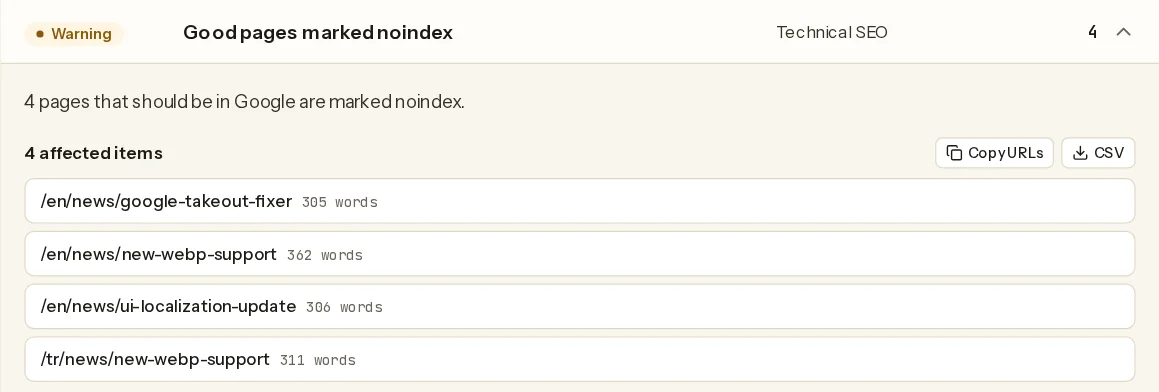
access.noindex_homefails if the home page hasnoindex(ornonein the meta tag).tech.noindex_pagesfires when more than 30% of the pages we classified as articles carry noindex.tech.noindex_misusedlists pages that look like they belong in Google but are noindex: the home page, or a page with at least 300 words of its own text that is not an archive, search, pagination, utility or trust page.seo.robots_conflictfires when a page has both a meta tag and a header and only one of them says noindex.structure.index_bloatlists utility, search and pagination URLs, and archive pages with under about 250 words of their own text, that are not noindex. It is an estimate based on URL patterns and the pages we crawled.
A real example from one site we scanned: four news posts of 305 to 362 words each were marked noindex.
The full rule list is on the methodology page.
After you remove it
Nothing changes until Google recrawls: "We have to crawl your page in order to see <meta> tags and HTTP headers", and depending on the page's importance "it may take months for Googlebot to revisit a page" (block indexing). For the pages that matter, use "Request indexing" in URL Inspection; Google says "Indexing can take up to a week or two." Make sure the pages are in your sitemap (see XML sitemap errors) and that their canonical points to themselves (canonical tag problems).
On AdSense: the ad placement policies say Google may disable ads on "content that cannot be evaluated", naming robots.txt blocks and password-protected content. Noindex is not named there. The practical risk is simpler: a site that hides most of its articles looks thinner than it is. If you are mid-review, the AdSense for WordPress and Blogger guides cover the other settings worth checking on those platforms.
A free scan reads the meta tags and headers on your crawled pages and lists every page where they disagree with what the page looks like.
FAQ
Does nofollow alone hide a page?
No. nofollow tells Google not to follow the links on that page. Only noindex (or none) keeps the page itself out of results.
I removed noindex a week ago and the page is still missing. What now?
Run URL Inspection with "Test live URL". If "Indexing allowed?" now says yes, request indexing and wait; recrawl timing is up to Google. If it still says no, the noindex is still being served, often from a header or a cache.
Should I block noindex pages in robots.txt to save crawl budget?
Not if you want the noindex to work. Google has to fetch the page to read it. Blocking makes sense for URLs you never want crawled at all, such as endless filter combinations, not for pages you are trying to remove.
Is noindex on tag pages bad for AdSense?
Nothing in AdSense's published policies says so. Keeping thin list pages out of the index does not hide your articles; noindex on the articles themselves does.
Spotted something out of date or wrong? Tell us and we'll correct it.
Read this guide in Turkish →Check it on your own site. Free, no sign-up.
Free tools for this
Free scan
Check your own site
Free scan: readiness score and every issue, usually in a few minutes.