The "Seller information visibility" setting decides whether Google's public sellers.json file shows your name next to your publisher ID. Set to Transparent, buyers can see who you are (your payments name and, if you add it, your business domain). Left confidential, the entry is just an ID. Google recommends transparent and says confidential "might impact your revenue". The setting is in Account > Settings > Account information, and the change shows up in the file within 24 hours.
What sellers.json is
sellers.json is an IAB Tech Lab standard. Each ad system (Google, and every other exchange or SSP) publishes one file at the root of its own domain that lists the sellers it pays. Google's AdSense help describes it as a standard "that increases transparency in the ads ecosystem and helps to combat fraud", working "through a publicly-available file of seller information" (Provide your seller information with sellers.json).
You don't create or host a sellers.json file. Google does, at realtimebidding.google.com/sellers.json, and you appear in it because you have an AdSense account.
The IAB specification defines the fields that matter to you:
seller_id: "This is the same ID that appears in an ads.txt file and in the SupplyChain.nodes array sid property." For AdSense it's yourpub-ID.is_confidential: "0 = is not confidential and 1 = is confidential". The spec's default is 0.seller_type:PUBLISHER,INTERMEDIARYorBOTH.name: "required when is_confidential=0".domain: the business domain, "required if seller has a web presence and is_confidential=0".
How sellers.json and ads.txt fit together
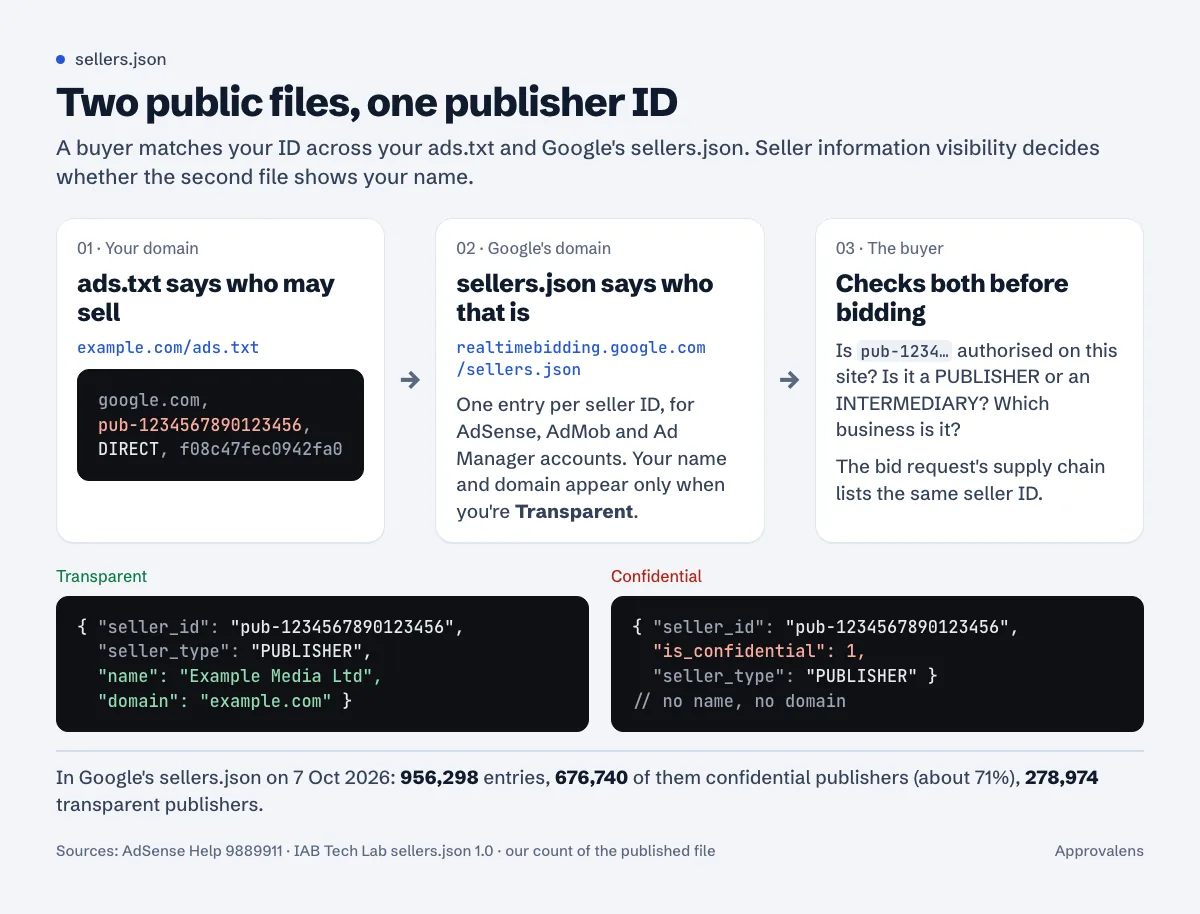
ads.txt lives on your domain and says which accounts may sell your ad space. sellers.json lives on the ad system's domain and says who each of those accounts belongs to. A buyer can join the two on the publisher ID.
There's a small detail in your ads.txt line that connects to this. The last field of Google's line, f08c47fec0942fa0, is Google's TAG ID, and the same value sits at the top of Google's sellers.json under identifiers:
$ curl -sL https://realtimebidding.google.com/sellers.json | head -n 7
{
  "contact_email": "sellers_json@google.com",
  "contact_address": "1600 Amphitheatre Parkway Mountain View, CA 94043",
  "identifiers": [{
    "name": "TAG-ID",
    "value": "f08c47fec0942fa0"
  }],
ads.txt version 1.1 adds one more link: an OWNERDOMAIN line, which "should be the same value as the sellers.domain in this Publisher's entries in referenced sellers.json files" (ads.txt 1.1). It's marked "Recommended", not required, and Google's AdSense ads.txt instructions don't ask for it. If your sellers.json domain is example.com, you can add OWNERDOMAIN=example.com to your ads.txt.
Getting ads.txt right matters more than any of this, because without an authorised line the sellers.json entry has nothing to vouch for. The ads.txt setup guide and the "Earnings at risk" guide cover that side.
Transparent vs confidential
| Transparent | Confidential | |
|---|---|---|
| What buyers see in sellers.json | ID, seller type, your name, your business domain (if added and verified) | ID and seller type only |
| Name shown | The name in your payments profile | Nothing |
| Google's advice | Recommended | "advertisers won't be able to see your name, which might impact your revenue" |
| Who can choose it | Publisher accounts | Publisher accounts only; INTERMEDIARY and BOTH accounts have no visibility control |
Google doesn't publish how much revenue confidential accounts lose, and no number is documented. What it does say is that transparency "will help advertisers to verify your inventory".
When we downloaded Google's sellers.json on 7 October 2026 it was 106,889,361 bytes and held 956,298 entries. 676,740 of them were confidential publishers, about 71% of all publisher entries, and 278,974 were transparent. So confidential is what most AdSense publishers have. Whether that's by choice or because nobody opened the setting, the file doesn't say.
The privacy side
The name field isn't a display name you pick. Google says it is "the name shown in either the "Name and address" section (individual accounts) or the "Business name and address" section (business accounts) of your payments profile." On an individual account that's your legal name, published in a file anyone can download.
That's the real trade-off. If you run the site as a business, transparent costs you nothing. If it's a personal account and you'd rather not have your full name in a public file next to your publisher ID, confidential is a reasonable choice, and the ads still serve.
Don't change your payments name just to get a nicer label: Google warns that "If you change your name, this will result in an automatic payment delay of 2 weeks." The tax info guide covers the other place where your payments name matters.
Where the setting is and how to change it
From Google's instructions (sellers.json in AdSense):
- Sign in to AdSense.
- Click Account > Settings > Account information.
- In the Seller information visibility section, select Transparent.
- Optional: add your business domain and click Verify and add.
"Your name, domain (if included), and your publisher ID will appear in the Google sellers.json file within 24 hours."
Three things to know before you flip it:
- It's shared across products. "Your seller_id is unique to each product, but your transparency status and domain will be shared across all products. It's not possible to be confidential for one product and transparent in another." Turning it on in AdSense also turns it on for your AdMob and Ad Manager accounts.
- Going back doesn't erase history. "your seller information (publisher ID, name, etc.) from a time period when your status was "transparent" could still be visible to external parties."
- Intermediaries can't hide. Accounts with seller type
INTERMEDIARYorBOTH"have is_confidential set to false by default. They do not have access to the "Seller information visibility" control."
The business domain field
The domain here is your company's domain, "not necessarily the domain where inventory is being monetized". If the only site you own is the one with AdSense, Google says to list that one.
Format rules from the same page: use the root domain, with no www, no https://, no trailing slash, and a public suffix. So example.com is right; www.example.com, https://example.com and example.com/ are not. Google may hide the domain "until we have verified that you own the URL".
Check your own entry
Google's help says to download the file and search it for your ID. It's a big file: about 107 MB on the day we checked, served through a redirect to Google Cloud Storage. From a terminal:
$ curl -sL https://realtimebidding.google.com/sellers.json | grep -A3 '"pub-1234567890123456"'
    "seller_id": "pub-1234567890123456",
    "is_confidential": 1,
    "seller_type": "PUBLISHER"
  }, {
If you see is_confidential there, your entry is confidential. A transparent entry shows name (and domain if verified) on the lines after seller_type. Note that the example on Google's help page writes "sellerId", but the published file uses "seller_id", so grep for the ID itself, not the key name.
Does it affect AdSense approval?
Nothing in Google's sellers.json help ties it to the site review; it's described as a transparency setting for buyers, and the control sits in the settings of an account you already have. If ads aren't showing at all, look elsewhere first; the ads not showing guide has the checklist.
For several sites or subdomains under one account, sellers.json doesn't change; it's one entry per account. ads.txt is where subdomains need care, covered in AdSense on subdomains.
Check the ads.txt half
Your sellers.json entry only helps if your ads.txt lists the same ID correctly. The free ads.txt checker fetches the file the way a crawler does and confirms your Google line.
FAQ
Is sellers.json the same as ads.txt?
No. ads.txt is on your site and lists who may sell your inventory. sellers.json is on the ad system's site and lists who its sellers are. Buyers use them together.
Do I need to create a sellers.json file on my site?
No. As an AdSense publisher you only need ads.txt. Google publishes the sellers.json that contains your entry.
Why does my entry show no name even though I chose Transparent?
Give it 24 hours. If the domain is missing, it may not be verified yet; Google can hide it until it confirms you own it.
Can I be confidential in AdSense but transparent in Ad Manager?
No. Google applies one transparency status and one domain across AdSense, AdMob and Ad Manager.
Will switching to transparent increase my earnings?
Google says confidential might impact revenue but doesn't publish a figure. Treat it as removing one reason for a buyer to skip your inventory, not as a guaranteed raise.
Spotted something out of date or wrong? Tell us and we'll correct it.
Read this guide in Turkish →Check it on your own site. Free, no sign-up.
Free tools for this
Free scan
Check your own site
The free scan reads the first 50 pages and shows your score and every problem it finds.