On this page (12)
- 01Is the site "Ready"?
- 02Does ads.txt say "Unauthorized"?
- 03Are ads actually set up, and is the code intact?
- 04Is your own browser hiding them?
- 05What does the ad request say?
- 06Is the space blank because nothing was bought?
- 07Are visitors in Europe getting fewer ads?
- 08Is there anything in the Policy center?
- 09Is the whole account limited?
- 10Still nothing?
- 11Keep it from breaking again
- 12FAQ
When AdSense ads don't show, the cause is almost always one of a short list, and the order you check them in matters. Two checks take a minute and rule out the most common causes: the site's status and ads.txt status on the Sites page, and whether your own browser is blocking ads. After that you look at the code, the ad request itself, unfilled units, consent for European visitors and the Policy center. Give a brand-new setup an hour before you start. Google says "It usually takes a few minutes for ads to appear on the page but occasionally it can take up to an hour" (create a display ad unit).
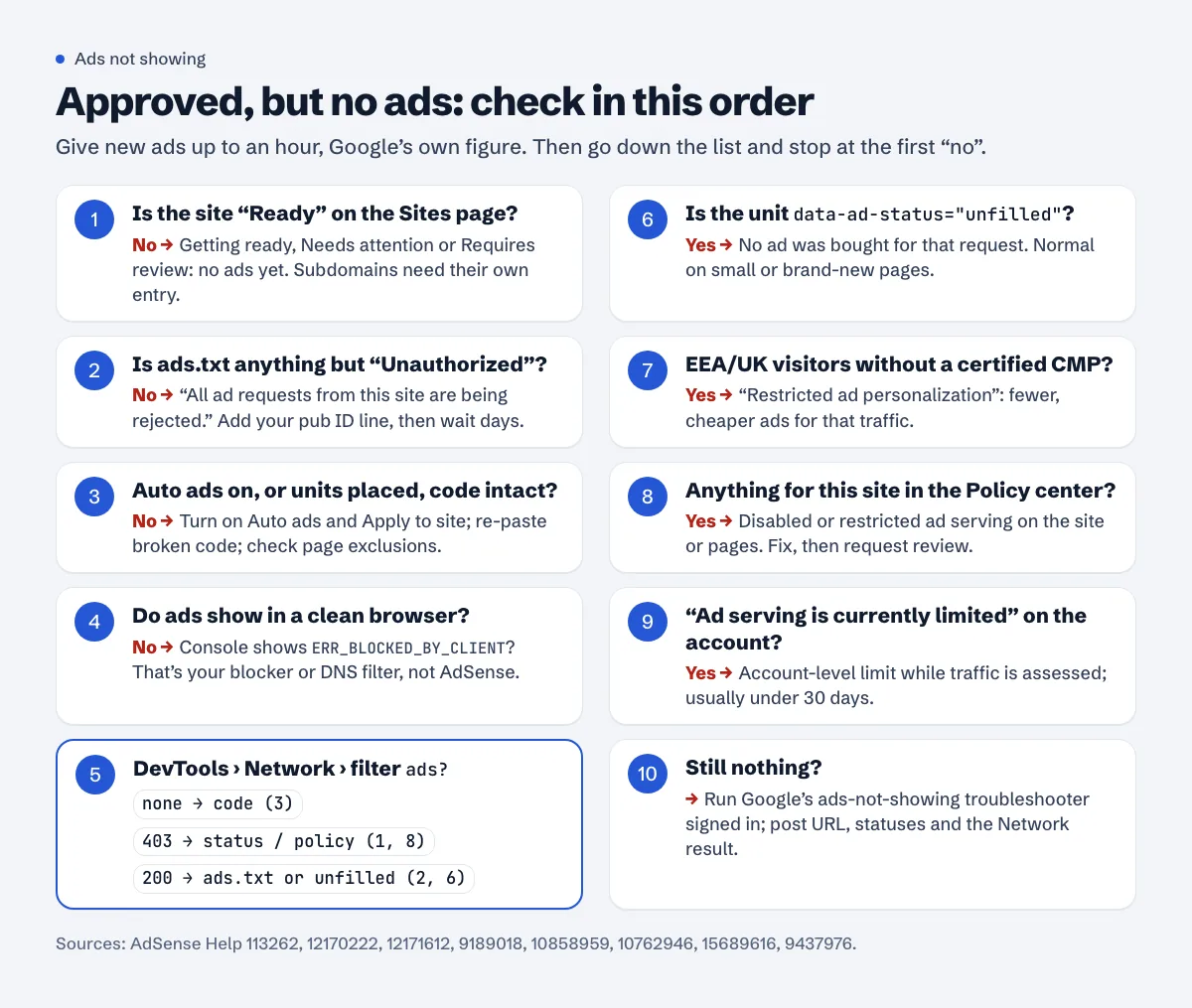
Is the site "Ready"?
Open Sites in AdSense and find the site. Google's site status table has four approval states, and only one shows ads:
| Status | What Google says |
|---|---|
| Ready | "Your site is ready to show ads." |
| Getting ready | "We're running some checks on your site. The review process usually takes a few days, but in some cases can take 2-4 weeks." |
| Needs attention | "You need to fix some issues before your site is ready to show ads." |
| Requires review | "Your site hasn't been checked yet." (or the site is inactive and needs another review) |
The trap here is the subdomain or second site. Approval is per site. If example.com is Ready and you put the code on blog.example.com or a new domain, that one needs its own entry and review. If it's still Getting ready, the approval time guide explains what's normal.
Does ads.txt say "Unauthorized"?
Same page, the ads.txt column. This one blocks everything: "All ad requests from this site are being rejected because your publisher ID was not found in this site's ads.txt file." "Not found" doesn't block ads; it means there's no file at all. "Unauthorized" means there is a file and your ID isn't in it, often because a theme, a host or an old ad network created one.
Check what Google sees with the ads.txt checker. The line you need is google.com, pub-0000000000000000, DIRECT, f08c47fec0942fa0 with your own ID. After you fix it, Google's ads.txt guide warns: "It may take a few days for your changes to be reflected in AdSense. If your site doesn't make many ad requests it may take up to a month." Once the status is Authorized and the site is Ready, "it may take up to an hour for ads to appear on your pages." The full walkthrough is in the ads.txt earnings at risk guide.
Are ads actually set up, and is the code intact?
Approval doesn't place a single ad. You either turn on Auto ads or place ad units.
Auto ads: go to Ads, click Edit next to the site and check that Auto ads is on under "Ad settings" and that you clicked Apply to site. The AdSense code must be on every page you want ads on; the Auto ads setup page says so and adds that "It can take up to an hour for ads to appear on the page." Also look at Page exclusions: an exclusion for "All pages under this section" on example.com/ switches off the whole site, and exclusions also take up to an hour to apply.
Ad units: each unit has its own <ins class="adsbygoogle"> snippet that must be on the page. Google's common ad code issues are three: the code "does not appear in its entirety, for example, there's a missing