On this page (13)
- 01Down for everyone or just you?
- 02Only you can't open it
- 03Read the error before you run anything
- 04Check DNS
- 05Check the connection and the certificate
- 06Check the HTTP status
- 07Cloudflare 520, 521, 522, 523 and 524
- 08508 "Resource Limit Is Reached" on shared hosting
- 09Rule out the boring causes
- 10What to tell your host
- 11Does a few hours of downtime hurt Google or AdSense?
- 12Don't find out from a visitor next time
- 13FAQ
Your site won't open. Before you open a ticket or start changing settings, answer one question: is it down for everyone, or only for you? That takes two minutes. If it's only you, the fix is on your side (a cached DNS answer, your IP blocked by the host's firewall, a browser extension). If it's everyone, the error message tells you which layer broke, and you can usually narrow it to one of four places: DNS, the certificate, the server, or the CDN in front of it.
Down for everyone or just you?
Do these in order and stop when you have an answer.
- Turn Wi-Fi off on your phone and open the site on mobile data. Different network, different DNS resolver, different IP address.
- Run the home page through the free website down checker. It requests the page from our server, not your network, and shows the status code, response time and the error if there is one.
- If both work and your computer still can't open it, it's local. Skip to Only you can't open it.
If the phone fails too and the checker reports an error, the site is down for everyone. Here's the order that finds the cause fastest:
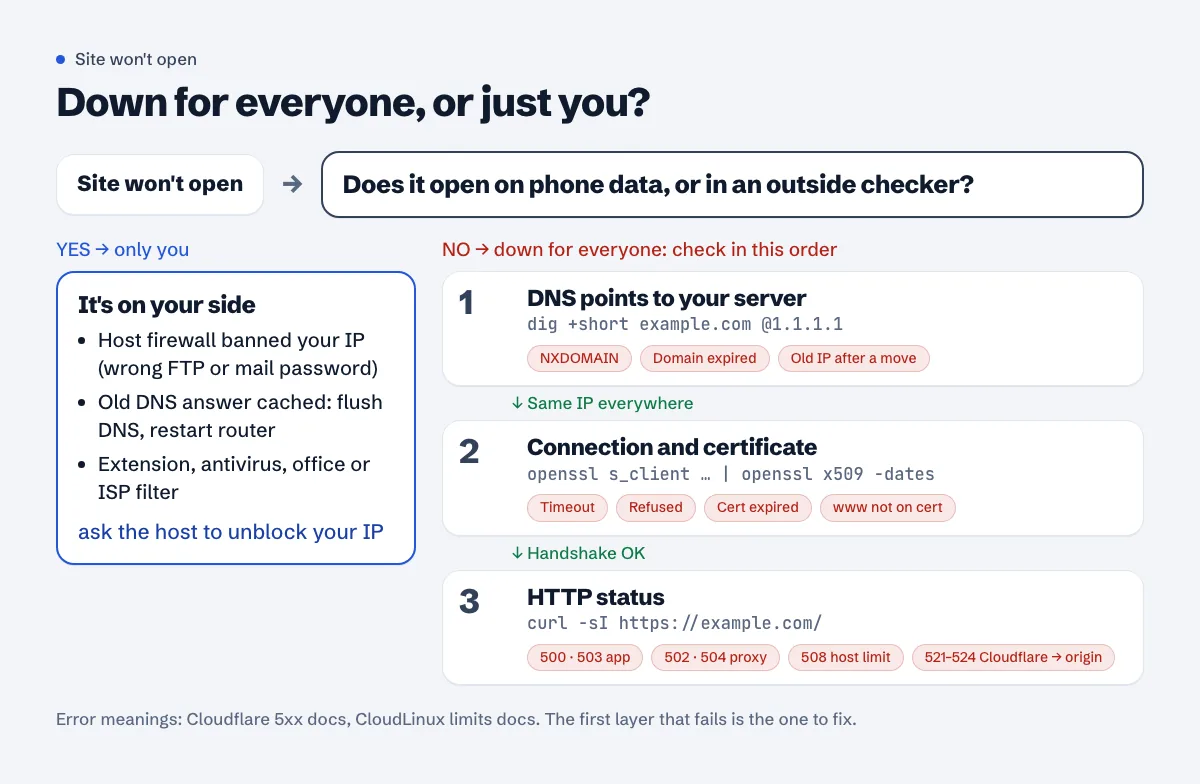
Only you can't open it
When the site works on phone data and in the checker but not on your computer, it's almost always one of these:
- Your IP got blocked by the host's firewall. On shared hosting with cPanel this happens after a few wrong passwords for FTP, e-mail or the panel. The firewall bans the IP for a while, and from that network the whole site times out. Your phone on mobile data has a different IP, so it works. Ask the host to unblock your IP and tell them what it is (search "what is my IP" to see it).
- Your computer or router cached an old DNS answer. Common right after you moved hosts or changed an A record. Flush it:
ipconfig /flushdnson Windows,sudo dscacheutil -flushcache; sudo killall -HUP mDNSResponderon macOS. Restarting the router clears its cache too. - A browser extension or security software blocks the domain. Try a private window with extensions off, or another browser.
- Your office or ISP filters the site. If it opens on one internet provider and not another, it's a network-level block or a resolver problem at that provider, not your server.
Read the error before you run anything
What the browser shows already points at a layer. Chrome's wording, for reference:
| What you see | Layer | First thing to check |
|---|---|---|
DNS_PROBE_FINISHED_NXDOMAIN |
DNS | Domain expired, nameservers changed, record deleted |
ERR_CONNECTION_TIMED_OUT |
Network | Server off, firewall dropping traffic, wrong IP in DNS |
ERR_CONNECTION_REFUSED |
Server | Web server (nginx, Apache) not running on that port |
NET::ERR_CERT_DATE_INVALID |
TLS | Certificate expired |
NET::ERR_CERT_COMMON_NAME_INVALID |
TLS | Certificate doesn't cover this name (often www) |
| 500, 502, 503, 504 | Server / app | PHP errors, database down, app crashed, overload |
| 508 Resource Limit Is Reached | Shared hosting | Your account hit its process limit |
| Cloudflare page with 520 to 524 | Between CDN and server | Your server, as seen by Cloudflare |
Check DNS
dig +short example.com
dig +short www.example.com
dig +short example.com @1.1.1.1
dig +short example.com @8.8.8.8
dig +short NS example.com
You want the same IP from every resolver, and it should be your server's IP (or your CDN's, if you use one). On Windows, nslookup example.com 1.1.1.1 does the same job.
What goes wrong here:
- Empty answer or NXDOMAIN. Check that the domain hasn't expired at the registrar. Then check the nameservers: if
dig NSshows nameservers you don't recognise, someone changed them, or the registrar parked the domain after it expired. - Old IP. You moved hosts and one record still points to the old server, or only
wwwwas updated. Some resolvers keep the old answer until the record's TTL runs out. - Different answers from different resolvers. A change is still spreading. Wait out the TTL; don't keep editing the record.
Check the connection and the certificate
curl -sS -o /dev/null -w "status=%{http_code} connect=%{time_connect}s tls=%{time_appconnect}s ttfb=%{time_starttransfer}s\n" https://example.com/
On a healthy small site you'll see something like status=200 connect=0.05s tls=0.09s ttfb=0.4s. An error starting curl: (28) (timeout) means nothing answered on port 443: the server is off, a firewall drops the traffic, or DNS points to the wrong machine. curl: (7) ("Couldn't connect to server", connection refused) usually means the machine is up but no web server listens on that port. curl: (6) Could not resolve host sends you back to DNS.
For the certificate dates and names:
echo | openssl s_client -connect example.com:443 -servername example.com 2>/dev/null | openssl x509 -noout -subject -dates -ext subjectAltName
If notAfter is in the past, the certificate expired and browsers block the site with a full-page warning. That has its own guide: SSL certificate expired: fixing certbot renewal. If the date is fine but subjectAltName doesn't list the name you opened (www.example.com, say), the certificate was issued for the other name only.
Check the HTTP status
curl -sI https://example.com/ | head -n 5
The first line is the status. 200 with your page means the site is up and the problem is somewhere between the visitor and you. For the 5xx codes:
- 500 is your application failing. On WordPress that's usually a plugin or theme error after an update, or a PHP version change in the panel. The error log in your hosting panel (or
/var/log/nginx/error.logon a server) names the file and line. - 502 and 504 mean a proxy in front (nginx, a load balancer) didn't get a usable answer, or didn't get one in time, from PHP-FPM or the app behind it.
- 503 is "not available right now": maintenance mode, an overloaded server, or a host that suspended the account. Read the page body, it often says which.
Cloudflare 520, 521, 522, 523 and 524
These come from Cloudflare, not your server, but they're about your server: Cloudflare is telling you it couldn't get a proper answer from your origin. Cloudflare's own definitions (5xx errors):
- 521: "Error 521 occurs when the origin web server refuses connections from Cloudflare." The web server is stopped, or the server's firewall blocks Cloudflare's IP ranges.
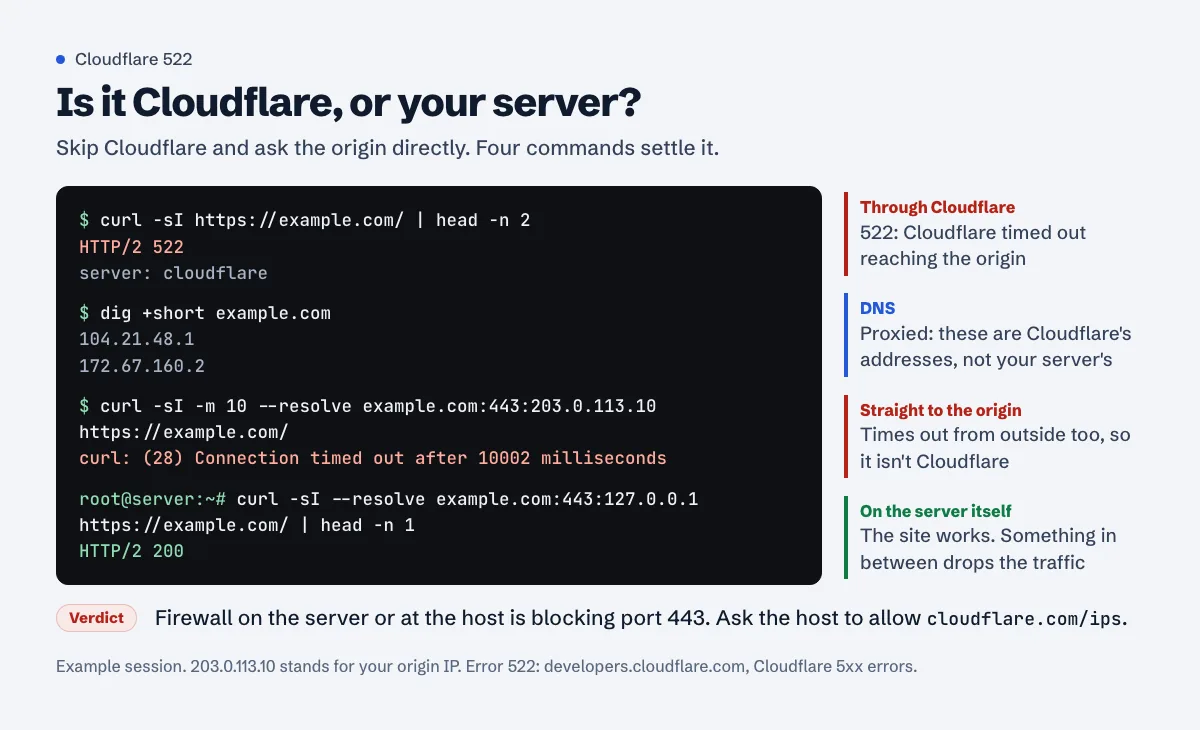
- 522: "Error 522 occurs when Cloudflare times out contacting the origin web server." Before the connection is made, the limit is a SYN+ACK "within 19 seconds". Cloudflare lists a firewall that blocks or rate-limits its IPs as the most common cause, and also "The origin IP address in your Cloudflare DNS app does not match the IP address currently provisioned to your origin web server". That's the classic one after a host move: you updated DNS at the old place, not in Cloudflare.
- 523: "This error occurs when Cloudflare cannot contact your origin web server", typically because there's no network route to the origin's IP.
- 524: Cloudflare connected, but the origin "did not provide an HTTP response before the default 125 seconds". Something on the server is very slow: a heavy query, a stuck import, an overloaded PHP pool.
- 520 is the catch-all: the origin returned something Cloudflare couldn't use (an empty or malformed response).
The quickest way to see whether the problem is Cloudflare or your server is to skip Cloudflare and ask the origin directly. Put your server's real IP in place of 203.0.113.10:
curl -sI --resolve example.com:443:203.0.113.10 https://example.com/
If that times out too, the origin is the problem, and the fix is on your host's side (or your server's firewall). If it answers 200, look at the Cloudflare side: DNS records in the Cloudflare dashboard, the SSL/TLS mode, and firewall rules that only allow some IPs. Cloudflare's 521 page also notes that the origin has to listen on port 80 for Flexible mode and on port 443 for Full and Full (Strict).
508 "Resource Limit Is Reached" on shared hosting
Many shared hosts (most of the cPanel ones) run CloudLinux, which caps each account's CPU, memory, I/O and "entry processes", roughly the number of requests your site handles at the same moment. CloudLinux's documentation says that once your site goes over that limit the web server serves an "error 508 page ( Resource Limit Reached )", and that hitting the memory or process limits shows up as 500 or 503 errors instead (CloudLinux limits).
So the site isn't broken; it's being throttled. The usual reasons on a small WordPress site:
- A crawler or bot hammering search, tag or feed URLs. Check the access log for one IP or user agent with thousands of hits.
wp-cron.phprunning on every visit, or a backup or import plugin running during the day.- No page cache, so every visit runs PHP and the database.
Look at Resource Usage (sometimes under Metrics) in cPanel to see which limit you hit and when. A cache plugin and blocking abusive bots usually fix it; if the graphs show you're at the limit with normal traffic, the plan is too small. The slow server response guide covers caching in more detail.
Rule out the boring causes
Before you spend an hour on logs:
- The host's status page. Most hosts publish one, or post on social media during outages. If the whole data centre is down, there's nothing to fix on your end.
- The domain renewal date. An expired domain fails at DNS, and some registrars show a parking page instead, so the site "works" but isn't yours.
- An unpaid hosting invoice. Suspended accounts usually return a 503 or a "suspended" page.
- What changed today. A plugin update, a DNS change, a new firewall rule, a PHP version switch. Undo the last change first.
What to tell your host
A ticket that says "my site is down" gets a "works for us" reply. Cloudflare's checklist for contacting a host is a good template (required error details): the specific error code and message, "The time and timezone when the 5XX error occurred", and the exact URL. Add:
- Your own public IP, in case their firewall blocked you.
- The output of the
dig,curl -sIandcurl --resolvecommands above. - Whether it fails from mobile data and from an outside checker too.
- What you changed last.
Something like: "Since 14:20 (UTC+3) https://example.com/ returns 522 through Cloudflare. Direct requests to the origin IP 203.0.113.10 on port 443 time out from outside, but the server answers locally. Is a firewall blocking Cloudflare's IP ranges? My IP is 198.51.100.24 in case it was banned."
Does a few hours of downtime hurt Google or AdSense?
For search, short outages are survivable. Google says 5xx and 429 errors "prompt Google's crawlers to temporarily slow down with crawling", and "already indexed URLs are preserved in the index, but eventually dropped" if errors persist (HTTP status codes and Google's crawlers). Once the server answers 2xx again, crawling picks back up gradually.
For AdSense the timing matters more. If the review crawler hits your site while it's down, you can get a "site down or unavailable" rejection even though everything works an hour later. That rejection, and how to test the site the way the AdSense crawler sees it, is covered in Site down or unavailable in AdSense. If your site is behind Cloudflare, also read Cloudflare blocking AdSense, because a firewall rule can make your site "down" only for Google.
Don't find out from a visitor next time
Most small sites learn about an outage from a reader's message or a drop in the AdSense report a day later. What actually helps:
- Check from outside every few minutes, not once a day. An outage of 20 minutes is invisible to a daily check.
- Alert after two failed checks in a row, not one, so a single slow response doesn't wake you up.
- Watch the certificate expiry date separately. Let's Encrypt stopped sending expiry reminder e-mails in 2025, so a broken renewal gives you no warning until browsers block the site.
- Keep a short history. "Down 6 minutes every night at 03:00" points straight to a backup job or a cron.
Approvalens site monitoring loads your home page every 5 minutes, e-mails you after two failures in a row and again when it's back, and warns 14 and 7 days before the SSL certificate expires. For a one-off check right now, use the website down checker.
FAQ
The checker says my site is up, but I can't open it. Why?
Then it's your connection: a cached DNS answer, a firewall ban on your IP (common after a few wrong FTP or e-mail passwords), or an extension. Try mobile data, flush DNS, and ask your host to check whether your IP is blocked.
My site is down only on www (or only without www). What's wrong?
Usually DNS or the certificate. Check dig +short www.example.com returns an address, and that the certificate lists both names. The www redirect guide for Cloudflare covers the setup if you're on Cloudflare.
Is a Cloudflare 52x error Cloudflare's fault?
Rarely. 521 to 524 mean Cloudflare couldn't get an answer from your server. Test the origin directly with curl --resolve; if it fails there too, the fix is on the server or at the host.
How long until a DNS change works everywhere?
Until the old record's TTL runs out in every resolver that cached it. With a TTL of 3600 that's up to an hour after the change, longer if a resolver ignores TTLs. Lower the TTL a day before a planned move.
Should I show a maintenance page with status 200?
Not for a short outage. Google's advice for taking a site offline for 1-2 days is to "return an informational error page with a 503 HTTP response status code instead of all content", and not to return a 503 for robots.txt, "because this blocks all crawling" (pausing a website). A maintenance page with 200 tells Google that's your content.
Spotted something out of date or wrong? Tell us and we'll correct it.
Read this guide in Turkish →Check it on your own site. Free, no sign-up.
Free tools for this
Free scan
Check your own site
The free scan reads the first 50 pages and shows your score and every problem it finds.