cloud-init is the program that sets up a cloud server on its first boot: it creates your user, installs your SSH key, sets the hostname and network, and runs whatever you put in the provider's "user data" box. When cloud-init status says error or degraded, something in that setup didn't go as described. Sometimes that matters (your user or packages are missing). Often, on a server that's been running for months, it doesn't.
The first job is to find out which of the two you have.
Read the status first
sudo cloud-init status --long
The possible statuses, per the cloud-init docs, are "not started", "running", "done", "error - done", "error - running", "degraded done", "degraded running" and "disabled". Degraded means it finished but hit problems: "If cloud-init has experienced issues while running, the extended status will include the word 'degraded' in its status."
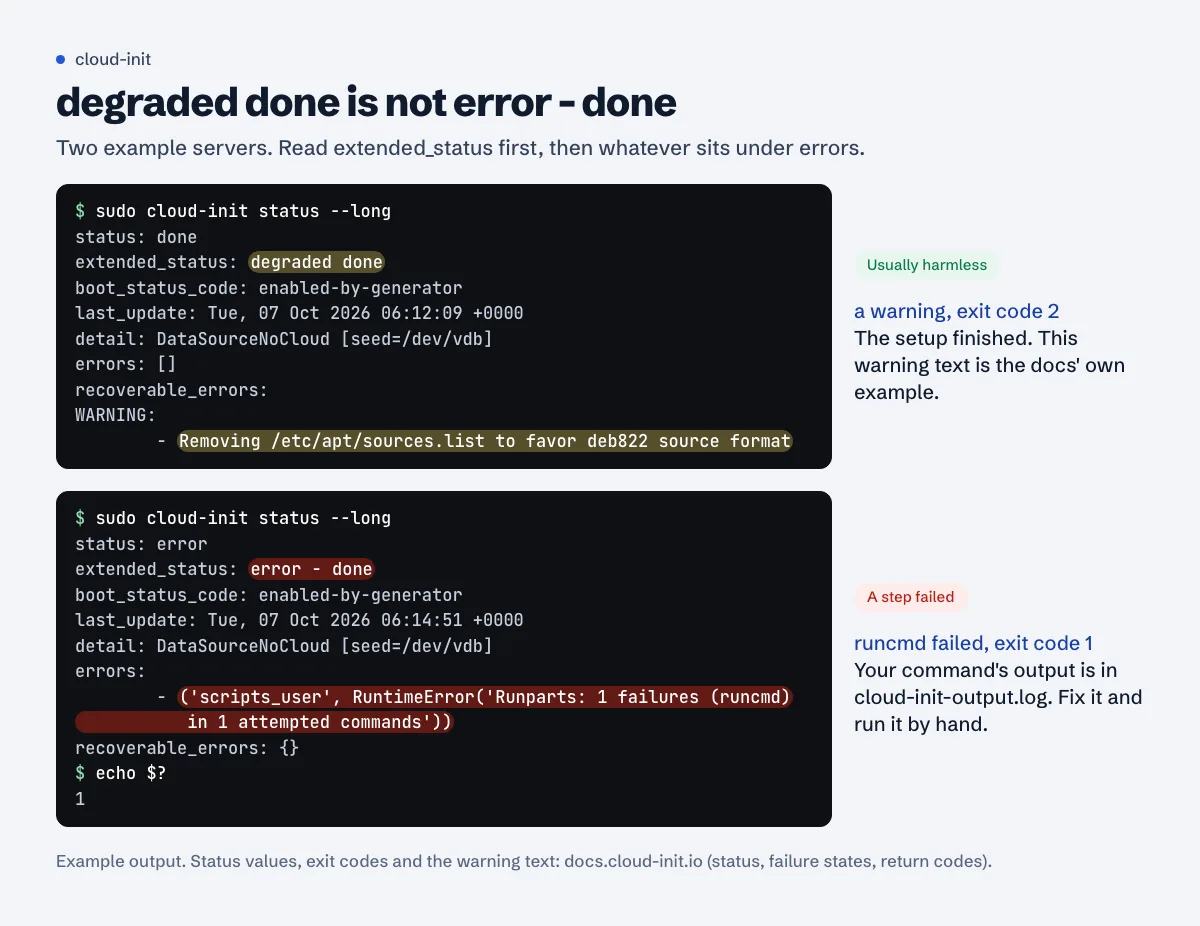
degraded done with only a WARNING is usually noise. An entry under errors means a step really failed; the module name tells you which.The exit code tells scripts the same thing. Since cloud-init 23.4: "0 - success", "1 - unrecoverable error", "2 - recoverable error" (return codes). The same page: "As of 23.4, errors that do not crash cloud-init will have an exit code of 2. Exit code of 1 means that cloud-init crashed, and an exit code 0 more correctly means that cloud-init succeeded." So a monitoring script that suddenly reports cloud-init as failing after an upgrade may simply be seeing a 2 for a warning it never saw before.
Per the failure states page, a critical failure is when cloud-init "experiences a condition that it cannot safely handle", while a recoverable one means it "is able to complete yet something went wrong". The messages sit under errors and recoverable_errors, sorted by stage: init-local, init, modules-config, modules-final.
The two logs, and what each one holds
The debugging guide points you to two files:
/var/log/cloud-init.log: cloud-init's own detailed log. Which data source it found, which modules ran, the Python traceback when one failed./var/log/cloud-init-output.log: the output of the commands it ran for you.apterrors, the output of yourruncmdlines, anything a script printed.
Start with the warnings and errors, then read the lines just before the first one:
sudo grep -nE 'WARNING|ERROR|Traceback' /var/log/cloud-init.log | head -40
sudo tail -n 60 /var/log/cloud-init-output.log
The docs also suggest checking the services and the failed-unit list:
systemctl --failed
systemctl list-units 'cloud*'
(The unit names changed between releases; list-units 'cloud*' shows the ones your version uses.)
If the complaint is a slow boot rather than an error, cloud-init analyze shows where the time went: blame gives a "report ordered by most costly operations", show a "time-ordered report of the cost of operations during each boot stage" (CLI reference). A package upgrade at first boot usually tops the list.
Common causes
Bad user data
The docs name the two most frequent user-data problems: badly formatted YAML and a missing #cloud-config header (debug user data). The header has to be the very first line, exactly #cloud-config. A tab for indentation, a missing space after a colon or a key at the wrong level is enough.
Validate what the server actually received:
sudo cloud-init schema --system --annotate
And validate a file before you paste it into the provider's panel next time:
cloud-init schema -c user-data.yaml --annotate
Not every entry is a failure. recoverable_errors are sorted by level, "WARNING", "DEPRECATED", "ERROR" and "CRITICAL" (exported errors), and the docs' own example of degraded done is a single warning about apt sources. A warning or a deprecation note is enough to make the status degraded while everything still works.
The network or metadata wasn't ready
cloud-init reads its configuration from the provider's data source (a metadata address or an attached config drive). If it can't find one, or the network came up late, it can't apply the settings. In cloud-init.log you'll see it trying data sources and timing out. The detection log is /run/cloud-init/ds-identify.log, which the docs suggest checking when cloud-init didn't seem to run at all.
On a server that was moved, restored from a snapshot onto another platform, or installed from an ISO without a metadata service, this repeats on every boot. That case is usually harmless; see below.
Package mirror failures
package_update, package_upgrade and packages run apt at first boot. If the mirror was slow, unreachable or mid-sync, cloud-init-output.log shows the apt errors and the status shows an error from the packages module. The fix is just to run the step yourself now that the network is fine:
sudo apt update && sudo apt upgrade
sudo apt install <the packages from your user data>
Your own runcmd failed
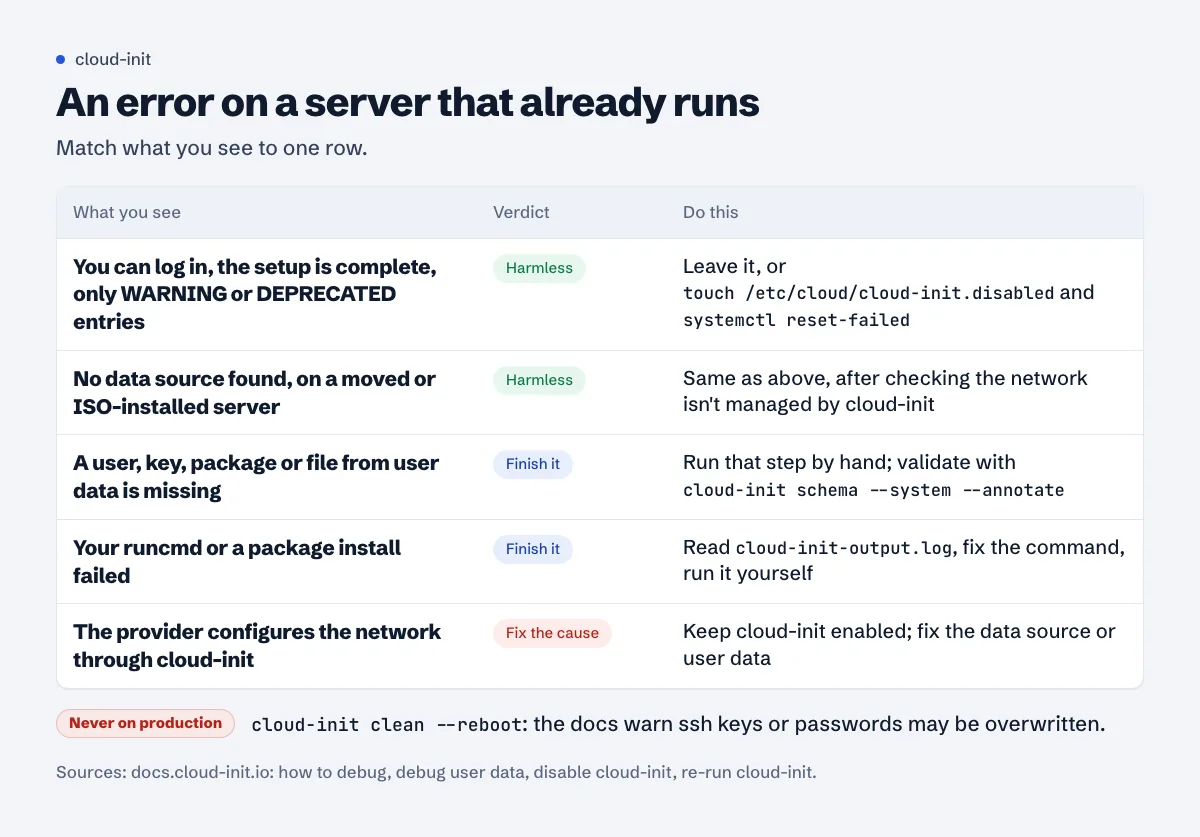
runcmd lines run as a script at the end of the first boot. If one exits non-zero, cloud-init reports an error from the scripts_user module. The command's own output is in cloud-init-output.log. Fix the command and run it by hand; there's no need to re-run cloud-init for it.
When it's harmless
Leave it alone, or silence it, when all of these are true:
- You can log in with your key, your user exists, the hostname and network are right.
- The packages and files you asked for are there (or you've since installed them).
- The status is
degraded donewith onlyWARNINGorDEPRECATEDentries, or the only complaint is "no data source" on a server that has none.
The cloud-init docs list touch /etc/cloud/cloud-init.disabled as one way to disable cloud-init: "During boot the operating system's init system will check for the existence of this file. If it exists, cloud-init will not be started." After that, clear the old failure from systemd's list:
sudo touch /etc/cloud/cloud-init.disabled
sudo systemctl reset-failed
One exception: if your provider sets the network up through cloud-init, don't disable it until you've checked. On Ubuntu, look in /etc/netplan/; a file there whose header says it was generated from the data source belongs to cloud-init. Disabling cloud-init keeps the current network file but stops it from being updated, which matters if the provider ever changes your addressing. In that case, fix the error instead.
Re-running cloud-init safely
The tempting fix is cloud-init clean --reboot. The CLI reference describes what clean does: it removes cloud-init's artifacts "to simulate a clean instance. On reboot, cloud-init will re-run all stages as it did on first boot." The re-run guide warns: "Making cloud-init run again may be destructive and must never be done on a production system. Artefacts such as ssh keys or passwords may be overwritten." In practice that can mean new SSH host keys (every client then sees a host-key warning), users and passwords re-applied from old user data, and first-boot commands running twice.
Safer options, from least to most invasive:
- Run the failed step yourself. For packages and
runcmd, this is almost always the answer. - Run one module again. The docs give
sudo cloud-init single --name cc_ssh --frequency alwaysas the pattern; replace the module name with the one that failed. - Reboot. "Rebooting the instance will re-run any parts of cloud-init that run per-boot."
- Full clean and reboot, only on a test machine or one you're about to rebuild anyway.
If you build servers often
Validate user data with cloud-init schema -c before every new server, and keep first-boot work small: create the user, add the key, and let your own deploy script install the rest. Then a mirror hiccup at boot doesn't leave a half-built machine. Once the server is up, the SSH and UFW guide is the next step, then fail2ban. And if the server misbehaves later for a reason that has nothing to do with first boot, a full disk is the first thing we'd rule out.
See failed services by name
The Approvalens server agent reports failed systemd services by name, and the server page explains common ones such as cloud-init, including when they're safe to ignore.
FAQ
Is "degraded done" an error?
It means cloud-init finished but logged at least one problem. Look at recoverable_errors in cloud-init status --long. If it's only WARNING or DEPRECATED entries and the server is set up correctly, nothing is broken.
Why did cloud-init status start returning exit code 2?
Since version 23.4, 2 means "recoverable error". Before that, the same situation returned 0. Scripts that treat any non-zero code as failure need updating; the docs suggest checking for 1 when you only care about crashes.
Can I uninstall cloud-init?
You can, but disabling it with /etc/cloud/cloud-init.disabled is easier to undo and is what the docs describe. Check first that your provider doesn't manage the network through it.
Where do I find the user data the server received?
sudo cloud-init query userdata prints it. Run sudo cloud-init schema --system --annotate to see which lines cloud-init didn't accept.
Spotted something out of date or wrong? Tell us and we'll correct it.
Read this guide in Turkish →Free scan
Check your own site
The free scan reads the first 50 pages and shows your score and every problem it finds.