On cPanel hosting, example.com and www.example.com usually both point to the same folder, so both show your site. That's two copies of every page. Google asks you to "pick one of those URLs as your canonical URL, and use redirects to send traffic from the other URLs to your preferred URL" (consolidate duplicate URLs), and AdSense's crawler visits "site.com and www.site.com separately" (AdSense crawler). cPanel gives you two ways to fix it: the Redirects screen, or a few lines in .htaccess. The second is more reliable on WordPress sites.
Before you redirect: SSL on both names
A visitor who opens https://www.example.com needs a valid certificate for www before the redirect can happen. Without one, the browser shows a security warning and never sees your 301.
cPanel's AutoSSL normally covers this: "AutoSSL includes corresponding www. domains for each domain and subdomain in the certificate", but "if the corresponding www. domain does not pass a DCV test, AutoSSL will not attempt to secure that www. domain" (cPanel SSL guide). DCV fails when www has no DNS record or points somewhere else. So first:
- In Domains → Zone Editor, check that
wwwhas a record pointing at the same server (often a CNAME to the main domain). - In Security → SSL/TLS Status, check that both
example.comandwww.example.comare covered. Run AutoSSL again ifwwwisn't.
Option A: the Redirects screen
Go to Domains → Redirects (cPanel Redirects). To send www to the bare domain:
| Field | Value |
|---|---|
| Type | Permanent (301) |
| Domain | example.com |
| Path | leave empty (the / is already there) |
| Redirects to | https://example.com/ |
| www. redirection | Only redirect with www. |
| Wild Card Redirect | ticked, so /page goes to /page and not to the home page |
The www option is what keeps you out of a loop. "Redirect with or without www." would also redirect example.com to itself. cPanel's three options are "Only redirect with www.", "Redirect with or without www." and "Do Not Redirect www.". For the opposite direction (bare → www), choose Do Not Redirect www. and enter https://www.example.com/ as the target.
Two limits from cPanel's own docs:
- cPanel writes these rules "at the bottom of the .htaccess file", and "if you use a third-party application or content management system to add a redirect, such as WordPress®, the redirect may not function properly". WordPress's own rewrite block sits above them and can catch the request first.
- "You cannot change an existing redirect. To modify a redirect, you must delete it, and then recreate it."
If either bites you, use option B.
Option B: .htaccess (works with WordPress)
Open Files → File Manager, turn on Show Hidden Files (dotfiles) in Settings, and edit .htaccess in the site's document root (usually public_html). Put the rule at the top, above # BEGIN WordPress if that block exists.
www → bare domain, and HTTP → HTTPS, in one hop:
RewriteEngine On
RewriteCond %{HTTPS} off [OR]
RewriteCond %{HTTP_HOST} ^www\. [NC]
RewriteCond %{HTTP_HOST} ^(?:www\.)?(.+)$ [NC]
RewriteRule ^ https://%1%{REQUEST_URI} [L,NE,R=301]
bare domain → www, and HTTP → HTTPS, in one hop:
RewriteEngine On
RewriteCond %{HTTPS} off [OR]
RewriteCond %{HTTP_HOST} !^www\. [NC]
RewriteCond %{HTTP_HOST} ^(?:www\.)?(.+)$ [NC]
RewriteRule ^ https://www.%1%{REQUEST_URI} [L,NE,R=301]
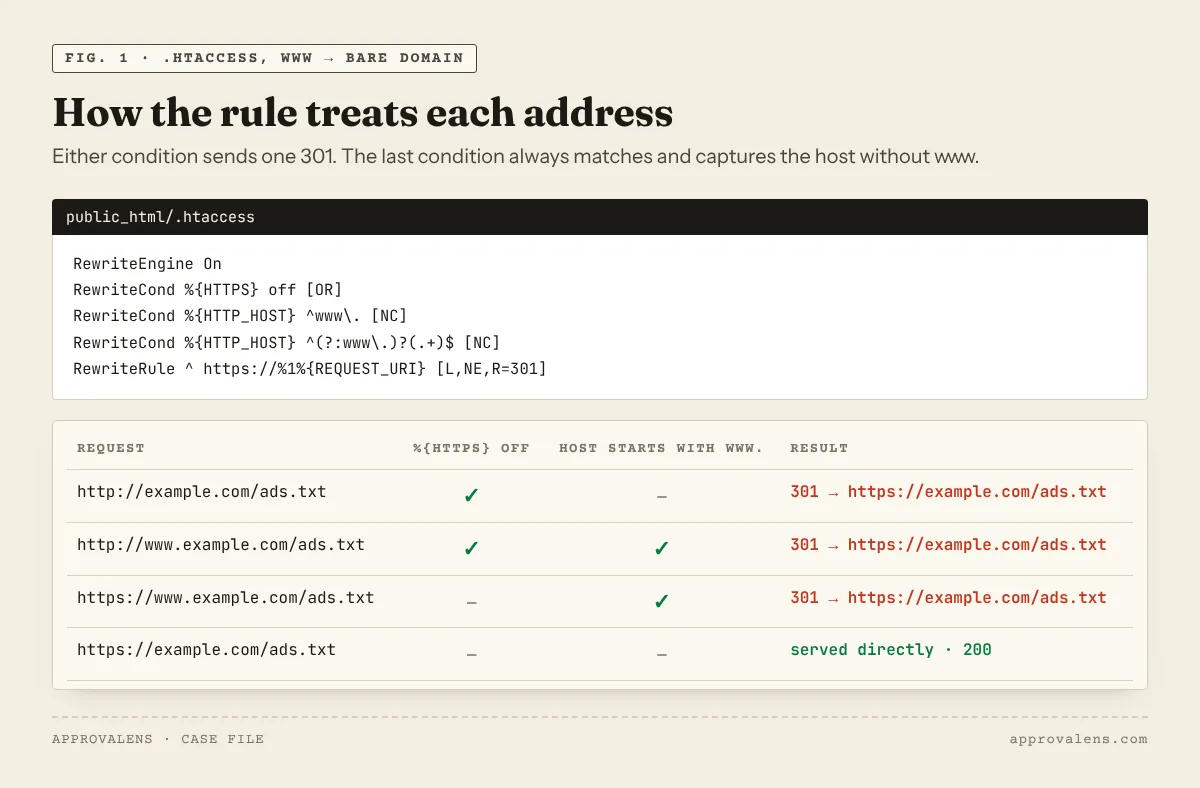
These are our adaptation of Apache's "Canonical Hostnames" recipe (Apache docs). Two changes matter. Apache's examples use a bare [R], which sends a 302 ("with a 302 status code being used by default if none is specified", RewriteRule flags), so we use R=301. And they combine the HTTPS and hostname fixes, so a visitor never goes through two redirects. The last condition always matches and captures the host without www. as %1. %{REQUEST_URI} keeps the path and the query string comes along automatically.
We tested both rules on Apache 2.4 with http://example.com/ads.txt?x=1, http://www.example.com/ads.txt?x=1 and a deeper path. Every request returned one 301 to the expected HTTPS address with the path and query intact.
If the site is behind Cloudflare
With Cloudflare's SSL mode set to Flexible, Cloudflare talks to your server over HTTP, so %{HTTPS} is always off and the rule above redirects forever. Cloudflare's docs say not to use Flexible when the origin forces HTTPS (Flexible mode). Switch to Full (strict), or do the redirect in Cloudflare instead. Fixing www vs non-www in Cloudflare covers that. Pick one place for the redirect, not both.
Force HTTPS Redirect
cPanel also has a Force HTTPS Redirect toggle under Domains → Domains. It redirects HTTP to HTTPS for a domain with a valid certificate (Domains). It's fine to use, but combined with a separate www rule it can create a two-step chain (http://www → https://www → https://). The .htaccess rules above already do both in one step. If you use them, you don't need the toggle.
Make WordPress agree
In WordPress, Settings → General has WordPress Address (URL) and Site Address (URL). Both must use the version you redirect to. If they say https://www.example.com while .htaccess strips www, WordPress redirects back and you get a loop. When the fields are greyed out, the values are set in wp-config.php as WP_HOME and WP_SITEURL (General Settings).
Check the result
for u in http://example.com http://www.example.com https://example.com https://www.example.com; do
  curl -s -o /dev/null -w "$u  %{http_code}  %{redirect_url}\n" "$u/ads.txt"
done
Three of the four should return 301 to the same https:// address, and the canonical one should return 200. cPanel's docs warn that "most web browsers add redirections to a cache", so test with curl or a private window after each change. The Googlebot access checker shows the redirect path that Google's crawlers get. The ads.txt checker confirms that the file is reachable from the root domain, which Google requires (ads.txt crawl rules).
When all four variants end on one address, run a free scan. It retests both hostnames and both schemes and lists any redirect chain it finds.
Spotted something out of date or wrong? Tell us and we'll correct it.
Read this guide in Turkish →Check it on your own site. Free, no sign-up.
Free tools for this
Free scan
Check your own site
Free scan: readiness score and every issue, usually in a few minutes.