When the messages from your contact form or newsletter land in spam, the receiving server usually couldn't confirm that the mail really came from your domain. Three DNS records let it check. SPF lists the servers allowed to send mail for your domain. DKIM adds a signature that proves the message wasn't forged or changed. DMARC ties both to the address people see in the From line and tells receivers what to do when the checks fail. Gmail has required at least SPF or DKIM from every sender since February 2024, and all three from bulk senders. A small site should set up all three anyway; it's an hour of work once.
SPF, DKIM and DMARC in plain words
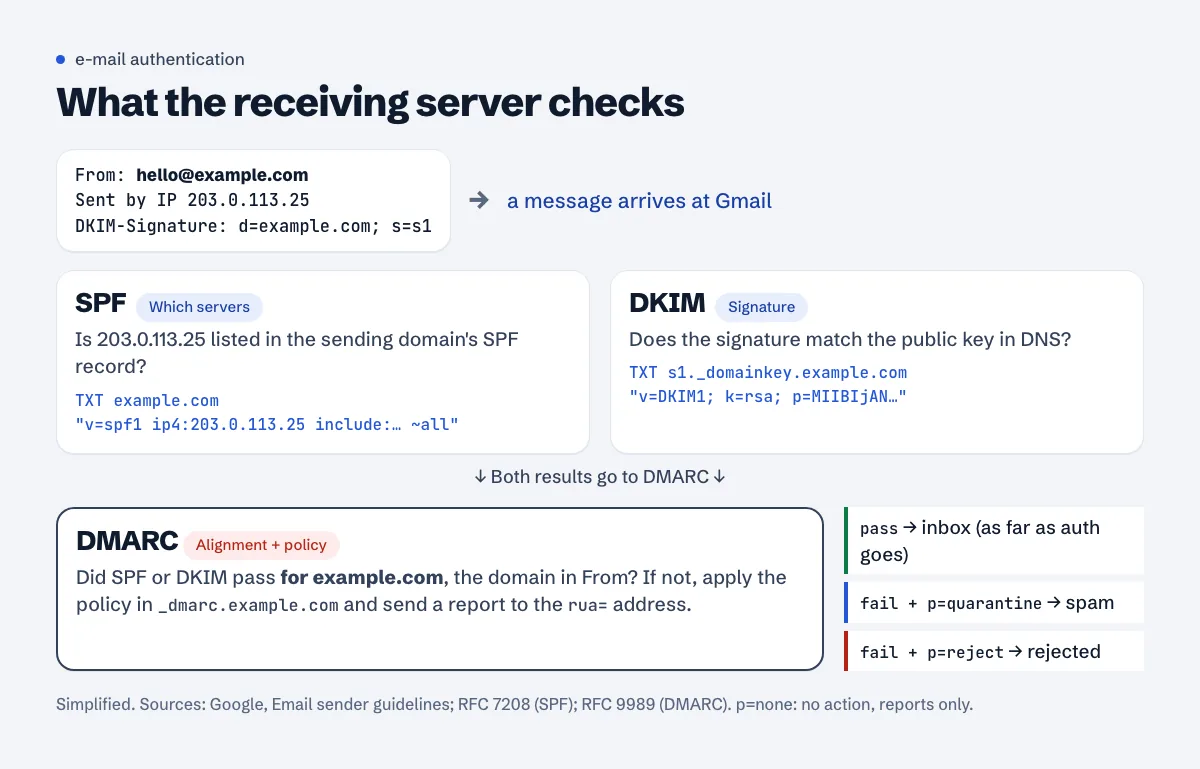
SPF is a TXT record on your domain that lists who may send mail for it. A receiving server looks at the IP that delivered the message, looks up the SPF record of the sending domain, and checks whether that IP is on the list.
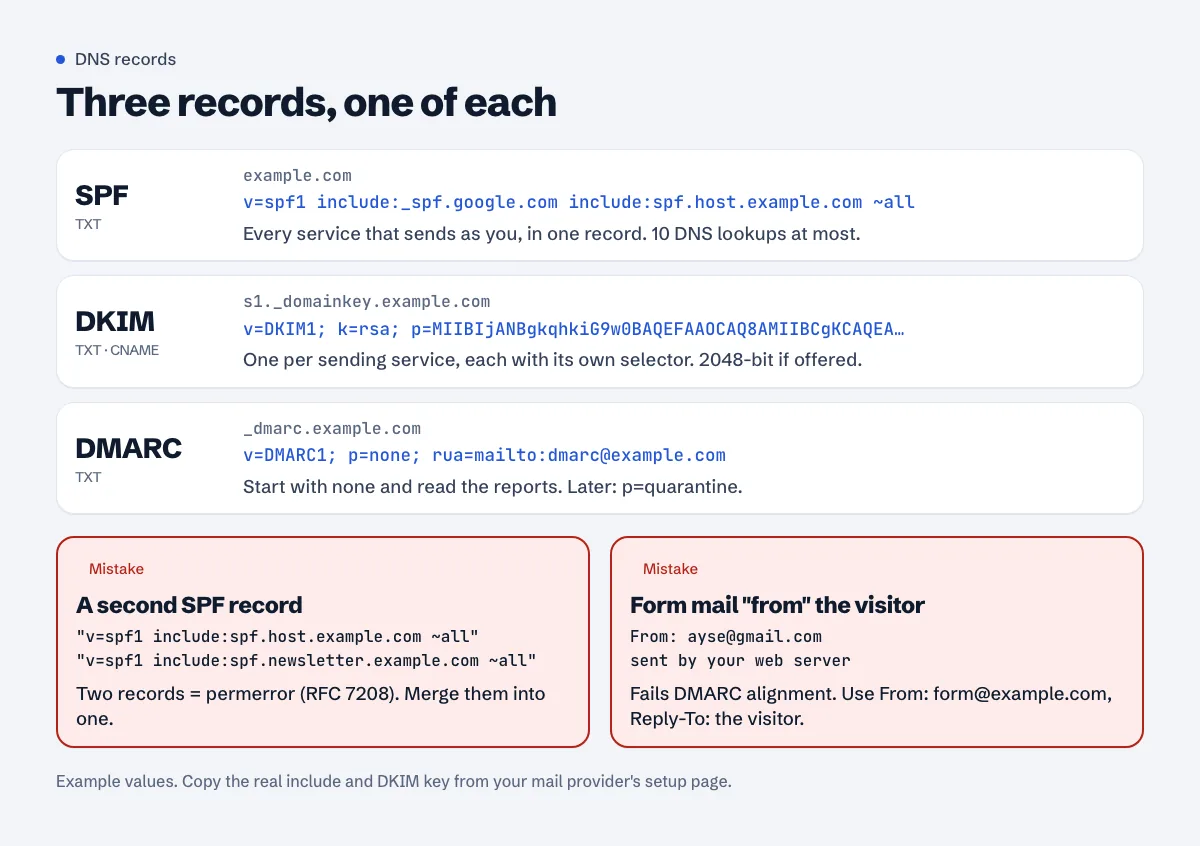
example.com. TXT "v=spf1 include:_spf.google.com include:spf.host.example.com ~all"
DKIM is a signature. Your mail provider signs each outgoing message with a private key and you publish the matching public key in DNS, under a name like s1._domainkey.example.com. The receiver fetches the key and checks the signature. If someone changed the message on the way, or forged it from elsewhere, the signature doesn't match.
DMARC is the policy on top. Google's sender guidelines put it simply: "DMARC tells receiving servers what to do with your messages that don't pass SPF or DKIM." It also adds the rule that makes forging hard: "The authenticating domain must be the same domain that appears in the message From: header" (Email sender guidelines). That's called alignment. SPF or DKIM passing for some other domain doesn't count.
_dmarc.example.com. TXT "v=DMARC1; p=none; rua=mailto:dmarc@example.com"
What Gmail and Yahoo require since 2024
Google's Email sender guidelines say: "Starting February 1, 2024, all email senders who send email to Gmail accounts must meet the requirements in this section." For everyone, the first requirement is "Set up SPF or DKIM email authentication for your sending domains", along with valid forward and reverse DNS for the sending IP, TLS, and a spam rate below 0.3%.
Bulk senders need more: "Set up SPF and DKIM email authentication for your domain" and "Set up DMARC email authentication for your sending domain. Your DMARC enforcement policy can be set to none." Marketing mail also needs one-click unsubscribe. Google's sender FAQ defines a bulk sender as one "that sends close to 5,000 messages or more to personal Gmail accounts within a 24-hour period", and adds that "Starting November 2025, Gmail is ramping up its enforcement on non-compliant traffic", with "temporary and permanent rejections".
Yahoo's sender best practices match: "Implement SPF or DKIM at a minimum" for everyone, and for bulk senders both, plus "Publish a valid DMARC policy with at least p=none".
A small blog's newsletter isn't near 5,000 a day. Set up all three anyway. Google itself recommends "always set up SPF, DKIM, and DMARC for your domains", and unauthenticated messages "might be marked as spam or rejected with a 5.7.26 error".
Why your contact form mail lands in spam
In order of how often we see it:
The form sends "From" the visitor's address
A visitor types ayse@gmail.com into your form, and the plugin sends you the message as From: ayse@gmail.com. Your web server isn't allowed to send for gmail.com, so SPF and DKIM can't align with that From domain, and DMARC fails. Google lists "Don't impersonate Gmail From: headers" among the requirements for all senders.
Fix it in the form plugin's settings: From must be an address on your own domain (form@example.com), and the visitor's address goes into Reply-To. You still reply with one click.
Mail leaves through PHP mail() on shared hosting
WordPress sends mail with wp_mail(), and unless a plugin changes it, that uses PHP's mail() (the source literally says // Set to use PHP's mail().) from wordpress@ your domain (wp_mail reference). On shared hosting that means the message leaves from the web server's IP. Whether it passes depends on the host: is that IP in your SPF record, does the server sign DKIM for your domain, and what else is sent from that IP? Google's note on shared IPs: "The activity of any senders using a shared IP address affects the reputation of all senders for that shared IP address."
The fix that holds up: send through a real mailbox over SMTP. Install an SMTP plugin, point it at your mail provider (your host's mail server, Google Workspace, Zoho or similar) with a real mailbox's login, and set From to that mailbox. Then SPF and DKIM are your provider's job, and they're set up once for all your mail.
Two SPF records
Adding a second v=spf1 record when you sign up for a newsletter service is the classic mistake. RFC 7208 (the SPF standard): "A domain name MUST NOT have multiple records that would cause an authorization check to select more than one record", and if more than one is found the check "produces the "permerror" result" (RFC 7208). Both records then count as broken. Merge them into one:
# wrong: two records
"v=spf1 include:spf.host.example.com ~all"
"v=spf1 include:spf.newsletter.example.com ~all"

# right: one record, both senders
"v=spf1 include:spf.host.example.com include:spf.newsletter.example.com ~all"
(spf.newsletter.example.com stands for whatever your newsletter service tells you to include. Some services don't need an SPF include at all because they send with their own return address; their setup page says which.)
Too many DNS lookups in SPF
Each include:, a, mx, ptr, exists and redirect= costs a DNS lookup, includes inside includes count too, and RFC 7208 section 4.6.4 caps it: "SPF implementations MUST limit the total number of those terms to 10 during SPF evaluation". Over 10, the result is again "permerror". ip4: and ip6: don't count. Remove includes for services you stopped using, and drop a and mx if those servers don't send mail.
No DKIM at all
SPF alone breaks when mail is forwarded (the forwarding server isn't in your record). DKIM survives forwarding. Turn it on at every service that sends for you, and check the key length: Google says personal Gmail accounts require "a DKIM key of 1024 bits or longer" and recommends 2048 bits.
Turning DKIM on at the usual places
- cPanel: Email » Email Deliverability. It shows each domain's SPF and DKIM status and a Repair button that writes suggested records (cPanel docs). The docs note that Repair "is unavailable if the system does not control the domain's DNS records". If your DNS is at Cloudflare or your registrar, copy the suggested DKIM and SPF values from Manage and add them there by hand.
- Plesk: Websites & Domains > your domain > Mail tab > Mail Settings, tick "Use DKIM spam protection system to sign outgoing email messages" (Plesk docs). With external DNS, Plesk shows the records to copy.
- Google Workspace, Zoho, newsletter services: each has a "domain authentication" or "authenticate domain" page that gives you one or two DNS records (TXT or CNAME). Add them exactly, wait for the service to show "verified".
Rolling out DMARC without losing mail
Google's recommended DMARC rollout starts with: "Set up DKIM and SPF at least 48 hours before setting up DMARC." Then:
p=nonewith reports for at least a week. Google: "Messages are delivered normally. There is no risk of messages being rejected or marked as spam." Therua=address receives daily XML reports showing every server that sent mail as your domain and whether it passed.- Fix what the reports show. Usually a forgotten sender: the shop's order e-mails, the host's server notifications, an old newsletter tool.
- Move to
p=quarantine. Failing mail then goes to spam rather than the inbox. Google's page suggests ramping up withpct=(for examplepct=5). The current DMARC standard, RFC 9989 from May 2026, removedpctbecause "the "pct" tag was usually not accurately applied" by receivers. For a small site with two or three senders we'd skip the percentage step: once a couple of weeks of reports show everything passing, switch top=quarantinefor all mail. p=rejectis optional for a blog. It stops spoofing completely, but a sender you forgot is then silently dropped.
Check it
From a terminal:
dig +short TXT example.com | grep spf1
dig +short TXT s1._domainkey.example.com
dig +short TXT _dmarc.example.com
Replace s1 with your provider's selector (you'll find it in the DKIM setup page, or in the s= part of a message's DKIM-Signature header).
Then send a test from your contact form to a Gmail address, open it, and use More (three dots) > Show original. The top of that page lists SPF, DKIM and DMARC with PASS or FAIL. If DMARC fails while SPF passes, look at the domains: the SPF pass is probably for your host's domain, not yours.
Where this connects to your site
A contact address that actually gets your replies into inboxes is part of a believable contact page; the About and contact pages guide covers what reviewers and readers look for there. If you collect e-mail addresses for a newsletter, your privacy policy should say so.
Check your records for free
The free SPF and DMARC checker reads your domain's SPF and DMARC records, counts the SPF lookups and flags a second SPF record or a missing DMARC policy.
FAQ
Do I need DMARC if I only send a few e-mails a week?
Google requires it only from bulk senders, so you can get by without it. We'd still publish p=none with a report address: it costs nothing, the reports show anyone sending mail as your domain, and Google recommends it for every domain.
What's the difference between ~all and -all?
~all is a soft fail: mail from unlisted servers is suspicious but not rejected on SPF alone. -all is a hard fail. With DMARC in place, ~all is the usual choice, because DMARC's policy decides what happens.
Can I have one SPF record for the domain and another for a subdomain?
Yes. The one-record rule is per name. example.com and news.example.com can each have their own SPF record.
My domain doesn't send any e-mail. Should I still set these up?
Yes, to stop others from using it. Publish v=spf1 -all and v=DMARC1; p=reject; on domains that never send mail.
My host's DNS and Cloudflare both have records. Which one counts?
Only the DNS provider your domain's nameservers point to. If the nameservers are Cloudflare's, records you add in the hosting panel do nothing; add them in Cloudflare.
Spotted something out of date or wrong? Tell us and we'll correct it.
Read this guide in Turkish →Check it on your own site. Free, no sign-up.
Free tools for this
Free scan
Check your own site
The free scan reads the first 50 pages and shows your score and every problem it finds.